Welcome Guest ( Log In | Register )

Bump Topic Topic Closed RSS Feed
123 Pages « < 53 54 55 56 57 > » Bottom

Outline · [ Standard ] · Linear+

 Your One Stop iTunes Troubleshooting Centre, How-to-do guides, backup, tips & tricks!

views
     
xrenoz
post Apr 25 2010, 01:34 PM

Getting Started
**
Junior Member
74 posts

Joined: Apr 2010
From: Bayan Baru, Penang


QUOTE(wyk85 @ Apr 25 2010, 12:55 PM)


Added on April 25, 2010, 1:03 pmHm, when i click on the pay app that i previously download, a message with "are you sure want to buy and download xyz app?"  Your payment method will be charge....

Is it ok for me to click "Buy" since i download it free 1 day before?  rclxub.gif

Thank you
*
Usually re-dl a paid apps that u have dl before no matter its free or paid when u dl it...it will show u the msg "U already download the apps before, Do u wan to download it for free?"

I have tried to dl two apps with same name b4... rclxub.gif

lucky only cost $ 0.99
wyk85
post Apr 25 2010, 01:46 PM

Getting Started
**
Junior Member
197 posts

Joined: Apr 2010
Hm, when i want to re-download it no msg : "U already download the apps before, Do u wan to download it for free?".

xpresside did mention the msg only appear if download paid app and not free app.

I try to redownload back the app (previously is free) and there is no such msg "U already download the apps before, Do u wan to download it for free?". I don't dare to click and download the app now since it cost $3.

Not to be a cheap ass, i don't mind paying for app, but paying for an app that i previously download if for free will kinda like an idiot.

Anyone face this problem before?
Some extra info, i already authorize my pc but still, do not see the msg, "U already download the apps before, Do u wan to download it for free?".

Thank you
xrenoz
post Apr 25 2010, 01:53 PM

Getting Started
**
Junior Member
74 posts

Joined: Apr 2010
From: Bayan Baru, Penang


QUOTE(wyk85 @ Apr 25 2010, 01:46 PM)
Hm, when i want to re-download it no msg : "U already download the apps before, Do u wan to download it for free?".

xpresside did mention the msg only appear if download paid app and not free app.

I try to redownload back the app (previously is free) and there is no such msg "U already download the apps before, Do u wan to download it for free?". I don't dare to click and download the app now since it cost $3.

Not to be a cheap ass, i don't mind paying for app, but paying for an app that i previously download if for free will kinda like an idiot.

Anyone face this problem before?
Some extra info, i already authorize my pc but still, do not see the msg, "U already download the apps before, Do u wan to download it for free?".

Thank you
*
My friend dl an apps for free then i use his acc to dl it again but now it cost money. The msg did appear...
We usually go for the FreeAppADay but sometime miss out some so we exchange each other apps...

If u scare about the charge again, try copy it from the computer
wyk85
post Apr 25 2010, 02:07 PM

Getting Started
**
Junior Member
197 posts

Joined: Apr 2010
Ya, i know there are other workarounds:

1. Sync the iPhone (with the app) to the pc that do not have the app, or
2. Copy the app(from the pc that have the app) and put into the new pc and
authorize it.

Both ways workable, just i want it more simpler, just download again with
my itunes. Well, guess i will continue to find solution for this approach. Worst case will try contact with Apple support. smile.gif

Will keep you all posted if i have any news regarding this matter.

Thank you.


Added on April 25, 2010, 2:13 pm
QUOTE(xrenoz @ Apr 25 2010, 01:53 PM)
My friend dl an apps for free then i use his acc to dl it again but now it cost money. The msg did appear...
We usually go for the FreeAppADay but sometime miss out some so we exchange each other apps...

If u scare about the charge again, try copy it from the computer
*
Hm, the message to ask you download for free, is it appear after this message "are you sure want to buy and download xyz app?" Your payment method will be charge...." or when u click on the app and it straight prompt you to download for free?

Thank you

This post has been edited by wyk85: Apr 25 2010, 02:13 PM

xrenoz
post Apr 25 2010, 02:42 PM

Getting Started
**
Junior Member
74 posts

Joined: Apr 2010
From: Bayan Baru, Penang


QUOTE(wyk85 @ Apr 25 2010, 02:07 PM)

Added on April 25, 2010, 2:13 pm
Hm, the message to ask you download for free, is it appear after this message "are you sure want to buy and download xyz app?" Your payment method will be charge...." or when u click on the app and it straight prompt you to download for free?

Thank you
*
Straight prompt out...

No ask about the charge again...but even when i buy new apps i didn't see the message for warning me rclxub.gif
wyk85
post Apr 25 2010, 02:51 PM

Getting Started
**
Junior Member
197 posts

Joined: Apr 2010
QUOTE(xrenoz @ Apr 25 2010, 02:42 PM)
Straight prompt out...

No ask about the charge again...but even when i buy new apps i didn't see the message for warning meĀ  rclxub.gif
*
Well, there is an option for you to select "dont warn me again if i make purchase..." something like this when you click to purchase the app. You might click it before? smile.gif

Well, guess I can't find a straight forward answer here with so many forum member with diff experience. lol

I will give Apple support team a call and rectify with them. Not sure can call them today or not since it is Sunday.
Will try tomorrow.

Well, once i got an answer, i will post it here for future reference.

Thank you for your time. smile.gif

This post has been edited by wyk85: Apr 25 2010, 02:52 PM
xrenoz
post Apr 25 2010, 03:01 PM

Getting Started
**
Junior Member
74 posts

Joined: Apr 2010
From: Bayan Baru, Penang


QUOTE(wyk85 @ Apr 25 2010, 02:51 PM)
Well, there is an option for you to select "dont warn me again if i make purchase..." something like this when you click to purchase the app. You might click it before? smile.gif

Well, guess I can't find a straight forward answer here with so many forum member with diff experience. lol

I will give Apple support team a call and rectify with them. Not sure can call them today or not since it is Sunday.
Will try tomorrow.

Well, once i got an answer, i will post it here for future reference.

Thank you for your time. smile.gif
*
I think so. lol
I am currently at my work place whistling.gif
Can't check my iTunes...
wyk85
post Apr 25 2010, 03:22 PM

Getting Started
**
Junior Member
197 posts

Joined: Apr 2010
Well, i manage to find info in Apple support website.

Omg, the support page is like giant maze.
Guess i have noob skill in google.

Nevertheless, here is the weblink for reference:

http://74.125.153.132/search?q=cache:s7vkA...lient=firefox-a

Hm, for some reason, the actual page cant be open, Apple have schedule update for the support website. The link above is google cache.

xrenoz, well, the actual steps is when u click on the item u purchase before, it will prompt you if you want to purchase the item or not, will bill to your account bla bla bla... When you click buy, only the message, you purchase the app before, click to download free smile.gif Hope that help.

Cheers smile.gif


Edit: Try and tested. smile.gif
- An "Apple" a day keeps the doctor away!!"

This post has been edited by wyk85: Apr 25 2010, 03:30 PM
xpresside
post Apr 25 2010, 04:17 PM

Regular
******
Senior Member
1,982 posts

Joined: Aug 2005
From: TTDI


Attached Image
Attached Image
Attached Image
Attached Image
Attached Image
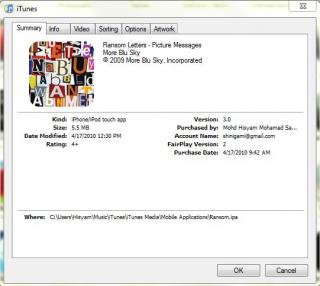
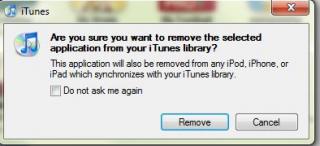
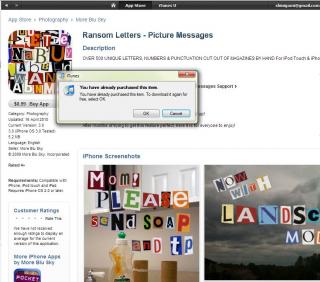
Here, if u get double charged don't blame me since I dont have that problem


Added on April 25, 2010, 4:19 pm
QUOTE(squall_kay @ Apr 23 2010, 11:40 PM)
anyone have the answer for this?  smile.gif
*
how come above your letter got does symbols?

This post has been edited by xpresside: Apr 25 2010, 04:19 PM
wyk85
post Apr 25 2010, 04:20 PM

Getting Started
**
Junior Member
197 posts

Joined: Apr 2010
Hi xpresside,

Thank you for your help.
I tested it a while ago, and yes, i can re-download it for free.

Thank you for helping smile.gif
xrenoz
post Apr 25 2010, 04:45 PM

Getting Started
**
Junior Member
74 posts

Joined: Apr 2010
From: Bayan Baru, Penang


But i dl some many never have prompt me about billing etc hmm.gif

This post has been edited by xrenoz: Apr 25 2010, 04:45 PM
wyk85
post Apr 25 2010, 05:03 PM

Getting Started
**
Junior Member
197 posts

Joined: Apr 2010
QUOTE(xrenoz @ Apr 25 2010, 04:45 PM)
But i dl some many never have prompt me about billing etc  hmm.gif
*
Hm, well, u might click on the option "dont remind me when next purchase...." something like this?
I have the billing alert and bottom part of the alert have this option do disable reminder.

smile.gif
xrenoz
post Apr 25 2010, 05:57 PM

Getting Started
**
Junior Member
74 posts

Joined: Apr 2010
From: Bayan Baru, Penang


I think so...thanks
jiny
post Apr 26 2010, 01:35 PM

New Member
*
Junior Member
4 posts

Joined: Nov 2009
hi all. my iphone suddenly went 'expanded' mode ( icons & text ) cant seem 2 reduce it back to normal. any ideas ? tks.
yuvanesh
post Apr 26 2010, 01:55 PM

<<ASSASSINO>>
******
Senior Member
1,231 posts

Joined: Aug 2009
From: Nilai---KL


what you mean of expanded mode...?????
CallMeMonkey
post Apr 26 2010, 07:58 PM

On my way
****
Senior Member
506 posts

Joined: Jun 2006
From: Jungle

QUOTE(jiny @ Apr 26 2010, 01:35 PM)
hi all. my iphone suddenly went 'expanded' mode ( icons & text ) cant seem 2 reduce it back to normal. any ideas ? tks.
*
triple click your home button

use 3 finger to slide up or down, in this case slide down

tap on turn zoom off


jiny
post Apr 27 2010, 01:45 AM

New Member
*
Junior Member
4 posts

Joined: Nov 2009
QUOTE(CallMeMonkey @ Apr 26 2010, 07:58 PM)
triple click your home button

use 3 finger to slide up or down, in this case slide down

tap on turn zoom off
*
hi, got it. tks a lot.

Roysmith
post Apr 28 2010, 10:55 AM

Getting Started
**
Junior Member
118 posts

Joined: Mar 2010


Hi, I have some mp3 in my laptop. How do I transfer it to my Iphone.? Pls advice. TQ
ExtraSpicyCrunchy
post Apr 28 2010, 12:34 PM

Getting Started
**
Junior Member
153 posts

Joined: Apr 2010


^ open up ur itunes.
take the file tab on ur top of ur left hand side.
then take add file to library.
and add it.
kain_kapan
post Apr 28 2010, 06:00 PM

Getting Started
**
Junior Member
180 posts

Joined: Apr 2005
From: Ampang - Cheras - Kuala Lumpur


yesterday i download 2 free app from appstore
but it wont installed...just stuck at waiting...
i cant delete it...the download loading is not resume...
what can i do ?

123 Pages « < 53 54 55 56 57 > » Top
Topic ClosedOptions
 

Change to:
| Lo-Fi Version
0.0204sec    0.48    6 queries    GZIP Disabled
Time is now: 7th December 2025 - 06:52 PM