QUOTE(gyuunyuu @ Apr 17 2009, 01:25 PM)
Anybody know how to add the shortcut icon as shown in below picture?
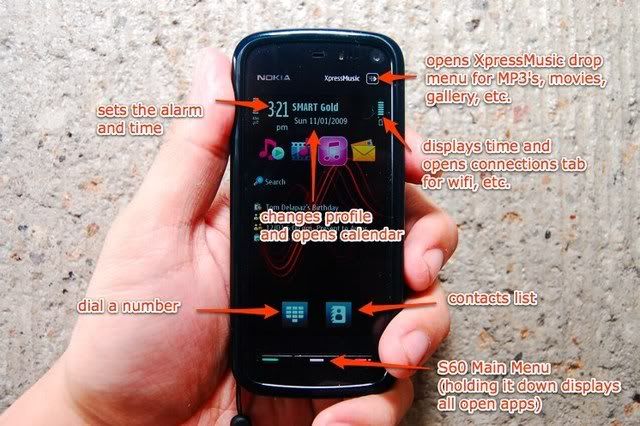
I try to enter Setting > Personal > Home Screen > Home Screen Bar
After select the Home Screen Bar, I go back to Home Screen option, and select the Shortcuts,
But it shows "No editable shortcuts in selected theme"

I use the same theme as shown in the picture.
And one more thing, after I change to Home Screen Bar setting, the "dial a number" and "contact list" icon at the desktop there,
no longer can be use anymore. No matter how I press it


QUOTE(wongkev @ Apr 18 2009, 07:19 PM)
settings -> personal -> home screen -> home screen theme -> shortcuts bar
After I select the Shortcuts Bar, "No editable shortcuts in selected theme" still prompt under the Shortcuts option
Then I try to press *#7370# and format it, everything seems to be fine now

And now I manage to add the shortcuts on desktop



 Apr 16 2009, 07:37 PM


 Quote
Quote















 ...welcome me please..!!hihi


 0.0438sec
 0.78
0.78
 7 queries
 GZIP Disabled