Welcome Guest ( Log In | Register )

Outline · [ Standard ] · Linear+

 RAM Faulty ? ------- Memtest

views
     
TSFoxNope
post Mar 20 2009, 09:24 AM, updated 17y ago

On my way
****
Senior Member
571 posts

Joined: Jun 2008
From: Perth


Hi there,

I having some problem with my pc, but i not really sure is that ram faulty or not.

1) Sometimes, the pc will jump to blue screen... i dunno when it will happen and how, and after one or two second of blue screen it will restart .... so in that 1 or 2 sec, what i can see it "dump physical memory ??? : 87%" at the bottom screen.

2)Microsoft Office always show me an error msg after i finish use it. And i run a microsoft diagnostic test ... they show me memory error and suggest me to take a Windows Memory Diagnostic Test

3)Run Windows Memory Diagnostic Test -- result show there is error. but dunno what... tell me to call manufacturer

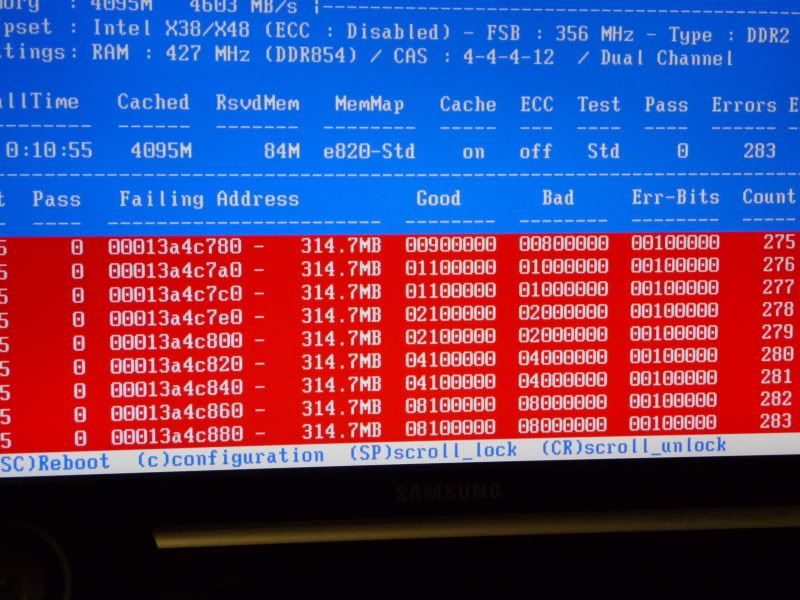
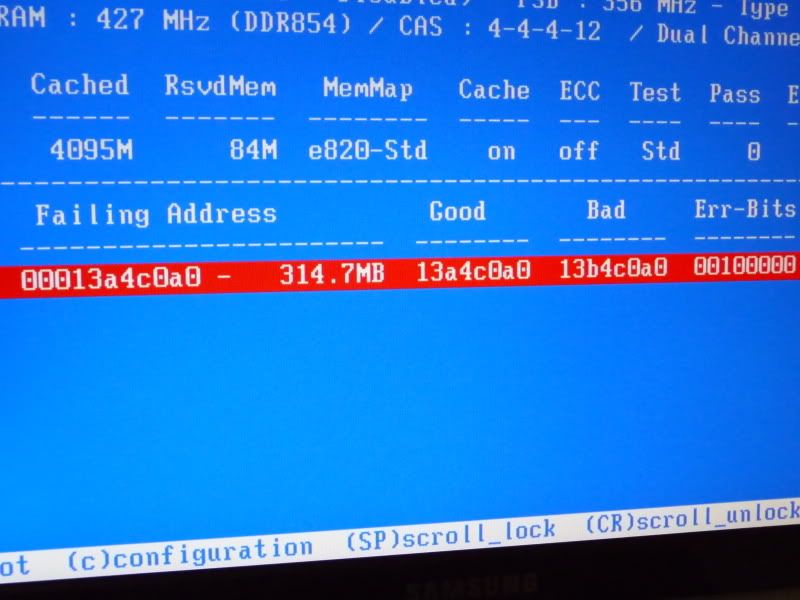
4)Boot Memtest yesterday midnight 12am.... and leave it until 2:15am .... the test still running(not stuck..its still going) !!!! on Test# 7.. but i decided to shut off coz i not sure is that any problem to run that long.

Image Result:
user posted image

user posted image


So can anyone tell me what going wrong there?


*The test result.... should be one more line down there with error on Test#
tskhang
post Mar 20 2009, 11:05 AM

Regular
******
Senior Member
1,495 posts

Joined: Aug 2007
From: PJ


I can see that you overclocked your RAMs. Try to put back the RAMs to it's original speed and see if the errors happen.

If no errors after changing the RAM speed to original speed, it means the RAMs just cannot take that overclocked speed. You can then reduce the overclocked speed a bit and test if it is stable. Or read further on the overclocking threads for ways to stabilize the RAMs at overclocked speeds.

This post has been edited by tskhang: Mar 20 2009, 11:07 AM
TSFoxNope
post Mar 20 2009, 12:40 PM

On my way
****
Senior Member
571 posts

Joined: Jun 2008
From: Perth


i already set back to default value.... and it seem like the problem still there.... any suggestion?
yngwie
post Mar 20 2009, 12:51 PM

| Ðøñ'¯|¯ G|v€ Â ÐðmÑ!
*******
Senior Member
3,092 posts

Joined: Nov 2007
From: |{µð£ð £µmPµ®


probably an after effect of the overclocked ram / system.
have you try clearing the cmos, re-set and restart the system?
if possible, post the blue screen error here too.
TSFoxNope
post Mar 20 2009, 01:01 PM

On my way
****
Senior Member
571 posts

Joined: Jun 2008
From: Perth


QUOTE(yngwie @ Mar 20 2009, 12:51 PM)
probably an after effect of the overclocked ram / system.
have you try clearing the cmos, re-set and restart the system?
if possible, post the blue screen error here too.
*
i did restart the system... but i not sure anythings about the cmos..

i dun think i got any chance to post the blue screen error... coz as i said, it only appear for 1 second then restart.... so what i can only see is the physical error : <counting 1 to 100%> ....
abubin
post Mar 20 2009, 03:48 PM

10k Club
********
All Stars
10,429 posts

Joined: Jan 2003


most probably ram faulty already go RMA if it's still underwarranty.

If you have access to other people's computer, use memtest there to be sure really ram problem. Test the ram 1 piece at a time if more than 1 piece.
tskhang
post Mar 20 2009, 03:55 PM

Regular
******
Senior Member
1,495 posts

Joined: Aug 2007
From: PJ


QUOTE(FoxNope @ Mar 20 2009, 12:40 PM)
i already set back to default value.... and it seem like the problem still there.... any suggestion?
*
What about your FSB? Have you set it back to original speed at 333 MHz?
Gamer
post Mar 20 2009, 07:05 PM

Be Original
*******
Senior Member
3,366 posts

Joined: Jan 2003
From: Sarawak, Sibu


check the timing and memory voltage, some mainboard default settings are difference.
apis
post Mar 20 2009, 07:13 PM

Regular
******
Senior Member
1,175 posts

Joined: Jun 2006
From: Borneo Island


What brand is ur ram?Any other problem instead of the BSOD?
TSFoxNope
post Mar 21 2009, 09:07 AM

On my way
****
Senior Member
571 posts

Joined: Jun 2008
From: Perth


QUOTE(apis @ Mar 20 2009, 07:13 PM)
What brand is ur ram?Any other problem instead of the BSOD?
*
Crucial Ballistix Tracer 6400 2x2GB 800Mhz 4GBKIT

All the problem i already stated in first post.


Added on March 21, 2009, 9:41 am
QUOTE(tskhang @ Mar 20 2009, 03:55 PM)
What about your FSB? Have you set it back to original speed at 333 MHz?
*
QUOTE(Gamer @ Mar 20 2009, 07:05 PM)
check the timing and memory voltage, some mainboard default settings are difference.
*
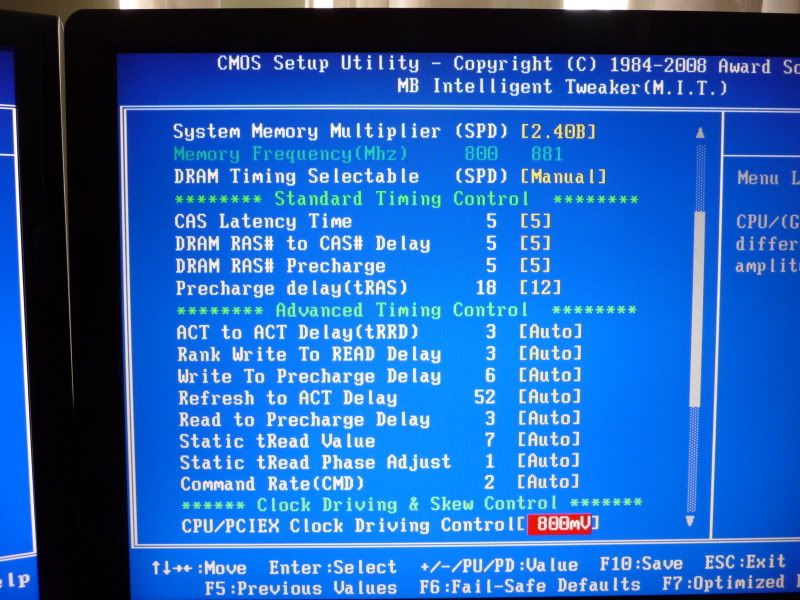
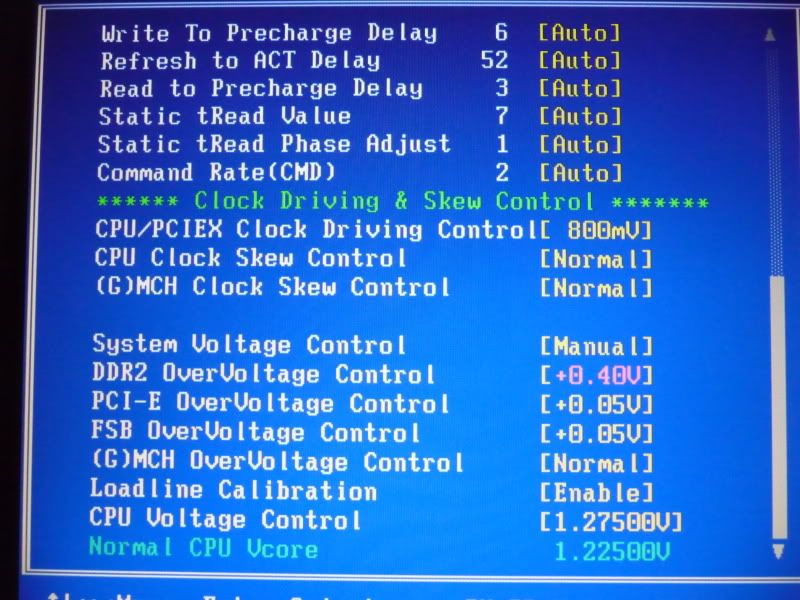
I not really sure is that 333Mhz ....
user posted image

user posted image


This post has been edited by FoxNope: Mar 21 2009, 09:41 AM
sotong168
post Mar 21 2009, 10:27 AM

in retiring mode
*******
Senior Member
5,291 posts

Joined: Dec 2004
From: I Luv Msia
ts, shud u have confirmed it is ram issue, u may want to join the bulk RMA for your crucial ram, just helping my frenz for passing info...
tskhang
post Mar 21 2009, 12:44 PM

Regular
******
Senior Member
1,495 posts

Joined: Aug 2007
From: PJ


On that page shown on picture, scroll all the way up and take a picture of it.


Change to:
| Lo-Fi Version
0.0210sec    0.78    5 queries    GZIP Disabled
Time is now: 18th December 2025 - 03:52 AM