Welcome Guest ( Log In | Register )

Bump Topic Topic Closed RSS Feed

Outline · [ Standard ] · Linear+

 [WTA] My P31 Mobo cannot OC my E6600.., Closed. Give up

views
     
TSedkiasu
post Mar 19 2009, 02:24 AM, updated 17y ago

ºº 1/2 Retired ºº
*****
Senior Member
970 posts

Joined: Nov 2006
From: ™º♫♪♪♫♪♫♪♪♫♪♫♪♫º™


Here is my Rig's specs:
OS - Windows Vista Ultimate x64 SP1
Mobo - Gigabyte GA-EP31-DS3L
Proc - Intel C2D E6600 2.4GHz 4MB L2 (266.7x9)
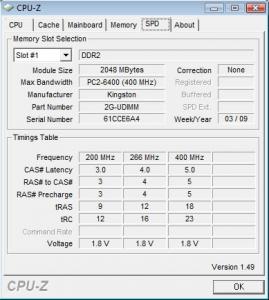
Ram - Kingston Value Ram 2x2GB DDR2 800MHz PC6400
GC - Sapphire HD4830 512mb 256bits

I wonder why i cant OC my proc in BIOS. As i've been told before, this proc is very easy to OC from 2.4GHz to 3.2GHz changing the FSB and multiplier only in BIOS, other settings like Vcore and Ram's SPD no need to change.

But my problem is, I got into BIOS and change the multiplier to 8x and FSB to 400MHz (total equals to 3.2GHz) and save then reboot, then i try to get into the BIOS once again and check, my custom FSB has been disabled which means it remains 266.7MHz but the multiplier remains 8x.. I've tried a lot of little OC even 9x278MHz (total equals to 2.5GHz) only also cannot..

Can anyone tell me why? I heard from my friend that my current mobo is kinda troublesome for OCing.. Even if its troublesome, it sure got its own way to OC right? Please help me~ notworthy.gif

Attached Image Attached Image Attached Image Attached Image

Closed. Give up for this 2nd rig.. wonder why i wanna bother to OC this rig doh.gif

This post has been edited by edkiasu: Mar 21 2009, 05:49 PM
RoxyGal
post Mar 19 2009, 02:28 AM

٩͡[๏̯͡๏]۶ Im roxygal ٩͡[๏̯͡๏]۶
******
Senior Member
1,031 posts

Joined: Sep 2006
From: ▁▂▃▅▇ ٩͡[๏̯͡๏]۶?


QUOTE(edkiasu @ Mar 19 2009, 02:24 AM)
Here is my Rig's specs:
Mobo - Gigabyte GA-EP31-DS3L
Proc - Intel C2D E6600 2.4GHz 4MB L2 (266.7x9)
Ram - Kingston Value Ram 2x2GB DDR2 800MHz PC6400
GC - Sapphire HD4830 512mb 256bits

I wonder why i cant OC my proc in BIOS. As i've been told before, this proc is very easy to OC from 2.4GHz to 3.2GHz changing the FSB and multiplier only in BIOS, other settings like Vcore and Ram's SPD no need to change.

But my problem is, I got into BIOS and change the multiplier to 8x and FSB to 400MHz (total equals to 3.2GHz) and save then reboot, then i try to get into the BIOS once again and check, my custom FSB has been disabled which means it remains 266.7MHz but the multiplier remains 8x.. I've tried a lot of little OC even 9x278MHz (total equals to 2.5GHz) only also cannot..

Can anyone tell me why? I heard from my friend that my current mobo is kinda troublesome for OCing.. Even if its troublesome, it sure got its own way to OC right? Please help me~  notworthy.gif
*
mobo limitation of G31 chipset and kingston ram chip
TSedkiasu
post Mar 19 2009, 02:32 AM

ºº 1/2 Retired ºº
*****
Senior Member
970 posts

Joined: Nov 2006
From: ™º♫♪♪♫♪♫♪♪♫♪♫♪♫º™


QUOTE(RoxyGal @ Mar 19 2009, 02:28 AM)
mobo limitation of G31 chipset and kingston ram chip
*
what should i do then?

QUOTE(Jansmit @ Mar 19 2009, 02:28 AM)
i think you bios got problem or you forgot to save the setting be4 you reboot i using same mobo with you so far no problem  have overclocked my pentium dual core 1.6Ghz to 2.8Ghz so fat no problem at all
*
I did save and reboot.. If bios problem, then how should i solve it? update bios? how can i check my current version of bios?

This post has been edited by edkiasu: Mar 19 2009, 02:33 AM
-pWs-
post Mar 19 2009, 03:12 AM

Look at all my stars!!
Group Icon
Elite
8,545 posts

Joined: Aug 2006
From: 224.0.0.6


Use CPU-z to check your motherboard bios. smile.gif

-pWs-
OC4/3
post Mar 19 2009, 03:27 PM

.
Group Icon
Elite
4,746 posts

Joined: Dec 2007
From: Speed rule


Try updating your mobo bios and see,sound like bugged bios to me
hiroki04030
post Mar 19 2009, 04:14 PM

Retired Member
*****
Senior Member
995 posts

Joined: May 2008
dude, open cpu-z when u r stressing the comp. if not the multiplier won't go up coz there is simply not necessary to do so.


Added on March 19, 2009, 4:14 pmsuper pi or prime95 does a great stress job

This post has been edited by hiroki04030: Mar 19 2009, 04:14 PM
TSedkiasu
post Mar 19 2009, 05:06 PM

ºº 1/2 Retired ºº
*****
Senior Member
970 posts

Joined: Nov 2006
From: ™º♫♪♪♫♪♫♪♪♫♪♫♪♫º™


QUOTE(OC4/3 @ Mar 19 2009, 03:27 PM)
Try updating your mobo bios and see,sound like bugged bios to me
*
How to update bios huh? need floopy? Omg i dont have it.. can the bios be updated in windows?

QUOTE(hiroki04030 @ Mar 19 2009, 04:14 PM)
dude, open cpu-z when u r stressing the comp. if not the multiplier won't go up coz there is simply not necessary to do so.


Added on March 19, 2009, 4:14 pmsuper pi or prime95 does a great stress job
*
Sorry but i dont really understand what are you going to tell me.. Is this regarding the OC thingy or bios? The multiplier will goes up to x9 when the proc is on load, when it is idle, then the multiplier will go down to x6.. this is normal for most of the procs ma...
fullyinsane
post Mar 19 2009, 05:14 PM

Getting Started
**
Junior Member
64 posts

Joined: Apr 2008
From: Klang


QUOTE(edkiasu @ Mar 19 2009, 05:06 PM)
How to update bios huh? need floopy? Omg i dont have it.. can the bios be updated in windows?

*
you dont need floppy drive like old days...can be done in windows

download the bios file from gigabyte then use gigabyte bios updater software provided with your mobo...im not so sure about gigabyte mobo whether they provide the software or not, but nowadays, all manufacturer has its own updater..

This post has been edited by fullyinsane: Mar 19 2009, 05:15 PM
TSedkiasu
post Mar 19 2009, 06:01 PM

ºº 1/2 Retired ºº
*****
Senior Member
970 posts

Joined: Nov 2006
From: ™º♫♪♪♫♪♫♪♪♫♪♫♪♫º™


QUOTE(fullyinsane @ Mar 19 2009, 05:14 PM)
you dont need floppy drive like old days...can be done in windows

download the bios file from gigabyte then use gigabyte bios updater software provided with your mobo...im not so sure about gigabyte mobo whether they provide the software or not, but nowadays, all manufacturer has its own updater..
*
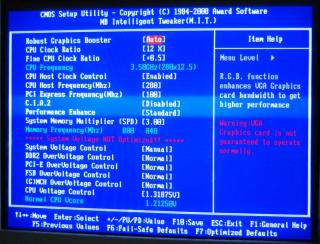
Updated to latest BIOS just now.. but the problem remains there.. pls refer to the pic below for the exact of wad i described at top there..

When i change the CPU Host Frequency (Mhz) from 266 to 320 and System Memory Multiplier (SPD) from auto to 2.50
Attached Image

I did SAVE and EXIT by "Y" selected and "Enter" and reboot
Attached Image

When the system reboot and i enter the BIOS-MIT once again, everything just changed to default..
Attached Image

This is exactly what i mean.. My previousx2 MSI mobo, quite old MOBO, can even OC my P4 from 2.0 to 2.6 easily by just changing the CPU frequency.. Why this mobo cant do it?

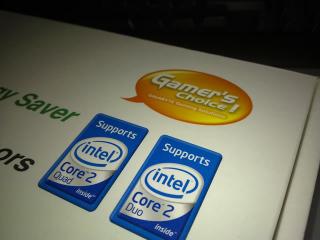
Its stated on top of the box for this mobo...
Attached Image

Or should i disable the Dynamic Energy Saver function at 1st place?

This post has been edited by edkiasu: Mar 19 2009, 06:02 PM
OC4/3
post Mar 19 2009, 06:48 PM

.
Group Icon
Elite
4,746 posts

Joined: Dec 2007
From: Speed rule


Try disable dynamic energy saver function first
razr_sped
post Mar 19 2009, 06:53 PM

Casual
***
Junior Member
393 posts

Joined: Oct 2006


n change ur spd to 2.00
nt 2.5
cos at 2.5...ur ram is running at 1000 le
when u try set to 8x400...
alwis try 1:1 ratio 1st
TSedkiasu
post Mar 19 2009, 08:03 PM

ºº 1/2 Retired ºº
*****
Senior Member
970 posts

Joined: Nov 2006
From: ™º♫♪♪♫♪♫♪♪♫♪♫♪♫º™


QUOTE(razr_sped @ Mar 19 2009, 06:53 PM)
n change ur spd to 2.00
nt 2.5
cos at 2.5...ur ram is running at 1000 le
when u try set to 8x400...
alwis try 1:1 ratio 1st
*
Cannot bro, the lowest in my bios is 2.5.. how then?
SUSaltimi
post Mar 19 2009, 09:50 PM

Look at all my stars!!
*******
Senior Member
2,173 posts

Joined: Jan 2006

QUOTE(edkiasu @ Mar 19 2009, 08:03 PM)
Cannot bro, the lowest in my bios is 2.5.. how then?
*
I think you need FC bios. So far I don't have any problem overclocking on this mobo. My old E6300 can overclock to 7 X 400MHz FSB on stock voltage and E5200 overclock to 12.5 X 280MHz FSB.

This post has been edited by altimi: Mar 19 2009, 10:04 PM


Attached thumbnail(s)
Attached Image Attached Image
cooper88
post Mar 20 2009, 12:25 AM

Getting Started
**
Junior Member
77 posts

Joined: Sep 2008
oo..i used to have this problem with my msi ka790gx..cannot oc my cpu..maybe disconnect any pci card then reset the bios can help..i try on my board,it work..dunno if it gonna work on ur mobo.. tongue.gif
TSedkiasu
post Mar 20 2009, 01:16 AM

ºº 1/2 Retired ºº
*****
Senior Member
970 posts

Joined: Nov 2006
From: ™º♫♪♪♫♪♫♪♪♫♪♫♪♫º™


QUOTE(altimi @ Mar 19 2009, 09:50 PM)
I think you need FC bios. So far I don't have any problem overclocking on this mobo. My old E6300 can overclock to 7 X 400MHz FSB on stock voltage and E5200 overclock to 12.5 X 280MHz FSB.
*
Bro, where did u get ur FC bios? i have it from taiwan gigabyte site but it seems like cannot use.. its for rev2.0 one.. then when i click on rev1.0, there's no FC file there.. i cant update it either in Qflash or in windows by using Qbios. mind to give me the link for download the FC bios file?

This is the file that i had downloaded from the site "motherboard_bios_ga-ep31-ds3l_2.0_fc.exe" the files extracted were 1.FLASHSPI.EXE 2.EP31DS32.FC and 3.autoexec.bat
taq_gt
post Mar 20 2009, 08:34 AM

Getting Started
**
Junior Member
294 posts

Joined: Jan 2008
From: Kuantan

bro,did the driver cd from ur mobo got the software that can update bios from their website n straight flash it to ur mobo ?i just used that software.correct me if im wrong about that software
SUSaltimi
post Mar 20 2009, 09:17 AM

Look at all my stars!!
*******
Senior Member
2,173 posts

Joined: Jan 2006

QUOTE(edkiasu @ Mar 20 2009, 01:16 AM)
Bro, where did u get ur FC bios? i have it from taiwan gigabyte site but it seems like cannot use.. its for rev2.0 one.. then when i click on rev1.0, there's no FC file there.. i cant update it either in Qflash or in windows by using Qbios. mind to give me the link for download the FC bios file?

This is the file that i had downloaded from the site "motherboard_bios_ga-ep31-ds3l_2.0_fc.exe" the files extracted were 1.FLASHSPI.EXE 2.EP31DS32.FC and 3.autoexec.bat
*
Sorry bro, I've checked my mobo and apparently it's EP31-DS3L Rev 2.1. FC bios came standard from factory...........

This post has been edited by altimi: Mar 20 2009, 09:17 AM
TSedkiasu
post Mar 20 2009, 01:21 PM

ºº 1/2 Retired ºº
*****
Senior Member
970 posts

Joined: Nov 2006
From: ™º♫♪♪♫♪♫♪♪♫♪♫♪♫º™


QUOTE(taq_gt @ Mar 20 2009, 08:34 AM)
bro,did the driver cd from ur mobo got the software that can update bios from their website n straight flash it to ur mobo ?i just used that software.correct me if im wrong about that software
*
I also used that software, but it gave me same outcome... sweat.gif

QUOTE(altimi @ Mar 20 2009, 09:17 AM)
Sorry bro, I've checked my mobo and apparently it's EP31-DS3L Rev 2.1. FC bios came standard from factory...........
*
Haiz.. i knew it.. rclxub.gif

I can only OC it in windows using the EasyTune Pro5 that provided by gigabyte..
0168257061
post Mar 20 2009, 01:51 PM

EimiFukada
********
All Stars
14,242 posts

Joined: Jul 2007
From: JAVABUS


lalala.....
just change your battery.
TSedkiasu
post Mar 20 2009, 02:00 PM

ºº 1/2 Retired ºº
*****
Senior Member
970 posts

Joined: Nov 2006
From: ™º♫♪♪♫♪♫♪♪♫♪♫♪♫º™


QUOTE(168257061 @ Mar 20 2009, 01:51 PM)
lalala.....
just change your battery.
*
I also ever tot of that.. but then the time and date in my windows goes well.. and one more thing, the mobo able to change the multiplier but not the clock frequency.. should not be battery problem rite? can please elaborate more?

2 Pages  1 2 >Top
Topic ClosedOptions
 

Change to:
| Lo-Fi Version
0.0250sec    0.33    6 queries    GZIP Disabled
Time is now: 9th December 2025 - 11:03 PM