Outline ·
[ Standard ] ·
Linear+
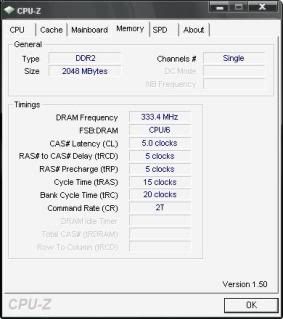
Dual channel DDR2 RAM, WHY CPU-Z show single channel?
|
TSbanKarl
|
 Mar 18 2009, 02:41 PM, updated 17y ago Mar 18 2009, 02:41 PM, updated 17y ago
|
Getting Started


|
My motherboard support dual channel, but cpuz show single channel in memory menu. i have 2x1GB kingston value ram now, do i have to buy those high performance ram in pair in order to get dual channel? I want to use dual channel ram,pls guide me. thanks.
|
|
|
|
|
|
leoboom
|
Mar 18 2009, 03:14 PM
|
Getting Started
|
1. What is your motherboard brand and model?
2. How many RAM slots are there?
3. Which 2 slots did you plug the RAMs into?
Usually, you will need to plug in the RAM into same coloured slots to enable dual channel. (But refer to your motherboard manual also)
Any RAM, be it value or high performance can enable dual channel..
|
|
|
|
|
|
TSbanKarl
|
Mar 18 2009, 05:14 PM
|
Getting Started
|
1. ASUS M2N68.
2. 4 slot.
3. 2 slot that same color.
what should the cpuz memory info show if dual is enable?
(can any1 teach me how to print screen? i can paste the cpuz memory info here)
|
|
|
|
|
|
shajack
|
Mar 18 2009, 07:30 PM
|
|
|
under the memory tab,u can see a channel#,it will say dual in d cpu-z
|
|
|
|
|
|
nidzamputra
|
Mar 18 2009, 07:57 PM
|
|
|
try update with latest one bios...
|
|
|
|
|
|
shajack
|
Mar 18 2009, 08:02 PM
|
|
|
it may sound like a stupid question,but can u make sure d speed of both stick
|
|
|
|
|
|
muhiann
|
Mar 18 2009, 08:33 PM
|
|
|
try put in different color ram slot.
my mobo need to put like this to enable dual channel.
|
|
|
|
|
|
nidzamputra
|
Mar 18 2009, 09:10 PM
|
|
|
yeslike me..using MSI K9A2 Platinum...different color is dual channel setup  ... |
|
|
|
|
|
saturn85
|
Mar 18 2009, 10:03 PM
|
|
|
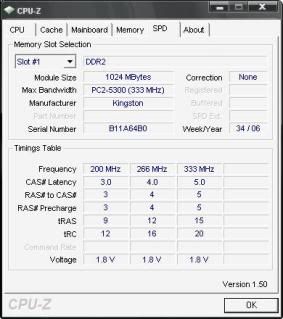
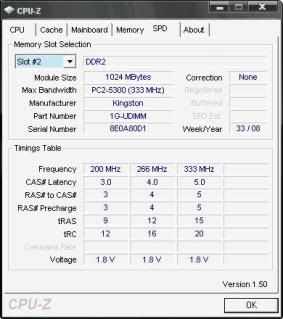
QUOTE(banKarl @ Mar 18 2009, 05:14 PM) 1. ASUS M2N68. 2. 4 slot. 3. 2 slot that same color. what should the cpuz memory info show if dual is enable? (can any1 teach me how to print screen? i can paste the cpuz memory info here) open cpuz, then click on memory tab, then press F5 to print screen the cpuz. you can find the image in the same folder with the cpuz..  print along the SPD tab with the slot containing RAM.. |
|
|
|
|
|
aztas_mon
|
Mar 19 2009, 12:32 AM
|
|
|
diff channel try or not?
|
|
|
|
|
|
tskhang
|
Mar 19 2009, 02:32 PM
|
|
|
Your dual channel is DIMM A1 and DIMM B1, same colour slot.
If you still cannot get dual channel, that means you are having 2 RAMs with different density or single sided/double sided.
You have one RAM which is uDIMM
This post has been edited by tskhang: Mar 19 2009, 02:44 PM
|
|
|
|
|
|
ooiwbng
|
Mar 19 2009, 02:52 PM
|
|
|
wads d diff wit double sided and single sided?
|
|
|
|
|
|
tskhang
|
Mar 19 2009, 02:57 PM
|
|
|
QUOTE(ooiwbng @ Mar 19 2009, 02:52 PM) wads d diff wit double sided and single sided? The placement of the RAM chips on the RAM PCB board. Single-sided means all the chips are placed on one side of the board. Double-sided means chips are placed on both sides. Basically both type of RAMs are the same. Overclocker will see this as an important factor to the RAM's overclockability. |
|
|
|
|
|
ooiwbng
|
Mar 19 2009, 03:03 PM
|
|
|
oh ok thx but if combined single and dual sided still can dual rite?
|
|
|
|
|
|
tskhang
|
Mar 19 2009, 03:31 PM
|
|
|
QUOTE(ooiwbng @ Mar 19 2009, 03:03 PM) oh ok thx but if combined single and dual sided still can dual rite? no, dual channel requires identical RAMs (same specs, not only same speed). That's why you have RAM kits, to ensure that they are exactly identical to run in dual channel. |
|
|
|
|
|
TSbanKarl
|
Mar 19 2009, 03:44 PM
|
Getting Started
|
QUOTE(tskhang @ Mar 19 2009, 03:31 PM) no, dual channel requires identical RAMs (same specs, not only same speed). That's why you have RAM kits, to ensure that they are exactly identical to run in dual channel. u r realy expert, thanks man, exactly wat i suspected earlier, i got 1x1GB two sided ram and 1X1GB one sided ram. now who want to trade with me or suggest me wat i can do leh? aiyo, i never notice the 1 side or 2 side ram when i buy it.  because everytime i buy computer things, sales person answers can can can, wat also can, canot take back here, got waranty  This post has been edited by banKarl: Mar 19 2009, 03:53 PM This post has been edited by banKarl: Mar 19 2009, 03:53 PM |
|
|
|
|
|
zer0hour
|
Mar 19 2009, 03:59 PM
|
|
|
Sigh unfortunately sales people are like that lor. Anything to push the stock out of the door. That's why do research before buy =p
Try selling the old RAM in garage sales I guess.
This post has been edited by zer0hour: Mar 19 2009, 03:59 PM
|
|
|
|
|
|
ooiwbng
|
Mar 19 2009, 04:23 PM
|
|
|
exactly wad i did =-=.. ts i also kena b4 like u... last time my ram http://forum.lowyat.net/index.php?showtopic=969486 1 single 1 dual. go cpu check only single no wonder lol.. nvm now use KHX85002D2K/2G dual channel keke..but maybe dats why i cant boot comp wit all 4 pieces installed lol.. install 3 piece BSOD, 2 piece can work, geng ar |
|
|
|
|



 Quote
Quote




 0.0237sec
 0.43
0.43
 5 queries
 GZIP Disabled