Welcome Guest ( Log In | Register )

Bump Topic Topic Closed RSS Feed
124 Pages « < 38 39 40 41 42 > » Bottom

Outline · [ Standard ] · Linear+

  iPhone Club v8, Post iPhone News/Queries/HowTo

views
     
fezza
post Dec 1 2008, 09:47 AM

New Member
*
Newbie
2 posts

Joined: Apr 2007
iPhone Generation : 2g
Current Firmware : upgraded to 2.2
iTunes Version : 8.0.1.11
Computer Platform : OSX 10.5.5
Jailbreaking software : Pwnage 2.2
Problem Encountered : Could not activate cellular data network
Problem Screenshot (if any) :

Bros, just upgraded to new FW 2.2 and now my GPRS not functioning at all. Tried resetting network settings but to no avail. Thank you in advance for your help.
Acquiesce
post Dec 1 2008, 09:49 AM

Casual
***
Junior Member
355 posts

Joined: Sep 2004
QUOTE(fezza @ Dec 1 2008, 09:47 AM)
iPhone Generation : 2g
Current Firmware :  upgraded to 2.2
iTunes Version : 8.0.1.11
Computer Platform : OSX 10.5.5
Jailbreaking software : Pwnage 2.2
Problem Encountered : Could not activate cellular data network
Problem Screenshot (if any) :

Bros, just upgraded to new FW 2.2 and now my GPRS not functioning at all. Tried resetting network settings but to no avail. Thank you in advance for your help.
*
i thought iTunes must be 8.02 or something....need to go back and check.

is your settings correcto for GRPS?
harmeet15
post Dec 1 2008, 09:53 AM

Winners don't make excuses
*******
Senior Member
2,729 posts

Joined: Oct 2005
From: Gotham City


QUOTE(fezza @ Dec 1 2008, 09:47 AM)
iPhone Generation : 2g
Current Firmware :  upgraded to 2.2
iTunes Version : 8.0.1.11
Computer Platform : OSX 10.5.5
Jailbreaking software : Pwnage 2.2
Problem Encountered : Could not activate cellular data network
Problem Screenshot (if any) :

Bros, just upgraded to new FW 2.2 and now my GPRS not functioning at all. Tried resetting network settings but to no avail. Thank you in advance for your help.
*
wats da settings u r using in cellular data?
apn...unet
user..maxis
pass.wap

check tat


Added on December 1, 2008, 10:00 ambtw
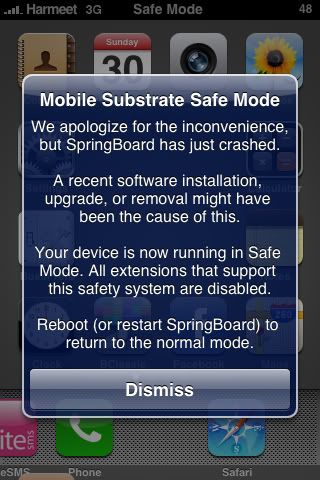
any u guys getting tis

user posted image

im getting tis msg very very often

This post has been edited by harmeet15: Dec 1 2008, 10:00 AM
fezza
post Dec 1 2008, 10:06 AM

New Member
*
Newbie
2 posts

Joined: Apr 2007
Thanks bro harmeet15! Changed to APN unet and got it working. Guess its a different setting if u have activated 3g from maxis.
TSnokia2003
post Dec 1 2008, 10:11 AM

Look at all my stars!!
*******
Senior Member
5,786 posts

Joined: Nov 2007
From: VIC - The Place To Be


QUOTE(fezza @ Dec 1 2008, 10:06 AM)
Thanks bro harmeet15! Changed to APN unet and got it working. Guess its a different setting if u have activated 3g from maxis.
*
technically if you leave the settings empty, you should be able to surf internet as leaving them out denotes that you wish to use the default settings.


perhaps you needed just to reset the network settings prior to this.
milky
post Dec 1 2008, 10:14 AM

- King -
*******
Senior Member
4,743 posts

Joined: Jan 2003
From: u noe EARTH ? wher all human being is there


QUOTE(milky @ Dec 1 2008, 12:27 AM)
saving the image? i tot when take picture already auto saved?

i did take the photo twice still the same... @ my camera roll the picture is blank...
@ my "photos" there's no picture inside
*
guys jus wan to noe is that if i restore back to default factory setting will my problem been solved? or this is happening to everyone too ? or is it jus me?
TSnokia2003
post Dec 1 2008, 10:16 AM

Look at all my stars!!
*******
Senior Member
5,786 posts

Joined: Nov 2007
From: VIC - The Place To Be


QUOTE(milky @ Dec 1 2008, 10:14 AM)
guys jus wan to noe is that if i restore back to default factory setting will my problem been solved? or this is happening to everyone too ? or is it jus me?
*
i have never encountered this problem before.
milky
post Dec 1 2008, 10:19 AM

- King -
*******
Senior Member
4,743 posts

Joined: Jan 2003
From: u noe EARTH ? wher all human being is there


QUOTE(nokia2003 @ Dec 1 2008, 10:16 AM)
i have never encountered this problem before.
*
using fw 2.2 also ?
TSnokia2003
post Dec 1 2008, 10:20 AM

Look at all my stars!!
*******
Senior Member
5,786 posts

Joined: Nov 2007
From: VIC - The Place To Be


QUOTE(milky @ Dec 1 2008, 10:19 AM)
using fw 2.2 also ?
*
yes.
milky
post Dec 1 2008, 10:23 AM

- King -
*******
Senior Member
4,743 posts

Joined: Jan 2003
From: u noe EARTH ? wher all human being is there


nvm... davidgary gave me a solution done already.. phew... lucky.. rclxms.gif rclxms.gif

This post has been edited by milky: Dec 1 2008, 10:28 AM
harmeet15
post Dec 1 2008, 10:36 AM

Winners don't make excuses
*******
Senior Member
2,729 posts

Joined: Oct 2005
From: Gotham City


no one here getting safe mode pop ups?
sad.gif
sad.gif
davidgary73
post Dec 1 2008, 10:38 AM

Music Producer
Group Icon
VIP
4,903 posts

Joined: Jul 2008
QUOTE(harmeet15 @ Dec 1 2008, 10:36 AM)
no one here getting safe mode pop ups?
sad.gif
sad.gif
*
Safe Mode
- It is a ‘mobile substrate’ safe mode not an iPhone safe mode as seems to be the impression. Mobile Substrate is written by Saurik. I assume this is put in place to avoid a continual crash of the springboard by some dodgy theme or plugin. This way you can disable the last theme item or any mobile substrate plugin (eg 5 icon dock or new safari file access) that's installed and stop the phone crashing. Just off and restart your phone will revert back to normal phone usage.
harmeet15
post Dec 1 2008, 10:44 AM

Winners don't make excuses
*******
Senior Member
2,729 posts

Joined: Oct 2005
From: Gotham City


i hv installed mostly da same stuff i had over at 2.1
but tat time no prob
oni now got prob la...
damn annoying la
hv 2 reboot everytime wan
claxxion
post Dec 1 2008, 12:23 PM

Casual
***
Junior Member
465 posts

Joined: May 2005
From: Puchong, Selangor


Hi sifus. I'm sorry if this question had been asked before here..

iPhone Generation : 2G
Current Firmware : 2.1
iTunes Version : 8.0.0.35
Computer Platform : XP SP2
Jailbreaking software : Quickpwn 2.1

Problem Encountered : Its like this: I used to download apps from the appstore before this, through itunes and wifi, but they worked fine. till yesterday, when i downloaded more from itunes, about 10 of them, synced to my iphone, restarted it, and then all my downloaded apps cannot be opened. When i try to open, they will jump back to my main screen. Only downloaded apps wont work, but all the phone apps (SMS, contacts, notes, etc) will work.

Steps Had Taken (list down) : Restarted the phone like 5 times, synced again through itunes, use bossprefs to 'fix user dir permissions', none worked. sad.gif

Hope the great sifus here can help.. thanks in advance. smile.gif
jesseblue
post Dec 1 2008, 02:53 PM

Regular
******
Senior Member
1,113 posts

Joined: Jan 2006
From: Neverland
@claxxion

I had the same problem before. What I did was, un-sync all the applications via itunes and then re-sync it back and everything is ok after that - not sure if you have already done that when you mentioned "synced again through itunes".


Damonzero
post Dec 1 2008, 04:04 PM

✪✪✪✪✪✪✪✪✪✪✪
******
Senior Member
1,467 posts

Joined: Oct 2007
From: ✪Candy Land✪
Hi guys,

whenever i connect my iphone with itune, the status bar shows backing up ihone, the question is what exactly is being backup? the contacts or the media?

I cant see any contacts in my outlook or windows address book...

Thanks for reading.
TSnokia2003
post Dec 1 2008, 04:35 PM

Look at all my stars!!
*******
Senior Member
5,786 posts

Joined: Nov 2007
From: VIC - The Place To Be


QUOTE(Damonzero @ Dec 1 2008, 04:04 PM)
Hi guys,

whenever i connect my iphone with itune, the status bar shows backing up ihone, the question is what exactly is being backup? the contacts or the media?

I cant see any contacts in my outlook or windows address book...

Thanks for reading.
*
you have to enable it in the itunes tab first
afcmh
post Dec 1 2008, 08:22 PM

Getting Started
**
Junior Member
127 posts

Joined: Mar 2006
From: KL


shud i remove my simcard b4 updating to 2.2?
davidgary73
post Dec 1 2008, 08:35 PM

Music Producer
Group Icon
VIP
4,903 posts

Joined: Jul 2008
QUOTE(afcmh @ Dec 1 2008, 08:22 PM)
shud i remove my simcard b4 updating to 2.2?
*
Just leave your simcard in the phone.
rjmm2
post Dec 1 2008, 08:42 PM

Getting Started
**
Junior Member
150 posts

Joined: Jan 2003
From: Perak/Georgetown


QUOTE(claxxion @ Dec 1 2008, 12:23 PM)
Hi sifus. I'm sorry if this question had been asked before here..

iPhone Generation : 2G
Current Firmware : 2.1
iTunes Version : 8.0.0.35
Computer Platform : XP SP2
Jailbreaking software : Quickpwn 2.1

Problem Encountered : Its like this: I used to download apps from the appstore before this, through itunes and wifi, but they worked fine. till yesterday, when i downloaded more from itunes, about 10 of them, synced to my iphone, restarted it, and then all my downloaded apps cannot be opened. When i try to open, they will jump back to my main screen. Only downloaded apps wont work, but all the phone apps (SMS, contacts, notes, etc) will work.

Steps Had Taken (list down) : Restarted the phone like 5 times, synced again through itunes, use bossprefs to 'fix user dir permissions', none worked. sad.gif

Hope the great sifus here can help.. thanks in advance. smile.gif
*
I have the same problems. have downloaded quite a number of applications but unable to open it. Have re-scyn plenty of time without joy... not sure what to do? Anyway using Iphone 3G from US.

124 Pages « < 38 39 40 41 42 > » Top
Topic ClosedOptions
 

Change to:
| Lo-Fi Version
0.0282sec    0.36    6 queries    GZIP Disabled
Time is now: 2nd December 2025 - 11:39 AM