

800x600
other medium
looks like my lappy can play well
 but a bit stressful for it
[attachmentid=1088650]
Action/Platformer resident evil 5..PC?, got pc version??
|
|
 Jul 20 2009, 02:00 AM Jul 20 2009, 02:00 AM
Return to original view | Post
#1
|
 
Senior Member
1,002 posts Joined: Dec 2008 From: Kuala Lumpur  
|
shadow low
800x600 other medium looks like my lappy can play well but a bit stressful for it [attachmentid=1088650] |
|
|
|
|
|
Jul 20 2009, 11:44 PM
Return to original view | Post
#2
|
|
Senior Member
1,002 posts Joined: Dec 2008 From: Kuala Lumpur
|
this time test with my desktop rig
[attachmentid=1090251] is it sheva only playable during on9 play via games for windows live?? can i play it in single player mode? |
|
|
Jul 23 2009, 10:14 AM
Return to original view | Post
#3
|
|
Senior Member
1,002 posts Joined: Dec 2008 From: Kuala Lumpur
|
i just got some info from other site
open its config.ini & set JobThread=X, where X is the number of ur cpu core, eg. mine is core2duo, so i set 2 this will cause performance gained u guys can try the benchmark b4 & after the performance gained quite big for me when no AA, while c16xq mainly no difference in my rig here the result b4 & after, resoultion 1440x900, no AA, all high b4 [attachmentid=1095446] after [attachmentid=1095447] This post has been edited by Xehanort: Jul 23 2009, 10:15 AM |
|
|
Jul 23 2009, 06:25 PM
Return to original view | Post
#4
|
|
Senior Member
1,002 posts Joined: Dec 2008 From: Kuala Lumpur
|
QUOTE(sai86 @ Jul 23 2009, 11:26 AM) may i know where the config.ini file is located?? i cant find it at installed directory.... ur os is winxp or vista??tats quite a gain on fps u got there   for xp, it is located at My Document\CAPCOM\RESIDENT EVIL 5 Benchmark Version for vista, it is located at C:\User\"your username"\Apps Data\Local\CAPCOM\RESIDENT EVIL 5 Benchmark Version |
|
|
Jul 23 2009, 06:46 PM
Return to original view | Post
#5
|
|
Senior Member
1,002 posts Joined: Dec 2008 From: Kuala Lumpur
|
as the setting getting higher, the performance gained will be decreased
eventually no change  |
|
|
Jul 23 2009, 09:14 PM
Return to original view | Post
#6
|
|
Senior Member
1,002 posts Joined: Dec 2008 From: Kuala Lumpur
|
the easiest way to find it
just type config.ini & search it, sure find it  |
|
|
|
|
|
Sep 12 2009, 08:47 AM
Return to original view | Post
#7
|
|
Senior Member
1,002 posts Joined: Dec 2008 From: Kuala Lumpur
|
maybe u guys can try open the config.ini file & set JobThread=4
then try benchmark again |
|
|
Sep 12 2009, 12:33 PM
Return to original view | Post
#8
|
|
Senior Member
1,002 posts Joined: Dec 2008 From: Kuala Lumpur
|
QUOTE(JuzJoe @ Sep 12 2009, 09:19 AM) what does that do? JobThread=*the number of core of ur cpu*i changed it from 1 to 2 & get around 10fps |
|
|
Sep 14 2009, 08:15 PM
Return to original view | Post
#9
|
|
Senior Member
1,002 posts Joined: Dec 2008 From: Kuala Lumpur
|
great, gonna grab one copy when i back to kl this week
|
|
|
Oct 1 2009, 04:25 PM
Return to original view | Post
#10
|
|
Senior Member
1,002 posts Joined: Dec 2008 From: Kuala Lumpur
|
hi guys
i encounter this problem when cutscenes is played during dx9 mode while the problem is not occurred during dx10 mode anyone here encounter this b4 & know how to solve it? 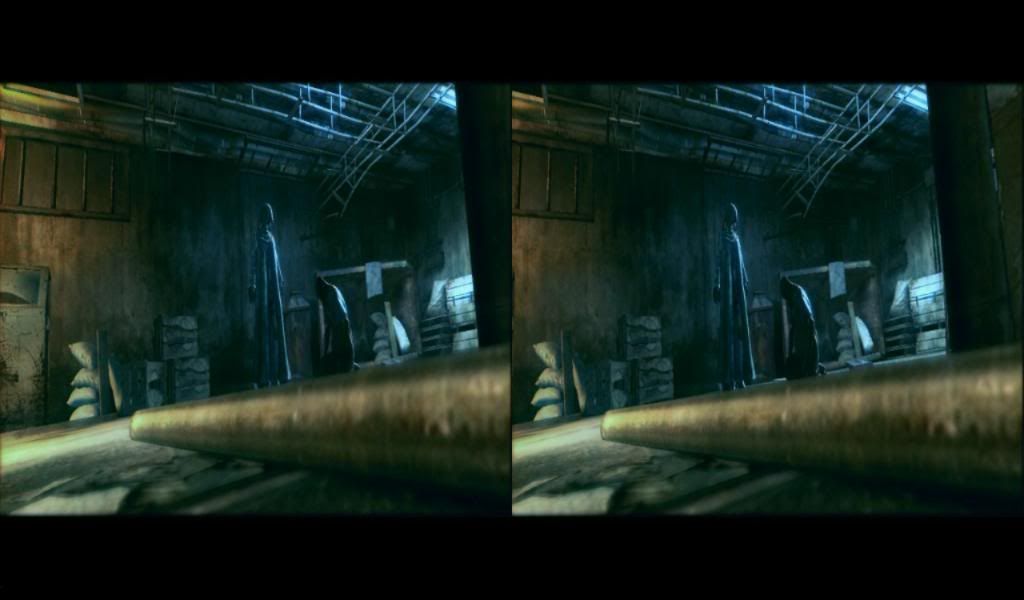 |
| Change to: |  0.0439sec 0.0439sec
 0.89 0.89
 7 queries 7 queries
 GZIP Disabled GZIP Disabled
Time is now: 22nd December 2025 - 07:10 PM |
 Quote
Quote