Welcome Guest ( Log In | Register )

Bump Topic Topic Closed RSS Feed
11 Pages « < 5 6 7 8 9 > » Bottom

Outline · [ Standard ] · Linear+

 NVIDIA GRAPHIC CARD FANS CLUB V2, Discussion All about Nvidia Graphic Card

views
     
ZeneticX
post Apr 30 2009, 02:30 AM

stars for what
********
All Stars
12,413 posts

Joined: Jan 2008
From: KL - Cardiff - Subang - Sydney


if u have tight budget just go for the cheapest brand like palit.if u tell me to recommend u a brand i would recommend zotac.thou many users out there will just say most of them is just the same with different art work
ZeneticX
post Apr 30 2009, 11:13 PM

stars for what
********
All Stars
12,413 posts

Joined: Jan 2008
From: KL - Cardiff - Subang - Sydney


still in beta stage
ZeneticX
post May 1 2009, 01:29 AM

stars for what
********
All Stars
12,413 posts

Joined: Jan 2008
From: KL - Cardiff - Subang - Sydney


QUOTE(Terence573 @ Apr 30 2009, 11:29 PM)
it gives ambient occlusion setting for 8800gt which not available for 182.

but the graphic effect is "seemless"  unsure.gif  unsure.gif

but so far this beta driver is okay.Unlike the last beta which will hang running games.
*
can check few pages back.i posted up screen shots for few games with comparison AO OFF and AO ON

QUOTE(romulus47plus1 @ Apr 30 2009, 11:59 PM)
Do you guys' nvidia control panel have option for ambient occlusion automatically after installing 185 drivers? im using 185.66, but still dun have the option, installed new control panel, still dun have the option.


Added on April 30, 2009, 11:59 pmOr is it vista only?
*
its on the 1st setting
ZeneticX
post May 1 2009, 01:37 AM

stars for what
********
All Stars
12,413 posts

Joined: Jan 2008
From: KL - Cardiff - Subang - Sydney


strange.nvidia didnt state its for vista only

have u ran driver cleaner before installing the 185 driver?
ZeneticX
post May 4 2009, 12:28 AM

stars for what
********
All Stars
12,413 posts

Joined: Jan 2008
From: KL - Cardiff - Subang - Sydney


QUOTE(Xehanort @ May 2 2009, 09:27 PM)
i have followed these steps to reinstall 182.50 driver
now devil may cry 4 has problem again
sometimes screen stutter for 1 sec then quickly back to normal, i still dunno if it is game bug or not
coz even the demanding crysis totally no problem occur since i installed it till now
*
screen shutter like 1 sec then back to normal u mean like off for 1 sec thn back to normal?i think its quite normal la.i have the problem too,but i dun care it because it doesn't affect me during gameplay,only during menu selection it appear
ZeneticX
post May 6 2009, 12:16 AM

stars for what
********
All Stars
12,413 posts

Joined: Jan 2008
From: KL - Cardiff - Subang - Sydney


120 hertz refresh rate lcd monitor available edi?i only saw this spec on lcd tv
ZeneticX
post May 8 2009, 11:47 AM

stars for what
********
All Stars
12,413 posts

Joined: Jan 2008
From: KL - Cardiff - Subang - Sydney


nvidia system tools is good at oc as well
ZeneticX
post May 8 2009, 09:43 PM

stars for what
********
All Stars
12,413 posts

Joined: Jan 2008
From: KL - Cardiff - Subang - Sydney


QUOTE(Terence573 @ May 8 2009, 06:35 PM)
how far can gtx260 216 core 65nm OC?
just asking sifus here.
*
http://forum.lowyat.net/topic/893153
ZeneticX
post May 9 2009, 02:11 AM

stars for what
********
All Stars
12,413 posts

Joined: Jan 2008
From: KL - Cardiff - Subang - Sydney


it seems newer forceware like the recent 185.85 tend to resize ur screen smaller if ure using 1920 x 1080 or high reso (not sure for smaller reso).need to manually select resize hdtv desktop to readjust the screen size


Added on May 9, 2009, 2:13 am
QUOTE(Xehanort @ May 8 2009, 11:07 PM)
btw, after update to 185.85 driver
this dmc4 still will lag for 1 sec then recover in gameplay but not in menu, very annoying vmad.gif
*
did u check other players of dmc4 using the same gc and almost the same spec with u?

btw pm me ur settings ingame


This post has been edited by ZeneticX: May 9 2009, 02:13 AM
ZeneticX
post May 9 2009, 07:06 PM

stars for what
********
All Stars
12,413 posts

Joined: Jan 2008
From: KL - Cardiff - Subang - Sydney


QUOTE(RMaliff @ May 9 2009, 05:41 PM)
Hey guys, I just updated to the 185.85 driver. Is it me or does the new driver down clock the clock times when it doesn't need it? Or is there something wrong with my rivatuner? D:


Added on May 9, 2009, 6:04 pm

Anyone knows how to stop this? It's pretty annoying tongue.gif
*
thts normal,its for energy saving and can lower ur card's temp


as for the screen size thing,jz resize it and it will be gone
ZeneticX
post May 9 2009, 11:56 PM

stars for what
********
All Stars
12,413 posts

Joined: Jan 2008
From: KL - Cardiff - Subang - Sydney


QUOTE(RMaliff @ May 9 2009, 10:08 PM)
Cool, so it is a new feature.

I choose do not resize and it went back to normal. But after a restart, it will resize it again D:

Anyone here overclocked a 280gtx ?
*
after u resize select do not resize my desktop at the top

QUOTE(KayK @ May 9 2009, 11:12 PM)
wondering if any1 having difficulty installing the new 185.85 driver in Vista 32bit? I removed the old driver then install the new driver, but it say "your system has not been modified. To install this program at a later time, please run the installation again."

when i restart the driver seem to be installed...only that PhysX, PDsetup, and the Nvidia Control Panel not install, so i manually run PhysX setup, successful but not the control panel, saying "setup failed to read the required display driver to be used with this package. Setup will not continue."

anyone having this issue too?
*
eveytime before installing a new driver remember to run driver cleaner


ZeneticX
post May 11 2009, 12:07 AM

stars for what
********
All Stars
12,413 posts

Joined: Jan 2008
From: KL - Cardiff - Subang - Sydney


QUOTE(metsatsu @ May 10 2009, 12:08 PM)
Your are in the same shoe like zenetix were. I think it's the 65nm problem. after he switched to 55nm chip, he was able to hit more than 700
*
eh since when i change to 55nm tongue.gif.im still with my good ol 65nm zotac.on 725 core now tongue.gif

QUOTE(RMaliff @ May 10 2009, 09:02 PM)
I just found out that the EVGA Precision tool is made by Rivatuner? =D
*
QUOTE(Terence573 @ May 10 2009, 09:42 PM)
hoh I also dunno...where u got this info?
*
QUOTE(RMaliff @ May 10 2009, 09:46 PM)
I was playing with my newly installed precision. Then i tried the on screen  display thingy. and it says there rivatuner thingymajigy. And the looks and menu has similarities to rivatuner.
*
it was written/made by the same guy
ZeneticX
post May 12 2009, 05:02 PM

stars for what
********
All Stars
12,413 posts

Joined: Jan 2008
From: KL - Cardiff - Subang - Sydney


QUOTE(ericpires @ May 12 2009, 04:46 PM)
Just want to ask for my 9500gt, do i enable the triple buffering to increase performance or just leave all my settings default? any other settings i can adjust?  coz playing some games really lag like hell...
*
triple buffering only helps when u enable vsync
ZeneticX
post May 13 2009, 06:47 PM

stars for what
********
All Stars
12,413 posts

Joined: Jan 2008
From: KL - Cardiff - Subang - Sydney


the cooler looks not so promising,a fan between the 2 cores?if the fan is powerful enough then its good.this sure reminds me of the xfx 7800 ultra or gtx

This post has been edited by ZeneticX: May 13 2009, 06:48 PM
ZeneticX
post May 14 2009, 09:57 PM

stars for what
********
All Stars
12,413 posts

Joined: Jan 2008
From: KL - Cardiff - Subang - Sydney


QUOTE(jimmylim85 @ May 14 2009, 09:26 PM)
Firefox triggers it, depends on website, LYN did triggered.

Even watching realplayer RMVB files trigger its default speed.
*
mine doesn't trigger?

Attached Image
ZeneticX
post May 14 2009, 10:46 PM

stars for what
********
All Stars
12,413 posts

Joined: Jan 2008
From: KL - Cardiff - Subang - Sydney


my gc is always at the stated clock in the ss posted above unless i ply some graphic intense game like cod4,dmc4,crysis etc
ZeneticX
post May 14 2009, 10:50 PM

stars for what
********
All Stars
12,413 posts

Joined: Jan 2008
From: KL - Cardiff - Subang - Sydney


lipat lipat will surely make it go full speed as well tongue.gif
ZeneticX
post May 15 2009, 12:08 AM

stars for what
********
All Stars
12,413 posts

Joined: Jan 2008
From: KL - Cardiff - Subang - Sydney


QUOTE(Xehanort @ May 14 2009, 11:12 PM)
well, my gc alwaz on 625MHz clock speed ( pre-oc)
i wonder if it is bcoz of my gtx 260 is pre-oc version??
*
my gc is pre-oced and i manually oc it further.when ur comp is rly idle sometimes for about 30 min open up gpu-z and check
ZeneticX
post May 17 2009, 02:31 AM

stars for what
********
All Stars
12,413 posts

Joined: Jan 2008
From: KL - Cardiff - Subang - Sydney


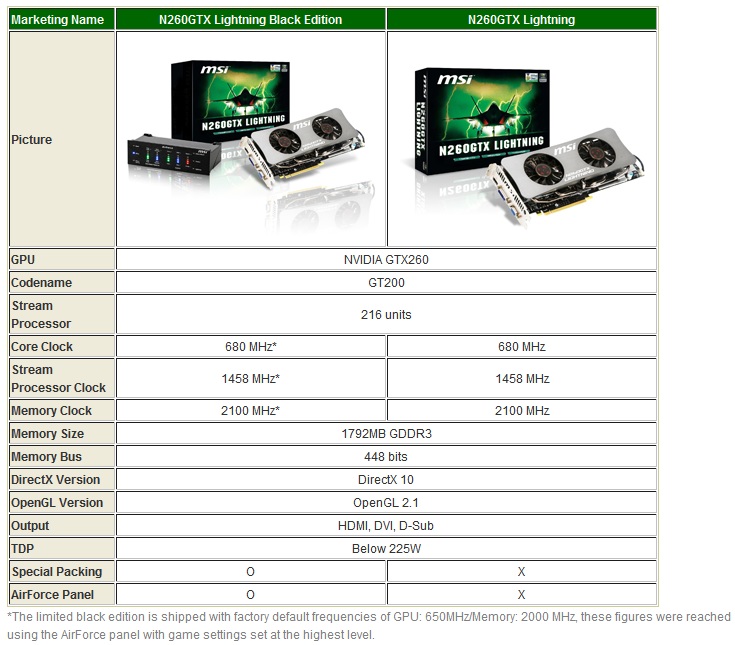
MSI GeForce N260GTX Lightning 1792 MB

user posted image
user posted image

Guru3d review


look at the clocks and mem size sweat.gif

This post has been edited by ZeneticX: May 17 2009, 02:32 AM
ZeneticX
post May 17 2009, 02:47 AM

stars for what
********
All Stars
12,413 posts

Joined: Jan 2008
From: KL - Cardiff - Subang - Sydney


the black edition is only good for overclockers,normal users can just go for the normal lightning

11 Pages « < 5 6 7 8 9 > » Top
Topic ClosedOptions
 

Change to:
| Lo-Fi Version
0.0488sec    0.42    7 queries    GZIP Disabled
Time is now: 12th December 2025 - 11:09 PM