

QUOTE(signither @ Mar 1 2009, 01:36 AM)
i want 50mm f/1.4 too 

go buy, just use the Master or Visa card in few seconds 
Photography The Sony Alpha Thread V21!, The Orange Legion
|
|
 Mar 1 2009, 04:49 PM Mar 1 2009, 04:49 PM
Return to original view | Post
#61
|
 
Senior Member
4,073 posts Joined: Aug 2006  
|
QUOTE(signither @ Mar 1 2009, 01:36 AM) i want 50mm f/1.4 too go buy, just use the Master or Visa card in few seconds |
|
|
|
|
|
Mar 1 2009, 05:25 PM
Return to original view | Post
#62
|
|
Senior Member
4,073 posts Joined: Aug 2006
|
halo, all expert alpha users, please come here guide me on this:
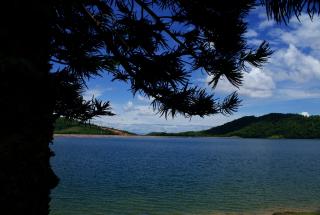
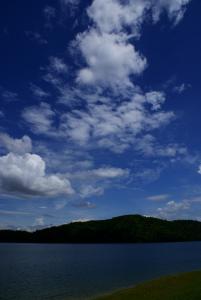
how to shoot landscape photo under a sunlight condition, i observed that the landscape objects are dark see attached pictures (LYN link) these photos shoot with m dial and the no over/under exposure in the meter scaling + creativity style = lanscape +1 +1 +1 and aiya , shit, it is portrait creativity with +0+0+0  forgot to changed back forgot to changed backwhat setting, configuration i need in order to capture on the blue & white sky and bright objects? i am been failed in this type of situation for many times already  ** shit, after investigation for the black dot i found in my photos, luckily that dots is the birds flying  example photos are here:  This post has been edited by jimlim007: Mar 1 2009, 05:26 PM Attached thumbnail(s) 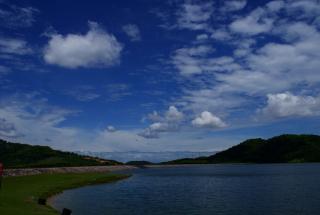
|
|
|
Mar 1 2009, 06:33 PM
Return to original view | Post
#63
|
|
Senior Member
4,073 posts Joined: Aug 2006
|
QUOTE(chiggy @ Mar 1 2009, 05:30 PM) here is another way to steady your camera erm, are you replying my post?before you pull your shutter release using your right hand, pull the strap down on the left side using your left hand. Hold the camera on your right by pushing it up, so that you counter your left. So left down, right up... balance Then set to 2 secs timer and wait... need to practice to make it perfect  if yes, object darken at sunlight condition is due to my hand shking issue during pressing on shutter  |
|
|
Mar 1 2009, 06:37 PM
Return to original view | Post
#64
|
|
Senior Member
4,073 posts Joined: Aug 2006
|
QUOTE(vikingw2k @ Mar 1 2009, 05:30 PM) gND or CPL will settle your problem. so curious CPL able to remove the darken areas  thought CPL only to remove those water/solid metal reflection stuff thought CPL only to remove those water/solid metal reflection stuffdo GND filter similiar to CPL, which is we need to rotate the ring? (most of time, i forgot to turn that ring when shooting photo for my CPL km 50mm; those photo is shoot by kit lens) Added on March 1, 2009, 6:42 pm QUOTE(dark lenanza @ Mar 1 2009, 06:35 PM) shot in raw yer... i dont like to pp de (in fact, i also duno to pp then spend time editing it  or get the CPL or gradient filter ), if possible to improve the skill for this shoot  but it seem like not skill concern in this condition, its about hardware requirement but it seem like not skill concern in this condition, its about hardware requirement This post has been edited by jimlim007: Mar 1 2009, 06:42 PM |
|
|
Mar 1 2009, 06:55 PM
Return to original view | Post
#65
|
|
Senior Member
4,073 posts Joined: Aug 2006
|
QUOTE(vcxv @ Mar 1 2009, 06:51 PM) @ jimlim - may i know what type of metering u used? oh ya, forgot to mention, i used centre-weighted. does this really help in my case, since i dont use cpl or nd, i try to avoid spot metering in similar situation. so, i either use center-weighted or multi segment |
|
|
Mar 1 2009, 07:11 PM
Return to original view | Post
#66
|
|
Senior Member
4,073 posts Joined: Aug 2006
|
QUOTE(vcxv @ Mar 1 2009, 07:07 PM) im not sure. probably u metered at the sky itself? this is my example of using center-weighted during bright sunny day erm...let me think back, i think i metered at slightly higher abit from centre object; do we need to consider the factor where the sunnlight from? some time i am not even know which side the sunlight from  since that, my 2nd photo under tree, the leaf sure black loh, since i focus to the sky This post has been edited by jimlim007: Mar 1 2009, 07:13 PM |
|
|
|
|
|
Mar 1 2009, 07:16 PM
Return to original view | Post
#67
|
|
Senior Member
4,073 posts Joined: Aug 2006
|
QUOTE(Sp00kY @ Mar 1 2009, 07:11 PM) Pic Spam:some custom made bracelet OOF C&C appreciated... yaya, also want to ask one thing, today when i was using 55200mm, i focus to a signboard, the lens not perform ziiii zee auto focus, but after i zoom zoom in to 1 object (small signboard), then only the lens able to auto focus zii zeee.... (of course when not zoom zoom in, the signboard look more small at first, so this is because the object too small to be focus or the sunlight too bright at focus area and make lens not able too focus?) This post has been edited by jimlim007: Mar 1 2009, 07:17 PM |
|
|
Mar 1 2009, 07:23 PM
Return to original view | Post
#68
|
|
Senior Member
4,073 posts Joined: Aug 2006
|
QUOTE(The Wonder @ Mar 1 2009, 07:17 PM) I see all exposure were almost the same. Did u accidentally pressed the lock exp button (camera lcd should show * marking)? aiya data integrity issue with vrcx, dont use multi-segment If u think your shot is underexposed, increase the exp directly (exp +-) using the same metering method & focus point. For such scenery shoot, try multi segment metering. aiya, din notice that * sign woh (will check on it); but i always remembered ahmike say meter scaling must be ...........| -3-2-1 0 1 2 3 ;(but seen for this scenary, it is not working even it is at 0) so we do need to adjust on exp+- (which button is that); but there is another issue, cant really able to review the picture to check exposure due to sunlight reflected at LCD, cant see it clear  This post has been edited by jimlim007: Mar 1 2009, 07:25 PM |
|
|
Mar 1 2009, 08:11 PM
Return to original view | Post
#69
|
|
Senior Member
4,073 posts Joined: Aug 2006
|
QUOTE(vcxv @ Mar 1 2009, 07:21 PM) from my understanding, people try to avoid facing sunlight because of metering error. if you accidentally meter the sky(sun), the sky will be properly exposed and the subject will usually be under-exposed. and if you meter the subject you will get overblown sky. erm.... the sun... din notice just now the sun position that's my understanding la what if in this scenary: does this consider we facing sun or follow sun light?.........................Object to be shoot ....................................... ^ ....................................... ^ ....................................... ^ ....................................... ^ ....................................... ^ ....................................... ^ ....................................... ^ ....................................... ^<<<<<<<<<<<<<<<<<< Sun ....................................... ^ ....................................... ^ ....................................... ^ ....................................... ^ ....................................... ^ ....................................... ^ ....................................... ^ ....................................... ^ .................CaoCao a100/200/300/350/700/a900 Added on March 1, 2009, 8:15 pm QUOTE(vcxv @ Mar 1 2009, 07:27 PM) aiya, i said dont use spot la. use either center-weighted or multi-segment ya, that bracketing mode shoot 3 pics once; will this work when i am in M Dial? or only work in A or S mode Added on March 1, 2009, 7:29 pmif u use A or S priority, u need to adjust the exposure compensation lor Added on March 1, 2009, 7:30 pm..and to be save, use exposure bracketing mode This post has been edited by jimlim007: Mar 1 2009, 08:15 PM |
|
|
Mar 1 2009, 08:52 PM
Return to original view | Post
#70
|
|
Senior Member
4,073 posts Joined: Aug 2006
|
QUOTE(TheWandererX @ Mar 1 2009, 08:35 PM) Hey Alpha users, hope you don't mind me invading camps - but I have a question: by look to manual the camera interface u will see the major of button function,My friend has an a200, and I seriously dunno how to change the ISO, shutter speed, aperture, etc. I can't find a button for it. which one do I press? I don't have the manual with me...ISO button at top right, A mode - right dial will be for aperture, S mode - right dial for S speed, M mode - right dial is shutter (press & hold the [ ] icon and turning dial for adjust aperture correct me if i m wrong (my god, this for a300, i saw din replied d) This post has been edited by jimlim007: Mar 1 2009, 09:02 PM |
|
|
Mar 1 2009, 09:12 PM
Return to original view | Post
#71
|
|
Senior Member
4,073 posts Joined: Aug 2006
|
QUOTE(dingenius3 @ Mar 1 2009, 09:10 PM) just in case u still needs a manual... please refer to this manual even though it is for A350.. hehe, kodak merged with minolta, then sony sapu all all functions are the same except these 2: LiveView & megapixel counts... link >> http://www.sony.com.my/support/manual/product/dslr-a350 Added on March 1, 2009, 9:10 pm i got a feeling... like both are kinda different... i guess onli |
|
|
Mar 1 2009, 09:55 PM
Return to original view | Post
#72
|
|
Senior Member
4,073 posts Joined: Aug 2006
|
haha dont laugh me please
typo d, typing while think in the wrong name Added on March 1, 2009, 9:59 pm QUOTE(AlphaBeta @ Mar 1 2009, 09:16 PM) Sony really smart...buy over ericsson and now Sony Ericsson..now buy over Konica Minolta and Sony Alpha. What more? if u have money, u can buy sony, u earn a lot d, got PS3, Blueray (will death 1 or 2 more years), SONY DSLR, SONY HDCAM, SONY Ericsson, and so much This post has been edited by jimlim007: Mar 1 2009, 09:59 PM |
|
|
Mar 1 2009, 10:17 PM
Return to original view | Post
#73
|
|
Senior Member
4,073 posts Joined: Aug 2006
|
QUOTE(AlphaBeta @ Mar 1 2009, 10:02 PM) haha yea...no im asking wht other company that sony has bought over? erm... like that u need jump ship d i wanna ask a question again which i did asked last time... Wht magnifying eyepiece suits a300? Do i need to take off my current eyepiece b4 attaching it? |
|
|
|
|
|
Mar 1 2009, 10:32 PM
Return to original view | Post
#74
|
|
Senior Member
4,073 posts Joined: Aug 2006
|
QUOTE(AlphaBeta @ Mar 1 2009, 10:28 PM) lol now a bit too late for me to jump ship...but i know there is magnifying eyepiece for alpha.. not made by sony though.. ya, i heard befor, like convertor some thing Added on March 1, 2009, 10:39 pmafter filter all the photos, left 3 can just to show ppl MengKuang Dam shoot. C&C welcome. Arigato!    This post has been edited by jimlim007: Mar 1 2009, 10:40 PM |
|
|
Mar 2 2009, 01:42 PM
Return to original view | Post
#75
|
|
Senior Member
4,073 posts Joined: Aug 2006
|
QUOTE(ryzan76 @ Mar 2 2009, 01:06 PM) hallo my alpha fren.................. please resize ur photo la morning at kudat sabah   ___________________________________ flickr loading so slow; of course i know u want to show off |
|
|
Mar 2 2009, 08:40 PM
Return to original view | Post
#76
|
|
Senior Member
4,073 posts Joined: Aug 2006
|
QUOTE(AlphaBeta @ Mar 2 2009, 07:59 PM) canon 50mm f1.8 only rm300?? omg why so cheap? haha, u can jump ship d if u are surprise on this, forgot to say, its with warranty too Added on March 2, 2009, 8:42 pm QUOTE(ryzan76 @ Mar 2 2009, 02:05 PM) no to show off la bro...... wakakaka  Added on March 2, 2009, 8:43 pm QUOTE(albnok @ Mar 2 2009, 02:23 PM) AlphaBeta, you need to remove your current eyepiece. yaya, in future, i will watch out many thing, like exposure locked * , DRO stuff loh.You can find it on http://www.shashinki.com/ or the camera shop called dSLR, in the computer shop area, somewhere behind Kenny Rogers in Subang Parade... jimlim007, about your landscapes, you could shoot RAW and use (minor) HDR. With RAW, you can use the Shadow Fill tool to brighten the dark hills (it will not brighten the skies.) Also try turning on DRO+ for landscapes, it helps. This post has been edited by jimlim007: Mar 2 2009, 08:43 PM |
|
|
Mar 3 2009, 07:37 AM
Return to original view | Post
#77
|
|
Senior Member
4,073 posts Joined: Aug 2006
|
QUOTE(creepydslr @ Mar 2 2009, 11:31 PM) in 'M' mode, u must remember, -ve sign for black/darker and +ve sign for white/brighter...so if u wanna take a snow or person with white shirt, make sure u overexpose 1 or 2 step up...so the white will be white or else it will be gray...so do the black, do vice versa... such a good detail in explanation, thank you creepydslr this applies only if u meter the subject in the situation above..remember that FYI, the '0' sign for grey = in between of white and black... for landscape, if u wanna brighter ground than sky, meter the ground and get '0' then compose and then snap...or for silhouette, meter the sky, get '0' or 1 or 2 step up (or ikut u nyer preference) then compose and then snap...there you go... for get nice balance metering ground and sky, use GND/CPL is recommended... i would suggest Cookin GND blue Filter (even though i dont have one, hanafinoor have it)... for A300 i would sugget Pentax O-ME53... for A200 i would suggest Olympus ME-1 (bigger and brighter) but thinking of buy GND or CPL filter, i think pretty hard for me loh, last time i am very lazy change lenses, now is ok. again now need to change filter since i already have uv filter erm...forgot what is silhouette shoot d, i used to see that in previous alpha thread long long time ago, but cant recall already This post has been edited by jimlim007: Mar 3 2009, 07:38 AM |
|
|
Mar 3 2009, 08:04 PM
Return to original view | Post
#78
|
|
Senior Member
4,073 posts Joined: Aug 2006
|
QUOTE(achew @ Mar 3 2009, 03:28 PM) taken using tamron 90mm macro =) wah, achew, can creat 1 more box human to me boh tried using cz1680 n sal50mm f1.4...but couldnt really see the flower..its too small..lol |
|
|
Mar 3 2009, 08:26 PM
Return to original view | Post
#79
|
|
Senior Member
4,073 posts Joined: Aug 2006
|
QUOTE(achew @ Mar 3 2009, 08:13 PM) errr..don really catch u..hahaha..u mean create another copy of that toy for u? haha, create a nother toy for me  or u mean create another shot of that toy for u?haha or u mean create another shot of that toy for u?haha |
|
|
Mar 4 2009, 10:28 PM
Return to original view | Post
#80
|
|
Senior Member
4,073 posts Joined: Aug 2006
|
QUOTE(craziqbal @ Mar 4 2009, 10:20 PM) check out this dude's set. he's not using a sony, but his pictures are nice, so I wanted to share with u guys.. omg, crazybal change avatar dhttp://www.flickr.com/photos/balakov/sets/72157602602191858/ Added on March 4, 2009, 10:29 pm QUOTE(craziqbal @ Mar 4 2009, 10:20 PM) check out this dude's set. he's not using a sony, but his pictures are nice, so I wanted to share with u guys.. he is Achew fren http://www.flickr.com/photos/balakov/sets/72157602602191858/ same type This post has been edited by jimlim007: Mar 4 2009, 10:29 PM |
|
Topic ClosedOptions
|
| Change to: |  0.0459sec 0.0459sec
 0.81 0.81
 7 queries 7 queries
 GZIP Disabled GZIP Disabled
Time is now: 6th December 2025 - 08:06 PM |
 Quote
Quote