Welcome Guest ( Log In | Register )

Outline · [ Standard ] · Linear+

 Xbox Wireless Controller on PC (Windows XP), Does it work?

views
     
TSflipacoin2k
post Feb 12 2009, 11:27 AM, updated 17y ago

Getting Started
**
Junior Member
136 posts

Joined: Sep 2008
Good day mates.

I read in a few articles and learned that the Wireless Xbox 360 Controller might actually work with Windows XP.

I have googled about it. Well, the catch is, some claimed that the default controller (that usually comes with the console) doesn't work for PC, one has to purchase the controller that explicitly stated "Works for PC and Xbox 360" to be compatible. Wired controller on the other hand, is compatible with Windows by default.

While, I have also read that Microsoft had released a windows driver that will make the common wireless controllers that doesn't initially state compatible with Windows work on PC. But then they were debating if the driver only works for wired controller.

Well, my guess is that it is a fake that wireless one could work with PC. Anyone can clear my doubt?

* it would be a real bonus if it can work smile.gif


Added on February 12, 2009, 11:34 amI guess I found the answer to my own question: A wireless adapter is needed for the wireless controller:
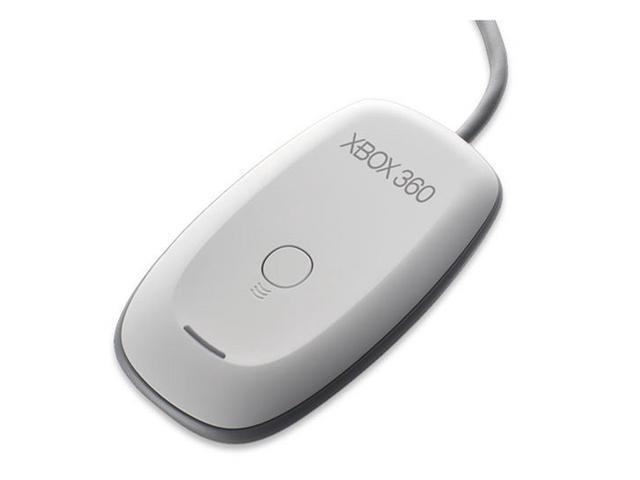
user posted image

So, need an additional purchase unfortunately rclxub.gif

This post has been edited by flipacoin2k: Feb 12 2009, 12:47 PM
andy0212
post Feb 12 2009, 11:44 AM

Getting Started
**
Junior Member
132 posts

Joined: Jun 2005


It works...

xbox360 controller for windows / for xbox360 console is the same...

if you want to use on windows, you need the wireless receiver, and driver (all you can get from xbox360 controller for windows )

and the the one that you bought for windows also can be used on your xbox360 console.. vice versa..

if you have the play & charge kit, try connect it on your pc.. your pc will detect a new hardware, xbox360 wireless controller via play & charge kit (or something like that..).. windows can obtain driver automatically from internet..
but using this method, i'm not sure if you still need the wireless receiver.. at the time that I try, I didn't disconnect the wireless receiver..
prominen
post Feb 12 2009, 11:57 AM

Getting Started
**
Junior Member
290 posts

Joined: Sep 2006
From: Kepong + KL
I already tried using plug and play...doesn't work...I've tried using bluetooth also cannot detect my wireless controller...(well I using some guys blog guiding how to use wireless controller using bluetooth)... hmm.gif

but if u use ps3 wireless controller using charging usb connected to pc with the approtiate driver and software, its easily detect my ps3 controller on pc and I've been using it to play most pc games with custom mapping to the controller... rclxms.gif
Hisyam91
post Feb 12 2009, 12:07 PM

Getting Started
**
Junior Member
55 posts

Joined: Dec 2008


What games u guys play on PC using Controller >_<?
Use keyboard better ar..

prominen
post Feb 12 2009, 12:11 PM

Getting Started
**
Junior Member
290 posts

Joined: Sep 2006
From: Kepong + KL
just play game like racing type and platforming...fps or tps usually using keyboard and mouse...
TMTANWHACKY
post Feb 12 2009, 12:13 PM

Enthusiast
*****
Senior Member
745 posts

Joined: Jan 2003
where can the additional purchase be found in kl and how much does it cost?
TSflipacoin2k
post Feb 12 2009, 12:29 PM

Getting Started
**
Junior Member
136 posts

Joined: Sep 2008
QUOTE(TMTANWHACKY @ Feb 12 2009, 12:13 PM)
where can the additional purchase be found in kl and how much does it cost?
*
The one I found is from Amazon, quoted at $16.99. Local price I am not sure.

» Click to show Spoiler - click again to hide... «


Nonetheless, converting that price to RM, I might as well get a good PC gaming controller with that money (which I dun really need for now).

I have no prob with Keyboard and mouse but it would be nice if I can plug in the existing 360 controllers as an alternative - for free biggrin.gif
chapree
post Feb 12 2009, 12:37 PM

I used to stuff for LYN Editorial and troll at LYN Forums
Group Icon
Elite
2,046 posts

Joined: Jan 2003
From: On a chair, facing the screen


QUOTE(flipacoin2k @ Feb 12 2009, 12:29 PM)
The one I found is from Amazon, quoted at $16.99. Local price I am not sure.

» Click to show Spoiler - click again to hide... «


Nonetheless, converting that price to RM, I might as well get a good PC gaming controller with that money (which I dun really need for now).

I have no prob with Keyboard and mouse but it would be nice if I can plug in the existing 360 controllers as an alternative - for freeĀ  biggrin.gif
*
The Xbox 360 Wireless Gaming Receiver for Windows worked quite nicely just as per its wired cousin, my friend. I used one currently. nod.gif

I don't know whether the stand-alone receiver still available here. I bought mine last year at GH for around RM 90.

But if you want it badly, you might want to consider the wireless gamepad + receiver combo, available for slightly less than RM 200 at Low Yat Plaza. Yes, official Microsoft one, not third party. nod.gif


This post has been edited by chapree: Feb 12 2009, 12:40 PM
TSflipacoin2k
post Feb 12 2009, 02:42 PM

Getting Started
**
Junior Member
136 posts

Joined: Sep 2008
Well, I am not really wanting to get a new one no more.

If I learn in advance that Wired controller can work with Windows by default, I would have purchased my second controller as Wired one instead of wireless. My second wireless controller sits still in the TV bench most of the time - until a friend comes over to play.

Imagine hooking laptop to Plasma/LCD and play some retro games using 360 controller, that would be fun. rclxms.gif Too bad...
TMTANWHACKY
post Feb 13 2009, 05:15 PM

Enthusiast
*****
Senior Member
745 posts

Joined: Jan 2003
no solution for this thread den i guess sad.gif
DarkSaviour
post Feb 14 2009, 10:17 AM

Casual
***
Junior Member
336 posts

Joined: Jan 2003


QUOTE(chapree @ Feb 12 2009, 12:37 PM)
The Xbox 360 Wireless Gaming Receiver for Windows worked quite nicely just as per its wired cousin, my friend. I used one currently.  nod.gif

I don't know whether the stand-alone receiver still available here. I bought mine last year at GH for around RM 90.

But if you want it badly, you might want to consider the wireless gamepad + receiver combo, available for slightly less than RM 200 at Low Yat Plaza. Yes, official Microsoft one, not third party.  nod.gif
*
nah it's abt rm150 more worth then buying only controller, but 16.90 not bad...

BTW when u connect tht time u need to switch off the power for ur xbox360 else will power up ur box.


I'm using it quite good..
adeckbad
post Sep 11 2010, 01:07 AM

New Member
*
Junior Member
34 posts

Joined: May 2006
What if i have play and charge kit? can i connect to cpu? i've try it it detect play and charge but not joypad
new~b0y
post Sep 12 2010, 04:01 AM

Casual
***
Junior Member
456 posts

Joined: Jan 2003


QUOTE(adeckbad @ Sep 11 2010, 01:07 AM)
What if i have play and charge kit? can i connect to cpu? i've try it it detect play and charge but not joypad
*
It wouldn't work with the play n charge kit. The driver is only for windows hardware identification, so that you can charge the batteries through the USB port.


Change to:
| Lo-Fi Version
0.0161sec    0.54    5 queries    GZIP Disabled
Time is now: 22nd December 2025 - 03:59 PM