

 Feb 6 2009, 09:34 PM, updated 17y ago


Please help me. I have tried HP website and googled the driver for 2 days but no luck.
The model is Presario v3000 - model V3307TU. (Intel board not AMD)
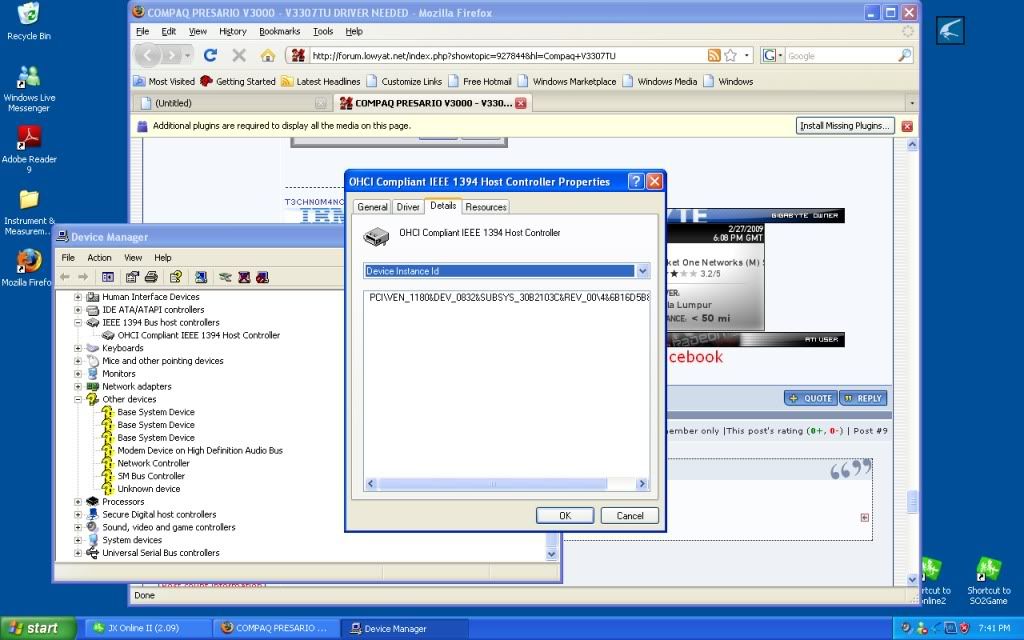
I still have 2 unknown device in the device manager.
- Audio Device on High Definition Audio Bus (Must be AUDIO)
- HP integrated Module (May be is BLUETOOH)
Below is the info from everest.
If anyone has the same notebook. Please share it ya. Thanks.

QUOTE
Computer:
Operating System Microsoft Windows XP Professional
OS Service Pack Service Pack 2
DirectX 4.09.00.0904 (DirectX 9.0c)
Computer Name ADREA
User Name owner
Motherboard:
CPU Type Mobile DualCore Intel Pentium M, 1866 MHz (14 x 133)
Motherboard Name Unknown
Motherboard Chipset Intel Calistoga i945GM/PM
System Memory 502 MB (DDR2-667 DDR2 SDRAM)
BIOS Type Phoenix (07/20/06)
Display:
Video Adapter Mobile Intel® 945GM Express Chipset Family (128 MB)
Video Adapter Mobile Intel® 945GM Express Chipset Family (128 MB)
Monitor Plug and Play Monitor [NoDB]
Monitor Plug and Play Monitor [NoDB]
Monitor Plug and Play Monitor [NoDB]
Multimedia:
Audio Adapter Intel 82801GBM ICH7-M - High Definition Audio Controller
Storage:
IDE Controller Intel® 82801G (ICH7 Family) Ultra ATA Storage Controllers - 27DF
IDE Controller Intel® 82801GBM/GHM (ICH7-M Family) Serial ATA Storage Controller - 27C4
IDE Controller Ricoh Memory Stick Host Controller
IDE Controller Ricoh MMC Host Controller
IDE Controller Ricoh xD-Picture Card Host Controller
Disk Drive FUJITSU MHV2080BH PL (74 GB, IDE)
Disk Drive Kingmax USB2.0 FlashDisk USB Device (1921 MB, USB)
Optical Drive MATSHITA DVD-RAM UJ-850S
SMART Hard Disks Status OK
Partitions:
C: (NTFS) 38154 MB (32720 MB free)
D: (NTFS) 38154 MB (1534 MB free)
Total Size 74.5 GB (33.5 GB free)
Input:
Keyboard HID Keyboard Device
Keyboard Standard 101/102-Key or Microsoft Natural PS/2 Keyboard with HP QLB
Mouse HID-compliant mouse
Mouse Synaptics PS/2 Port TouchPad
Network:
Network Adapter Intel® PRO/100 VE Network Connection (192.168.1.5)
Network Adapter Intel® PRO/Wireless 3945ABG Network Connection
Peripherals:
USB1 Controller Intel 82801GBM ICH7-M - USB Universal Host Controller
USB1 Controller Intel 82801GBM ICH7-M - USB Universal Host Controller
USB1 Controller Intel 82801GBM ICH7-M - USB Universal Host Controller
USB1 Controller Intel 82801GBM ICH7-M - USB Universal Host Controller
USB2 Controller Intel 82801GBM ICH7-M - Enhanced USB2 Controller
USB Device HP Integrated Module
USB Device USB Human Interface Device
USB Device USB Mass Storage Device
Battery Microsoft AC Adapter
Battery Microsoft ACPI-Compliant Control Method Battery
Problems & Suggestions:
Problem Disk free space is only 4% on drive D:.
DMI
--------------------------------------------------------------------------------
[ BIOS ]
BIOS Properties:
Vendor Phoenix
Version F.10
Release Date 07/20/2006
Size 1024 KB
Boot Devices Floppy Disk, Hard Disk, CD-ROM
Capabilities Flash BIOS, Shadow BIOS, BBS
Supported Standards DMI, APM, ACPI, ESCD, PnP
Expansion Capabilities ISA, PCI, AGP, PCMCIA, USB
[ System ]
System Properties:
Manufacturer Hewlett-Packard
Product Presario V3000 (GC178PA#UUF)
Version F.10
Serial Number 2CE71220BD
Universal Unique ID 0D6BDF80-D7DB11DB-A435B3DA-085EF1D9
Wake-Up Type Power Switch
[ Motherboard ]
Motherboard Properties:
Manufacturer Wistron
Product 30B2
Version 61.42
[ Chassis ]
Chassis Properties:
Manufacturer Hewlett-Packard
Version N/A
Chassis Type Notebook
[ Processors / Intel® Core™ Duo CPU T2350 ]
Processor Properties:
Manufacturer Intel
Version Intel® Core™ Duo CPU T2350
External Clock 667 MHz
Maximum Clock 1860 MHz
Current Clock 1860 MHz
Type Central Processor
Voltage 3.3 V
Status Enabled
Upgrade Slot 1
Socket Designation U1
[ Caches / L1 Cache ]
Cache Properties:
Type Internal
Status Enabled
Operational Mode Write-Back
Maximum Size 16 KB
Installed Size 16 KB
Supported SRAM Type Asynchronous, Burst, Pipeline Burst
Current SRAM Type Asynchronous
Socket Designation L1 Cache
[ Caches / L2 Cache ]
Cache Properties:
Type External
Status Enabled
Operational Mode Write-Back
Maximum Size 2048 KB
Installed Size 2048 KB
Supported SRAM Type Asynchronous, Burst, Pipeline Burst
Current SRAM Type Burst
Socket Designation L2 Cache
[ Memory Devices / M1 ]
Memory Device Properties:
Form Factor SODIMM
Type Detail Synchronous
Speed 533 MHz
Device Locator M1
Bank Locator Bank 0
[ Memory Devices / M2 ]
Memory Device Properties:
Form Factor SODIMM
Type Detail Synchronous
Size 512 MB
Speed 533 MHz
Total Width 32-bit
Data Width 32-bit
Device Locator M2
Bank Locator Bank 1
[ System Slots / PCMCIA Slot CBUS1 ]
System Slot Properties:
Slot Designation PCMCIA Slot CBUS1
Type PC Card (PCMCIA)
Usage Empty
Data Bus Width 32-bit
Length Long
[ On-Board Devices / 8 8 ]
On-Board Device Properties:
Description 8 8
 Quote
Quote


 im having almost the same problem..but slighlty different..after i installed the UUA bus and the Conexant HD Audio,everytime i plug in my earphone or speaker,i cant hear any noise frm it..instead there is noise frm MY LAPTOP speaker.


 mind if i ask how can i go there?


 0.0189sec
 0.77
0.77
 5 queries
 GZIP Disabled