Welcome Guest ( Log In | Register )

Bump Topic Topic Closed RSS Feed

Outline · [ Standard ] · Linear+

 Seagate 7200.11 hard drive firmware woes, Barracuda 7.11, FW:SD15, 1.5TB/1TB/500GB

views
     
SUSMatrix
post Jan 14 2009, 09:26 AM

King of Char Siew!
********
Senior Member
15,022 posts

Joined: Jan 2003
From: Damansara Jaya/Bandar Utama


Well, i've 2 x 250GB and 1 x 500GB in my PC. All seagates, no problem. 1 250GB is an old model, no problem for that.

The newer 250GB is maybe 8 months or so, it has some problems after 2 or 3 months, but later discover it's the SATA cable giving problem and after changing the SATA cable, it works fine.

The last 500GB is the model in the thread title, i think about 2 months or so. So far no problem....but i'll start making schedule backup of my data to the other HDD tonight...
SUSMatrix
post Jan 15 2009, 10:50 AM

King of Char Siew!
********
Senior Member
15,022 posts

Joined: Jan 2003
From: Damansara Jaya/Bandar Utama


Made a NERO backup last night of my data in the 500GB drive to another Seagate 250GB HDD. Will set to schedule to run it twice weekly.

I still love my SEAGATE. smile.gif....Just give it enough love and it'll run fine....ha-ha..

This post has been edited by Matrix: Jan 15 2009, 10:50 AM
SUSMatrix
post Jan 16 2009, 11:20 AM

King of Char Siew!
********
Senior Member
15,022 posts

Joined: Jan 2003
From: Damansara Jaya/Bandar Utama


Just checked my HDD using SeagateTools....confirm it's the SD15 500GB drive....sweat.gif

Gonna schedule to run backup every 3 days tonight..


SUSMatrix
post Jan 18 2009, 08:48 PM

King of Char Siew!
********
Senior Member
15,022 posts

Joined: Jan 2003
From: Damansara Jaya/Bandar Utama


QUOTE(ar188 @ Jan 18 2009, 08:24 PM)
wah WD also died? now using SEAGATE with this problem?  then looks like have to try Hitachi or samsung lor..    biggrin.gif
*
nOOOO!!!! I've just bought a 640GB WD HDD today for my BT machine...doh.gif

btw, how to update the firmware for the seagate 500GB HDD?? The link provided up there has the batch file and all, but i've three drives in my PC....how does it know which to flash? Furthermore, is is safe to do? I'm afraid if i do it, it kills it immediately even faster than let it die naturally ..sweat.gif
SUSMatrix
post Jan 18 2009, 11:13 PM

King of Char Siew!
********
Senior Member
15,022 posts

Joined: Jan 2003
From: Damansara Jaya/Bandar Utama


Dang...mines is affected...i tried to create a case but failed to login...maybe non-working hours?
SUSMatrix
post Jan 19 2009, 09:39 AM

King of Char Siew!
********
Senior Member
15,022 posts

Joined: Jan 2003
From: Damansara Jaya/Bandar Utama


I've called Seagate Malaysia just now.

Just give them the serial number and they checked for you. The operator confirmed my HDD is affected and will be e-mailing me the update instructions. thumbup.gif

Let's see how fast they can respond now....


Please call 1-800-80-2335. Just wait for a few minutes for the representative to pick up your call.

But i think everyone in LYP will start calling this number already so it might take longer now...tongue.gif

This post has been edited by Matrix: Jan 19 2009, 10:08 AM
SUSMatrix
post Jan 19 2009, 10:05 AM

King of Char Siew!
********
Senior Member
15,022 posts

Joined: Jan 2003
From: Damansara Jaya/Bandar Utama


Woo Hoo...Seagate reply me and responded already. They will send u a link and a certification validation. I've downloaded the file already...all in < 20 min after i called them....no need to e-mail to them...CALL IS MOST EFFECTIVE!

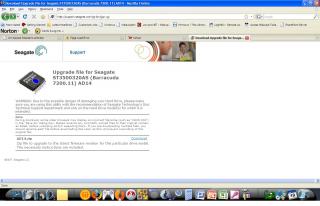
Here's the screenshot:


1) The certification link screen:
Attached Image

2) After u key in the certificate no(which is included in the e-mail they sent to you), the download screen.

Attached Image


I'll update tonight and see what happens...but must run backup before flashing!!

I still love Seagate.

thumbup.gif
SUSMatrix
post Jan 19 2009, 10:22 AM

King of Char Siew!
********
Senior Member
15,022 posts

Joined: Jan 2003
From: Damansara Jaya/Bandar Utama


QUOTE(Musafir_86 @ Jan 19 2009, 10:14 AM)
-Yes, please share!  icon_rolleyes.gif

-Err, did the firmware they give you is SD14? If yes, then it's the OLDER version!  sweat.gif
It have a problem of not able to utilize full cache capacity!
Refer here: http://www.seagate.com/www/en-us/support/d...wnloads/cuda-fw

-BTW, I want SD1A, please, anybody please share!  notworthy.gif
*
No, mine is AD14. The reason i don't wanna post is because there could be different firmware for different batches. Don't simply pandai-pandai and flash everything to latest urself lar. I dun wanna post my firmware here and later screw up everyone's hard disks, then blame SeaGate.

Just give em a call, forgot the e-mail to the support posted up there. What's so difficult? Just spend 5 minutes on the line and kaw-tim already. Tell them ur serial no and they'll give u the correct firmware. Don't be lazy! doh.gif

This post has been edited by Matrix: Jan 19 2009, 10:22 AM
SUSMatrix
post Jan 19 2009, 11:01 AM

King of Char Siew!
********
Senior Member
15,022 posts

Joined: Jan 2003
From: Damansara Jaya/Bandar Utama


QUOTE(poolcarpet @ Jan 19 2009, 10:37 AM)
AD14 fixes the cache issue, not this BSY problem.
I suggest you double check with Seagate and MAKE SURE you have 100% tested backups before you do this....

AD14 has been out for a while, so this cannot be the firmware that fixes the BSY problem.
*
Maybe, but perhaps it also didn't have the problematic code in SD15?? Who knows. We are not Seagate.

btw, here's some info from Seagate's forum...some user advice not to use NewEgg SD1A download (which i actually downloaded already).
http://forums.seagate.com/stx/board/messag...message.id=4240


Added on January 19, 2009, 11:03 am
QUOTE(Musafir_86 @ Jan 19 2009, 10:34 AM)
-I already created a support case at Seagate and escalated it 2 days ago (Friday).
No reply yet!
*
I said just give 'em a call (As in 'Membuat Pangillan Talipon'). So hard to pick up a phone and press some numbers meh??

Anyway, i'll pester their support to check on the SD1A.

This post has been edited by Matrix: Jan 19 2009, 11:03 AM
SUSMatrix
post Jan 19 2009, 11:12 AM

King of Char Siew!
********
Senior Member
15,022 posts

Joined: Jan 2003
From: Damansara Jaya/Bandar Utama


QUOTE(poolcarpet @ Jan 19 2009, 11:05 AM)
haha, you do realize that Seagate didn't own up to this until much later when they faced enormous pressure from worldwide community.

Anyway, what I'm saying is - AD14 doesn't sound like the fix for this BSY problem. If it were, then we wouldn't have this problem and now we are waiting for Seagate's firmware fix. Numerous people worldwide have contacted Seagate for the firmware fix and was told it was not ready yet. So it will be really amazing if AD14 is the solution.

What I'm also saying is be careful if you are going to do this, and make sure you have verified backups of your data before you proceed.
*
Yes, read somewhere that the fix isn't ready yet. So, even the SD1A isn't going to solve the problem anyway. Just wait for official release-lar. I backup my data everyday.


Added on January 19, 2009, 11:25 amJust found something:

http://ata.wiki.kernel.org/index.php/Known...Q_is_being_used

Is it because it caused by AHCI and NCQ? Those user who have a failed Seagate 500GB/1TB here....are you running in IDE mode or AHCI/RAID???

Please update!!

I am currently running in IDE mode.

This post has been edited by Matrix: Jan 19 2009, 11:25 AM
SUSMatrix
post Jan 19 2009, 06:25 PM

King of Char Siew!
********
Senior Member
15,022 posts

Joined: Jan 2003
From: Damansara Jaya/Bandar Utama


QUOTE(s1lencer @ Jan 19 2009, 04:30 PM)
For those with drives which have self bricked and aren't detected in the BIOS, let me save you some time. The AD 14 firmware upgrade Seagate is going to be offering you guys won't work. The tool itself will be unable to detect the drive. I just got the e-mail from Seagate tech with the firmware and tried it. Nada.

There is a fix up on http://www.msfn.org/board/index.php?showtopic=128807
for the strong at heart. Gonna see what Seagate says about that free data recovery, failing which i'm gonna debrick my own drive and ask for another model.
*
The firmware can't unbricked a bricked HDD. It is suppose to prevent the problem. What i would like to know is there and AD14 users who has a bricked HDD as well?
SUSMatrix
post Jan 19 2009, 09:37 PM

King of Char Siew!
********
Senior Member
15,022 posts

Joined: Jan 2003
From: Damansara Jaya/Bandar Utama


QUOTE(kuanhon @ Jan 19 2009, 02:31 PM)
try this page, not sure if it fix the issue http://seagate.custkb.com/seagate/crm/self...sp?DocId=207951

please note that some users experience this ->
user posted image
user posted image
*
So any 500gb users has updated the firmware successfully already?
SUSMatrix
post Jan 20 2009, 08:59 AM

King of Char Siew!
********
Senior Member
15,022 posts

Joined: Jan 2003
From: Damansara Jaya/Bandar Utama


QUOTE(trix @ Jan 20 2009, 08:30 AM)
successfully updated my drive with part number -301
no more annoying "clack" sound when the drive is powering up/down
*
yeah..yeah please tell more. You are the first guy who successfully updated the firmware and see improvement!

1) What is ur HD model?

2) What is ur previous firmware version?

3) What is the firmware you updated?

Please share!!!!


Added on January 20, 2009, 9:03 am
QUOTE(RacingTech @ Jan 20 2009, 07:43 AM)
http://seagate.custkb.com/seagate/crm/self...sp?DocId=207951

New version is up according to....

http://forums.seagate.com/stx/board/messag...cending&page=33
Wo hu... gonna try out this one... it should be able to detect -303 part number.
*
Sure or not???

An update update has been released as of Jan 19, 2008 3:15PM CST

That was 1 year ago?? or the updater still stuck in the 2008 twilight zone??? sweat.gif


Added on January 20, 2009, 9:13 amJust to share and update u guys, yesterday i called them and they give me a certificate to download the AD14 firmware. Then i reply them and ask them to confirm the new version (SD1A) and today they reply me with a link (same as the one above posted by poster here) which points to the SD1A....doh.gif doh.gif doh.gif

Wah...lau...if i ask them again for new version again, maybe they give me another version?????

====================

Seagete Support:

Dear Xxxxx,

As per our conversation, Sending you the link to download the firmware upgrade for your drive with Model no.ST3500320AS

http://seagate.custkb.com/seagate/crm/self...sp?DocId=207931

Kindly click on the model no.of your drive. and follow the process.

Also attached is the file below on how to upgrade the firmware upgrade.

For any further assistance kindly feel free to Contact Us.

Best Regards,
Aditi Singh,
Customer Service & Support,
Seagate Technology.


--------------- Original Message ---------------
From: xxxxx
Sent: 1/19/2009 11:07 AM
To: sfdc.apacsupport@seagate.com
Subject: RE: Firmware upgrade [ ref:00D0hhzl.50035uo8V:ref ]

Dear Aditi,

Thanks for your prompt reply. But from what I understand this AD14 is an old version of the firmware that fixes the SD14 problem of not recognizing the full cache. I understand there is a latest firmware called SD1A which is available.

Can you please confirm if the latest SD1A can be downloaded?

Thank you.

Regards,
xxxx


-----Original Message-----
From: Seagate Technical Support [mailto:sfdc.apacsupport@seagate.com]
Sent: Monday, January 19, 2009 9:42 AM
To: xxxxx
Subject: Firmware upgrade [ ref:00D0hhzl.50035uo8V:ref ]

Dear xxxx,

Below you will find the instructions for redeeming the certificate number for Firmware upgrade for your internal drive

1. Go to the Certificate Validation URL on Seagate's website at: http://support.seagate.com/support/certificate.html

2. Enter the certificate number in the field provided on the website and click SUBMIT,

Your certificate number for your download is: <deleted>

(This code consists of 12 characters so please verify that you are using all characters listed.)

For any further assistance kindly feel free to Contact Us.

Best Regards,
Aditi Singh,
Customer Service & Support,
Seagate Technology.


ref:00D0hhzl.50035uo8V:ref


This post has been edited by Matrix: Jan 20 2009, 09:13 AM

SUSMatrix
post Jan 20 2009, 09:18 AM

King of Char Siew!
********
Senior Member
15,022 posts

Joined: Jan 2003
From: Damansara Jaya/Bandar Utama


QUOTE(trix @ Jan 20 2009, 09:14 AM)
model: ST31000340AS
old fw: SD15
new fw: SD1A
part number: 9BX158-301

make sure to leave only your cd/dvd and the hdd connected when updating
btw, i downloaded the firmware iso at around 8am this morning from http://seagate.custkb.com/seagate/crm/self...sp?DocId=207951 (its stated there the file was updated at Jan 19, 2008 4:15PM CST)
*
Thank you. You da man! smile.gif

I'm not sure what is my part no though, must open up and see i suppose, can't see from the SEATOOLS.

I'll update tonight and feedback.
SUSMatrix
post Jan 20 2009, 10:47 AM

King of Char Siew!
********
Senior Member
15,022 posts

Joined: Jan 2003
From: Damansara Jaya/Bandar Utama


QUOTE(bill_yap @ Jan 20 2009, 10:23 AM)
omg, stay away from seagate, WD closed kilang.... then wat brand shd 1 use??
*
Cakera Keras Cap Ayam. Made in Chow Kit. tongue.gif
SUSMatrix
post Jan 20 2009, 11:04 AM

King of Char Siew!
********
Senior Member
15,022 posts

Joined: Jan 2003
From: Damansara Jaya/Bandar Utama


Well, my one doesn't have any clack sound AFAIK...i've got 3 HDD inside...maybe too many other noise?? I thought some sound is normal?? Maybe i try to put my ears to the PC and listen for the sound tonight.
SUSMatrix
post Jan 20 2009, 12:36 PM

King of Char Siew!
********
Senior Member
15,022 posts

Joined: Jan 2003
From: Damansara Jaya/Bandar Utama


Wah-lau...better not update anything now until they test their thing thoroughly. At least mine is still working at the moment, it might get KOed immediately if i update with a not-so-tested firmware released in a hurry. sweat.gif
SUSMatrix
post Jan 20 2009, 05:46 PM

King of Char Siew!
********
Senior Member
15,022 posts

Joined: Jan 2003
From: Damansara Jaya/Bandar Utama


QUOTE(-YellowSn0w- @ Jan 20 2009, 04:58 PM)
calm la bro , server downtime.
*
Not downtime. I think the SD1A got problem, so to prevent furhter damage, they take it offline b4 more Seagate users nuke their HDD.
SUSMatrix
post Jan 20 2009, 07:52 PM

King of Char Siew!
********
Senior Member
15,022 posts

Joined: Jan 2003
From: Damansara Jaya/Bandar Utama


QUOTE(boonykun @ Jan 20 2009, 06:57 PM)
the symptom of this hdd is where.... When you boot up normally.. it;s ok... but sometimes i restart my comp... then... Takes ages to detect the hdd.... and for Fastest way to cure that is to open the dam case and switch the sata ports... from 1-2.. or 2-3... or 3-4 (who cares, i have 5 ports ~_~) and then it will detect the HDD, Till your Next restart (Mostly for my case)

Checked with the drive detect.. and it's SD15... NOOOO!!! Typing the E-mail for Segate at this point of time.. hopefully something can be arranged... sleep.gif"
*
This sympton actually to my 250GB with AAC firmware. Switch port and all that. But after i changed the SATA cable, it is now ok and doesn't have such problem anymore. rclxub.gif
SUSMatrix
post Jan 21 2009, 09:31 AM

King of Char Siew!
********
Senior Member
15,022 posts

Joined: Jan 2003
From: Damansara Jaya/Bandar Utama


QUOTE(crazy_rose @ Jan 21 2009, 09:23 AM)
Guys.. if i Unplug my HDD's for the mean time will the time bomb still TICK? @_@". i was thinking to unplug until theres a fix @_@"
*
No guarantee. It could die the next time u plug it back in.

My advise...don't do anything or flash anything until there's further notice of new firmware and sees what happens...

It'll be ironic if we are trying to avoid a brick, but in the quest to prevent the brick, we actually bricked it. doh.gif

Stay cool....

2 Pages  1 2 >Top
Topic ClosedOptions
 

Change to:
| Lo-Fi Version
0.0390sec    0.54    7 queries    GZIP Disabled
Time is now: 5th December 2025 - 11:37 AM