Welcome Guest ( Log In | Register )

Bump Topic Topic Closed RSS Feed

Outline · [ Standard ] · Linear+

Nokia ♪♥ Nokia XpressMusic 5800 "TUBE" V5 ♪, WE'VE MORE THAN 200 TUBIANS NOW!!!!

views
     
RiuK3n
post Jan 17 2009, 11:00 PM

The Pursuit of Knowledge Dies With Age, Not Time
******
Senior Member
1,391 posts

Joined: Nov 2007
From: Osaka


Hey All!
I just did one of the most deadly sins ever committed...
I browse the forum ytd.. read 30 post or so.. and today i'm in possession of a 5800 Red!
Haha, n i'm a proud owner of it rclxm9.gif

Since i'm new with nokia (previously sony ericsson) I might hav to trouble u all with questions...
So, thanks in advance! tongue.gif

Btw, RiuK3n - Red here

This post has been edited by RiuK3n: Jan 17 2009, 11:02 PM
RiuK3n
post Jan 19 2009, 01:00 AM

The Pursuit of Knowledge Dies With Age, Not Time
******
Senior Member
1,391 posts

Joined: Nov 2007
From: Osaka


Sweet... finally i'm able to use Garmin Mobile XT

Working fine all minus the only single part that doesn't function which is the <house address search> bt won't bother with it much...

Thanks to freeman, admin and mod fr mytechnews for it =p

For those still in doubt I would say this garmin is near perfect ever since i've used it... hopefully there isn't a prob in the long term *crosses fingers*
RiuK3n
post Jan 19 2009, 02:11 AM

The Pursuit of Knowledge Dies With Age, Not Time
******
Senior Member
1,391 posts

Joined: Nov 2007
From: Osaka


QUOTE(jiidaineko @ Jan 19 2009, 01:28 AM)
the gps will only last 7 days? after that i will have to pay for it?
*
yup... nokia gps last 7 days frm activation date... after tat u need pay few hundred fr a yr subscription...

if u wan it free then use garmin as posted in the 1st page nod.gif
RiuK3n
post Jan 19 2009, 11:36 AM

The Pursuit of Knowledge Dies With Age, Not Time
******
Senior Member
1,391 posts

Joined: Nov 2007
From: Osaka


QUOTE(mugiwarabai @ Jan 19 2009, 09:48 AM)
What to do when you first get your Nokia 5800 XM?
http://mytechnews.info/b/2009/01/what-to-d...pressmusic.html
that will solve the certificate error problem.

For the virtual key, u need to follow these steps, try read n understand it.
http://mytechnews.info/b/2009/01/tutorial-...-part-deux.html

There IS a map for GMXT ver5.

As a summary,
Ive succesfully installed Garmin on my 5800 baby and it working perfectly~  rclxm9.gif
*
Lemme just add a few more things here..
Just like above you after you do a hard reset you must register with the chinese site in step 3 so that you can get any unsigned cert to be signed...
However It's been reported that the site is not working properly for everyone. If that's the case then you can use step 4 and register with another site. Both functions the same and give you the same end result which is the "signed virtual key"

And for virtual key you must download both of this:
1) Virtual Key Application
2) Virtual Key Config. from mytechnews

For maps just google up malsingmaps v2.30 gold and you can find plenty.

And to unlock the Garmin there's 2 ways:
1) Follow this web site Gamin XT and scroll all the way down till you see the "Garmin Mobile XT for Symbian Version 5.00.20, Thursday, November 6th, 2008" post and follow step 4
2) Get a keygen which can also be found everywhere

Just got mine working after a painstaking 4hrs ordeal rclxub.gif so just thought that I might share stuff that people might miss out.. for the rest.. just follow the instructions there and you are good to go thumbup.gif
RiuK3n
post Jan 19 2009, 08:00 PM

The Pursuit of Knowledge Dies With Age, Not Time
******
Senior Member
1,391 posts

Joined: Nov 2007
From: Osaka


QUOTE(dswwong @ Jan 19 2009, 06:58 PM)
Can someone please help me to understand what is this "virtual Key" all about !!!!
*
Juz like wat freeman says..
Virtual Key is used for phones that doesn't have qwerty keypad built in like our tube. Because Garmin does not support touch interface for the keypads yet so that's why the virtual key tricks garmin into thinking that the red, green, white and camera buttons are buttons that you have specified in the virtual key app.

However to use install Garmin, you have to download both Virtual Key app and Virtual Key config together as per my prev post.

Virtual Key config is already configured so that you dun hav to do anythin to ur virtual key app.

Just like a save file from a game but this is a save file for Virtual Key.

ps: Read my prev post at pg 53 for virtual key and map FAQ


@Buyou: choose the lowest option if you haven't unlocked it to get the card ID

@andypang: u gotta unlock the garmin so that you can use ur in-built gps.. to do so.. go browse for. else i would suggest e-mailing admin@mytechnews.info with ur card id so they'll send u the unlock code

This post has been edited by RiuK3n: Jan 19 2009, 08:10 PM
RiuK3n
post Jan 19 2009, 08:11 PM

The Pursuit of Knowledge Dies With Age, Not Time
******
Senior Member
1,391 posts

Joined: Nov 2007
From: Osaka


Haha.. oops... accidently typed it out in the midst of the excitement...

Thanks freeman thumbup.gif

Thanks for the prev help too.. now am a user of garmin and owner of 5800... hahahah

oh ya.. but after i edit.. the quote at ur post still states the key gen sweat.gif

This post has been edited by RiuK3n: Jan 19 2009, 08:18 PM
RiuK3n
post Jan 19 2009, 08:14 PM

The Pursuit of Knowledge Dies With Age, Not Time
******
Senior Member
1,391 posts

Joined: Nov 2007
From: Osaka


Well... for now i'm still safe... and now i have changed it so lets just prayed the mod din see tat =p

Anyway feel free to pm if help is needed... I understand how hard it is to get it installed but how much when one needs it blush.gif
RiuK3n
post Jan 19 2009, 09:06 PM

The Pursuit of Knowledge Dies With Age, Not Time
******
Senior Member
1,391 posts

Joined: Nov 2007
From: Osaka


QUOTE(reevephon @ Jan 19 2009, 09:02 PM)
Can someone guide me on how to install the Garmin XT, seems like this is a nice GPS software(as recommended by user), anyway I didn't use this kind of software before, so I really in need of a guy who can guide me on. notworthy.gif
*
Hi reeve, read the 1st page tutorial first and if you are stuck at certain parts we'll gladly help to guide you. This is because you need to have some basic knowledge on it first. At least when we explain you'll understand all the terms we use.

It's not that we are unfriendly or anything, it's just for the convenience of both parties... so anyway happy browsing! biggrin.gif
RiuK3n
post Jan 19 2009, 09:11 PM

The Pursuit of Knowledge Dies With Age, Not Time
******
Senior Member
1,391 posts

Joined: Nov 2007
From: Osaka


QUOTE(Lionheart216 @ Jan 19 2009, 09:09 PM)
I willing to buy a new nokia 5800...may i noe wat is market price now?
original n ap set..who can tell me pls..tq
*
Original RM1330, AP RM 1250

And that's based on the price Atlantis gave me before nego.


I heard there's cheaper
RiuK3n
post Jan 20 2009, 01:26 PM

The Pursuit of Knowledge Dies With Age, Not Time
******
Senior Member
1,391 posts

Joined: Nov 2007
From: Osaka


Lol, If anybody needs garmin help and if you happen to be in setapak you can look for me.. I'll help u provided only when i'm free.. easy as that biggrin.gif
RiuK3n
post Jan 20 2009, 07:40 PM

The Pursuit of Knowledge Dies With Age, Not Time
******
Senior Member
1,391 posts

Joined: Nov 2007
From: Osaka


haha... i was away for just 3hrs and there's already 100+ post unread.. u guys gotta slow down man....
And wat's with the stuff sharing all shakehead.gif
thank god us fellow tubers help each other, lets juz stay low for now.. haha

This post has been edited by RiuK3n: Jan 20 2009, 07:40 PM
RiuK3n
post Jan 20 2009, 10:12 PM

The Pursuit of Knowledge Dies With Age, Not Time
******
Senior Member
1,391 posts

Joined: Nov 2007
From: Osaka


QUOTE(Slekerz @ Jan 20 2009, 10:02 PM)
I have install garmin XT and virtual keys at my nokia 5800, I also have download free malaysia maps and unlock code, but my nokia difficult to lock to gps device, can you guys help me out, thanks
*
U need to stand in an open air or maybe near an open window for the gps to lock onto ur device.. not in a room.

And also the settings for the gps takes at least 10minutes to lock onto it if you disable the assisted gps option...

This is the only thing that's you have to be patient...

It's just like astro's reception when it starts raining tongue.gif


@andypang: haha, you are welcomed and thanks for the comment blush.gif
RiuK3n
post Jan 21 2009, 01:21 AM

The Pursuit of Knowledge Dies With Age, Not Time
******
Senior Member
1,391 posts

Joined: Nov 2007
From: Osaka


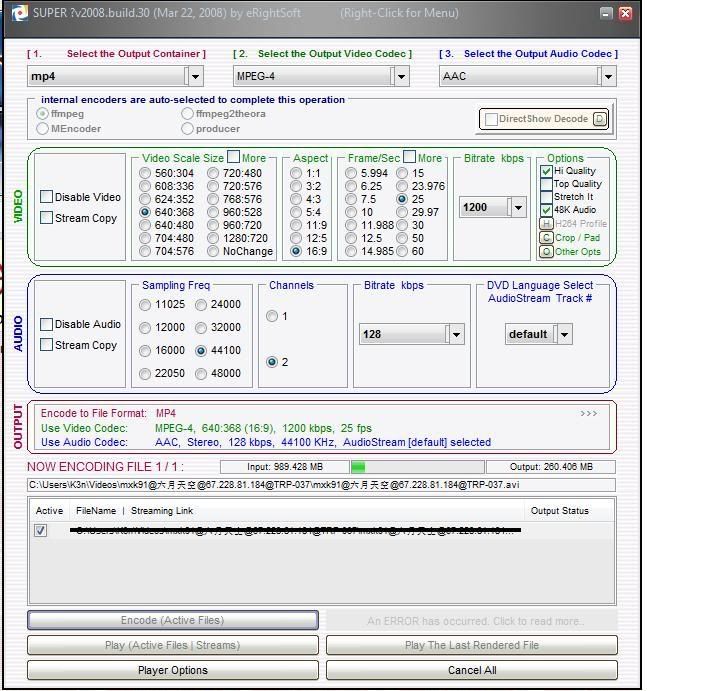
Tried a few converter around and i still think Super Converter (it's free by eright soft) is still the best...

The quality video is the exact same as the 1 you originally have and fits nicely to screen

user posted image

Will try to get the settings and tutorial up when I have the time.. maybe after my morning exams tomorrow

This post has been edited by RiuK3n: Jan 21 2009, 02:02 AM
RiuK3n
post Jan 21 2009, 02:02 PM

The Pursuit of Knowledge Dies With Age, Not Time
******
Senior Member
1,391 posts

Joined: Nov 2007
From: Osaka


Ok, as promised I'll write a tutorial for Super converter

First thing first, I need to clarify that Super converter is not the best of the best of all converter there is out there. This is just one of the alternative that I think suits me best because I own a PSP, MP4, K850i and 5800 (latest) and it's a hassle having so many different converter for so many apps when I can just have 1 for all of them.

Pros;
All in one : Practically able to convert any file (unless if there's is a file type that I have not tried)
Customization : Convert any file with any settings you desire
Quality : It maintains the quality of the file you convert with the correct settings

Cons;
Takes a long time for large files
Have to try a few settings before getting the right one
Different computers give different output files depending on the codes you have in the computer


Before Starting

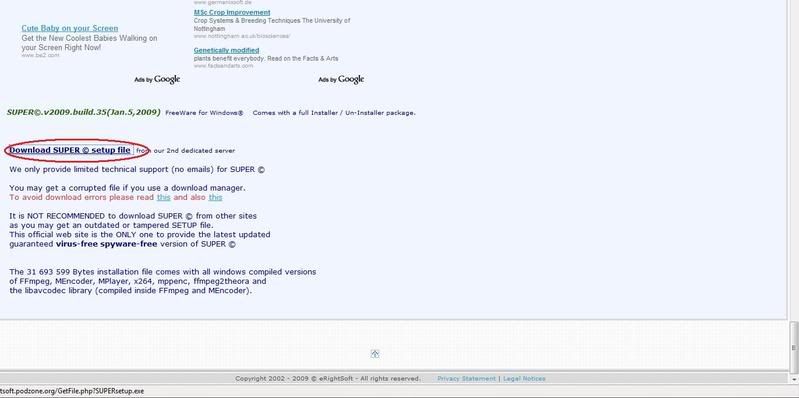
1) Click on this link to download Super Converter at the bottom of the page ---> Super™

» Click to show Spoiler - click again to hide... «


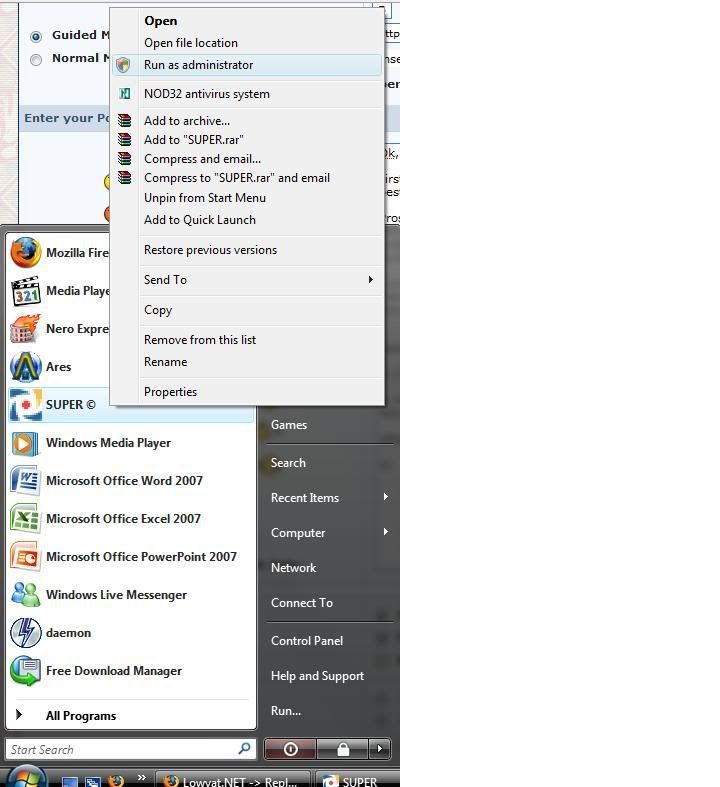
2) Do all the necessary installations as needed and also an important note for Vista users, before you start the converter you need to right click an select "Run As Administrator" --> "Allow" in order to use this converter.

» Click to show Spoiler - click again to hide... «


After launching Super Converter

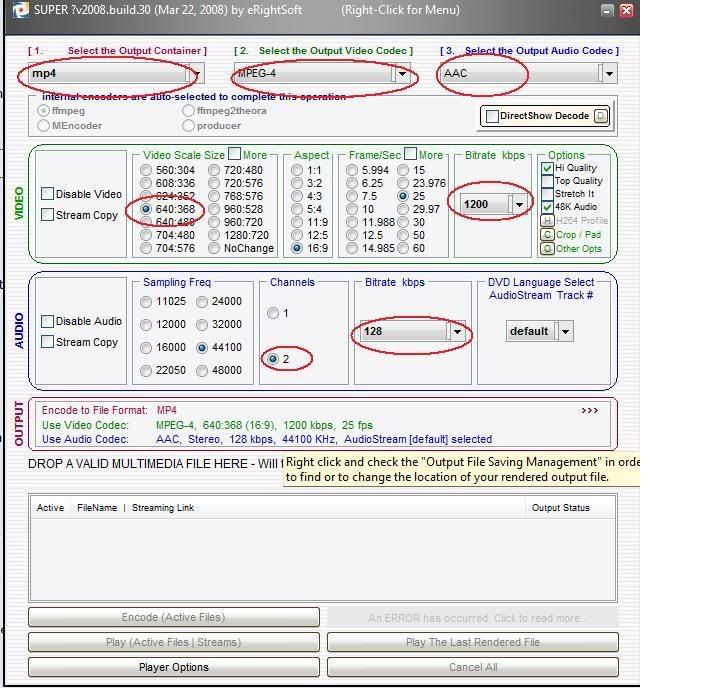
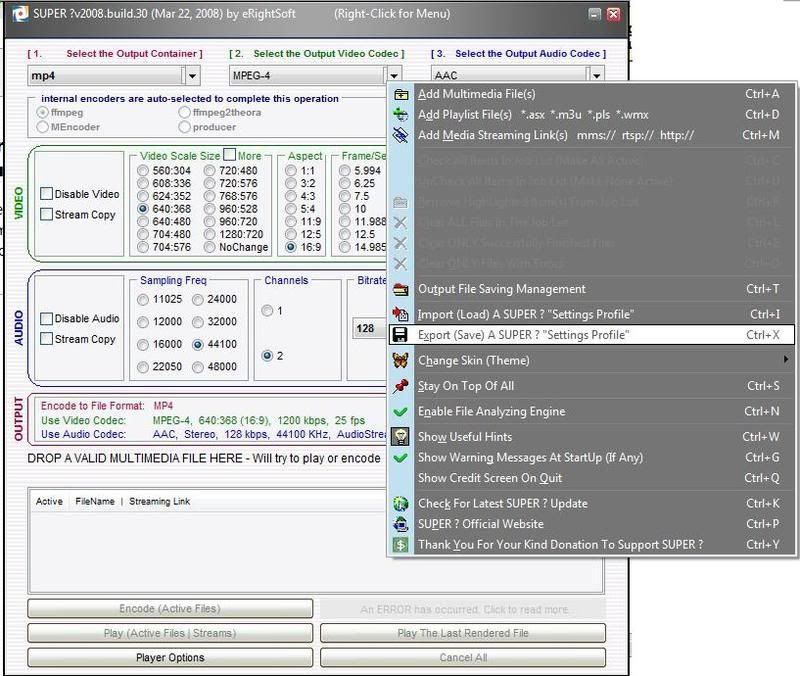
3) You'll notice that there's a lot of settings and also preset settings that is available in it. However what we are trying to do is to customize the settings for our tube.

4) To do so you need this settings:

Video
i) Output Container = MP4
ii) Output Video Codec = Mpeg - 4
iii) Output Audio Codec = AAC
iv) Video Scale Size = 640:368 (In case you can't find it, there's a "More" box beside the Video Scale title. Click on it to find it)
v) Aspect = 16:9
vi) Frame/sec = 25
vii) Bitrate = 1200

Audio
i) Sampling Freq = 44100
ii) Channels = 2
iii) Bitrate = 128

» Click to show Spoiler - click again to hide... «


5) Save the settings so that you don't have to configure them anymore next time. To save, Right Click --> Export (Save) a Super? "Settings Profile"

» Click to show Spoiler - click again to hide... «


To convert

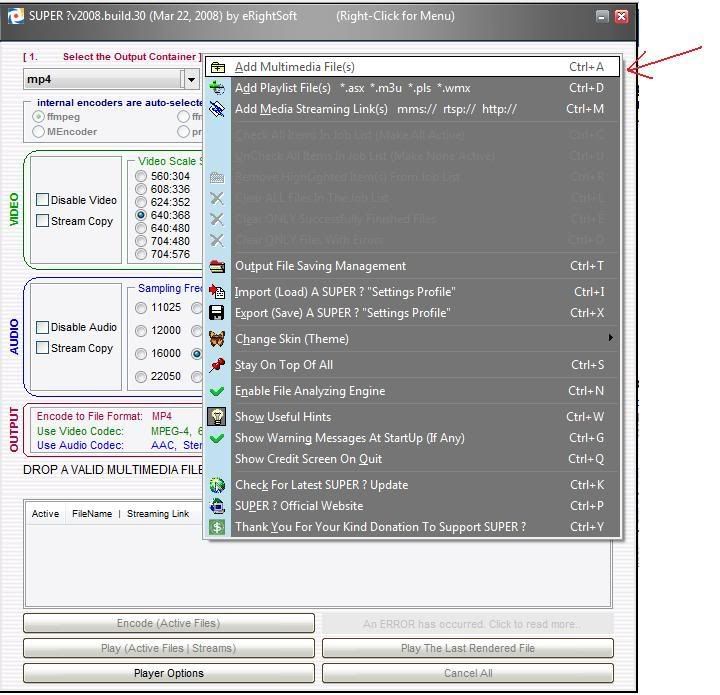
6) Right click and choose "Multimedia Files", browse the files you want and then place it in.

» Click to show Spoiler - click again to hide... «


7)Finally, just press the "Encode Active Files" and wait for the file to be converted. The file will appear under the Output folder of your designated Super Converter folder


Finally done... phew... anyway I have not fully tested all the settings yet so there's still room for improvement.. tell me if there's any mistake in my guide and I'll have it rectified.
Thanks

Ps: all the settings above are just what I would call the "Normal" settings. It's best to play around and choose the best settings for your phone because I also notice that some files tend to be larger after conversion.

This post has been edited by RiuK3n: Jan 21 2009, 02:21 PM

RiuK3n
post Jan 21 2009, 02:19 PM

The Pursuit of Knowledge Dies With Age, Not Time
******
Senior Member
1,391 posts

Joined: Nov 2007
From: Osaka


QUOTE(kennyboy @ Jan 21 2009, 02:05 PM)
I would recommend setting the resolution to 640x360 instead. no point encoding to bigger res than the screen is. Just click the "More" box.

For audio bitrate, for aac audio, 112 will be good enough for video if you're tight for space.
*
Actually it depends.. I'm doing it per average settings... coz some videos are have unusual properties especially jap drama's (tried 640x360 and I got a black screen above and below the video, but using the settings I did in the tutorial I got it to be crystal clear full screen) and when converted they tend to run off from their properties..
So i'm just maximising and at the same time averaging the numerous files there is..

Diff videos and diff computers give diff outputs, tat's y not everyone have the same output file even if they use the same converter

But thanks for the info.. will edit it.. hehe blush.gif thumbup.gif

This post has been edited by RiuK3n: Jan 21 2009, 02:24 PM
RiuK3n
post Jan 21 2009, 02:44 PM

The Pursuit of Knowledge Dies With Age, Not Time
******
Senior Member
1,391 posts

Joined: Nov 2007
From: Osaka


QUOTE(Eiraku @ Jan 21 2009, 02:37 PM)
Well done bro! I have Super as well but IMHO its a bit "weng" on my Vista so it's my last ditch backup... icon_rolleyes.gif

How about MKVs, tried any? Great tut by the way... thumbup.gif
*
Haha, dunno y but super don't really go well with vista. But i heard the current updates fixes that but have not yet tried it yet.

I have not tried MKV type file yet coz i dun have any at all =p

But will try it after my final exams are over.. still looking for that "perfect" setting for videos... hehe


Thanks blush.gif
RiuK3n
post Jan 21 2009, 03:10 PM

The Pursuit of Knowledge Dies With Age, Not Time
******
Senior Member
1,391 posts

Joined: Nov 2007
From: Osaka


QUOTE(kennyboy @ Jan 21 2009, 02:54 PM)
that depends on your needs....if you just want the video to fill the whole screen, and play with the aspect ratio and stretch it option. you gotta check your japanese dramas' original resolution to determine the optimum settings.

i still prefer to have my video with the original aspect ratio, and not have any stretching. so for 4:3 video, i'll have black bars on the sides, and for 2.35:1 movies i'll have black bars on the top/bottom.
*
Yup yup, tat's y before converting i always check.. coz it's too troublesome to do it again if did it wrongly...

I notice that stretch it sometimes elongates the screen too much that people tend to look fat... shocking.gif

Even the settings i set here is not really perfect coz normal videos that are not wide screen will hav black bar also but only at the side but nt top and bottom tongue.gif
RiuK3n
post Jan 21 2009, 03:58 PM

The Pursuit of Knowledge Dies With Age, Not Time
******
Senior Member
1,391 posts

Joined: Nov 2007
From: Osaka


QUOTE(hvaly @ Jan 21 2009, 03:51 PM)
yes, the bitrate wont have much effect, if u read my tips, try to use  H.264 @ 550kbps resolution 400×224(also mp4 format), it give the best result.
many testing had done by other expert for our 5800.

Our tube seem to be special one and not widely accept other resolution/format (either wont play at all or just playing with sound but no picture).  sweat.gif
*
Yup, i did that after i read ur tips n it also works also.. then after tat i went n play with different kind of settings and decided to do tat tutorial since our thread doesn't have much other than 1 at the 1st page... the rest are just suggestions for converter
RiuK3n
post Jan 21 2009, 04:33 PM

The Pursuit of Knowledge Dies With Age, Not Time
******
Senior Member
1,391 posts

Joined: Nov 2007
From: Osaka


QUOTE(panasonic88 @ Jan 21 2009, 04:22 PM)
okie, RiuK3n's video converting tutorial has been updated.

ohya i edit some of your sentence and spoiler them, looks neat and not that lenghty, hope you dun mind biggrin.gif
*
Nah dun mind at all.. i did tat after a sitting for a confirmed failing exam... i'm not in the right of mind after tat to actually really check and edit the tutorials.. hehe tongue.gif
RiuK3n
post Jan 21 2009, 04:37 PM

The Pursuit of Knowledge Dies With Age, Not Time
******
Senior Member
1,391 posts

Joined: Nov 2007
From: Osaka


QUOTE(chris2k @ Jan 21 2009, 04:35 PM)
You can even get an original set for 1250 from one of the sellers in this forum.
*
got mine rm1300 coz i bought 2 from atlantis... oh ya pana.. help me add this person as red -evan

i bought it with him at the same time tongue.gif
Thanks thumbup.gif

2 Pages  1 2 >Top
Topic ClosedOptions
 

Change to:
| Lo-Fi Version
0.0457sec    0.31    7 queries    GZIP Disabled
Time is now: 7th December 2025 - 03:25 AM