Outline ·
[ Standard ] ·
Linear+
Maximum Upgrade On Dell XPS 420, Maximum possible upgrade?
|
TSalvinkhorfire
|
 Dec 30 2008, 12:39 AM, updated 17y ago Dec 30 2008, 12:39 AM, updated 17y ago
|
Getting Started


|
I have a Dell XPS 420 desktop which uses BTX motherboard. There is a possiblity that XPS 430 will be introduced at Malaysia at next year, so I am thinking of purchasing a XPS 430 motherboard from Dell to be fitted inside my XPS 420. The question, guys, is whether it is feasible and reasonable for me to upgrade my motherboard. I need your advise. I am not going to overclock it.
Here is my current specification:
XPS 420 motherboard (Intel® X38 (Bearlake) with 800/1066/1333 MHz FSB, supports up to Core 2 Quad)
Intel® CoreTM 2 Quad Q6600 (2.4 GHz, 1066 MHz)
Kingston ValueRAM 4 GB (2x2GB) NECC Dual Channel DDR2 800MHz SDRAM Memory (supports up to Up to 8GB8 800 MHz Dual Channel DDR2 SDRAM)
Hard disk of 500 GB3 7200 rpm SATA w/ 16M Cache
Dell 19" Wide Screen Flat Panel LCD Monitor
Integrated Sound Blaster® Audigy® software
768 MB NVIDIA® GeForce® 8800GTX Graphics
Power: 425 W
Expansion Slots
PCI: 3 Slots
PCIe x1: 1 Slot
PCIe x16 (Graphics): 1 Slot
PCIe x8: 1 Slot
The XPS 430 motherboard:
Intel® X48 Chipset (supports up to Core 2 Quad and Core 2 Extreme, FSB of 1066/1333/1600 MHz)
Supports up to Up to 8GB8 1066 MHz Dual Channel DDR3 SDRAM
Expansion Slots
PCI: 2 Slots
PCIe x1: 2 Slots
PCIe x8 (Graphics): 1 Slot
PCIe x16 (Graphics): 1 Slot
Well, if I charge to XPS 430 motherboard, I have to buy new DDR3 RAM from Dell, but I can reuse the processor, graphic cards, etc. The reason I am charging to XPS 430 motherboard is that I want to use Core 2 Extreme (when its price drops after Core i7 become affordable) and DDR3 RAM. I know that XPS 430 motherboard will perform better, but whether it is worth the additional cash I have to spend?
Guys, is all right for me to upgrade to XPS 430 motherboard or should I retain the XPS 420 motherboard? Regardless of which choice, I will eventually purchase a total of 8 GB RAM to be used with (if possible the upcoming Windows 7). Please advise. Thank you very much.
This post has been edited by alvinkhorfire: Dec 30 2008, 11:25 PM
|
|
|
|
|
|
TSalvinkhorfire
|
Dec 30 2008, 11:26 PM
|
Getting Started
|
No reply till now...  well, what to do? Guess that many of us do not favour OEM PC. Let's move on, asuuming I keep the old motherboard. Suppose that I want to charge to Core 2 Quad Q9650 (Is this fastest Core 2 Quad?) and GeForce GTX 295. Is that feasible for me to do so? Currectly, I have Core 2 Quad Q6600 and 768 MB NVIDIA® GeForce® 8800GTX Graphics. If I spend so much money in buying the new parts, will the performance difference be a lot? and worth it? |
|
|
|
|
|
krainsyafiq95
|
Dec 31 2008, 01:10 AM
|
|
|
OC the Q6600This post has been edited by krainsyafiq95: Dec 31 2008, 01:11 AM
|
|
|
|
|
|
TSalvinkhorfire
|
Dec 31 2008, 11:54 PM
|
Getting Started
|
QUOTE(krainsyafiq95 @ Dec 31 2008, 01:10 AM) Thanks for the advise. But I do not overclock the processor. Yes, it seems stupid as I do not know about overclocking and I am affaid that it may void the warranty. Putting overclocking aside, is it feasible for me to charge to Core 2 Quad Q9650 and GeForce GTX 295? |
|
|
|
|
|
riku2replica
|
Jan 1 2009, 01:44 AM
|
|
|
QUOTE(alvinkhorfire @ Dec 31 2008, 11:54 PM) Thanks for the advise. But I do not overclock the processor. Yes, it seems stupid as I do not know about overclocking and I am affaid that it may void the warranty. Putting overclocking aside, is it feasible for me to charge to Core 2 Quad Q9650 and GeForce GTX 295? Even u change the component, or upgrade it will void the warranty. Bear in that that the mobo that Dell uses has different design layout from ordinary mobo. |
|
|
|
|
|
OC4/3
|
Jan 1 2009, 02:50 AM
|
.

|
QUOTE(alvinkhorfire @ Dec 31 2008, 11:54 PM) Thanks for the advise. But I do not overclock the processor. Yes, it seems stupid as I do not know about overclocking and I am affaid that it may void the warranty. Putting overclocking aside, is it feasible for me to charge to Core 2 Quad Q9650 and GeForce GTX 295? This is not really oc,just bringing back your processor back to its native bin/strap  All Q6600 G0 able to reach 3ghz on stock vcore |
|
|
|
|
|
TSalvinkhorfire
|
Jan 2 2009, 01:28 AM
|
Getting Started
|
QUOTE(OC4/3 @ Jan 1 2009, 02:50 AM) This is not really oc,just bringing back your processor back to its native bin/strap All Q6600 G0 able to reach 3ghz on stock vcore Could you please show me how to do it? Does it involve BIOS tweaking or adjusting the processor? |
|
|
|
|
|
syafix
|
Jan 2 2009, 01:30 AM
|
|
|
QUOTE(alvinkhorfire @ Jan 2 2009, 01:28 AM) Could you please show me how to do it? Does it involve BIOS tweaking or adjusting the processor? QUOTE( from calvin_gsc ) I managed to overclock my C2D Q6600 2.4GHz to "3.0Ghz" using this 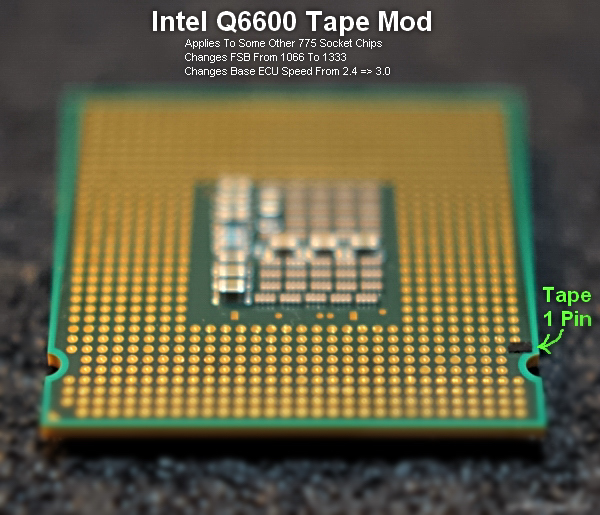 There is no other procedure needed. Very simple. My highest true value was just 2993.6MHz. I have yet to run into any BSOD. It's safe. You wont void your warranty as you can remove the tape easily. This mod changes your CPU Multiplier from x6 to x9, Bus speed from 266MHz to 333MHz and FSB from 1033MHz to 1333MHz. Click on  to verify. The increase in temperature is only by less than 5 celsius. Very small amount. Try it out. |
|
|
|
|
|
TSalvinkhorfire
|
Jan 2 2009, 10:01 PM
|
Getting Started
|
So, I just use any black tape, right? Its function is to prevent the pin from motherboard from contacting the processor? Once I use black tape, would it leave sticky strain on the processor itself?
|
|
|
|
|
|
mahfouz
|
Jan 2 2009, 10:03 PM
|
New Member
|
to see the maximum possible upgrades just go to WWW.crucial.com and click on the check system button  |
|
|
|
|
|
syafix
|
 Jan 2 2009, 10:20 PM Jan 2 2009, 10:20 PM
|
|
|
QUOTE(alvinkhorfire @ Jan 2 2009, 10:01 PM) So, I just use any black tape, right? Its function is to prevent the pin from motherboard from contacting the processor? Once I use black tape, would it leave sticky strain on the processor itself? i never done that, but u can try ask calvin_gsc... he already done that  |
|
|
|
|
|
OC4/3
|
Jan 3 2009, 04:24 AM
|
.
|
QUOTE(alvinkhorfire @ Jan 2 2009, 10:01 PM) So, I just use any black tape, right? Its function is to prevent the pin from motherboard from contacting the processor? Once I use black tape, would it leave sticky strain on the processor itself? Best is using conductive ink pen Only take like 1minute to perform the mod  |
|
|
|
|
|
New_born
|
Jan 3 2009, 06:10 AM
|
Getting Started
|
are u sure with that modding???
interesting...
|
|
|
|
|
|
mysonic
|
Jan 16 2009, 05:33 PM
|
New Member
|
Here what u can upgrade - 1. GTX 260 216 core . bought it and install run perfect. run with ageia physx card.  2. power supply (525 W) - t3400 power supply - done that.. and working - old power supply 425 w. or u can upgrade to t5400 PSU - it come with 825 W. the cabling fit BTX casing 3. 1066 mhz and 1333 mhz not supportted on XPS 420 as dell rewrite the bios . the max is 800 mhz 4. GTX 295 not possible as required 800 W PSU (Min) . 5. Install exaust fan behind the grill. keep ur CPU insider cooler. i done that with 10cm FAn. 6. Not worth it to change to XPS 430 m/b . 7. either u can buy power supply that fit BTX casing. 8. The tape is working . My friend done it and is working. Am using Q9450 .. so no point for me to do that. 9. any QUAD processor is working for ur m/b . happy upgrade Thanks This post has been edited by mysonic: Jan 16 2009, 05:52 PM |
|
|
|
|
|
shaun3230
|
Jan 16 2009, 08:33 PM
|
|
|
Warranty will void if u change the specs, unless u ask Dell to do it for u (if that is possible), at this point, oc the Q6600
|
|
|
|
|
|
Pro-MX
|
Feb 28 2009, 08:15 PM
|
|
|
sorry for reviving a 1 month thread but i am here to inform u that u could upgrade to a gtx 260 without changing the XPS 420 stock power supply...link is here http://en.community.dell.com/forums/p/19201929/19331651.aspx ...i am gonna upgrade my dell xps 420 to a gtx 260 very soon as well |
|
|
|
|
|
kaname88
|
Mar 2 2009, 05:53 PM
|
New Member
|
QUOTE(mysonic @ Jan 16 2009, 05:33 PM) Here what u can upgrade - 1. GTX 260 216 core . bought it and install run perfect. run with ageia physx card. 2. power supply (525 W) - t3400 power supply - done that.. and working - old power supply 425 w. or u can upgrade to t5400 PSU - it come with 825 W. the cabling fit BTX casing 3. 1066 mhz and 1333 mhz not supportted on XPS 420 as dell rewrite the bios . the max is 800 mhz 4. GTX 295 not possible as required 800 W PSU (Min) . 5. Install exaust fan behind the grill. keep ur CPU insider cooler. i done that with 10cm FAn. 6. Not worth it to change to XPS 430 m/b . 7. either u can buy power supply that fit BTX casing. 8. The tape is working . My friend done it and is working. Am using Q9450 .. so no point for me to do that. 9. any QUAD processor is working for ur m/b . happy upgrade Thanks means here, xps 420 mobo should support Q9650 proc rite? i'm planning to upgrade mine.. |
|
|
|
|



 Quote
Quote







 0.0220sec
 0.95
0.95
 5 queries
 GZIP Disabled