Outline ·
[ Standard ] ·
Linear+
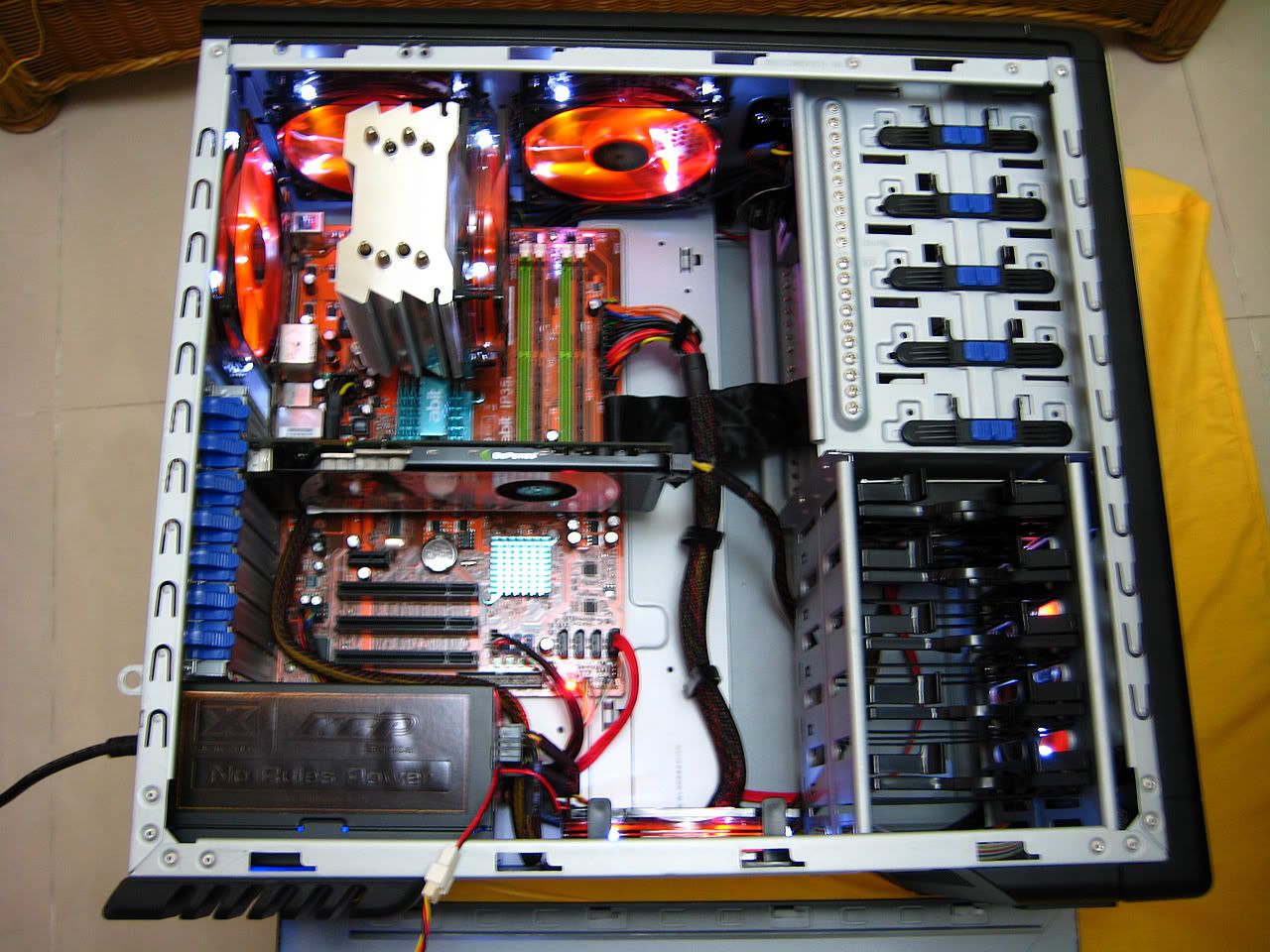
Ahh..Cables! help Badddd, CM690 Very Messy
|
TSavailyboy
|
 Dec 21 2008, 05:54 PM, updated 16y ago Dec 21 2008, 05:54 PM, updated 16y ago
|

|
Hi guys im having cable problems =.= i dunno how to keep or make my computer looks clean or clearer ...ahhh its very messy until i dunno wta to do with them T_T » Click to show Spoiler - click again to hide... « » Click to show Spoiler - click again to hide... « Anyone have any views about this ? help ! thx Im using CM690 casing : O This post has been edited by availyboy: Dec 21 2008, 06:04 PM |
|
|
|
|
|
nidzamputra
|
Dec 21 2008, 06:08 PM
|
|
|
hahahaha bro..you can join cable management club...there many forumer can help you to manage your cable...
btw...look very messy & a lot do cable management...
my advise...for exhaust fan..you can connect to mobo 3 pin power fan...and for HSF you can route back your mobo tray...
|
|
|
|
|
|
mantiz125
|
Dec 21 2008, 06:10 PM
|
|
|
why dont u connect ur 3pin 12CM fan to ur mobo... u can hide some of the wire edi...
if i'm not mistaken.. ur casing has a hole where u can masukkan wire behind the mobo plate...
|
|
|
|
|
|
TSavailyboy
|
Dec 21 2008, 06:14 PM
|
|
|
Exhaust fans? above got two more : o its already connected to mobo i think i should change the cable side hor
=/ there is holes? : o i never know that =/ coz im still new here ^^ hehe
This post has been edited by availyboy: Dec 21 2008, 06:15 PM
|
|
|
|
|
|
kazairol
|
Dec 21 2008, 06:20 PM
|
|
|
behind ur mobo tray got plenty of space.. use it to hide ur cable.. go through this thread, see how others manage their cable in cm690 casing..  |
|
|
|
|
|
TSavailyboy
|
Dec 21 2008, 06:21 PM
|
|
|
Oh Thanks bro i'll go take a look hehe  http://forum.lowyat.net/index.php?act=Atta...=post&id=601849This post has been edited by availyboy: Dec 21 2008, 06:22 PM http://forum.lowyat.net/index.php?act=Atta...=post&id=601849This post has been edited by availyboy: Dec 21 2008, 06:22 PM |
|
|
|
|
|
TSavailyboy
|
Dec 21 2008, 06:28 PM
|
|
|
Wah  im from Johor Bahru bro ^^ that's far you're from KL right? ^^ This post has been edited by availyboy: Dec 21 2008, 06:28 PM |
|
|
|
|
|
capiche
|
Dec 21 2008, 06:37 PM
|
|
|
hm.. a lot of forummers here done an excellent cable management with that casing.. pls refer to the cable management thread.. plenty of good example there  |
|
|
|
|
|
TSavailyboy
|
Dec 21 2008, 06:52 PM
|
|
|
Ok thanks guys for the comment  and suggestions and also referral link and so  i'll do it Thanks alot Brb
Added on December 21, 2008, 7:08 pmweird...it seems my gigabyte power supply 800watt de 24 cable the ATX i think one of the pin broke off or smth but i counted it has 24 wires anyone have any idea? T_T This post has been edited by availyboy: Dec 21 2008, 07:08 PM |
|
|
|
|
|
karthyhu
|
Dec 21 2008, 07:43 PM
|
|
|
JB where bro i might be able to help if near me la ^^
|
|
|
|
|
|
karthyhu
|
Dec 21 2008, 08:54 PM
|
|
|
waiting for his reply lor help sure can help but dont too far or place i dunno how to go  |
|
|
|
|
|
xelnamikaze
|
Dec 21 2008, 09:43 PM
|
|
|
omg.. i see big fat cacings all over the place !
|
|
|
|
|
|
TSavailyboy
|
Dec 21 2008, 09:52 PM
|
|
|
LoL Big fat cacings? oh i get it (in cantonese) dai lan chong =.= lol hi karthyhu  the whole day i was doing cable management it looks better now lol but thanks for trying to help though ^^ i live near the skudai hehe This post has been edited by availyboy: Dec 21 2008, 09:58 PM |
|
|
|
|
|
nidzamputra
|
Dec 21 2008, 10:23 PM
|
|
|
you live at taman U?
|
|
|
|
|
|
TSavailyboy
|
Dec 21 2008, 10:27 PM
|
|
|
taman u? no lar actually i live near the hutan bandar if u dont know =/ i live near the johor specialist hospital i dunno where does that call ...haha i just went to johor ...so i dont know much of the places btw i live in Bukit saujana xP |
|
|
|
|
|
karthyhu
|
Dec 21 2008, 11:02 PM
|
|
|
any pictures of ur new cable management ? show us might improve more
|
|
|
|
|
|
nidzamputra
|
Dec 21 2008, 11:29 PM
|
|
|
yeahh show some picture la bro...need to look improvement...
|
|
|
|
|
|
TSavailyboy
|
Dec 22 2008, 12:32 AM
|
|
|
har bro my power supply cable came out so i put some temporary stuff first hold on snapping : o its slightly better than just now but still looks messy haha : o when i added those cables take a llook.Bro you can see the white cables right? : o It makes the whole thing goes very messy any idea with them? =/ i its below the attachment thx before putting those white cables or stuff it looks very nice » Click to show Spoiler - click again to hide... « This post has been edited by availyboy: Dec 22 2008, 12:52 AM |
|
|
|
|
|
mADmAN
|
Dec 22 2008, 03:24 AM
|
|
|
take a FULL picture of the case from the side dude... all those angles and closeup makes it really hard to see....
so no angles...no closeup... just a full view straight of the internals....
|
|
|
|
|
|
BuBuCai
|
Dec 22 2008, 07:46 AM
|
Getting Started

|
QUOTE(availyboy @ Dec 21 2008, 06:28 PM) Wah im from Johor Bahru bro ^^ that's far you're from KL right? ^^ LOL u in jb i tot u were at KL......  |
|
|
|
|
|
TSavailyboy
|
Dec 22 2008, 10:20 AM
|
|
|
uh oh madman sry i dont know how to take pictures >>_>> take casing picture from the side means erm the whole thing one snap? : O |
|
|
|
|
|
hermit23
|
Dec 22 2008, 10:36 AM
|
|
|
ermm . . . dun wan be bad la but, seems no diff from 1st also . . . yes take pic direct facing the side of casing without panls, on both side.
|
|
|
|
|
|
TSavailyboy
|
Dec 22 2008, 11:12 AM
|
|
|
hahaha bro for me its already ok but i still need to do nicer jobs btw i guess i'll think of some ways brb go check coolermaster league |
|
|
|
|
|
nidzamputra
|
Dec 22 2008, 12:38 PM
|
|
|
yeah bro..just visit LYN CM league..there are many forumer posting their pic with good cable management
|
|
|
|
|
|
mADmAN
|
Dec 22 2008, 02:42 PM
|
|
|
QUOTE(availyboy @ Dec 22 2008, 10:20 AM) uh oh madman sry i dont know how to take pictures >>_>> take casing picture from the side means erm the whole thing one snap? : O yes the whole casing one snap. |
|
|
|
|
|
mADmAN
|
Dec 22 2008, 03:36 PM
|
|
|
my advise... start by going to the hardware store and get 2 sizes of cable ties... small and large.
next....unplug ALL ur cables. and remove them out of the casing. this includes removing ur power supply out from ur casing. the front panel headers can leave it on.
then plug in ur fans. rear fan to mobo. wrap the cable around ur fan first if possible then plug it in to the nearest header. next is ur IFX fans... same thing..wrap around the fan then plug them in to nearest header. remember to put at least 1 in the CPU header. the top fans leave them alone first. bottom and front fan, oso leave it alone first.
now re-install ur PSU. next to the PSU is a hole on the mobo tray. cram ur 24pin cable in there. same goes for the 4/8 pin atx cable. and every other cable u can possibly cram in... u cram in then route them properly and plug them in the appropriate place.
the balance of the cables, hide them in ur ROM bays. but keep 1 molex cable at the HDD area. plug ur bottom and front intake fan to this molex cable. 1 molex cable thats in the rom bays, plug ur top fans into it.
as for side panel fans... plug it into the molex cable in the HDD bay or something.
as for the cable ties earlier, use them to secure the cables together. ull know where to use them once u start doing the management
This post has been edited by mADmAN: Dec 22 2008, 03:36 PM
|
|
|
|
|
|
TSavailyboy
|
Dec 22 2008, 03:59 PM
|
|
|
Bro the problem is all my hdd is sata just my coolermaster musketeer need one molex cable as well as the fans coz i tried to put into the motherboard the fans just run slowly...already disabled smart fan control Thanks bro i'll go give it a try ^^ |
|
|
|
|
|
AHBOON
|
Dec 22 2008, 04:30 PM
|
|
|
found so many kind ppl here, can assist to fix for me 2 when i need ur help ? lolz
|
|
|
|
|
|
nidzamputra
|
Dec 22 2008, 06:04 PM
|
|
|
bro..your gigabyte psu is modular right?
|
|
|
|
|
|
TSavailyboy
|
Dec 22 2008, 07:17 PM
|
|
|
yeah modular : O =/ used all of them : O
oh wait got one more is free slot XD haha
any ideas bro? : o
|
|
|
|
|
|
xelnamikaze
|
Dec 22 2008, 09:32 PM
|
|
|
@nidzamputra
where you get the fan behind the mobo 80mm fan !?
i want it also !!
|
|
|
|
|
|
TSavailyboy
|
Dec 22 2008, 09:52 PM
|
|
|
Oh ic bro thanks for the pics XD btw i forced my casing case to be closed behind i think should be no probs riggh? lol |
|
|
|
|
|
nidzamputra
|
Dec 22 2008, 11:11 PM
|
|
|
QUOTE(xelnamikaze @ Dec 22 2008, 09:32 PM) @nidzamputra where you get the fan behind the mobo 80mm fan !? i want it also !! i got come with this casing when i bought...i bought this casing in july '08..that time 3x120mm + 1x80mm.. then i bought another one cm690 in november '08..just got only 3x120mm..then i bought 80x80x15 from ngbh...
Added on December 22, 2008, 11:12 pmQUOTE(availyboy @ Dec 22 2008, 09:52 PM) Oh ic bro thanks for the pics XD btw i forced my casing case to be closed behind i think should be no probs riggh? lol that shouldn't be problem bro..just force a bit only maaa... This post has been edited by nidzamputra: Dec 22 2008, 11:12 PM |
|
|
|
|
|
TSavailyboy
|
Dec 23 2008, 01:16 AM
|
|
|
bro the behind fan i mean i tried but it doesn't fit? any idea bro? =/ or got sizes for all 80mm? |
|
|
|
|
|
xelnamikaze
|
Dec 23 2008, 01:37 AM
|
|
|
QUOTE(availyboy @ Dec 23 2008, 02:16 AM) bro the behind fan i mean i tried but it doesn't fit? any idea bro? =/ or got sizes for all 80mm? need to find 80x80x15 fan lor.. that will do the job. please tell me where to buy it once you found it ^^ |
|
|
|
|
|
karthyhu
|
Dec 23 2008, 02:04 AM
|
|
|
bro ngbh sells them why no buy from him ?
|
|
|
|
|
|
nidzamputra
|
Dec 23 2008, 07:14 AM
|
|
|
you need put fan size 80X80x15mm at behind your mobo..
hint : you can find ngbh or zhen^wei..their bring this size
|
|
|
|
|
|
koyok
|
Dec 23 2008, 10:16 AM
|
Getting Started
|
Bro nidzamputra ,
juz wanna ask u about the 3 pin cable extension cable. ( for fan side). how much do you bought it? izzit already pack with sleeve cover?
|
|
|
|
|
|
nidzamputra
|
Dec 23 2008, 10:58 AM
|
|
|
QUOTE(koyok @ Dec 23 2008, 10:16 AM) Bro nidzamputra , juz wanna ask u about the 3 pin cable extension cable. ( for fan side). how much do you bought it? izzit already pack with sleeve cover? where bro?i not clear about that bro... btw..all it's come with my fan..i dont buy any extension...just used what i got only... |
|
|
|
|
|
TSavailyboy
|
Dec 23 2008, 12:35 PM
|
|
|
Bro about the molex and etc i should hide them behind the casing? hmm ok |
|
|
|
|
|
koyok
|
Dec 23 2008, 02:59 PM
|
Getting Started
|
 the green molex one. Oso the fan wire (white and thin) at the middle... i dunno what is the name for the it. I saw few forumers had the extension for the wire.... it will good to have it since my fan wire is not long enuff.  This post has been edited by koyok: Dec 23 2008, 03:01 PM This post has been edited by koyok: Dec 23 2008, 03:01 PM |
|
|
|
|
|
nidzamputra
|
Dec 23 2008, 03:54 PM
|
|
|
oooo..that one i sleeve my own bro....for green one....that time i don't see black sleeving kit..
for fan wire (white and thin) that come original la bro...i dont modded anything...
|
|
|
|
|
|
TSavailyboy
|
Dec 23 2008, 04:29 PM
|
|
|
Updated on picture 
I think got improve abit? bbtw when i close the behind casing...i think i damaged the whole thing it bumped out lolz i used all my strength to close that back case =.= zzzz molex cables not enough long to hide behind or maybe coz i cant close the back casing help? This post has been edited by availyboy: Dec 23 2008, 04:30 PM |
|
|
|
|
|
nidzamputra
|
Dec 23 2008, 06:11 PM
|
|
|
hehhehe..not a bit bro..but a lot...
This post has been edited by nidzamputra: Dec 23 2008, 06:11 PM
|
|
|
|
|
|
loongking
|
Dec 24 2008, 01:03 AM
|
|
|
try adjust those molex up to the optical drive area n hide it there
try route all ur wires at the back n avoid it in front n visible
cheers n thumbs up for the effort
|
|
|
|
|
|
id86
|
Dec 24 2008, 04:01 AM
|
|
|
that one more messy than my CM690 tried to route the cable behind the HDD rack  |
|
|
|
|
|
TSavailyboy
|
Dec 24 2008, 07:05 PM
|
|
|
swt woah bro you reply at 4am haven't sleep? xP
ok thanks guys i'll try it out update later ^^ HAPPY XMAS -EVE
|
|
|
|
|
|
nidzamputra
|
Dec 24 2008, 07:30 PM
|
|
|
bro..you can hide all unused cable at front fan space..if you notice that..you can see i hide all unused molex at there...
This post has been edited by nidzamputra: Dec 24 2008, 07:31 PM
|
|
|
|
|
|
Silverfire
|
Jan 5 2009, 03:25 PM
|
|
|
Let you refer mine Not really a great job but spent quite some time too... » Click to show Spoiler - click again to hide... « This post has been edited by Silverfire: Jan 5 2009, 03:26 PM |
|
|
|
|
|
E-J@1
|
Jan 5 2009, 03:47 PM
|
|
|
@ Silverfire still improve a bit change those ide cable to sata --> buy converter laio or change to sata interface drive 24pin cable --> route it on the back of the mobo plate |
|
|
|
|
|
ZeneticX
|
Jan 5 2009, 07:07 PM
|
|
|
giga psu eh,the 24 pin is just so hard to get behind nth chg much in mine yet  This post has been edited by ZeneticX: Jan 5 2009, 07:21 PM
 |
|
|
|
|
|
NewbieBetta
|
Jan 5 2009, 09:48 PM
|
|
|
hmm...planning to get 690 too...affordable & perform well too
|
|
|
|
|
|
irmond
|
Jan 5 2009, 11:44 PM
|
|
|
your pictures is messier lah. i don't think is anything is wrong with cable being messy. looks more awesome. if you don't like it, cover it with non-transparent cover. |
|
|
|
|
|
KiFuRi
|
Jan 6 2009, 01:17 PM
|
Getting Started
|
messy cables can disturb airflow....
with good cable management can improve the airflow in ur casing...
make ur hardware cool to...
|
|
|
|
|
|
latias93
|
Jan 18 2009, 11:34 PM
|
|
|
Use cable ties xD like the one they use in supermarket so you dont steal stuff L:P
|
|
|
|
|
|
AlexLee277
|
Jan 21 2009, 05:42 PM
|
|
|
just take out all the wire that r connected to hardware..
pull all wire to the rightside of the casing
n then just pull those that u want to use to the mobo place
then enjoy reconnect the wire...
Added on January 21, 2009, 5:44 pmhaha! dint see pg3...haha!
This post has been edited by AlexLee277: Jan 21 2009, 05:44 PM
|
|
|
|
|
|
TSavailyboy
|
Jun 4 2010, 01:22 AM
|
|
|
@Silverfire
Bro the pics u posted really sexy xD'
sorry i came bak to this thread..
Any idea with TJ07 LOL @@ need advices again
|
|
|
|
|



 Quote
Quote














 0.0376sec
 1.17
1.17
 6 queries
 GZIP Disabled