

enable aero.. what is that?

Super Noobs Help! [Thread V3], Post Your ULTRA Simple Questions Here
|
|
 Jan 1 2009, 12:48 PM Jan 1 2009, 12:48 PM
Return to original view | Post
#1
|
 
Senior Member
843 posts Joined: May 2008 From: S'wak Kuching 
|
sorry noob question.
enable aero.. what is that? |
|
|
|
|
|
Jan 3 2009, 12:02 AM
Return to original view | Post
#2
|
|
Senior Member
843 posts Joined: May 2008 From: S'wak Kuching
|
@ lucifah
Try look your motherboard box. should have provide right? |
|
|
Jan 5 2009, 06:40 PM
Return to original view | Post
#3
|
|
Senior Member
843 posts Joined: May 2008 From: S'wak Kuching
|
when you do safely remove hardware it also will detect either your ex.hdd still have program running or not. To avoid accidentally shut down damaged hdd or lose data while still have program running in your ex.hdd.
|
|
|
Jan 27 2009, 10:37 AM
Return to original view | Post
#4
|
|
Senior Member
843 posts Joined: May 2008 From: S'wak Kuching
|
@systix
electric bills is variable between u and forumers due to computer rig, power saving setting etc if you turn on 24/7 I suggest you try 1month for your self if you really want to do so. make sure your eyes don be like this when see the bill ->  Well i don't know what you downloading. if you want to reach your download target per day but afraid electric bills. my advice you upgrade your internet to higher. ( 1Mbps to 2Mbps? ) for more RM30 or RM20 (2Mbps to 4Mbps?)  @normeck Ya its ok. i can see your Attached thumbnail(s). A picture showing at there. Did I answered your super ultra simple question? This post has been edited by Onion-KiD: Jan 27 2009, 10:43 AM |
|
|
Jan 29 2009, 01:13 AM
Return to original view | Post
#5
|
|
Senior Member
843 posts Joined: May 2008 From: S'wak Kuching
|
QUOTE(fadhfuad @ Jan 28 2009, 11:39 PM) Just posting on some issue..May or may not related to the topic at all.. Marketing strategy no simple as that you know... and also production management.Why is the new stuff/hardwares coming out new very2 expensive? This is y. Noticed how the technologies keep getting better and better? In order to cover the manufacturing cost of the previous product (since even if they sell the old products at production cost, no one will buy it) the manufacturers has must cover the cost by absorbing the price into the new stuff. As simple as that. Some thing to take notes while buying new stuff..Example when buying a new Graphic card. Noticed how all of them say supports DirectX10? openGL3.0? Blablablabla..Do tell me how many games now are using those stuffs?? Less than 10 right? For the next 3-4 years, IMO is not worth it if your on a tight budget. Instead of getting a 9800, try to get a 8800..LOL. Same goes with a certain intel CPU..i wont tell you guys..You can get it for less than RM300 but still on par with a certain C2D..Problem in msia is that all vendors/shop/sellers are going for the latest stuff. LOL  How on par if with latest stuff compare with old stuff? There is a reason : because you are already satisfy with your current life / set up / rig or whatever. unlike some of forumer... even latest still no satisfy yet. |
|
|
Feb 20 2009, 06:38 PM
Return to original view | Post
#6
|
|
Senior Member
843 posts Joined: May 2008 From: S'wak Kuching
|
QUOTE(dan137 @ Feb 20 2009, 05:13 PM) what is the different between 790FXB-M2RSH and 790FXB-M2RS2 There is the difference  by the way what is that? Bank account password? ID pls... by the way what is that? Bank account password? ID pls... |
|
|
|
|
|
Apr 9 2009, 07:41 PM
Return to original view | Post
#7
|
|
Senior Member
843 posts Joined: May 2008 From: S'wak Kuching
|
QUOTE(spflee @ Apr 9 2009, 05:32 PM) Hihi,a noobie here = =...I have some questions to ask... About your pc, currently how many RAM running on your pc? 256mb or 512mb or 1GB etc?1,my old pc is pentium 4,currently I can't play the newest game like dynasty warriors 6 (english) and the lord of the ring conquest... My CPU speed is 2.6GHz DDR400 2.5GB GC forget dy,need to check back,but bought it 2 years ago,and just cost RM 200+ my old pc is dy 5 years old +... For the dynasty warriors 6,I can run the game but it is lag lag 1...but for LOTRC the game totally cannot run,I can enter the game but no image come out,just got sound only >< How to solve this problem?change graphic card is enough??? And,I dun know what is the different of the GC: NVIDIA GEFORCE,and its number after each model like GS,GT, or each model like ATI RADEON,SAPPHIRE,GIGABYTE,GALAXY...Can any1 explain for me? Hm,for the speed of bus,is it depend on motherboard?Thanks About dynasty warriors 6, i guess it should be not enough ram to support, that cause your game lag lag while playing. it can be solve by adding more ram. If your ram is 1GB, it might other problem. Edit: Sorry i Did't see your post clearly, your ram is 2.5GB. In this case, try the step below. hope it can help About LOTRC, no image but got sound. the most case i face it because pc current graphic card unable to support the game (card old liao). But don't give up yet, it might able to play by: 1,lower down your game resolution at game setting which is location at your LOTRC game folder.(some game might don have this setting, I no sure about LOTRC. try search ya  ) ) 2,Update your current graphic card driver. QUOTE(@MAN-kun @ Apr 9 2009, 05:51 PM) actually what gc r u using now? its rare to hear that a gc can bottleneck lcd. hmm, very curious here hehe, use (" reply) for quote single post.hmm...mr kenvess/anyone. how to use quote properly? hehe, i'm new here   use (- quote) (-quote) (-quote) + (Add reply) for quote multipost Hope this help This post has been edited by Onion-KiD: Apr 9 2009, 07:52 PM |
|
|
Apr 13 2009, 07:07 PM
Return to original view | Post
#8
|
|
Senior Member
843 posts Joined: May 2008 From: S'wak Kuching
|
QUOTE(felixfoo @ Apr 13 2009, 06:40 PM) yesterday i go pc fair and bought superb 720w .... and i have input the psu pins .. but the computer wont run ... .. just have the green light only.. and i connecting a 24 pins to a 20 pins mobo ..... i wonder the 24 pins from superb 720w .. the extra 4 pins can be removed? The extra 4pin can be separate right? |
|
|
Jun 12 2009, 08:24 PM
Return to original view | Post
#9
|
|
Senior Member
843 posts Joined: May 2008 From: S'wak Kuching
|
QUOTE(Fyrekat @ Jun 12 2009, 06:49 PM) That's the thing, I had assumed that new motherboards that support higher speed RAM will use faster RAM at their rated speeds, sort of like plug and play. No need to do anything. Your RAM is 1066HMz. To make it simple, at CPU-Z there, 533.3 x 2 = 1066 However, when I was reading around I read articles which said that speeds are normally capped at 800MHz and anything higher than that will require changing BIOS settings. Since these kinds of thing change so often, I just wanted to know whether this restriction of 800MHz still applies now. Or did I just misunderstand something while reading? Added on June 12, 2009, 7:52 pm[img]http://i220.photobucket.com/albums/dd40/commanderbubu/memory-1999.jpg Am I right to interpret from the above that my RAM is performing at 1066MHz?  There's no need do any adjustment if you just normal use your pc. Unless you interest to go more detail about computer performance example overclocking. By that time changing BIOS setting is required. Your ram is performing at 1066Mhz. No worry. This post has been edited by Onion-KiD: Jun 12 2009, 08:24 PM |
|
|
Jul 13 2009, 07:22 PM
Return to original view | Post
#10
|
|
Senior Member
843 posts Joined: May 2008 From: S'wak Kuching
|
QUOTE(hantu667 @ Jul 13 2009, 01:59 AM) i buy 2333sw lcd.. Samsung 2333sw came with DVI cable. Maybe that seller steal away or in your box? If no in your box then don't go that shop buy thing anymore.but i dont get dvi cable 2333sw dont get dvi cable ker? |
|
|
Jul 24 2009, 11:21 PM
Return to original view | Post
#11
|
|
Senior Member
843 posts Joined: May 2008 From: S'wak Kuching
|
Sorry, Noob question.
E5200 is core 2 duo or duo core? Thanks ^^ |
|
|
Jul 27 2009, 06:43 PM
Return to original view | Post
#12
|
|
Senior Member
843 posts Joined: May 2008 From: S'wak Kuching
|
QUOTE(eastwest @ Jul 27 2009, 05:10 PM) One more question: Is it enough to use quad core cpu with a 450watt psu? A PSU definitely enough to boot a cpu.It depend on your overall system. example: how many fans in your system? what many/model your graphic card you using? Etc... Because PSU power up whole system not just only cpu. Extra for you: PSU guide by Mr kmarc |
|
|
Aug 4 2009, 06:28 PM
Return to original view | Post
#13
|
|
Senior Member
843 posts Joined: May 2008 From: S'wak Kuching
|
QUOTE(xi4n9 @ Aug 4 2009, 05:51 PM) theres alot of motherboards out there nowdays, and for a noob finding one, i search alot and end up i dunno which one to pick with... i want to find one motherboard which suits: As long as it is socket 775 and support core 2 duo /quad 45nm(The motherboard box will have the sticker and stated). 1. P4/core 2 duo processors (currently using p4,will change to c2d but not soon) 2.running ddr2 ram 3.using PCI-E card slot for GC anyone can intro me one? Don't worry. nowadays Socket775 motherboard running ddr2 ram and have PCI-E x16 slot With price range RM150 ~ RM800+ This post has been edited by Onion-KiD: Aug 4 2009, 06:28 PM |
|
|
|
|
|
Aug 5 2009, 06:37 PM
Return to original view | Post
#14
|
|
Senior Member
843 posts Joined: May 2008 From: S'wak Kuching
|
QUOTE(xi4n9 @ Aug 5 2009, 12:31 AM) hmm, a question for motherboard socket 775 1, To feed customer's and improve some object. Example: Perodua Myvi have some model, standard edition / special edition / other.1.why there is so many variety of them? different heat sink? or different slot applicable? 2.my ram's maximum capacity depends on motherboard or processor? 3.the pci-e graphic card every model also can insert every kind of motherboard pci-e slot? 4.can anyone tell me whats the difference between rm200 mobo and rm300-400 mobo difference? maybe rm600-800 i can assume it have its own high end issue, but what makes a difference if the price is between range rm100?(same brand here i conclude as for MSI or gigabyte.) 2, Depend on your motherboard and operating system (OS) 3, As long as is PCI-E x16. Can slot in Any kind,brand of motherboard PCI-E x16 slot 4, About this, We can take Nokia handphone as example. Nokia 3310, Nokia N80 and Nokia N95. Whats the difference between this three model? Well we know... 3G, camera, online, MP3... So the price came with difference too. But they still do their main job-------> Put SIM card and PHONE. Motherboard too. Latest = More expensive = more function. But still do their main Job. Help You do Your job |
|
|
Aug 6 2009, 06:39 PM
Return to original view | Post
#15
|
|
Senior Member
843 posts Joined: May 2008 From: S'wak Kuching
|
QUOTE(xi4n9 @ Aug 6 2009, 06:13 AM) thanks! this explain is more easy to consume, as i did assume the same, but i still a bit cant think of which mother board to get with... Ho.. between this 3 model. I suggest pick EP43-UD3L due to: gigabyte GA-P31 rm235 or gigabyte GA-EP31 rm270 or maybe gigabyte GA-EP43 rm345 function more or less the same, but a difference of rm35, seems like abit better or what? i might be on my pc for days usage for adobe photoshop,illustrator,games,movies,songs and some downloads...which board has more variety of user? the price range between rm100 models make me feels  the more i look at it, the more i cant make up my mind... >.< price range in a few 10's to 100 ... annoyed me... LOL 1)Latest tech. (UD3, Solid Capacitors, PCI-E 2.0 etc etc) 2)6 USB port (compare other model only 4) 3)6 SATA port (compare other model only 4) *but this without old printer slot. I believe you no need that slot anymore? |
|
|
Oct 18 2009, 10:13 PM
Return to original view | Post
#16
|
|
Senior Member
843 posts Joined: May 2008 From: S'wak Kuching
|
QUOTE(Xiia0Ban @ Oct 18 2009, 10:02 PM)  can i know what the different of the 2 slot??will affect the speaker sound? 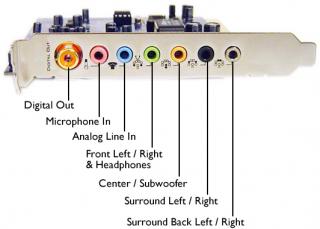
Here for detail. Put 2.1 speaker to green and cheap cheap 2.0 speaker to black play surround sound ^^ |
|
|
Oct 19 2009, 06:49 PM
Return to original view | Post
#17
|
|
Senior Member
843 posts Joined: May 2008 From: S'wak Kuching
|
QUOTE(jason18689 @ Oct 19 2009, 05:11 PM) Hello guys... 1) Yes socket is difference. DVI is white. VGA is blue. Their pin also difference.I got a very noob question for noobs like me lolx... 1. DVI socket and VGA socket is different? 2. The thing from graphic card to monitor, it is both VGA-VGA right? 3. What if monitor only got HDMI, how to connect graphic card VGA to monitor HDMI? Does this one-time cable available? Thanks in advance ! 2) I believe start from 3 years old graphic card will pair 1 VGA and 1 DVI together. Latest graphic card most only came with DVI, few have HDMI or display port. But they will provide DVI to VGA converter. 3) PC LCD monitor or LCD TV ? QUOTE(ArianneG @ Oct 19 2009, 06:04 PM) What he said. Nowadays most comp screens usually come with HDMI though, and quite a few still support VGA. Check for the connector type. Sure no VGA hiding around? Also, using desktop or laptop (just curious, as my laptop got no HDMI, only VGA)? Suppose almost all lcd monitor have VGA port. Most with DVI, quite a few with HDMI.Laptop no idea. This post has been edited by Onion-KiD: Oct 19 2009, 06:50 PM |
|
|
Oct 28 2009, 06:09 PM
Return to original view | Post
#18
|
|
Senior Member
843 posts Joined: May 2008 From: S'wak Kuching
|
QUOTE(kanethesun @ Oct 28 2009, 05:36 PM) anyone? motherboard doesn't limit your HDD memory. Yes you can use it. As long as you have sata slot to plug in. No problem.I just pay for a 1.5TB HDD anyway, hope it can be used :   |
|
Topic ClosedOptions
|
| Change to: |  0.0205sec 0.0205sec
 0.44 0.44
 7 queries 7 queries
 GZIP Disabled GZIP Disabled
Time is now: 8th December 2025 - 04:24 AM |
 Quote
Quote