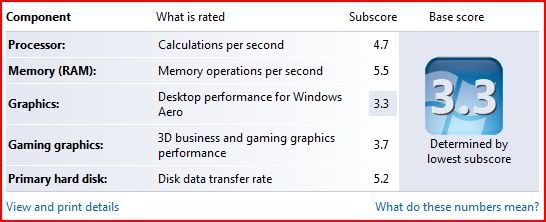
My lappy score
My Friend lappy score
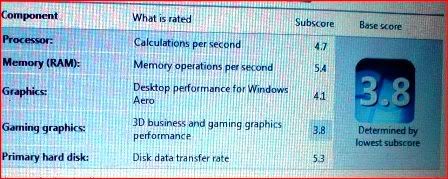
Windows Experience Index, Same model and spec, different score
|
|
 Dec 11 2008, 05:01 PM, updated 18y ago Dec 11 2008, 05:01 PM, updated 18y ago
Show posts by this member only | Post
#1
|
 
Senior Member
3,251 posts Joined: Nov 2006 From: Kuala Rompin, Pahang  
|
I own HP TX2520au, when i compared my Windows Experience Index (WEI) score with other TX2520au user, it gave different WEI regardless all the spec was the same. Any idea why it happened?
My lappy score My Friend lappy score |
|
|
|
|
|
Dec 11 2008, 07:24 PM
Show posts by this member only | Post
#2
|

Senior Member
6,738 posts Joined: Dec 2006 From: Kuala Lumpur, Malaysia | Eau Claire, Wisconsin
|
QUOTE(Deani_77 @ Dec 11 2008, 05:01 PM) I own HP TX2520au, when i compared my Windows Experience Index (WEI) score with other TX2520au user, it gave different WEI regardless all the spec was the same. Any idea why it happened? Don't be jealous. Update your computer or tweak the scores yourself. A Windows Update may be just the fix but seeing that it's graphics related. Update the driver. My lappy score » Click to show Spoiler - click again to hide... « My Friend lappy score » Click to show Spoiler - click again to hide... «  QUOTE Be a man, do the right thing! |
|
|
Dec 11 2008, 09:12 PM
Show posts by this member only | Post
#3
|
|
Senior Member
3,251 posts Joined: Nov 2006 From: Kuala Rompin, Pahang
|
Display driver already been updated to the latest driver available at HP Support site.
|
|
|
Dec 12 2008, 02:22 AM
Show posts by this member only | Post
#4
|
|
Senior Member
6,738 posts Joined: Dec 2006 From: Kuala Lumpur, Malaysia | Eau Claire, Wisconsin
|
QUOTE(Deani_77 @ Dec 11 2008, 09:12 PM) Display driver already been updated to the latest driver available at HP Support site. Ask your friend to update his display driver also. Last time I updated my display driver (nVidia), the score dropped by ".05".  |
|
|
Dec 12 2008, 09:37 AM
Show posts by this member only | Post
#5
|
|
Senior Member
3,251 posts Joined: Nov 2006 From: Kuala Rompin, Pahang
|
QUOTE(TechnoDude94 @ Dec 12 2008, 02:22 AM) Ask your friend to update his display driver also. Last time I updated my display driver (nVidia), the score dropped by ".05". like that aaa... using latest driver sometime will gave lower WEI. Look like I just need to ignore the WEI |
|
|
Dec 12 2008, 11:55 AM
Show posts by this member only | Post
#6
|

Senior Member
6,543 posts Joined: Dec 2004 From: Miri 
|
QUOTE(Deani_77 @ Dec 12 2008, 09:37 AM) like that aaa... using latest driver sometime will gave lower WEI. Look like I just need to ignore the WEI For more accurate benchmark result, try using 3DMark 06 for Windows XP or 3DMark Vantage for Windows Vista. |
|
|
|
|
|
Dec 12 2008, 12:08 PM
Show posts by this member only | Post
#7
|

Senior Member
1,098 posts Joined: Nov 2006
|
Definitely driver version... perhaps the one with the higher score has the latest video driver or... a BETA version driver that improves graphics performance...
|
|
|
Dec 12 2008, 02:10 PM
Show posts by this member only | Post
#8
|
|
Senior Member
6,738 posts Joined: Dec 2006 From: Kuala Lumpur, Malaysia | Eau Claire, Wisconsin
|
QUOTE(Deani_77 @ Dec 12 2008, 09:37 AM) like that aaa... using latest driver sometime will gave lower WEI. Look like I just need to ignore the WEI Tell your friend to update his driver, maybe it'll be same score as your after updated (lower). A simple fix would be refreshing your scores...  |
|
|
Dec 12 2008, 05:57 PM
Show posts by this member only | Post
#9
|
|
Senior Member
3,251 posts Joined: Nov 2006 From: Kuala Rompin, Pahang
|
QUOTE(FarCry3r @ Dec 12 2008, 11:55 AM) For more accurate benchmark result, try using 3DMark 06 for Windows XP or 3DMark Vantage for Windows Vista. Thanks for the advise, will try to have a look at the recommended software.Added on December 12, 2008, 6:02 pm QUOTE(defaultname365 @ Dec 12 2008, 12:08 PM) Definitely driver version... perhaps the one with the higher score has the latest video driver or... a BETA version driver that improves graphics performance... QUOTE(TechnoDude94 @ Dec 12 2008, 02:10 PM) Tell your friend to update his driver, maybe it'll be same score as your after updated (lower). A simple fix would be refreshing your scores... whistling.gif As for myself, my score before updating the display driver (driver already there when I bought the lappy) and after updating the display driver (with the latest version available at HP Supportr site) was the same.  This post has been edited by Deani_77: Dec 12 2008, 06:02 PM |
|
|
Dec 12 2008, 06:12 PM
|
|
Senior Member
6,543 posts Joined: Dec 2004 From: Miri
|
QUOTE(Deani_77 @ Dec 12 2008, 05:57 PM) Thanks for the advise, will try to have a look at the recommended software. The score are not accurate. Sometimes an extra service(s) at background can affects the score. And those scores are only good to look for Games for Windows. For real world class 3d benchmark, try those I've recommend above.Added on December 12, 2008, 6:02 pm As for myself, my score before updating the display driver (driver already there when I bought the lappy) and after updating the display driver (with the latest version available at HP Supportr site) was the same. |
|
|
Dec 12 2008, 11:40 PM
|

Senior Member
6,015 posts Joined: Feb 2007
|
Go to bios and increase the video ram to max, that will help to increase the Graphics score, but not gaming performance
 |
|
|
Dec 13 2008, 02:52 AM
|
|
Senior Member
6,738 posts Joined: Dec 2006 From: Kuala Lumpur, Malaysia | Eau Claire, Wisconsin
|
QUOTE(1024kbps @ Dec 12 2008, 11:40 PM) Go to bios and increase the video ram to max, that will help to increase the Graphics score, but not gaming performance Bro, I've got a question. Does that apply only to integrated or also dedicated graphics? |
|
|
Dec 13 2008, 03:26 AM
|
|
Senior Member
6,015 posts Joined: Feb 2007
|
QUOTE(TechnoDude94 @ Dec 13 2008, 02:52 AM) Bro, I've got a question. Does that apply only to integrated or also dedicated graphics? Only intergrated, cos it does not have its own RAM and it's shared with system ram, additional shared video ram will boost a little bit performance,tried with geforce 6150 onboard GPU, it does add 0.5 Graphic score to WIE after increased the default vram 32MB to 64MB. Dedicated already has it own vram, and i think BIOS will hide that options if using discreet graphics card. |
|
|
|
|
|
Dec 13 2008, 08:54 AM
|
|
Senior Member
3,251 posts Joined: Nov 2006 From: Kuala Rompin, Pahang
|
QUOTE(1024kbps @ Dec 12 2008, 11:40 PM) Go to bios and increase the video ram to max, that will help to increase the Graphics score, but not gaming performance Already checkout the BIOS settings, there is no option to increase video RAM as per my previous lappy...  Anyway, thanks for suggest me that  |
|
|
Dec 13 2008, 07:29 PM
|
|
Senior Member
6,738 posts Joined: Dec 2006 From: Kuala Lumpur, Malaysia | Eau Claire, Wisconsin
|
QUOTE(Deani_77 @ Dec 13 2008, 08:54 AM) Already checkout the BIOS settings, there is no option to increase video RAM as per my previous lappy... Try updating your BIOS? One of my desktops with integrated graphics didn't have increase memory buffer option until I updated the BIOS. Anyway, thanks for suggest me that |
|
|
Dec 13 2008, 08:25 PM
|
|
Senior Member
3,251 posts Joined: Nov 2006 From: Kuala Rompin, Pahang
|
Already update BIOS to the latest version available at HP Support Site.
Today, I try to lower screen resolution to 1024x600 (default was 1280x800) and scaling option from Preserve Aspect Ratio to Full Screen. Now I get one extra point at Windows Aero 3.4 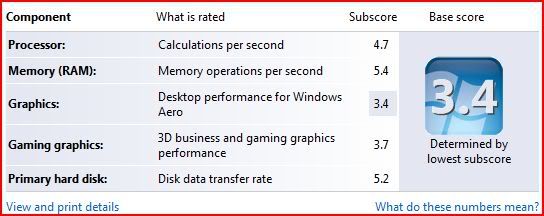 |
|
|
Dec 13 2008, 08:43 PM
|
|
Senior Member
6,738 posts Joined: Dec 2006 From: Kuala Lumpur, Malaysia | Eau Claire, Wisconsin
|
QUOTE(Deani_77 @ Dec 13 2008, 08:25 PM) Already update BIOS to the latest version available at HP Support Site. Try to lower the color to 16-Bit (default is 32-Bit). Today, I try to lower screen resolution to 1024x600 (default was 1280x800) and scaling option from Preserve Aspect Ratio to Full Screen. Now I get one extra point at Windows Aero 3.4  |
|
|
Dec 13 2008, 10:15 PM
|
|
Senior Member
6,015 posts Joined: Feb 2007
|
Dont try 16bt color, it only make your desktop/icon look fugly, aero only work with 32bit IIRC, and some apps might dont work correctly, eg Games.
|
|
|
Dec 13 2008, 10:18 PM
|
|
Senior Member
6,738 posts Joined: Dec 2006 From: Kuala Lumpur, Malaysia | Eau Claire, Wisconsin
|
QUOTE(1024kbps @ Dec 13 2008, 10:15 PM) Dont try 16bt color, it only make your desktop/icon look fugly, aero only work with 32bit IIRC, and some apps might dont work correctly, eg Games. What I meant was, try 16-Bit color just for the score and then reset it back. Remember, once you've changed to 16-bit color, you must refresh WEI. |
|
|
Dec 15 2008, 10:33 AM
|
|
Senior Member
3,251 posts Joined: Nov 2006 From: Kuala Rompin, Pahang
|
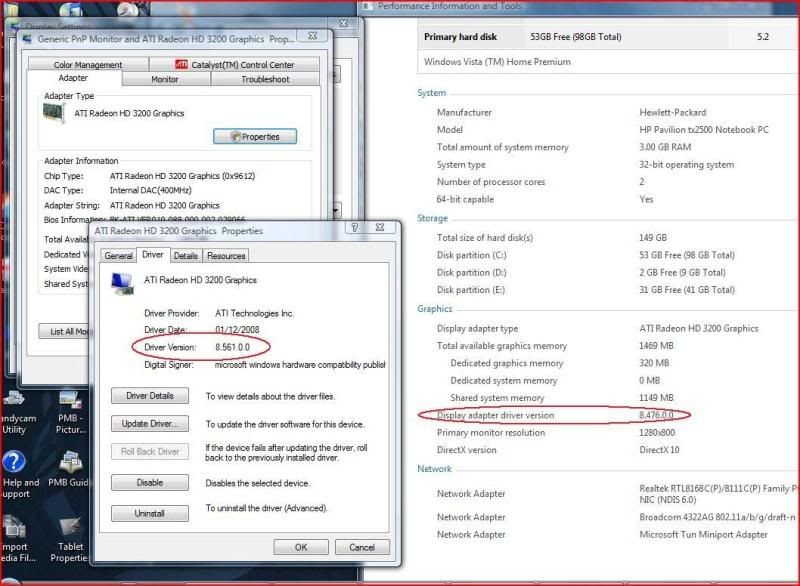
Just find out different information from device manager and WEI report. Anybody have any comments on this?
 » Click to show Spoiler - click again to hide... « |
|
Topic ClosedOptions
|
| Change to: |  0.0219sec 0.0219sec
 1.66 1.66
 5 queries 5 queries
 GZIP Disabled GZIP Disabled
Time is now: 17th December 2025 - 01:27 AM |
 Quote
Quote