http://www.opera.com/browser/next
http://dev.opera.com/articles/view/presto-...0-a-first-look/
Download: http://snapshot.opera.com/windows/
For your info, Opera 10 scores 100 out of 100 in Acid3 Test.

Opera 10 Alpha 1 Released, Opera 10
|
|
 Dec 4 2008, 09:58 PM, updated 18y ago Dec 4 2008, 09:58 PM, updated 18y ago
Show posts by this member only | Post
#1
|
 
Junior Member
360 posts Joined: Jan 2003 
|
http://my.opera.com/community/blog/2008/12/04/opera-10-alpha
http://www.opera.com/browser/next http://dev.opera.com/articles/view/presto-...0-a-first-look/ Download: http://snapshot.opera.com/windows/ For your info, Opera 10 scores 100 out of 100 in Acid3 Test. |
|
|
|
|
|
Dec 4 2008, 10:17 PM
Show posts by this member only | Post
#2
|

All Stars
10,783 posts Joined: Jan 2003  
|
Presto 2.2 sounds fantastic! and to pass Acid3 with full mark!! wah can't wait for Firefox to fight back (never bother IE la!)
|
|
|
Dec 5 2008, 09:36 AM
Show posts by this member only | Post
#3
|

All Stars
19,324 posts Joined: Jan 2003 
|
Opera 10.0 Build 1139 Alpha 1
Discover the new standard in Web browsing! Opera lets you surf the Internet in a safer, faster, and easier way. One of the most full-featured Internet power tools on the market, it includes pop-up blocking, tabbed browsing, integrated searches, and advanced functions like Opera's groundbreaking E-mail program, RSS Newsfeeds and IRC chat. You can customize the look and content of your browser with a few clicks of the mouse. Opera started out as a research project in Norway's largest telecom company, Telenor, in 1994, and branched out into an independent development company named Opera Software ASA in 1995. Opera Software develops the Opera Web browser, a high-quality, multi-platform product for a wide range of platforms, operating systems and embedded Internet products. Opera is known as the fastest and smallest full-featured browser, a first choice for people using older PCs and Windows 95 and a brilliant alternative to the default IE from Microsoft. Opera, first of all, is client World Wide Web, that is the program for extraction of the information from WWW as the documents created with help HyperText Markup Language (language of a marking of hypertext HTML). Low requirements to resources of system. Opera will work even on 386 computer about 6 MB of operative memory. MDI the interface. You can open without special expenses of memory any quantity of windows inside one working window, having chosen thus a tabulared or cascade mode. Explore our newest features • Quick Find. Have you ever forgotten the page where you found that great article or that perfect gift? When using Opera the browser remembers not only the titles and addresses, but the actual content of the Web pages you visit. • Opera Link. Access your favorite Web sites everywhere! Opera Link syncs your bookmarks and Speed Dial between your computers and mobile phone. • New browser engine. We've made the fastest browser in the world even faster with superior support for Web standards. Opera 9.5 is quicker to start, faster at loading Web pages and better at running your favorite Web applications. * More than 2x faster than Opera 9.2 in rendering JavaScript and HTML * Faster handling of third party plug-ins * Much faster start up time * Superior support for Web standards Simplify your life online • Speed Dial. Typing addresses for sites you visit frequently is ineffective. Get your favorite Web page with just one click. Speed Dial is a set of visual bookmarks you see when you open a new tab, like a dashboard for your online life. To add a new page, simply click on an empty Speed Dial and Opera will make suggestions based on browsing history and bookmarks. • Mouse Gestures. With Opera you can navigate the Web with your mouse. A mouse gesture is performed while clicking and holding the right mouse button and moving the mouse in an easy pattern. Perform movements with the mouse to access well-known features like «Back», «Forward» and «Open new tab». Like Opera's keyboard shortcuts, mouse gestures are fully customizable, so you can tailor them any way you want. • Download Manager with BitTorrent. Download files quicker with Opera. Opera starts downloading as soon as you've saved the file, so there’s no wasted time. Pause and resume downloads with the push of a button, and choose multiple files to download simultaneously without any fuss. Opera also features built-in support for the social file distribution protocol, BitTorrent, which makes it easy to download Torrent files without the need for a separate application. Master your information • Tabs and Sessions. Opera is very light on your computer, so it’s possible to have many tabs open at once. Drag and drop tabs around to change their order, or get a preview pausing over them with your mouse. You can even save a session of tabs for later, making it easy to pick up where you left off. • Content blocking. Block images, pop-ups, and plug-ins you don't want . Right-click and choose “Block content” to selectively disable annoying elements. To make Web pages load faster, or to avoid offensive content, temporarily turn off images by pressing the image button. In Opera, smart pop-up blocking is turned on by default. • Zoom and Fit to width. Is it difficult to read the content on a page? Use Opera’s Zoom button in the lower right corner to resize Web pages. If the page is too wide for your screen, simply hit “Fit to Width” and Opera will resize the Web page so you avoid horizontal scrolling. • Built-in e-mail and newsfeeds. Opera's built-in e-mail client features improved responsiveness. It also retrieves and searches your mail and news feeds even faster than before. In Opera, newsfeeds are stored on your computer so you can read them later, even when you're offline. Easily tag articles so you know which ones you want to read, which ones are important, which ones are funny, etc. Personalize your browsing experience • Customize your browser. Opera is easily customizable. Choose among hundreds of skins and setups, add or remove buttons, toolbars, or change the entire layout of the browser. It’s easy to do… or undo. • Add a Widget to your life. Widgets are small Web applications (multimedia, newsfeeds, games and more) that make your desktop experience more fun and useful. Use the Widgets menu to discover new widgets and access your favorites. Visit widgets.opera.com to learn more. • Quick and customizable Web search. Get quick access to Google, eBay, Amazon and more with the search field in the upper right corner. Or even quicker, search directly in the address bar using built-in and customizable keywords. For example, type "g Opera" in the address bar to search for “Opera” with Google. You can also create your own Web search from any search field on the Internet, simply by right clicking on a search field and choosing “Create Search”. Make the Web a better place • Stay safe with new Fraud Protection and EV. Not all Web pages are what they say they are. In Opera 9.5, Fraud Protection is enabled by default, automatically detecting and warning you about fraudulent Web sites. Fraud Protection is powered with phishing information from Netcraft and PhishTank, and Malware protection from Haute Secure. Malware is malicious software hidden throughout the Web. In addition Opera 9.5 support Extended Validation certificates (EV). This provides added assurance and trust for secure Web sites. Read more about Opera Security on: www.opera.com/security/ • Web developers: Meet Opera Dragonfly. Opera 9.5 includes a preview version of Opera Dragonfly, our upcoming developer tools. Opera Dragonfly makes web development using Opera easier than ever, both on your computer and mobile phone. What's new in Opera 10.0: * Presto 2.2 Engine * Performance boost * 100/100 and pixel-perfect on the Acid3 test * Auto-update * Inline spelling checker * Opera Mail improvements, including rich text composition and delete after X days * Widget Improvements on Linux Homepage - http://www.opera.com |
|
|
Dec 5 2008, 12:35 PM
Show posts by this member only | Post
#4
|

Senior Member
1,170 posts Joined: Nov 2006
|
really fast compare to 9.2.try that now.
|
|
|
Dec 5 2008, 05:19 PM
Show posts by this member only | Post
#5
|

Senior Member
778 posts Joined: Jan 2003 From: Polysiloxanes Boulevard 
|
QUOTE(Opera Newsletter) I take great pleasure in announcing, in case you haven't been up-to-date with the latest Opera development, that Opera 10 alpha, the developer release, now features HTML email authoring!  |
|
|
Dec 5 2008, 09:33 PM
Show posts by this member only | Post
#6
|

Senior Member
659 posts Joined: Nov 2008 From: ★ Currently Away ★ 
|
Downloading now and try it out... Thanks TS...
This post has been edited by yip_man: Dec 5 2008, 09:34 PM |
|
|
|
|
|
Dec 6 2008, 04:23 PM
Show posts by this member only | Post
#7
|
|
All Stars
10,783 posts Joined: Jan 2003
|
so far any occurences of Opera 10 Alpha crash during use?
|
|
|
Dec 6 2008, 08:48 PM
Show posts by this member only | Post
#8
|

Junior Member
416 posts Joined: May 2008 From: No Information
|
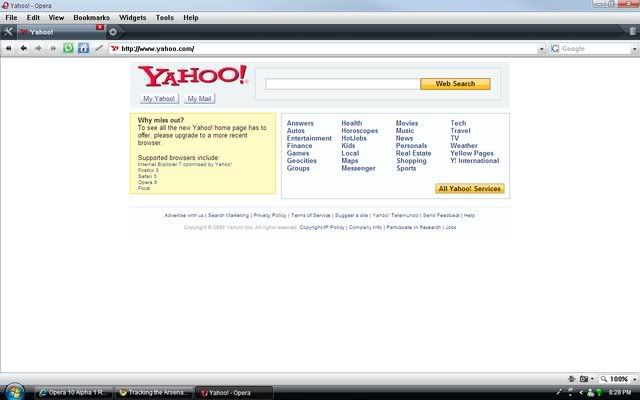
got problem with yahoo
» Click to show Spoiler - click again to hide... « |
|
|
Dec 6 2008, 09:38 PM
Show posts by this member only | Post
#9
|
|
Senior Member
1,170 posts Joined: Nov 2006
|
fast still got bug.stick it to 9.62.
got black line while searching. This post has been edited by mkei87: Dec 6 2008, 09:39 PM |
|
|
Dec 6 2008, 11:17 PM
|
|
Senior Member
778 posts Joined: Jan 2003 From: Polysiloxanes Boulevard
|
QUOTE(gajah91 @ Dec 6 2008, 08:48 PM) got problem with yahoo I had that the first time. But after refreshing the page it turned out ok. Odd. » Click to show Spoiler - click again to hide... «   » Click to show Spoiler - click again to hide... « |
|
|
Dec 7 2008, 12:15 AM
|

Senior Member
2,644 posts Joined: Jan 2003
|
I will wait until stable version is released. Opera is my fav browser now
|
|
|
Dec 7 2008, 09:35 PM
|

Junior Member
186 posts Joined: Apr 2008
|
cant revert back to older ver after upgrade?
|
|
|
Dec 10 2008, 05:32 PM
|

Senior Member
1,113 posts Joined: Jan 2006 From: Neverland
|
QUOTE(homie @ Dec 7 2008, 09:35 PM) cant revert back to older ver after upgrade? Uninstall and reinstall la. Just remember to backup your bookmarks. Me, i'm waiting for the portable version to come up  |
|
|
|
|
|
Dec 10 2008, 09:39 PM
|

All Stars
65,367 posts Joined: Jan 2003
|
portable already available
|
|
|
Dec 11 2008, 09:59 AM
|
|
Senior Member
1,113 posts Joined: Jan 2006 From: Neverland
|
You're right man. Baru je released. Downloading now as we speak. Will test it out asap.
|
|
|
Dec 11 2008, 03:49 PM
|
Senior Member
980 posts Joined: Nov 2007 From: Kuantan, Pahang
|
QUOTE(jesseblue @ Dec 10 2008, 05:32 PM) Uninstall and reinstall la. Just remember to backup your bookmarks. Use opera link for faster backup Me, i'm waiting for the portable version to come up |
|
|
Dec 11 2008, 04:03 PM
|
|
Senior Member
1,113 posts Joined: Jan 2006 From: Neverland
|
Opera link? Care to elaborate further?
|
|
|
Dec 11 2008, 09:44 PM
|
|
Junior Member
186 posts Joined: Apr 2008
|
yea...
wad u mean? |
|
|
Dec 11 2008, 09:56 PM
|
|
Senior Member
980 posts Joined: Nov 2007 From: Kuantan, Pahang
|
Its located at File > Synchronize Opera
With Opera Link you can sync your bookmarks, speed dial, notes, and other useful browser data in your opera account so that you dun have to waste time to build up another bookmark for another Opera For More Info, Go Here http://www.opera.com/link/This post has been edited by old_calculator: Dec 11 2008, 09:57 PM |
|
|
Dec 11 2008, 11:08 PM
|
|
Senior Member
1,113 posts Joined: Jan 2006 From: Neverland
|
Just tried that out. Cool feature. Now Opera will rank higher than Chrome in my fav. browser list.
 |
|
Topic ClosedOptions
|
| Change to: |  0.0181sec 0.0181sec
 0.45 0.45
 5 queries 5 queries
 GZIP Disabled GZIP Disabled
Time is now: 22nd December 2025 - 03:34 PM |
 Quote
Quote