Welcome Guest ( Log In | Register )

Bump Topic Topic Closed RSS Feed

Outline · [ Standard ] · Linear+

 AMD® Socket-AM2&AM2+ Overclocking V12, The Deneb Era...Is coming..Beware..

views
     
sadako-chan
post Dec 11 2008, 11:05 AM

Getting Started
**
Junior Member
226 posts

Joined: Nov 2008
From: Kelantan, Terengganu, Selangor


Need help here guys.

What HS do you guys recommend that are below RM200? I mean, a little over is okay, but I can't justify spending on a cooling setup that cost more than half my CPU price.

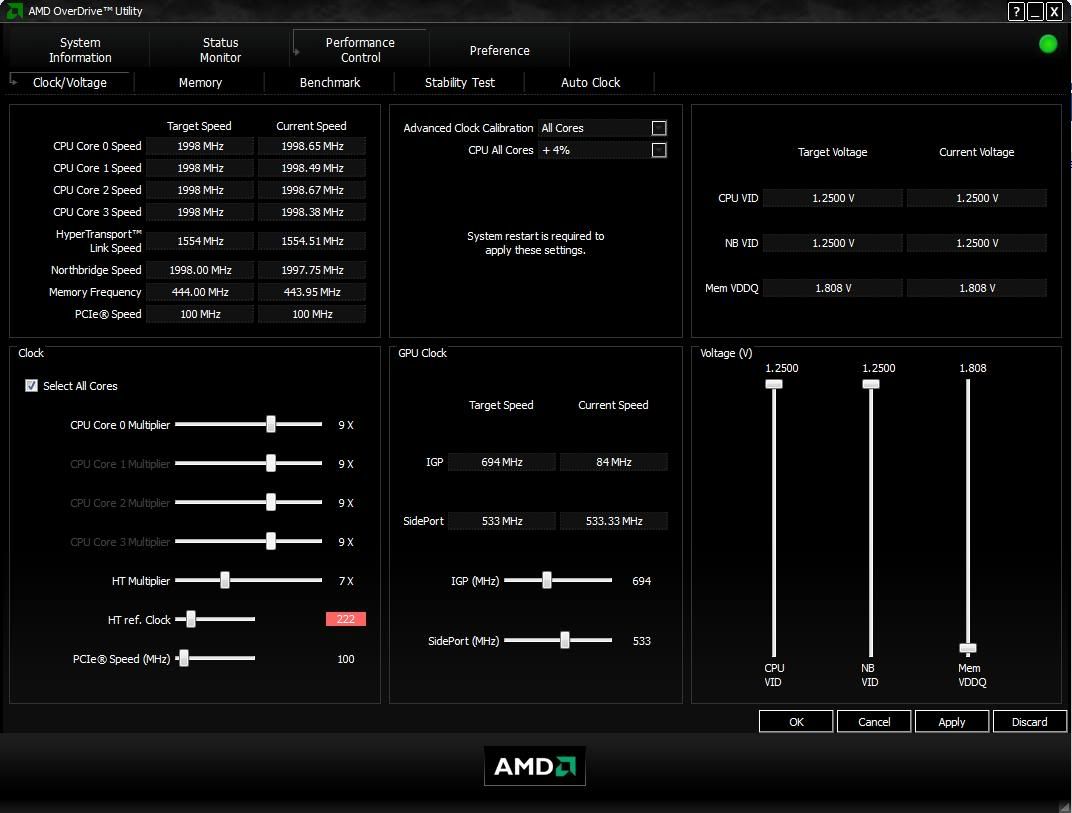
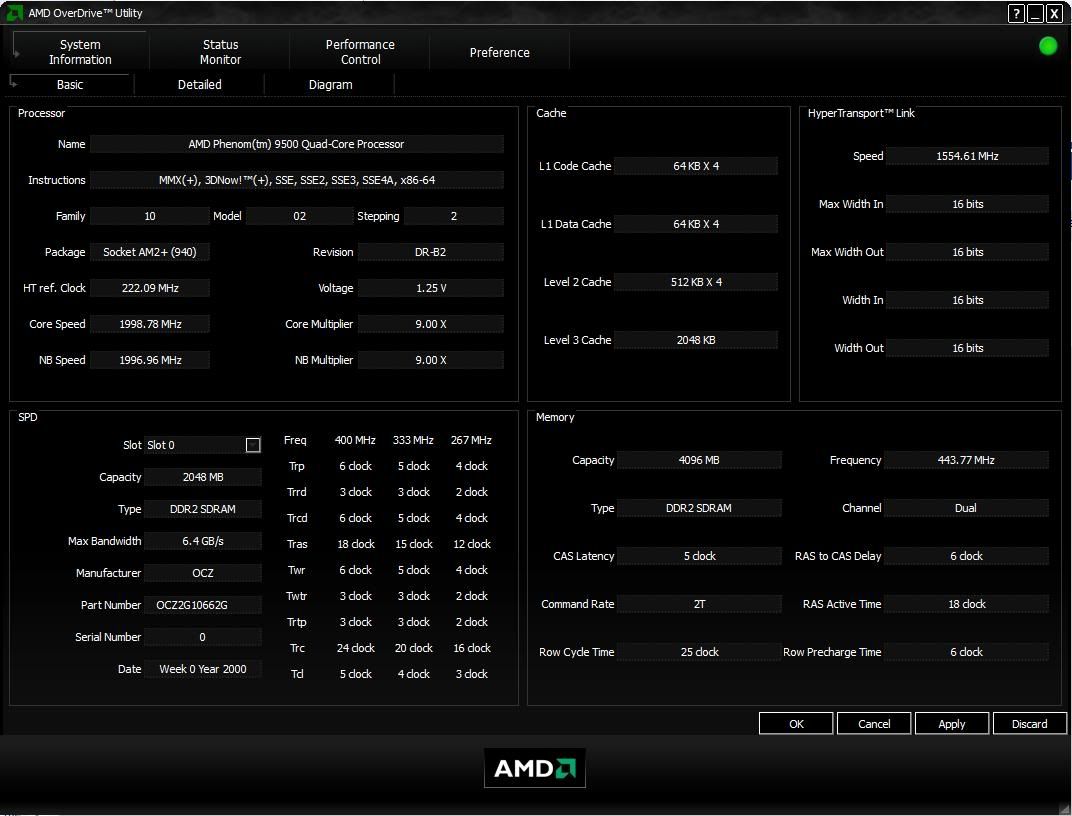
I'm running the following now, but temps are a concern, even though I haven't really bumped up the voltage, idle is at 50+ deg celcius.
Probably can go higher, but Everest says it doesn't recognize the motherboard.. so doing stress testing the old fahioned manual way.. open 5-8 H246 mplayer windows doh.gif

user posted image
user posted image


sadako-chan
post Dec 11 2008, 11:14 AM

Getting Started
**
Junior Member
226 posts

Joined: Nov 2008
From: Kelantan, Terengganu, Selangor


QUOTE(MENCHELSEA @ Dec 11 2008, 11:09 AM)
waaaaaaaa My dream mobo  wub.gif

Go for Sunbeam CCF ... Best  HSF Price/performances ratio..  icon_rolleyes.gif
*
I bought the board when my cheapo M3A died. Figured that SB750 with ACC would make a difference
As can be seen, can easily hit 230FSB with stock voltage with ACC set to auto.

Price wise, how much would the Sunbeam CCF be?

Oh, hopefully it's quiet.
No more airplane 6K rpm fans for me. >_>

Anyone else with alternative suggestions on what HS would be good for a quad core?

This post has been edited by sadako-chan: Dec 11 2008, 11:20 AM
sadako-chan
post Dec 11 2008, 11:26 AM

Getting Started
**
Junior Member
226 posts

Joined: Nov 2008
From: Kelantan, Terengganu, Selangor


QUOTE(ah_khoo @ Dec 11 2008, 11:19 AM)
try to use core temp or hwmonitor. b2 shouldn't be too hot, my ex 9600 & 9550 (b3) idlin @ bout < 50'c w/ vcore < 1.35v. however, they were cooled by 3rd party cooler. ccf or xigmatek will do d job decently w/o burnin holes in ya wallet.  nod.gif

d vcore is slightly high, imo ya chip should be able to do a 2.5GHz w/o any bump of voltage. lower ya ht link & nb multi by a notch. from my experience, locked phenoms don't like high ht link & nb freq.  wink.gif
*
Thanks for the tip, but I don't want to retard my ht/nb speed just for higher processor clocks, I think sure, the processor is faster, but the bandwidth to the other components are now a lot lesser.

Anyway, with the SB750 and ACC, there is a marked difference, I couldn't get it to post at 225FSB before with my older mother boards.

Any ideas on the prices? I haven't overclocked in a long time, and HS tech / new models wise, I didn't keep up to date for a long time edy.

Any other suggestions for Heatsinks? I might be heading to a local comp shop in a week or two and see what they have in stock.

I saw an Asus AM2+ HS selling for near RM300, is it any good?

QUOTE(MENCHELSEA @ Dec 11 2008, 11:22 AM)
If want CCF can refer here ..Price wise

» Click to show Spoiler - click again to hide... «


Very nice lengchai  seller

Max fan rpm is 2000 ,come with fan controller .. nod.gif
*
thanks, I'll go check it out biggrin.gif

This post has been edited by sadako-chan: Dec 11 2008, 11:27 AM
sadako-chan
post Dec 11 2008, 11:31 AM

Getting Started
**
Junior Member
226 posts

Joined: Nov 2008
From: Kelantan, Terengganu, Selangor


QUOTE(cdlim87 @ Dec 11 2008, 11:29 AM)
drool.gif  drool.gif  my dream mobo there too wub.gif  wub.gif 
yup.. CCF not airplane dun worry... performance  thumbup.gif  somemore.. now price @ RM155-170, some seller sell 155 without TX-2, some with RM16x-170 include TX-2 nod.gif  bro... fast fast grab it and OC here....... i'm waiting for ur OC result rclxms.gif  rclxms.gif
*
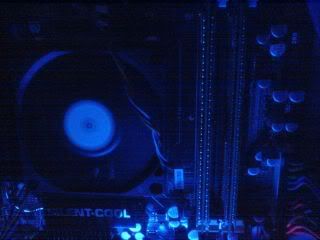
Just saw the picture.. a bit worrisome lah.. The J&W mobo ram slot very close to the processor.. hmm.gif
sadako-chan
post Dec 11 2008, 12:01 PM

Getting Started
**
Junior Member
226 posts

Joined: Nov 2008
From: Kelantan, Terengganu, Selangor


QUOTE(ah_khoo @ Dec 11 2008, 11:46 AM)
a slightly lowered frequency @ ht link won't effect much performance imo, however nb freq do have impact on mem bandwidth. it's give n take in most cases, if u want exactly same ht link & nb freq, u can put 10 * 250 and lower ya ht link & nb freq multi by a notch. i know it's quite hassle in oc'in a locked phenom, but d fun & challenges are there.  smile.gif

judgin by d perforamce/price ratio, i think ccf fits d bill well. forget bout asus, they as always overpriced...  tongue.gif
*
Actually been running over a year with the 9500 at stock clock. did try overclocking but stability just wasn't there.
Anyway, it'd be interesting to see how far I can push the NB frequency up without playing with the multis. Just to see how ACC affects OCing.

Anyway, here's the pictures of the ram clearance. Seems like adequate,
But I'll still rather buy the HS from a shop though. So hopefully they have it in stock and there's less hassle for me.
because I'd rather get it installed at the local shop so if there's any clearance issues, it'll be sorted out immediately.

user posted image

My 3-4 year old cheapo case.. I've had this since the first AMD introduction of 64bit CPUs, which I did the logo for.
user posted image


sadako-chan
post Dec 11 2008, 11:20 PM

Getting Started
**
Junior Member
226 posts

Joined: Nov 2008
From: Kelantan, Terengganu, Selangor


Been running my comp for the past 14 hours.. rock stable at 2.5ghz per core, without needing to tweak multipliers.
Proc at 1.288V, and Ram at 1.9 (dunno why the J&W board overvolts it even when at def. voltage)
SB750 and ACC really works!

Probably going to try 240/250 when I get a better cooling fan..
Hopefully can run HTT stupidly high for no particular reason.

This post has been edited by sadako-chan: Dec 11 2008, 11:25 PM
sadako-chan
post Dec 11 2008, 11:31 PM

Getting Started
**
Junior Member
226 posts

Joined: Nov 2008
From: Kelantan, Terengganu, Selangor


QUOTE(sepulgilo @ Dec 11 2008, 11:24 PM)
bro review more on jw make cdlim cannot sleep and put more poison on him  rclxms.gif  rclxms.gif
*
What's there to review? 6 Sata ports, so can run Raid 1+0/10 if you have 6HDDs
Esata, etc. etc.

Firewire is mysteriously missing though, even though there's provisions for it, and the manual states that firewire port exists.
sadako-chan
post Dec 12 2008, 12:42 AM

Getting Started
**
Junior Member
226 posts

Joined: Nov 2008
From: Kelantan, Terengganu, Selangor


QUOTE(ah_khoo @ Dec 11 2008, 11:36 PM)
max values for voltages, advance bios options available, pros & cons of d board's layout & etc... you can help more than u can imagine...  wink.gif
*
This one sure.. the bios options part.. board layout I think you guys can see from the internet pictures
Should start a new thread or post it here?

If you guys want photoes of the bios screen also can, but I'll have to reboot it lol.

Overclocking is straightforward, although the arrangement of the overclocking options, I don't really like.

This post has been edited by sadako-chan: Dec 12 2008, 12:46 AM
sadako-chan
post Dec 12 2008, 12:59 AM

Getting Started
**
Junior Member
226 posts

Joined: Nov 2008
From: Kelantan, Terengganu, Selangor


QUOTE(cdlim87 @ Dec 12 2008, 12:48 AM)
arhh.......!!!!!!!!
lol.... bro sepulgilo tumpang poison me...... cool2.gif 
yeah, cdlim is my user name here... sweat.gif  not a brand ya.., bro digswell gona  rclxub.gif , he say Q is mean question la bro..... shakehead.gif

@bro sadako-chan
yaya, js try harder on ur JW mobo,, post more result here icon_rolleyes.gif  thumbup.gif
i sure get poison by the good good result... biggrin.gif  if u can make sure CCF or other tower cooler can fit this board i lagi lagi  wub.gif  it....... laugh.gif  tongue.gif
---------------------------------------------------------------
edit:
» Click to show Spoiler - click again to hide... «

*
No tower cooler yet. earliest I will go buy is next week.

Bios options review don't want? there's some negatives I can say about the bios options.
sadako-chan
post Dec 12 2008, 04:09 AM

Getting Started
**
Junior Member
226 posts

Joined: Nov 2008
From: Kelantan, Terengganu, Selangor


QUOTE(cdlim87 @ Dec 12 2008, 03:05 AM)
4600+ OC result frm HKEPC forum:
» Click to show Spoiler - click again to hide... «

how stable i not sure, thy dun show any stress ss, only showing 3DMark sweat.gif  this result same as bro TS 4600+ drool.gif  flex.gif

another JW 790GX Ex user:
OC his x4 9650 to 2.7GHz @ 1.232v
» Click to show Spoiler - click again to hide... «

*ss for 3DMark oni too...
i'm asking him to OC more, same codition, he still waiting to get a beter cooler 1st... laugh.gif

@ sadako-chan
» Click to show Spoiler - click again to hide... «

hope it can help u to chose the cpu cooler without any crashing with ur ram... wink.gif

source:
>> http://prohardver.hu/tema/j_w_790gx-extreme/hsz_1-1.html
>> http://prohardver.hu/tema/j_w_790gx-extreme/hsz_4-4.html

dunoe wat language there are, but there was a simple review..
*
Well, no problems there then with the HS clearance

Anyway, it seems I just hit my processor maximum oc.

with 240FSB, NB speed was like 2160.. only managed to boot up once, then it hung, I rebooted and it corrupted my wifi lan card drivers and my USB card reader drivers.
Guess I can't push for better HT and NB with higher than 230FSB. Just marginally better than my old board, where I run the same processor at 215FSB, but my old board wouldn't even post at 220FSB!

I think people with multiplier unlock should do better.
Me, I'm sticking with the 2070Mhz HT/NB and 2.53Ghz per core.

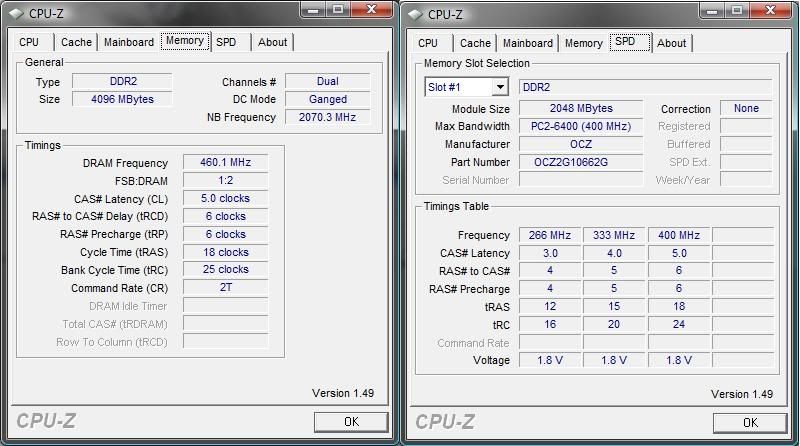
with RAM at 460Mhz, it runs pretty decently. Been running that since early this morning. 17hours, before I itchy hand and tried at 1am just now.

I did try lowering the HT multi, but it seems My NB speed is not affected by it, and still runs at 2070Mhz.
With HTx8 = 1920mhz , my NB speed still 2160, but could not be stable (booted into windows only once, then hanged when I ran AOD stress tester, even after feeding it 1.35V (proc idles at 70 deg lol)

But still, 2.5Ghz on an old 2.2ghz per core phenom isn't to shabby.

Updating in a while.. with pictures of BIOS screens

I can't really review it like others because my only other phenom board is the cheapo M3A that died.

This post has been edited by sadako-chan: Dec 12 2008, 04:10 AM
sadako-chan
post Dec 12 2008, 07:55 PM

Getting Started
**
Junior Member
226 posts

Joined: Nov 2008
From: Kelantan, Terengganu, Selangor


Didn't feel like writing a normal long ass review. (to be honest, I usually just read the conclusions part when reading reviews nowadays tongue.gif)
I haven't done overclocking in a long time, so these new boards are new to me, and so are the overclocking options.

My honest opinion? This board is not very feature filled with overclocking options, unless you're using multiplier tweaks (Phenom BE), in which case there are extra options for you to play with, which is grayed out for mine.

The few overclocking sucesses, if you've observed other sites that overclocked this boards, are all achieved by CPU multiplier tweaks. I believe it's due to the fact that the mem speed multiplier is tied to the CPU multi, and there is no longer a mem/fsb divisor option like the old days. I'm sure some of you have seen the charts on websites.

About my 230FSB OC.
Finally got slapped with an error with OCCT 12hrs into the test (this program is good!) with 230FSB...
with 240FSB at 1.4vcore, it crashes in 1min plus only, guess I might need to bump up vcore into the 1.35 region, or play with the ACC settings, rather than set it to auto.

Currently still running 230FSB, but for common tasks, it is stable enough.

These stuff takes time, and posting here would eat into that time.. blink.gif, so expect this to be the the last post until I sort out all the settings.. and eliminate the cooling as a factor.

For me, I still like FSB overclocks more than simply CPU speed, for purposes of memory bandwith, but of course getting high CPU overclocks is probably something done for bragging rights, so if you feel I should reduce my mem speed, (keep it to yourself yawn.gif ) ha ha.
I'm stuck with an early gen Phenom I bought in Nov 07' after all.

Frankly, I didn't buy this board for overclocking actually, but more for replacing my dead motherboard. I wanted the SB750 for it's SATA support more than the ACC, because I feel that with all the new speed gained with processor and memory, our HDD speed without hardware RAID striping is crap. (sorry, I got spoiled with h/w RAID striping since my Abit KT-7A RAID days tongue.gif)

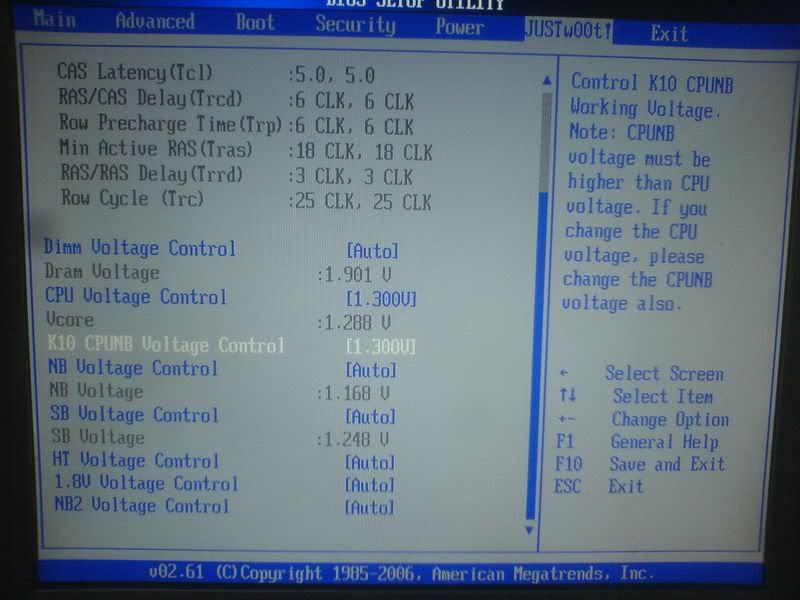
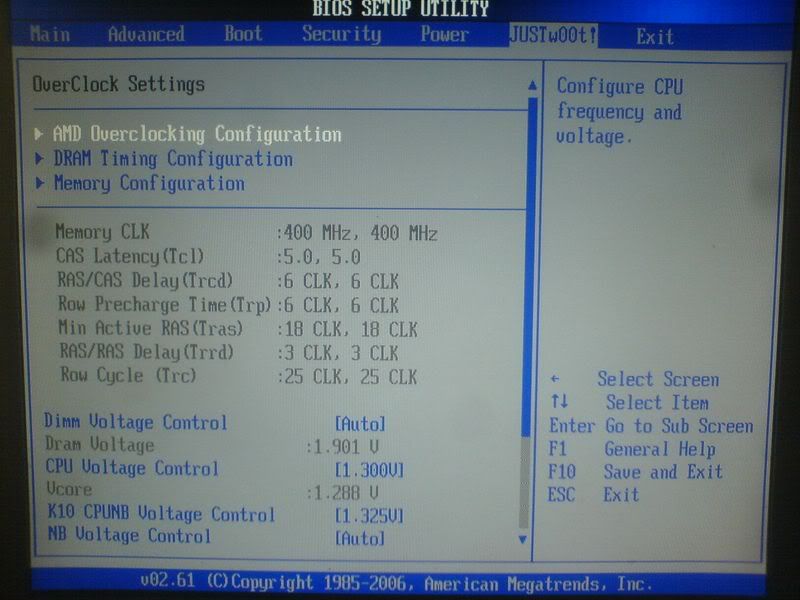
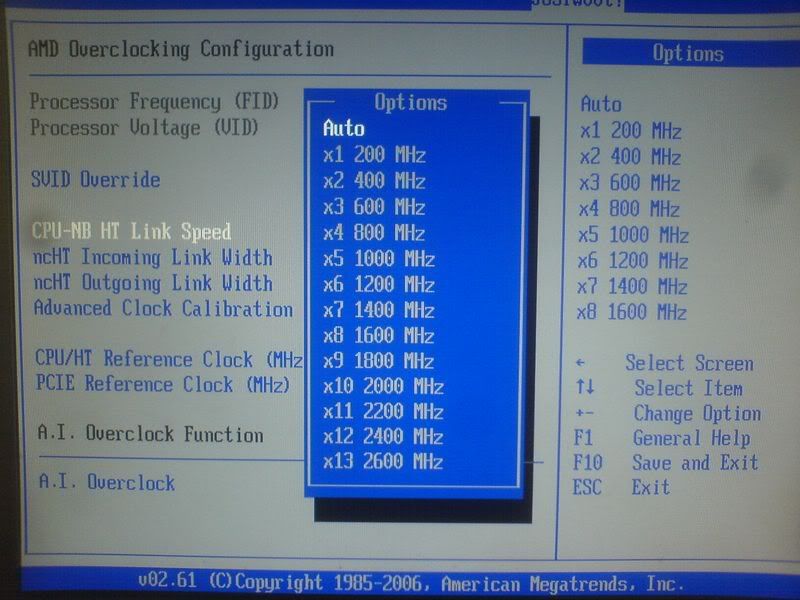
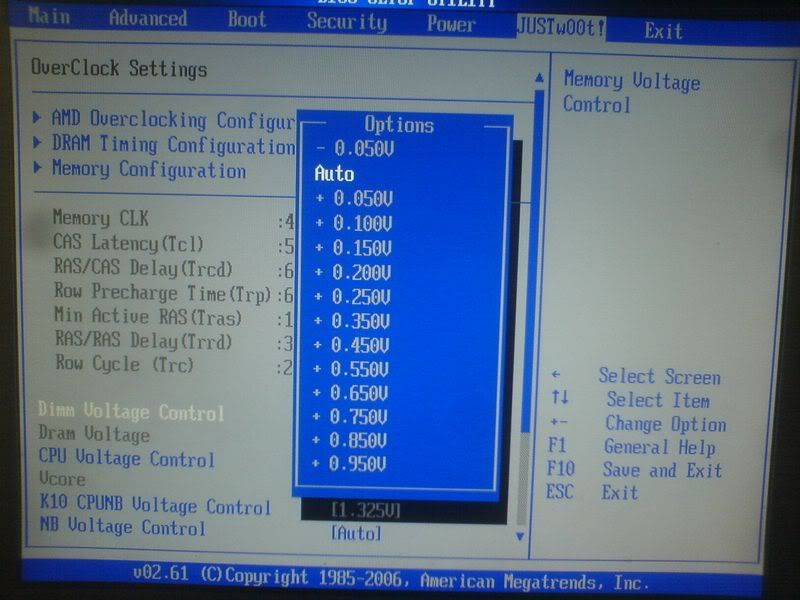
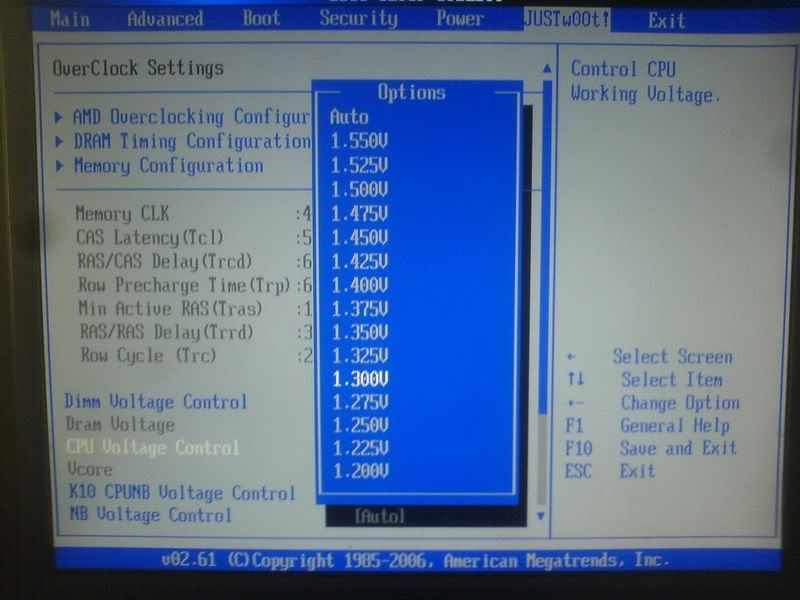
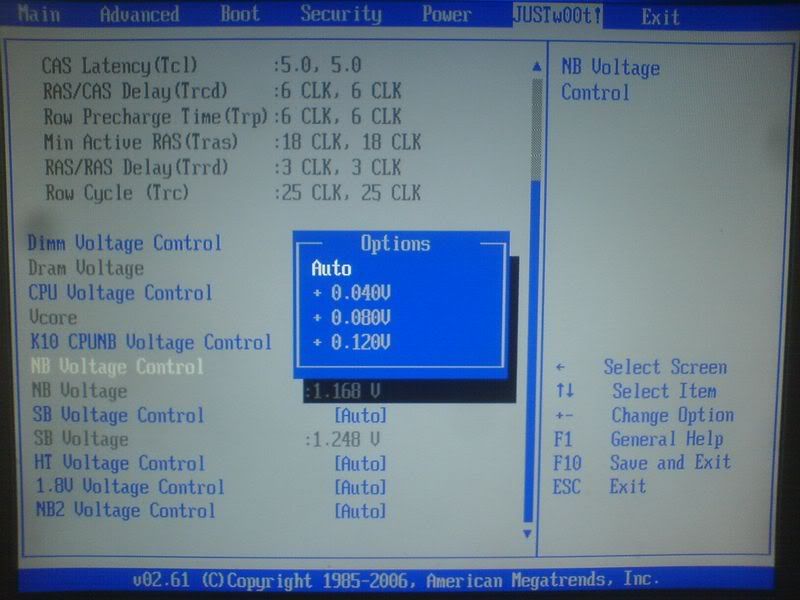
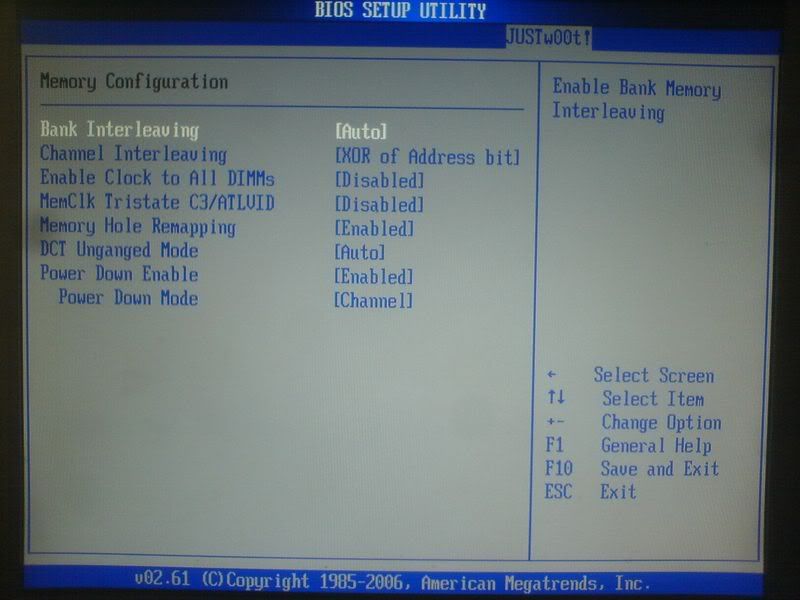
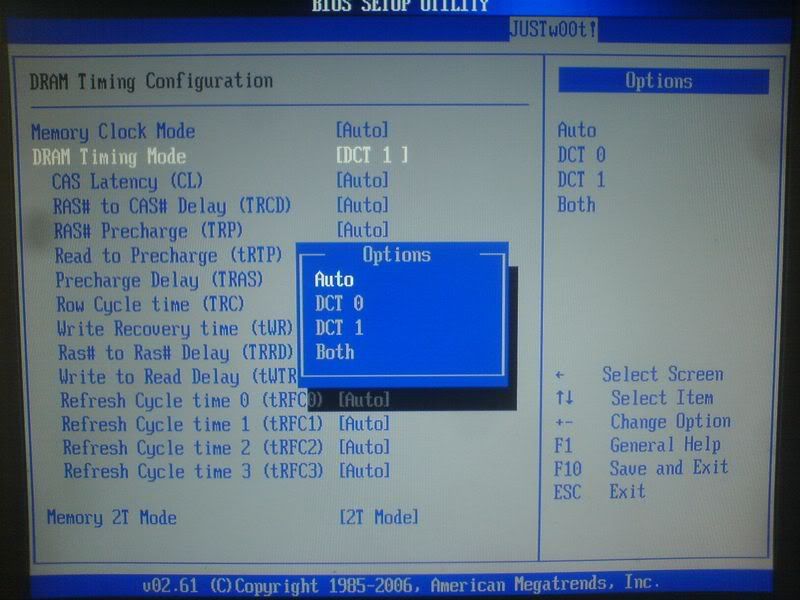
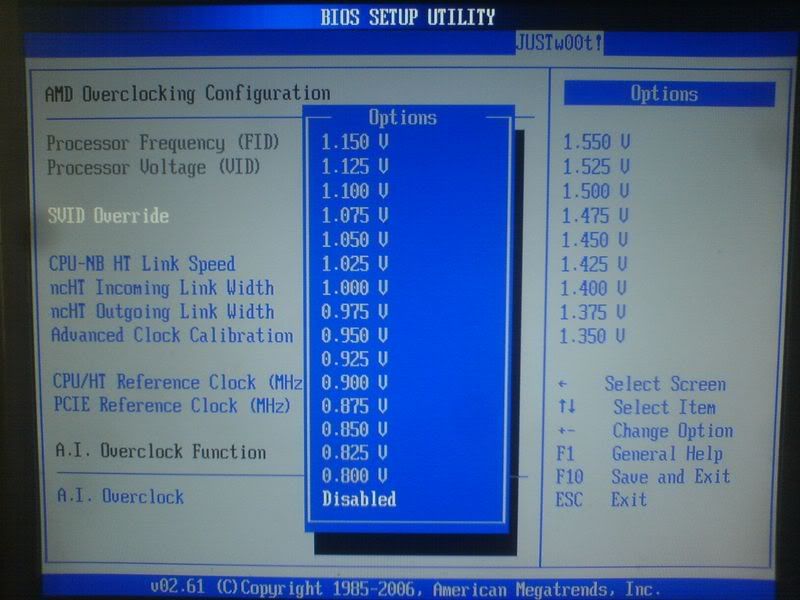
For others who think they want this board, here are the bios settings I mentioned. Justw00T! They call it (ha ha)
Individual memory settings for each slot, if you have it unganged, but that begs the question, that if you're overclocking, why are you NOT using matched ram pairs? sweat.gif

There's only one multi, that is the HT, and there's no other options for multipliers. (picture 3)
Less talk, more pictures tongue.gif
» Click to show Spoiler - click again to hide... «


Conclusion: A moderately good board, though the lack of people using it (popularity wise) means you also cannot rely on foreign forum help in terms of getting your BIOS settings spot on. The NB is cooled properly by it's silent cool heatsink, in all my overclocking tests, the NB never exceeded 50degs, with highest at only 48degs celcius. Board layout is as common as they come.. (hard to say anything fancy, because they all look the same to me.. BLAND!). Oh, the PCB's black by the way, if some enthusiasts swing that way.

I like UV reactive components on the old DFI lanparty line boards better. Black UV light in windowed cases FTW thumbup.gif (I'm biased)
For the price, I guess you can't really complain, I think it's a little better than how DFI does it's cooling on it DK series boards. (comparing due to it's same price ratio)

If you want this board for overclocking, you'd have to use a Phenom BE, I can't give a reasonably good impression of the overclocking potential with a multiplier locked phenom b2, because of how the memory and FSB is tied together. Going to try more settings and try to achieve a stable overclock. Some settings are apparently missing or different from the manual, so be warned.

I feel that as a beginning company trying to do a enthusiast board, they achieved the quality standards, but the lack of proper overclocking flexibility (clear and proper OC options in the BIOS) is a bit of a letdown. AOD in this case, doesn't help, as some of the settings on the AOD 2.1.4 application is grayed out.

All overclocking were done via bios without the use of AOD. AOD is used for testing AOD compatibility only (new AOD = horrible)

This post has been edited by sadako-chan: Dec 12 2008, 08:09 PM
sadako-chan
post Dec 12 2008, 10:05 PM

Getting Started
**
Junior Member
226 posts

Joined: Nov 2008
From: Kelantan, Terengganu, Selangor


QUOTE(cdlim87 @ Dec 12 2008, 08:22 PM)
@ sadako-chan
kk, thx anyway on ur good try... wink.gif
btw, ram and HTT are tied 2gahter.. sweat.gif  sweat.gif  phenom should be can set the ram speed individually by adjust the ram multiplier and multiply with HTT... hmm.gif  hmm.gif


No ram multiplier setting as you can see on BIOS with the J&W board.
and on this board, the memory stays at the same speed regardless of HTT speed

With HTT at x8 or x9, the ram still runs at 460mhz, and the NB at 2070Mhz with 230FSB, although HTT is down to below 2000mhz. (CPUZ 1.49)
No other multipliers to adjust, so I have no idea how to adjust NB speed

Like i said, the bios not very OC friendly. (for FSB overclocks)

New company mah..

can only hope they release a better bios in the future.

This post has been edited by sadako-chan: Dec 12 2008, 10:07 PM
sadako-chan
post Dec 12 2008, 10:13 PM

Getting Started
**
Junior Member
226 posts

Joined: Nov 2008
From: Kelantan, Terengganu, Selangor


QUOTE(sepulgilo @ Dec 12 2008, 10:10 PM)
since the release ive havent see any new bios for J&W
*
I know, I checked.. there are few bios options that are missing from the actual bios, but shown to be available in the mobo manual.
sadako-chan
post Dec 12 2008, 10:36 PM

Getting Started
**
Junior Member
226 posts

Joined: Nov 2008
From: Kelantan, Terengganu, Selangor


QUOTE(cdlim87 @ Dec 12 2008, 10:14 PM)
this prob oso happen to biostar manual.... bro sepul sure noe this prob too
--------------------------------------------------------------------------------------
btw can u post ur cpuz ss for reference?? thx notworthy.gif
*
I posted already a while back.
that one also not stable at 1.25V.. I.35V, still testing.. but won't know until OCCT gives an error.
» Click to show Spoiler - click again to hide... «


Interestingly for quad cores, the TDP rises a lot more when OCing.

This one is already 95W TDP, with 1.35V, the TDP rises to 137W (according to http://extreme.outervision.com/PSUEngine)

I'm already using Strider ST60F, so shouldn't be a problem of power.

This post has been edited by sadako-chan: Dec 12 2008, 10:40 PM
sadako-chan
post Dec 12 2008, 10:57 PM

Getting Started
**
Junior Member
226 posts

Joined: Nov 2008
From: Kelantan, Terengganu, Selangor


QUOTE(davidletterboyz @ Dec 12 2008, 10:47 PM)
? The website has V1.1 dated 29th of Nov, 2008. That's suppose to be an update? (although not sure if it helps or not hehe)

http://www.jwele.com/motherboard_detail.php?147#_bios
*
Yeah, I got the board with that bios.. >_>. I bought the motherboard pretty recently lol.
sadako-chan
post Dec 12 2008, 11:56 PM

Getting Started
**
Junior Member
226 posts

Joined: Nov 2008
From: Kelantan, Terengganu, Selangor


When I bought it, RM500++ >_>
sadako-chan
post Dec 13 2008, 03:26 AM

Getting Started
**
Junior Member
226 posts

Joined: Nov 2008
From: Kelantan, Terengganu, Selangor


QUOTE(ah_khoo @ Dec 13 2008, 12:49 AM)
for sure can one lah... it's impossible for a board of that kinda quality not to have mem divider option, even some lousiest boards have that. i'm sure there's an option for nb multi adjust as well...  wink.gif
*
If you think got, got lah.. I already have the board, and messed around for a few day already. BIOS option photo also got posted there.
only got one multiplier option, HTT for my B2 phenom 9500, if got Black Edition, then Multiplier available.
Ram multi tied to CPU multi I think for this board, because there's no ram divisor option

I cannot lower the NB speed no matter what I do.

Only HTT can go lower.. doh.gif

This post has been edited by sadako-chan: Dec 13 2008, 03:27 AM
sadako-chan
post Dec 13 2008, 04:32 AM

Getting Started
**
Junior Member
226 posts

Joined: Nov 2008
From: Kelantan, Terengganu, Selangor


AMD has always been cheaper than Intel, it's the reason why I bought it.

People comparing clock for clock and saying how intel is faster, but when you compare performance per ringgit, different story.

Update.. on the testing of the J&W mobo

The NB multi is locked, confirmed again and again
No option to slow down the NB speed from the stock 1800Mhz.

I tried retarding HTT link, but the NB speed still at stock 1800 at stock FSB (200Mhz)

Ram Divider option available, but not through the conventional 1:2, 3:5 option.. Just set Ram options to Manual, with 400, you get 1:2 mem divisor, 333, you get 3:5 mem divider. 533, I cannot confirm.. wont' post, but I assume maybe 1:1

The NB multi is tied to the CPU multiplier I think. I tried 3:5 divider and retarded my ram to 333mhz, but the NB still runs at 1800mhz, go figure. I can overclock it by pumping up the FSB, but I can't underclock it, which lies my problem of OC'ing using the FSB. More than 2000Mhz at NB, OCCT will fail.

Oh, and after playing with ACC, I think I figured out how to play with it.. FSB independent overclocking.. clever.. going to test it out before I say more though.

Edit:
OK..
On ACC
ACC seems to slow down the CPU speed independently of the FSB, when I tried a -2% setting for all cores, I got a CPU speed of 2Ghz per core..
In which case, I can see how it relates to higher overclock ability, as you can also slow down one particular core that could not hit the desired speed.
I tried increasing it to +2%, but nothing happens, probably increasing clocks are reserved for Black Edition Phenoms only.

The J&W bios is AOD friendly, as the only way I could adjust my CPU multiplier lower was through the AOD application.
However, northbridge multiplier is STILL non existent.

If the J&W board has it, they must have HIDDEN IT PRETTY WELL, cause there isn't any NB Multi adjustment.. nope, zip, zilch, none, nada, zero.

Without a phenom black edition, I don't think a reasonable amount of overclocking is available to me soon.

With my locked phenom, increasing FSB was my only avenue of OC, and without the NB Multi adjustment, looks like I'm limited in my FSB overclocking endeavour.

One can only hope they address this is future bios updates, or if AMI bios editor is out, I'd unhide the option myself. >_>

Photo whoring of UNDERclocking the cpu, while upping the FSB with AOD. The bios is meant to be used with AOD. I click apply, and on next reboot, the options sticks in the bios.., even though the CPU multiplier option isn't available in the bios, on next reboot, the mobo actually boots up with a x9 multiplier (O_o)

As usual, the pictures.. This is underclocking, just to show how the NB multi irritatingly stays at x9 even when I reduced CPU multiplier from x11 to x9, and increased FSB.

» Click to show Spoiler - click again to hide... «


But as an enthusiast's board.. Why the heck is the NB multiplier option MISSING? (>_>)

An excerpt from http://www.hardwarezone.com/articles/view....2502&cid=6&pg=6
QUOTE
Basically, for an AMD 790FX (or any AM2+) based motherboard to properly support overclocking Phenom processors, it will need to have a NB multiplier control as well. Of the four motherboards we've tested, the ASUS M3A32-MVP Deluxe and Gigabyte GA-MA790FX-DQ6 both feature standard multiplier controls for CPU and NB. The MSI K9A2 Platinum on the other hand, had surprisingly scant BIOS options. It was the only board that didn't even feature a NB multiplier at time of testing. This was surprising because we were using the latest v1.3 official BIOS. It was widely reported that the older v1.1 BIOS actually had a sub-menu with full advanced overclocking control, but MSI seems to have removed this feature again.
Well, I guess J&W forgot to put that in.. maybe I should go rant on their forums about it. Ha ha.

Edit:
Seems stable enough at the moment.. 2442Mhz with 1.3V.. 1.25 is a no go for anything above 2.4Ghz - 10 mins into the OCCT test, CPU was at 66degs, and climbing... looks like I might need a cooler after all, even though in real life, I hardly ever hit peak load sweat.gif

Well anyway, I trawled the J&W forums and found something about JHDT jumper being an item I should set when OC.. with anticipation, I set the jumper to JHDT, and NOTHING... no new options in the bios, nothing! Damn for not having NB multi.. lol

What a waste of time. shocking.gif

This post has been edited by sadako-chan: Dec 13 2008, 09:23 AM

sadako-chan
post Dec 13 2008, 03:52 PM

Getting Started
**
Junior Member
226 posts

Joined: Nov 2008
From: Kelantan, Terengganu, Selangor


[quote=cdlim87,Dec 13 2008, 11:36 AM]
@sadako-chan
bro, do u read post#1809?? i had edit it last nite..

well, for the ram, if no mistaken there will be such option:
200 : HTT x1
266 : HTT x1.33
333 : HTT x1.67
400 : HTT x2
533 : HTT x2.67

p/s: we call the FSB as HTT, where HTlink is diff with HTT, hope u understand it wink.gif

Actually I did try mess with the RAM options, I did mention it in the prev post. the only thing it changes is the RAM divisor

If I set to 400, FSB/RAM Ratio is 1:2, If I set to 333, it would be 3:5.

NB multi however, is fixed at x9 no matter what I do, and after reading a lot, it seems not many mobo's have that, even though they're enthusiast boards.

I tried registering at J&W, but no email to activate my account arrived.. >_>
Still waiting for the email till now, it' been like 8-10 hrs already. Tried registering, but email is in use.

You registered without a problem?

This post has been edited by sadako-chan: Dec 13 2008, 03:56 PM
sadako-chan
post Dec 13 2008, 05:03 PM

Getting Started
**
Junior Member
226 posts

Joined: Nov 2008
From: Kelantan, Terengganu, Selangor


QUOTE(cdlim87 @ Dec 13 2008, 04:29 PM)
js folo wat i write for the ram, its rite there, 1:2 mean HTT 200: DRAM 400, where ur totaly ram speed = DRAMx2= 800MHz thumbup.gif
for the acount it seem got prob too.. i still cnt get register but i got the moderator msn addrs.. js nw chat with him awhile, thn i go lunch, now he hvn on9 sweat.gif  sweat.gif
» Click to show Spoiler - click again to hide... «

thn u js chart to him if u wan... wink.gif

» Click to show Spoiler - click again to hide... «

*
Don't have MSN, looks like have to install it then
So far bus at 222, proc at 24xxMhz
If proc is the limitation, I probably can bump up to 250 FSB, lower multiplier for 1000Mhz++ DDR speeds

Cannot overclock processor, overclock ram loh.. ha ha doh.gif

2 Pages  1 2 >Top
Topic ClosedOptions
 

Change to:
| Lo-Fi Version
0.0461sec    0.30    7 queries    GZIP Disabled
Time is now: 8th December 2025 - 06:10 PM