Outline ·
[ Standard ] ·
Linear+
Speakers for your X360, What kinda speakers you have for X360?
|
TSP.I.M.P
|
 Nov 9 2008, 01:04 PM, updated 18y ago Nov 9 2008, 01:04 PM, updated 18y ago
|

|
Would like to know what kinda speakers you guys used for your X360  . I'm currently using Pioneer HTS-GS1, official home theater speakers for X360. Wonder if I can buy this in M'sia?  Anyone using Logitech Z5500 for their gaming console? I'm just curious if you're using Z5500 as your speaker system, what kind of input do you select on your Z5500? The reasong I'm asking this is because I'm thinking of getting Z5500 in M'sia. With the Pioneer system that I have, the audio input from my X360 into the speaker is automatically detected as Dolby Digital input, thus providing a 5.1 experience when you're playing Gears of War or Ace Combat 6. You can actually hear the sound coming from behind. But if I were to hook up Z5500 with my X360, how's the sound like? Does Z5500 automatically detect the audio input as Dolby Digital? I guess this part of the question only can be answered by those who own Z5500 + X360 at home. Please discuss your setting here  . Here is my setting.    This post has been edited by P.I.M.P: Nov 10 2008, 02:30 AM This post has been edited by P.I.M.P: Nov 10 2008, 02:30 AM |
|
|
|
|
|
TSP.I.M.P
|
Nov 9 2008, 05:12 PM
|
|
|
QUOTE(xxboxx @ Nov 9 2008, 03:57 PM) since Z5500 have dobly digital decoder built-in, it should manage to detect dolby digital signal and decode it to 5.1 sounds. Technically it should be that way. But I just wanna double confirm this issue. It will be not much fun playing with just stereo sound, defeats the Dolby Digital features right  . I'm happy with my Pioneer system now. |
|
|
|
|
|
TSP.I.M.P
|
Nov 10 2008, 12:37 AM
|
|
|
QUOTE(wintzen @ Nov 9 2008, 07:23 PM) Just want to ask, your pioneer system, is it a home system or is it specifically for xbox? Its both actually. When you connect to xbox then the whole thing becomes a home theater  . But I used it as my PC speaker + for xbox. QUOTE(daidzz @ Nov 9 2008, 07:28 PM) thats cool, how much does the pioneer sound system cost? Around US$170 QUOTE(wintzen @ Nov 9 2008, 11:27 PM) but i don't think the xbox have an optical output right? Xbox has an optical audio output.
Added on November 10, 2008, 2:30 amUpdate with photos. This post has been edited by P.I.M.P: Nov 10 2008, 02:30 AM |
|
|
|
|
|
TSP.I.M.P
|
Nov 18 2008, 07:18 AM
|
|
|
How come no more posting?
You guys don't use speaker for you xbox ka?
|
|
|
|
|
|
TSP.I.M.P
|
Nov 18 2008, 08:10 AM
|
|
|
Since you have LCD tv, might as well get a surround speakers to compliment your excitement. You can hear bullets & footsteps from behind. Real gaming experience.
|
|
|
|
|
|
TSP.I.M.P
|
Nov 18 2008, 11:18 AM
|
|
|
» Click to show Spoiler - click again to hide... « QUOTE(deodorant @ Nov 18 2008, 09:52 AM) I'm using some 2.1 Edifiers, haha. Thinking of a low-end 5.1, but no idea whether I can get anything decent around 1k-ish, lol. Around 1k can get pretty decent speakers liao AFAIK. Altec Lansing or Logitech. PLEASE STAY AWAY FROM CREATIVE!!!  » Click to show Spoiler - click again to hide... « QUOTE(wintzen @ Nov 18 2008, 10:46 AM) I think you should be able to find right? Like sonic gear or altec lansing? At first wanted to get a 2.1 as well, but managed to dig out the hifi....quite nice lar when playing GH. GH? What is that? |
|
|
|
|
|
TSP.I.M.P
|
Nov 19 2008, 12:32 AM
|
|
|
» Click to show Spoiler - click again to hide... « QUOTE(deodorant @ Nov 18 2008, 08:53 PM) Hmm I was considering the Pioneer SX-316, got some dude in Garage Sales selling for 1k. But ... it only has coax inputs, no digital inputs. Coax means those red & white connectors right? Can get surround sound from it or not? Or must have digital input then only can have surround? Otherwise ... I could always go for the Logitech Z-5500, I think it's around the same price also right? I think z5500 around RM1.4k |
|
|
|
|
|
TSP.I.M.P
|
Nov 19 2008, 01:05 AM
|
|
|
» Click to show Spoiler - click again to hide... « QUOTE(deodorant @ Nov 18 2008, 08:53 PM) Hmm I was considering the Pioneer SX-316, got some dude in Garage Sales selling for 1k. But ... it only has coax inputs, no digital inputs. Coax means those red & white connectors right? Can get surround sound from it or not? Or must have digital input then only can have surround? Otherwise ... I could always go for the Logitech Z-5500, I think it's around the same price also right? If you wanna get full surround, my advice is to go for optical input instead of coaxial. With optical you just need 1 cable, eliminate hassle.  |
|
|
|
|
|
TSP.I.M.P
|
Nov 19 2008, 09:11 AM
|
|
|
» Click to show Spoiler - click again to hide... « QUOTE(wintzen @ Nov 19 2008, 07:01 AM) But guys wanted to check, when you are using optical right, you will still need to use the component av cable for that right? since the optical output is tag to that cable No need. Your optical will transfer all your audio to the speaker. Don't have to connect any other cables for your audio. Depends what kinda of AV connection you're using, you still need to connect your AV component. Unless you're using HDMI, don't have to worry about anything. All being taken care of, audio + video in 1 cable. |
|
|
|
|
|
TSP.I.M.P
|
Nov 19 2008, 12:32 PM
|
|
|
If you use HDMI, no need to connect other speakers. It will take care of everything.
|
|
|
|
|
|
TSP.I.M.P
|
Nov 19 2008, 11:50 PM
|
|
|
» Click to show Spoiler - click again to hide... « QUOTE(deodorant @ Nov 19 2008, 11:27 PM) well 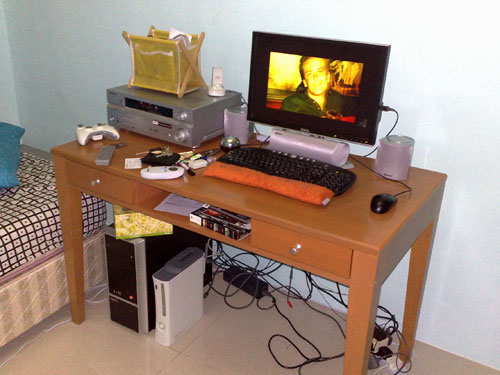 What monitor you're using? |
|
|
|
|
|
TSP.I.M.P
|
Nov 20 2008, 02:14 AM
|
|
|
Licensed for Xbox 360 only.
|
|
|
|
|
|
TSP.I.M.P
|
Nov 20 2008, 03:55 AM
|
|
|
» Click to show Spoiler - click again to hide... « QUOTE(deodorant @ Nov 20 2008, 03:07 AM) Dell 2007WFP. Thinking of upsizing to the new TNpanel 24-incher ... maybe ... Bigger better!  » Click to show Spoiler - click again to hide... « QUOTE(dark lenanza @ Nov 20 2008, 03:14 AM) using altec lanc  p/s:pimp ur avatar and sig very2....  Hehe. Wanna know more? Try google search the name in my avatar  |
|
|
|
|



 Quote
Quote

 0.0219sec
 0.61
0.61
 6 queries
 GZIP Disabled