

Official Pendrive having problem, Help needed
|
|
  Nov 4 2008, 10:37 AM, updated 18y ago Nov 4 2008, 10:37 AM, updated 18y ago
Show posts by this member only | Post
#1
|
 
Senior Member
1,029 posts Joined: Apr 2007 From: All Blue 
|
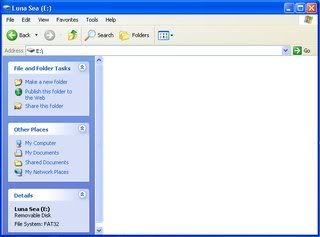
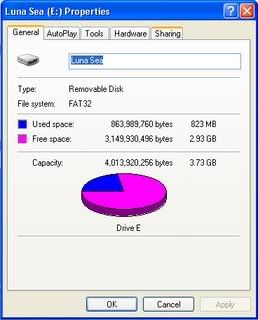
The previous day the pendrive is working fine but today when i plug my pendrive to my pc but i can see nothing inside my pendrive. The disk space shows that there still have data inside my pendrive. How to solve this problem? Please help as the data inside is very important.
|
|
|
|
|
|
Nov 4 2008, 10:38 AM
Show posts by this member only | Post
#2
|

All Stars
23,688 posts Joined: Aug 2007 From: Outer Space  
|
You can try format the pen drive and check the disk space again.
Edited: Sorry didn't read your post clearly. Better don't format the pen drive if you still wish to keep the data inside. This post has been edited by AskarPerang: Nov 4 2008, 10:39 AM |
|
|
Nov 4 2008, 10:39 AM
Show posts by this member only | Post
#3
|

Senior Member
1,140 posts Joined: Feb 2005
|
does it come with the password protected partition ? what model of pendrive u are using ?
|
|
|
Nov 4 2008, 10:54 AM
Show posts by this member only | Post
#4
|
|
Senior Member
1,029 posts Joined: Apr 2007 From: All Blue
|
QUOTE(NaMyzarC @ Nov 4 2008, 10:39 AM) does it come with the password protected partition ? what model of pendrive u are using ? Kinston Datatraveller 100 - without password protected partition This post has been edited by ac_N1: Nov 4 2008, 11:08 AM |
|
|
Nov 4 2008, 01:48 PM
Show posts by this member only | Post
#5
|

Junior Member
379 posts Joined: Dec 2006 
|
did you try to plug it to another pc instead of your pc?
could be pc problem, not pendrive |
|
|
Nov 4 2008, 02:33 PM
Show posts by this member only | Post
#6
|

Senior Member
2,644 posts Joined: Jan 2003
|
QUOTE(love_hina @ Nov 4 2008, 01:48 PM) did you try to plug it to another pc instead of your pc? I concur with your suggestion. Also, you can try plug in on different USB port on the same PC. And try restart the PC then try again. If all also fail, then we'll think of something else could be pc problem, not pendrive  |
|
|
|
|
|
Nov 4 2008, 04:31 PM
Show posts by this member only | Post
#7
|
|
Senior Member
1,029 posts Joined: Apr 2007 From: All Blue
|
QUOTE(love_hina @ Nov 4 2008, 01:48 PM) did you try to plug it to another pc instead of your pc? Yes, I already tried to plug it into my office pc. Same problem could be pc problem, not pendrive  |
|
|
Nov 4 2008, 05:23 PM
Show posts by this member only | Post
#8
|
|
Senior Member
1,029 posts Joined: Apr 2007 From: All Blue
|
QUOTE(rebelsoul76 @ Nov 4 2008, 02:33 PM) I concur with your suggestion. Also, you can try plug in on different USB port on the same PC. And try restart the PC then try again. If all also fail, then we'll think of something else Already tried your suggestion a few times edi. Still the same |
|
|
Nov 4 2008, 06:31 PM
Show posts by this member only | Post
#9
|
|
Senior Member
2,644 posts Joined: Jan 2003
|
823MB couldn't have just vanished into thin air. Some setting or software is hiding it?
Have you u checked "Show hidden files and folders" in the Window Explorer's Folder Options? Trace back what you did the previous day. Did you install any new software or change any setting? |
|
|
Nov 4 2008, 07:50 PM
|

Senior Member
1,035 posts Joined: Feb 2008
|
Yup, that may be happended.
U may also enable to view system file . |
|
|
Nov 4 2008, 08:28 PM
|

Senior Member
855 posts Joined: Oct 2008 From: Timezone , WA
|
I have the similar problem too with my kingston 100 CNY rat edition that i brought this year , how to help?
|
|
|
Nov 4 2008, 08:35 PM
|

Senior Member
754 posts Joined: Sep 2007 From: klang
|
QUOTE(ac_N1 @ Nov 4 2008, 05:23 PM) Already tried your suggestion a few times edi. Still the same try some other port???check the control panel????Added on November 4, 2008, 8:38 pm QUOTE(beyond_99 @ Nov 4 2008, 07:50 PM) Yup, that may be happended. double check ur control panel...u can enable itU may also enable to view system file . This post has been edited by myboo_1988: Nov 4 2008, 08:38 PM |
|
|
Nov 4 2008, 09:30 PM
|
|
Senior Member
2,644 posts Joined: Jan 2003
|
QUOTE(myboo_1988 @ Nov 4 2008, 08:35 PM) try some other port???check the control panel???? pls clarify. where in control panel? enable what? Added on November 4, 2008, 8:38 pm double check ur control panel...u can enable it  |
|
|
|
|
|
Nov 5 2008, 01:30 AM
|

Senior Member
725 posts Joined: Jul 2008
|
maybe be infected bu virus..
 |
|
|
Nov 5 2008, 05:54 PM
|
|
Senior Member
1,029 posts Joined: Apr 2007 From: All Blue
|
QUOTE(rebelsoul76 @ Nov 4 2008, 06:31 PM) 823MB couldn't have just vanished into thin air. Some setting or software is hiding it? I have already check the hidden files option. Doesn't help.... Did not change any software or hardware setting Have you u checked "Show hidden files and folders" in the Window Explorer's Folder Options? Trace back what you did the previous day. Did you install any new software or change any setting?  Added on November 5, 2008, 5:55 pm QUOTE(myboo_1988 @ Nov 4 2008, 08:35 PM) try some other port???check the control panel???? All 6 port give the same results....This post has been edited by ac_N1: Nov 5 2008, 05:55 PM |
|
|
Nov 5 2008, 07:10 PM
|
|
Senior Member
2,644 posts Joined: Jan 2003
|
what file system is the pendrive formatted in? right click on the pendrive in Windows Explorer, select Properties
|
|
|
Nov 5 2008, 07:20 PM
|

Senior Member
3,668 posts Joined: Jun 2006 From: Bikini Abyss
|
QUOTE(notystar_exe @ Nov 5 2008, 01:30 AM) maybe be infected bu virus.. uhh yeaaa!! idiot.. QUOTE(rebelsoul76 @ Nov 5 2008, 07:10 PM) what file system is the pendrive formatted in? right click on the pendrive in Windows Explorer, select Properties FAT32 .. there's screenshot further above http://support.microsoft.com/default.aspx?...8&Product=winxp |
|
|
Nov 6 2008, 12:36 AM
|
|
Senior Member
2,644 posts Joined: Jan 2003
|
facepalm.jpg
my bad, i totally forgot about the screenshot how bout try this method: Start>Run... >CMD at the prompt type "chkdsk e: /v" without the " quotes do you see your missing file reported there? Added on November 6, 2008, 12:40 amfacepalm.jpg my bad, i totally forgot about the screenshot how bout try this method: Start>Run... >CMD at the prompt type "chkdsk e: /v" without the " quotes do you see your missing file reported there? Another suggestion: try Linux Live CD (not sure which version is best nowadays). Boot up using the Live CD, then browse your pendrive. If you can see the file, copy it to the hard disk This post has been edited by rebelsoul76: Nov 6 2008, 12:40 AM |
| Change to: |  0.0165sec 0.0165sec
 0.60 0.60
 5 queries 5 queries
 GZIP Disabled GZIP Disabled
Time is now: 19th December 2025 - 05:57 AM |
 Quote
Quote