Outline ·
[ Standard ] ·
Linear+
How to make read chinese word in folder, XP help
|
TSenfenete
|
 Oct 24 2008, 04:26 PM, updated 18y ago Oct 24 2008, 04:26 PM, updated 18y ago
|
Getting Started


|
Hi Why my XP folder for Chinese word only come out with boxes..... You may view image below. 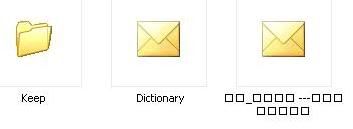 I would not like to use 3rd party software to enable it. What are the missing item i install during setup and how do i make it back. Its got connection with fonts......i have SimSun font install.......i can read chinese in using internet explorer/firefox. Hope can get some feedback. This post has been edited by enfenete: Oct 24 2008, 04:32 PM |
|
|
|
|
|
IcyDarling
|
Oct 24 2008, 04:43 PM
|
|
|
same problem, it seems that u can install the language pack by Microsoft to read the symbols, but it doesnt work for me because i screwed up my windows
|
|
|
|
|
|
TSenfenete
|
Oct 29 2008, 08:28 PM
|
Getting Started
|
Seem no one can help here, lastly i successful make my folder can view Chinese character.
How???
Okay goto --> Control Panel --> Regional and Language Options --> Languages Tab select Install files for East Asian Languages then OK button --> Prompt you insert your XP installer CD and when finish install its will ask u to restart your PC. After restart you are able to read Chinese character.
Make sure your XP installer have Asian pack inside else will prompt file not found and error in installing.
|
|
|
|
|



 Quote
Quote


 0.0139sec
 0.83
0.83
 5 queries
 GZIP Disabled