

this morning when i start my laptop,it doesn't apppear as normal,,,
blue screen appear first and it does not boot until window,,,
can someone please help on how can i solve my prob???,,,

blue screen!, help!!!!
|
|
  Oct 15 2008, 10:02 AM, updated 18y ago Oct 15 2008, 10:02 AM, updated 18y ago
Show posts by this member only | Post
#1
|
 
Junior Member
51 posts Joined: Sep 2008  
|
someone please help,,,
this morning when i start my laptop,it doesn't apppear as normal,,, blue screen appear first and it does not boot until window,,, can someone please help on how can i solve my prob???,,, |
|
|
|
|
|
Oct 15 2008, 10:15 AM
Show posts by this member only | Post
#2
|

Senior Member
1,723 posts Joined: Jun 2007
|
use ur camera or phone to take pic of the blue screen n post it here
|
|
|
Oct 15 2008, 01:01 PM
Show posts by this member only | Post
#3
|

Junior Member
25 posts Joined: Oct 2008
|
QUOTE(irusmas @ Oct 15 2008, 10:02 AM) someone please help,,, can enter windows or not?this morning when i start my laptop,it doesn't apppear as normal,,, blue screen appear first and it does not boot until window,,, can someone please help on how can i solve my prob???,,,  is it winxp pro sp2 if so... is it like this? 1) Turn on cpu 2) Blue screen appear,at first its full screen, then its just quarter screen size 3) Automatically restart 4) Can boot to windows on the second or third go...... If so maybe it's your win xp service pack 2, try upgrading it to sp3, got same problem with friend's notebook, other models are fine, only NEC have to run SP3, are yours NEC? |
|
|
Oct 15 2008, 01:10 PM
Show posts by this member only | Post
#4
|

Junior Member
186 posts Joined: Apr 2008
|
have u tried to boot in safe mood?
|
|
|
Oct 15 2008, 01:31 PM
Show posts by this member only | Post
#5
|
|
Senior Member
1,931 posts Joined: Mar 2008
|
or mayb your HD corrupted ?
|
|
|
Oct 15 2008, 01:36 PM
Show posts by this member only | Post
#6
|

Senior Member
2,152 posts Joined: Feb 2006
|
QUOTE(irusmas @ Oct 15 2008, 10:02 AM) someone please help,,, Hi there,this morning when i start my laptop,it doesn't apppear as normal,,, blue screen appear first and it does not boot until window,,, can someone please help on how can i solve my prob???,,, Please remove your RAM out of your laptop, Use a rubber to rub the gold fingers of the RAM and then put it back again (screenshot included below) NEXT, 1.If your system fails to boot, please let me know. Drop me a PM 2. If your system managed to boot after you do the above mentioned (if it fails, boot in safe mode and do the following.) Looking for minidump file Go to My Computer and locate C:\Windows\Minidump or C:\Minidump. Once you have the minidump folder, please zipped the whole folder and upload it here (using add attachement function) or other web hosting page mentioned below. Please provide the link to download your file. No minidump file available!!!How?? Do the following if you did not find your minidump file (Window XP)
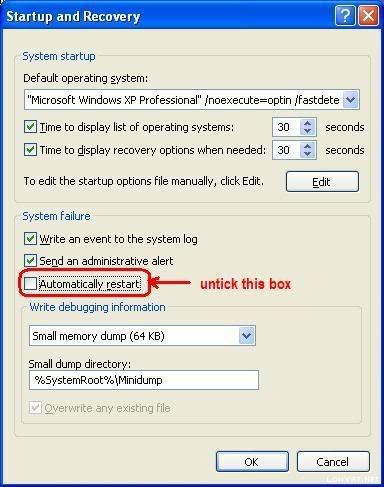 Further tutorial are available at http://forum.lowyat.net/topic/346230 Thanks This post has been edited by francischuahcw: Oct 15 2008, 01:39 PM Attached image(s)  |
|
|
|
|
|
Oct 15 2008, 04:52 PM
Show posts by this member only | Post
#7
|

Senior Member
6,738 posts Joined: Dec 2006 From: Kuala Lumpur, Malaysia | Eau Claire, Wisconsin
|
Mods, please move this thread to "Technical Support".
|
|
|
Oct 16 2008, 08:03 AM
Show posts by this member only | Post
#8
|
|
Junior Member
51 posts Joined: Sep 2008
|
i cannot boot in safe mood,,,
it will appear the same blue screen with something written in it,,, please help,,,,, |
|
|
Oct 16 2008, 11:07 AM
Show posts by this member only | Post
#9
|
|
Senior Member
2,152 posts Joined: Feb 2006
|
Hi there irusmas, as per information you give me
QUOTE STOP: 0x0000000A Did you see what are the additional error below those number? If yes please let me know.IRQL_NOT_LESS_OR_EQUAL something like this,,, please help,,, Please do below QUOTE To resolve an error caused by a faulty device driver, system service, or BIOS Restart your computer. Press F8 at the character-based menu that displays the operating system choices. Select the Last Known Good Configuration option from the Windows Advanced Options menu. This option is most effective when only one driver or service is added at a time. Please tell me if you have update any driver recently or what you have been done to your laptop. For this issue, i will help you to able to log into your window. But it depends on the severity of your system. I will try my best to help you to enter your system and let you backup your file. You might need to repair/reinstall your window if condition is worst. Once you managed to get into windows, please upload your minidump file here. |
|
|
Oct 16 2008, 02:41 PM
|
|
Junior Member
51 posts Joined: Sep 2008
|
i can't boot either in safe mode or other choice,,,
 it will still restart and appear blue screen and then restart again,,, |
|
|
Oct 16 2008, 03:00 PM
|
|
Senior Member
2,152 posts Joined: Feb 2006
|
I see,
You can try repair your window and let me know the result. Please refer below link. Screen shot is available on how to repair your window. http://www.geekstogo.com/forum/How-to-repa...ws-XP-t138.html This post has been edited by francischuahcw: Oct 16 2008, 03:01 PM |
|
|
Oct 16 2008, 03:13 PM
|

Senior Member
2,130 posts Joined: Oct 2004 From: Miri
|
When it is booting, try constantly press F8 until you get into OS selection menu, choose "disable automatic restart upon failure". It should leave the blue screen open and you can see the error codes .
|
|
|
Oct 16 2008, 05:12 PM
|

Junior Member
203 posts Joined: Mar 2006 
|
ehh..i thought for RAM issue....the pc will give u some sound as a respond.....
PS: u can try this...if u got XP cd...boot from CD...go to Repair (R key) then will ask you which to start or something...u will see somethinglike this Recovery Console C:\Windows --> type 1 enter --> then will give u C:\Windows --> type cd\ --> type chkdsk /f <---F got fix..R for repair.....last time my fren also face something like that...cannot even see the Windows logo and go to blue screen....after type that...it will take long time...to load...and fix the hdd... ** in my opinion what did u do, b4 facing this blue screen?? install any software or set something wrongly??most install unstable software and corrrupted...hope this can help u..... GOOD LUCK ** i'm not 100% sure can help u or not.........so at least a way This post has been edited by quahk2006: Oct 16 2008, 05:34 PM |
| Change to: |  0.0165sec 0.0165sec
 1.24 1.24
 6 queries 6 queries
 GZIP Disabled GZIP Disabled
Time is now: 23rd December 2025 - 12:06 PM |
 Quote
Quote