

 Oct 9 2008, 02:59 PM


Save it in a convenient permanent folder such as C:\HJT\.
Next
Go to Control Panel > Add or Remove Programs > Uninstall the following programs:
MyWebSearch
Seekmo
Next
Please download : CCleaner (freeware)
http://www.majorgeeks.com/download4191.html
Run the installer, and uncheck the option to install Yahoo toolbar (unless you want Yahoo toolbar).
Once installed, run CCleaner click the Windows [tab]
The following should be selected by default, if not, please select:
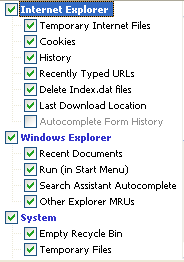
Next: click Options click the Settings tab
Uncheck: "Only delete files older than 48 hrs.", click Ok
Then click Run Cleaner (bottom right) then Exit
Next
Please download Malwarebytes' Anti-Malware from HERE or HERE
Note: If you already have Malwarebytes' Anti-Malware, just run and update it.. Then do a "Perform Full Scan"
Double Click mbam-setup.exe to install the application.
- Make sure a checkmark is placed next to Update Malwarebytes' Anti-Malware and Launch Malwarebytes' Anti-Malware, then click Finish.
- If an update is found, it will download and install the latest version.
- Once the program has loaded, select "Perform Full Scan", then click Scan.
- The scan may take some time to finish,so please be patient.
- When the scan is complete, click OK, then Show Results to view the results.
- Make sure that everything is checked, and click Remove Selected.
- When disinfection is completed, a log will open in Notepad and you may be prompted to Restart.(See Extra Note)
- The log is automatically saved by MBAM and can be viewed by clicking the Logs tab in MBAM.
- Copy&Paste the entire report in your next reply
Extra Note:
If MBAM encounters a file that is difficult to remove,you will be presented with 1 of 2 prompts,click OK to either and let MBAM proceed with the disinfection process,if asked to restart the computer,please do so immediately.
So, in your next reply, please include the following reports:
MBAM
Fresh HJT

 Quote
Quote
 0.0162sec
 0.86
0.86
 6 queries
 GZIP Disabled