Welcome Guest ( Log In | Register )

Bump Topic Topic Closed RSS Feed
12 Pages « < 9 10 11 12 >Bottom

Outline · [ Standard ] · Linear+

 AMD® Socket-AM2&AM2+ Overclocking V11, ~ The AMD Vibe is going STRONG ~

views
     
cdlim87
post Nov 6 2008, 10:42 PM

AMD
*******
Senior Member
2,220 posts

Joined: Sep 2008
From: PJ


QUOTE(sepulgilo @ Nov 6 2008, 10:34 PM)
im in cheras only
*
ohh.. quite far but consider near rclxub.gif ... haaahaaahaaa....
ok la, aft this if u r too bz, thn c how lor.. if i free to do experiment thn i borow frm u la...keke.. biggrin.gif

» Click to show Spoiler - click again to hide... «


---------------------------------------------------------------------------------
edit:
or b4 u take out ur mobo u js gv it a try lor.. if the performance still there, i aspect it should be able run at HTT 370-390MHz nod.gif
*remember lower multipier for(cpu/HTlink/ram) smile.gif

This post has been edited by cdlim87: Nov 6 2008, 10:53 PM
cdlim87
post Nov 6 2008, 11:06 PM

AMD
*******
Senior Member
2,220 posts

Joined: Sep 2008
From: PJ


QUOTE(sepulgilo @ Nov 6 2008, 10:57 PM)
hahaha can x 10 but need load of vcore do it hehehe  3600 @ 1.6 never stress it just run see
*
waaa drool.gif shocking.gif no worry fried ur 38f3 meh? beter lower cpu 1st maa...
dun take too much risk leh... laugh.gif
cdlim87
post Nov 6 2008, 11:20 PM

AMD
*******
Senior Member
2,220 posts

Joined: Sep 2008
From: PJ


eh, u try it now la... try it can run wat max HTT... interest here to noe... thx.. laugh.gif
mayb try 380/390
cdlim87
post Nov 7 2008, 08:20 AM

AMD
*******
Senior Member
2,220 posts

Joined: Sep 2008
From: PJ


QUOTE(sempronic @ Nov 7 2008, 01:27 AM)
wow...new name in AMD clan....
*
wuuhuuuuu......bro welcome...!!!!
shocking.gif sweat.gif sweat.gif u hv so many rig kah??
3800 fans..? full with 38 both F2,F3 rclxub.gif
BTW still hv 6000+ cheers.gif laugh.gif
urs 6k+ is 125w also ar? using wat cooler there,Vcore? temp? hmm.gif

cdlim87
post Nov 7 2008, 08:50 AM

AMD
*******
Senior Member
2,220 posts

Joined: Sep 2008
From: PJ


QUOTE(sempronic @ Nov 7 2008, 08:25 AM)
nahhh...sold them all already....
now only use 4200+ and e2140 G0..
not OC anymore...retired already nod.gif
*
oh.. haha.... notworthy.gif
but nvm.. bro..i blive if always come here sure will make u ''come out'' again flex.gif tongue.gif
gamer will hv reired gamer; OCer dun hv retired retired punya... thumbup.gif
----------------------------------------------------------------------------------------------------
edit:
u oledi put ur good name on winsor 38 and 6k..
now can go for phenom lo bro... brows.gif
like ''retired'' bro ah_khoo.. always say retired, but still saw his name on the board... rolleyes.gif tongue.gif
keep wrking bro..!!! icon_rolleyes.gif thumbup.gif


This post has been edited by cdlim87: Nov 7 2008, 08:55 AM
cdlim87
post Nov 7 2008, 08:58 AM

AMD
*******
Senior Member
2,220 posts

Joined: Sep 2008
From: PJ


QUOTE(lendew @ Nov 7 2008, 08:52 AM)
nood question here..i just wanna to ask..how we gonna to rank our oc result in this thread??? massage the thread stater ka or just paste here???? i already do that but no respond..heheheh thank!! hope someone can guide me
*
post here the the ''code'' like wat stated in the 1st page, mate.. smile.gif

but now our TS dunoe go where liao.. new TS now is AMDAthlon, u can try post ur result here.. he will update for BETA testing at forum body but not at the board.. smile.gif
aft we move to new house thn he will update all the board result.. wink.gif
cdlim87
post Nov 7 2008, 09:52 AM

AMD
*******
Senior Member
2,220 posts

Joined: Sep 2008
From: PJ


hey guys.. i notice that hv something quite interesting to ply with.. using power caculator.
v can draftly count how much v can OC our proc due to power consumed..
http://www.extreme.outervision.com/PSUEngine
using this llink..
at the cpu part.. select the proc we r using can calculate the power for OCed..
as i calculate mine:

6000+ stock speed 3000MHz @ Vcore1.47v(stock) 125W,
6000+ OCed speed 3371MHz @ Vcore1.47v using 140W;
6000+ OCed speed 3372MHz @ Vcore1.47v need 141W, (mean cnt support by mobo..)

where i ever try OC my proc cnt boot at 3400MHz,
mayb it walled by the power consumed there make it around 3370MHz for max clock speed

i thk this is quite accurate with my proc.. how about urs?? lets take a try there.. wink.gif
----------------------------------------------------------------------------------------------------------------------
@lendew
whn u lowered ur multiplier mean ur cpu/ram divider also lowered, mean u oledi OCed ur RAM..
so u nid to lower ur RAM multiplier for stable it.. u can take a reference at the 1st pgs on the multiplier of CPU and ram divider table smile.gif

*my opinion, higher HTT will get beter result in SPI compare to high multiplier at the same CPU speed

This post has been edited by cdlim87: Nov 7 2008, 10:11 AM
cdlim87
post Nov 7 2008, 10:57 AM

AMD
*******
Senior Member
2,220 posts

Joined: Sep 2008
From: PJ


QUOTE(lendew @ Nov 7 2008, 10:42 AM)
ooo really ka bro???so i need to reduce my ram to 667..then reduce the multiplier and used higher fsB..am i rite?? but lower the ram to 667 not effect the speed of ram ka bro?? let say now i can go to 860MHz..maybe if i lower the ram multipler to 667 it will go around 700MHz something...700MHz @860MHz..not effect ka bro??sorryy oledi pening2 here rclxub.gif
*
sure with low freq will effect the performance.. but as long as it get stable thn its good loh..
for me i will find out the max speed for cpu where at that speed i can get a max speed for my ram too..
example:
my 6000+ stock speed 3000MHz (200x15), ram800@ divider (cpu/8): 375MHzx2=750mhz only
so, let say i OC my proc to 3210mhz (214x15), ram800@ divider (cpu/8): 401mhzx2=802mhz
optimize my value ram speed at 800mhz, and HTlink at 1070 still comfortable for my mobo smile.gif

*js an example for u wink.gif
**remember bro.. ur ram stock speed is at 667mhz so 800 oledi is tough job for it.. nod.gif
im not familiar with other ram, so if ur ram r OCed able, thn u js try to loosen ur ram timing mayb can make it stable oledi

This post has been edited by cdlim87: Nov 7 2008, 11:24 AM
cdlim87
post Nov 7 2008, 11:26 AM

AMD
*******
Senior Member
2,220 posts

Joined: Sep 2008
From: PJ


QUOTE(lendew @ Nov 7 2008, 11:24 AM)
hahahaha... now i already upgrade to 800 MHz (corcair DHX C5)..heheheh biggrin.gif so if the speed of ram below it's stock...waaa really shame looo tongue.gif hahahah nevermind ..now i am running orthos for 250x12 with 760MHz speed of ram...then already can boot..after lower the ram multiplier..meaning that my ram limit my ocing laa niee...ayoooo..need to find another performance ram.. sweat.gif
*
yep... ram walled ur OC.. mayb u js loosen ur ram timing.. if can make it stable still worth it.. nod.gif
cdlim87
post Nov 7 2008, 11:48 AM

AMD
*******
Senior Member
2,220 posts

Joined: Sep 2008
From: PJ


QUOTE(lendew @ Nov 7 2008, 11:32 AM)
waaa...not familiar with ram timing..now my timing is 5-5-5-18-23-2T at 1.95Volt..your suggestion to loose my ram timing??.. and my opinion my mobo also walled my oc due to the limit of ram voltage..am i rite???if i can increase a bit more about ram voltage..maybe i can oc more...huhuhuh
*
i mean whn u OC ur ram u cnt boot rite?
so with the vdimm at 1.95v mayb u still can boot it with loosen its timing.. js my 2 cent thou laugh.gif
but for me, i always dun OC my ram as it oni is a value ram not suitable for OC.. blush.gif
cdlim87
post Nov 7 2008, 12:39 PM

AMD
*******
Senior Member
2,220 posts

Joined: Sep 2008
From: PJ


hohoho.. finally sifu come out d.. sifu ans more to ur ques... biggrin.gif
sifu xixo_12 pro to RAM timing timing thingy 1... laugh.gif
js use his solution to get wat u wan... nod.gif
cdlim87
post Nov 7 2008, 01:11 PM

AMD
*******
Senior Member
2,220 posts

Joined: Sep 2008
From: PJ


QUOTE(sepulgilo @ Nov 7 2008, 12:51 PM)
any reviews oc on jw board? i heard it does not have manual oc tools?
*
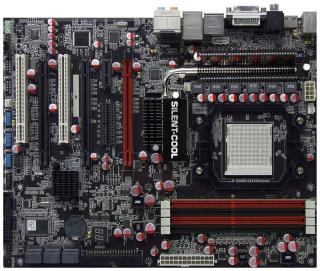
JW-790GX-EXTREME
Attached Image
this 1 kah?? drool.gif brows.gif
-------------------------------------------------------------------------------------------------------------
edit:
ohh ya.. BTW ad try ur asus board? HTT380,390 can run ? hmm.gif

This post has been edited by cdlim87: Nov 7 2008, 01:31 PM
cdlim87
post Nov 8 2008, 12:18 AM

AMD
*******
Senior Member
2,220 posts

Joined: Sep 2008
From: PJ


QUOTE(sepulgilo @ Nov 7 2008, 10:26 PM)
im installing all the parts bro hope tonite can warm up the engine tongue.gif
*
woo... bro so fast get new mobo n keyboard+mouse set..!! thumbup.gif
warming up ur engine, thn boost it to the ''highest RPM+ highest gear to get highest speed''.... brows.gif
---------------------------------------------------------------------------------------------------------------------------

BTW got test out the max HTT for m2n-e or nt bro? laugh.gif
cdlim87
post Nov 8 2008, 03:00 PM

AMD
*******
Senior Member
2,220 posts

Joined: Sep 2008
From: PJ


32bit windows can support 3.5GB ram oni rite?
or u js change to vista 64 bit lor brows.gif
thn put it 8GB.. brows.gif

since u ask which 1 hv more performence, so to save moneyflies.gif thn get add 1 pair enuf..= 4x1GB thumbup.gif laugh.gif

or if u thking for future upgrate thn get more thn DDR800 punya ram loh.. mayb each RAM with 2GB, so max can up to 4x2GB=8GB flex.gif laugh.gif


Added on November 8, 2008, 3:09 pm@sepulgilo

how ur new mobo? got try boost oledi..?? nice kah? try add-on for PWM cooling thn can push push push...!!!! flex.gif
make it 3.8GHz lah... tongue.gif but with air cooling its imposible la... laugh.gif
or try dry ice.. drool.gif mayb 38f3 oso can go 4.0 kekeke............ whistling.gif

This post has been edited by cdlim87: Nov 8 2008, 03:09 PM
cdlim87
post Nov 8 2008, 03:38 PM

AMD
*******
Senior Member
2,220 posts

Joined: Sep 2008
From: PJ


lol....i saw frm china OC forum,, ppl there using TA790GX 128M to OC 5400+ BE,
his setting is @UMA mode: 420x8=3360, HTlink can go till 2100MHz sweat.gif sweat.gif * this board so flex.gif ar..? hmm.gif
@side port + UMA mode: 250x13.5=3375, HTlink 1250MHz drool.gif

wat i dunoe here is any diff between UMA mode only vs UMA+side port mode, any diff there? hmm.gif

mayb ta790gx user can share share some thing here.. nod.gif

cdlim87
post Nov 8 2008, 03:41 PM

AMD
*******
Senior Member
2,220 posts

Joined: Sep 2008
From: PJ


QUOTE(teckhooi @ Nov 8 2008, 03:33 PM)
biostar ta790gx 128

How Much How much?
*
waaa... last time saw RM340 nw RM385... sweat.gif
cdlim87
post Nov 8 2008, 03:44 PM

AMD
*******
Senior Member
2,220 posts

Joined: Sep 2008
From: PJ


QUOTE(teckhooi @ Nov 8 2008, 03:42 PM)
Izzt?

Where U Refer The Price?
*
here u can go: http://forum.lowyat.net/topic/818519

still rm340 laugh.gif


Added on November 8, 2008, 3:54 pmerm........ i not sure how the performance diff among thm la, but wat i wana compare is TA790GX 128M vs TA790GX XE

for me i will chose XE coz it come with full solid cap, but it was m-atx type;
128M is not 100% solid cap,but wat advantage there is with 2xPCI-Ex16 slot..

i will not do CF so for me prefer XE more.. laugh.gif

This post has been edited by cdlim87: Nov 8 2008, 03:54 PM
cdlim87
post Nov 8 2008, 05:00 PM

AMD
*******
Senior Member
2,220 posts

Joined: Sep 2008
From: PJ


JW-790GX-EXTREME
» Click to show Spoiler - click again to hide... «

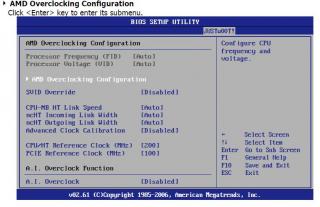
some ppl ask it can be OC manually in BIOS..??
the answer should be YES nod.gif

as wat i saw in its manual guide:
» Click to show Spoiler - click again to hide... «

u can see frm pic that i cut frm its manual, where it was not put the OC feature as other mobo inside advanced setting
it put in other setting called JUSTw00T!, it really gv some suprising here.. laugh.gif

and this is the OC configuration insided:
» Click to show Spoiler - click again to hide... «


it also come with AI overclock.. drool.gif , but i thk most of OC'er dun like to use AI overclock.. whistling.gif tongue.gif

and tis board hv many thing can control manually especially for OC purpose as wat i highlighted:
» Click to show Spoiler - click again to hide... «


**these js a few part of the manual i downloaded frm J&W official website biggrin.gif

this mobo really look interesting.. any OCer if get it dun 4gt to share with all of us.. icon_rolleyes.gif notworthy.gif

This post has been edited by cdlim87: Nov 8 2008, 05:06 PM
cdlim87
post Nov 8 2008, 05:44 PM

AMD
*******
Senior Member
2,220 posts

Joined: Sep 2008
From: PJ


QUOTE(sepulgilo @ Nov 8 2008, 05:37 PM)
i got it 350 @ robyn
bro, zhenwei selling@RM340; last time bro linglong selling ar RM339
but nw bro linglong oledi increase the price to RM385, new batch product mayb... hmm.gif

btw, where u bought? if near to cheras thn rm350 still is good price.. nod.gif
if nid travel far far away thn i beter get at nearer place, if the pricing not much diff.. laugh.gif
cdlim87
post Nov 8 2008, 06:08 PM

AMD
*******
Senior Member
2,220 posts

Joined: Sep 2008
From: PJ


QUOTE(sepulgilo @ Nov 8 2008, 05:49 PM)
i got it @ robyn imbi yesterday on the way home after work but now my problem is im lost in this bios hehehee seems cant get anything rite

if ther any biostar user plz assist me sweat.gif
*
how come u can lost inside there... sweat.gif try to take some photo snap, mayb other can help u.... laugh.gif

12 Pages « < 9 10 11 12 >Top
Topic ClosedOptions
 

Change to:
| Lo-Fi Version
0.0448sec    0.69    7 queries    GZIP Disabled
Time is now: 20th December 2025 - 09:09 AM