

i tried to overclock my processor, i followed kmarc's overclocking guide
i followed everything there, after i overclock...
my cpu cannot boot eventhough i lowered the speed and the voltage
target : Q6600 2.4ghz oc to around 3.4ghz
plz help me....

[WTA] Overclock problem
|
|
 Sep 25 2008, 01:24 AM, updated 18y ago Sep 25 2008, 01:24 AM, updated 18y ago
Show posts by this member only | Post
#1
|
 
Junior Member
345 posts Joined: Aug 2007 
|
My rig spec in my signature..
i tried to overclock my processor, i followed kmarc's overclocking guide i followed everything there, after i overclock... my cpu cannot boot eventhough i lowered the speed and the voltage target : Q6600 2.4ghz oc to around 3.4ghz plz help me.... |
|
|
|
|
|
Sep 25 2008, 01:26 AM
Show posts by this member only | Post
#2
|
|
Junior Member
512 posts Joined: Mar 2007
|
if even at default you cant boot. then go and resit the bios.
btw, first try to reach 3Ghz, test, stable. go more. dont just go to 3.4 directly. coz chip from chip overclock potential is different. This post has been edited by night_wolf_in: Sep 25 2008, 01:27 AM |
|
|
Sep 25 2008, 01:29 AM
Show posts by this member only | Post
#3
|
|
Junior Member
345 posts Joined: Aug 2007
|
erm...i try to reach 2.88ghz in 320mhz * 9
even the basic overclock, my cpu cannot boot and it need to restart many times to start my rig.. when i reset my bios to default speed, everything ok alr |
|
|
Sep 25 2008, 01:37 AM
Show posts by this member only | Post
#4
|
|
Junior Member
512 posts Joined: Mar 2007
|
im not sure about kmarc's guide.
but you might wanna tell us exactly what you did. like, what did you change etc. btw, since you are using Gigabyte board. read this guide. http://www.tomshardware.com/forum/245679-2...3l-overclocking and as i said, if you want us to tell you what might went wrong. you'll have to tell us every step that you did. |
|
|
Sep 25 2008, 01:41 AM
Show posts by this member only | Post
#5
|
|
Junior Member
345 posts Joined: Aug 2007
|
http://forum.lowyat.net/index.php?showtopi...hl=overclocking
i followed this steps Added on September 25, 2008, 1:50 amim scratching head now, dunno where went wrong... even the basic overclocking This post has been edited by hong1380: Sep 25 2008, 01:50 AM |
|
|
Sep 25 2008, 01:59 AM
Show posts by this member only | Post
#6
|
|
Junior Member
512 posts Joined: Mar 2007
|
btw, did u increase your ram voltages? i c u running 1066Mhz, these usually need 2.1v+. and the motherboard by default is 1.8v. so you might need to increase the volt for your rams to make sure they are running right. add 0.2v.
and dont yet overclock your rams. make the spd multiplier to run in a way that your cpu 1:1 ram. or lower. you have to figure exactly which multiplier you need to choose. do u know your chip's standard voltage? chip from chip is different. if you dont know, it is usually the one which comes by default if you put cpu voltage on auto. This post has been edited by night_wolf_in: Sep 25 2008, 02:00 AM |
|
|
|
|
|
Sep 25 2008, 02:02 AM
Show posts by this member only | Post
#7
|
|
Junior Member
345 posts Joined: Aug 2007
|
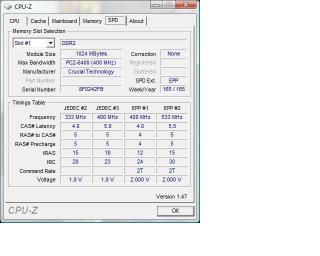
im not really sure the ram's voltage.... Added on September 25, 2008, 2:04 amoh ya, where can set the ram's voltage? This post has been edited by hong1380: Sep 25 2008, 02:04 AM |
|
|
Sep 25 2008, 02:16 AM
Show posts by this member only | Post
#8
|
|
Junior Member
512 posts Joined: Mar 2007
|
QUOTE System voltage control (Manual) - so that you can set your voltages DDR2 overvoltage control ---- Normal PCIE overvoltage control ----- Normal FSB overvoltage control ------ Normal (may need to increase if high FSB, usually if bus speed more than 450mhz) (G)MCH overvoltage control - Normal (may need to increase if high FSB, usually if bus speed more than 450mhz) CPU voltage control (very important) - let's mildly increase the vcore (+0.05v should be enough for now) there, DD@ overvoltage control. have a look at that link i showed u. dont worry, kmarc and that one not much different, since both same mobo.  |
|
|
 Sep 25 2008, 02:36 AM Sep 25 2008, 02:36 AM
Show posts by this member only | Post
#9
|
 
VIP
18,182 posts Joined: Jan 2005 From: Dagobah
|
When you overclock the FSB, usually the RAM frequency will follow suit... at 320MHz, the RAM frequency required will be at least 640MHz and usually achieveable using 1:2 memory ratio with DDR2-667. However to run at 1:1 ratios, would require RAM frequencies around 1280MHz (quad pumped) which is way beyond normal RAM clocks. Thus you have to beware of the memory frequency or host/memory settings also when overclocking. Anyway ideal overclocks for Q6600 (without resorting to "odd" frequencies) are...
2.67GHz = 8.0 x 333MHz (min DDR2-667) 3.0GHz = 9.0 x 333MHz (min DDR2-667) 3.2GHz = 8.0 x 400MHz (min DDR2-800) 3.6GHz = 9.0 x 400MHz (min DDR2-800) Anyway, try inquiring at the overclocking section... moving this thread there..  |
|
|
Sep 25 2008, 02:55 AM
|
|
Junior Member
345 posts Joined: Aug 2007
|
i tried to add the voltage of the ram by 0.4volt
it become worst, until totally cannot boot... and then i reset the bios by jumper |
|
|
Sep 25 2008, 03:08 AM
|

Junior Member
336 posts Joined: Oct 2007  
|
When u overclock, make sure ur ram not oc over than 1066... u can set that in bios under memory frequencies
like lex said, when u increased the fsb, the ram frequencies will increase |
|
|
Sep 25 2008, 03:30 AM
|
|
Junior Member
345 posts Joined: Aug 2007
|
hmm...i think didnt over 1066
since 320*2 ...just 640 0.0 |
|
|
Sep 25 2008, 04:27 AM
|

Senior Member
1,864 posts Joined: Jun 2008
|
You will probably need to increase Vmch and Vtt as well once you get to the higher FSBs.
|
|
|
|
|
|
Sep 25 2008, 11:03 AM
|
|
Junior Member
345 posts Joined: Aug 2007
|
what's that= =?
|
|
|
Sep 25 2008, 11:07 AM
|
 
Elite
8,545 posts Joined: Aug 2006 From: 224.0.0.6
|
vMCH = vNB = Voltage supplied to NorthBridge
vTT = Termination Voltage. Google it for more details.  -pWs- |
|
|
Sep 25 2008, 01:15 PM
|
|
Junior Member
345 posts Joined: Aug 2007
|
hmm..i tried to add the vmch and vtt...still the same= =
Added on September 25, 2008, 1:23 pmor either my motherboard / PSU cant support the overclock? This post has been edited by hong1380: Sep 25 2008, 01:23 PM |
|
|
Sep 25 2008, 07:40 PM
|

Elite
4,746 posts Joined: Dec 2007 From: Speed rule
|
Try 333x9,1:1 divider,all voltage leave on normal and timing to 5-5-5-12 for the time being.
Then,stress test it. |
|
|
Sep 25 2008, 09:34 PM
|
|
Junior Member
345 posts Joined: Aug 2007
|
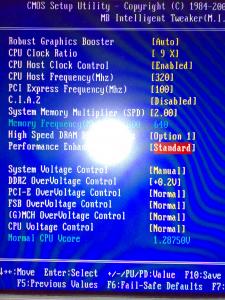

this is my bios setting, after i save and restart.. my cpu cant boot....the fans running, ram got light but the LED not blinking |
|
|
Sep 25 2008, 09:57 PM
|

Senior Member
976 posts Joined: Feb 2008 From: KU1TAN PHG
|
Just reset the bios again and set OC to 266mhz only..ensure ur vcore is up a little bit like 1.35v..
|
|
|
Sep 25 2008, 09:58 PM
|

Senior Member
7,318 posts Joined: Nov 2006 From: Pulau Sipadan
|
what is ur timing for now??
maybe u shud try to increase a little cpu voltage control |
|
|
Sep 25 2008, 10:05 PM
|
|
Junior Member
345 posts Joined: Aug 2007
|
erm...firstly i do set the cpu voltage to 1.35
but it doesnt help, until i have to reset the cmos in order to start my cpu |
|
|
Sep 25 2008, 10:09 PM
|
|
Senior Member
7,318 posts Joined: Nov 2006 From: Pulau Sipadan
|
but i dun see any digit like 1.35 there..
|
|
|
Sep 25 2008, 10:11 PM
|
|
Junior Member
345 posts Joined: Aug 2007
|
nono...before this screenshot 0.0
this is my 2nd try |
|
|
Sep 25 2008, 10:15 PM
|

Junior Member
486 posts Joined: Jul 2006 From: Above the Sky
|
Any possibility the PSU is the culprit?? TS, if u shut down your PC about half and hour, and then u switch on, does it able to boot?
|
|
|
Sep 25 2008, 10:16 PM
|
|
Junior Member
345 posts Joined: Aug 2007
|
when i turn off the psu, and replug it
it still got possibilty to boot my computer without reset the cmos Added on September 25, 2008, 10:35 pmand i tried to use 2 rams only...and it wont works = = This post has been edited by hong1380: Sep 25 2008, 10:35 PM |
|
|
Sep 25 2008, 10:50 PM
|

Senior Member
3,389 posts Joined: Mar 2007 From: KL
|
btw, i just saw ur advanced bios feature option there.
under 'init display first', u shud set to [PEG] not [PCI]. dis one makes u boot from ur PCI-E card first. actually, i hv nearly the same mobo as urs, same proc (but different VID). but then, my OC not as painful as urs. ask u smtg. did u mount ur heatsink properly??normally,334X 9 sure can boot a Q6600 without even up a single notch of Vcore by default. ok la.try another way.if u fail again, u reset ur bios. Disable CPU Enchance Halt ( in Advanced Bios Feature) Disable CPU EIST (in Advanced Bios Feature) Disable CIA2 ( in MIT) Enable CPU Host Clock Control (in MIT) CPU Host Frequency set to [334] PCI Express Frequency set to [100] Performance Enchance [Standard] <--if u get ur system stable only mess wif dis. got something to do wif ur performance System Memory Multiplier [2.0] or [2.4] or [2.5] <<<- any setting which is below and closest to 1000 Mhz of ur RAM specifications System Voltage set to [Manual] DDR2 Overvoltage [+0.2] u try dis setting see can or not. things tht i din mention, dun touch pls. |
|
|
Sep 25 2008, 10:54 PM
|
|
Junior Member
345 posts Joined: Aug 2007
|
i think the heatsink ok gua..
when i change the intel stock cpu cooler to ccf maybe i applied too much thermal paste on it...will it affect the cpu to boot@@? Added on September 25, 2008, 11:02 pmis it my ram causing the cpu cannot boot? cuz my ram doesnt blink at all...and others seems running This post has been edited by hong1380: Sep 25 2008, 11:02 PM |
|
|
Sep 25 2008, 11:08 PM
|

Junior Member
317 posts Joined: Mar 2008 
|
check if ur rams are in place properly... sometimes people tend to forget that their rams are not in place.....
|
|
|
Sep 25 2008, 11:15 PM
|
|
Junior Member
345 posts Joined: Aug 2007
|
hmm..double check alr..
normal setting...can boot once i change the setting....cant booot |
|
|
Sep 25 2008, 11:47 PM
|
|
Senior Member
1,864 posts Joined: Jun 2008
|
Wait you said 2x1GB doesn't work? Might be a RAM issue then. Ok do this: (Use all 4 sticks of RAM)
1. Reset CMOS to default. (9x266, all voltages default). 2. Bump system memory divider up until you get your memory frequency as close to 1066 as possible. Don't go above 1066 yet. 3. Bump Vdimm to 2.0 4. Run memtest: http://www.memtest86.com/ 5. Tell us whether your RAM passes =p |
|
|
Sep 26 2008, 02:23 AM
|
|
Junior Member
345 posts Joined: Aug 2007
|
my ram's memory frequency looks like run in 800 instead of 1066mhz..
how do i increase it to 1066? if not,i cant set it near to 1066= =.. oh ya, btw how to set / where to check the vdimm, i searched from google seems cant find the exact answer |
|
|
Sep 26 2008, 02:35 AM
|
|
Senior Member
1,864 posts Joined: Jun 2008
|
The system memory divider controls your DDR2 frequency. Change it until your memory frequency gets to as close to DDR2-1066 as possible.
Vdimm is the DDR2 overvoltage control. It's all there in your first screenshot. I thought you read the guide already? |
|
|
Sep 26 2008, 02:38 AM
|
|
Junior Member
345 posts Joined: Aug 2007
|
erm...from the screenshot,
memory frequency 800 640 i change the multiplier and makes the 640 become close to 1066 right? but the 800 - -? |
|
|
Sep 26 2008, 02:48 AM
|
|
Senior Member
1,864 posts Joined: Jun 2008
|
Correct, the '640' as close to 1066 as possible without going over. That will be the max tested stable speed (hopefully).
640 represents the speed derived from your FSB times your multiplier. 800, you can't do anything about don't worry. |
|
|
Sep 26 2008, 02:53 AM
|
|
Junior Member
345 posts Joined: Aug 2007
|
now im running the memtest using default setting
 |
|
|
Sep 26 2008, 03:01 AM
|
|
Senior Member
1,864 posts Joined: Jun 2008
|
Ok I've never used the one in Windows. Prefer the one with the bootable image. Oh well, test all 4096MB and see how it goes =p
What's the frequency of your RAM now? |
|
|
Sep 26 2008, 03:03 AM
|
|
Junior Member
345 posts Joined: Aug 2007
|
i think 533 mhz now
|
|
|
Sep 26 2008, 03:05 AM
|
|
Senior Member
1,864 posts Joined: Jun 2008
|
So the number reported where 640 used to be is 533 or 1066?
|
|
|
Sep 26 2008, 03:07 AM
|
|
Junior Member
345 posts Joined: Aug 2007
|
now...the fsb is 266 multiplier 2.0
Added on September 26, 2008, 3:08 amthe 640 is using 320mhz frequency and 2.0 multiplier which oced This post has been edited by hong1380: Sep 26 2008, 03:08 AM |
|
|
Sep 26 2008, 03:09 AM
|
|
Senior Member
1,864 posts Joined: Jun 2008
|
Sigh ok stop the test. Set the multiplier to 4.0 pls, so the number reported is 1066.
Then, rerun test. |
|
|
Sep 26 2008, 01:16 PM
|
|
Junior Member
345 posts Joined: Aug 2007
|
aikzz..run the test, no problem
when i changed anything in the bios, cpu cannot boot looks like i have to surrender overclocking my computer |
|
|
Sep 26 2008, 03:12 PM
|
|
Senior Member
1,864 posts Joined: Jun 2008
|
OK, so your RAM isn't the problem. Probably the board then.
Try going 1Mhz at a time la. |
|
|
Sep 26 2008, 04:32 PM
|
|
Junior Member
345 posts Joined: Aug 2007
|
aikzz...still the same
plan to overclock my cpu to improve the fps in crysis warhead 1.. now seems cannot... i play crysis warhead..in 1024X768 resolution : gamer in the ice there, chok har chok har |
|
|
Sep 26 2008, 04:40 PM
|
|
Senior Member
7,318 posts Joined: Nov 2006 From: Pulau Sipadan
|
did u try other bios too? or it doesnt have any bios release?
|
|
|
Sep 26 2008, 04:46 PM
|
|
Junior Member
345 posts Joined: Aug 2007
|
havent try to flash bios cuz i scare if din flash properly...will cause the hardware got problem
|
|
|
Sep 26 2008, 04:49 PM
|
|
Senior Member
7,318 posts Joined: Nov 2006 From: Pulau Sipadan
|
now u have two option.. either u try to flash it, or rma..
or.... » Click to show Spoiler - click again to hide... « |
|
|
Sep 26 2008, 05:00 PM
|
|
Junior Member
345 posts Joined: Aug 2007
|
im beginner^^"
followed everything and seems my cpu cant take it-.- |
|
|
Sep 26 2008, 05:03 PM
|
|
Senior Member
7,318 posts Joined: Nov 2006 From: Pulau Sipadan
|
maybe u shud follow some advice.. bump a little Mhz.. like 2Mhz per boot.. see how it going..
|
|
|
Sep 26 2008, 05:10 PM
|
|
Junior Member
345 posts Joined: Aug 2007
|
okie..trying now
|
|
|
Sep 26 2008, 05:30 PM
|
|
Senior Member
7,318 posts Joined: Nov 2006 From: Pulau Sipadan
|
ok better u downclock kaw kaw ur ram.. abandon ur ram
|
|
|
Sep 26 2008, 05:40 PM
|
|
Senior Member
1,864 posts Joined: Jun 2008
|
No la not his RAM. He proved his RAM is fine d via memtest. TS, your proc should have no problem at all at 333x9.
I'd say your motherboard is faulty. Try flashing it la, if it doesn't help, RMA board. |
|
|
Sep 26 2008, 05:44 PM
|
|
Senior Member
7,318 posts Joined: Nov 2006 From: Pulau Sipadan
|
ya i know man.. but better to test one by one to get know well about the hardware..key is patient
|
|
|
Sep 26 2008, 06:31 PM
|
|
Senior Member
1,864 posts Joined: Jun 2008
|
Tested d man =p
Can't be anything else, has to be the board. |
|
|
Sep 26 2008, 09:11 PM
|
|
Junior Member
345 posts Joined: Aug 2007
|
flash bios kinda scary, once failed....warranty void ler
|
|
|
Sep 26 2008, 09:17 PM
|
|
Senior Member
3,389 posts Joined: Mar 2007 From: KL
|
QUOTE(zer0hour @ Sep 26 2008, 05:40 PM) No la not his RAM. He proved his RAM is fine d via memtest. TS, your proc should have no problem at all at 333x9. actually if cannot OC, the manufacturer will accept RMA or not? its not tht it cannot start at all. just cannot OC.I'd say your motherboard is faulty. Try flashing it la, if it doesn't help, RMA board.  flash BIOS actually not tht scary. read the motherboard manual.it has steps to do it. |
|
|
Sep 26 2008, 11:00 PM
|
|
Senior Member
1,864 posts Joined: Jun 2008
|
Can try to RMA la. I'm sure his board is rated for more than 266FSB, which is what he's getting now. If it can't get to 333, I'd RMA it.
|
|
|
Sep 27 2008, 12:02 AM
|
|
Junior Member
345 posts Joined: Aug 2007
|
oo...tml i try to ask from pc zone0.0
see whether can rma anot  Added on September 27, 2008, 12:05 amactually..my computer can boot at 320mhz but then have to on off on off for many many times... depend on luck....and i scare it'll dmg my hardware Added on September 27, 2008, 1:03 amshould i change my mobo to asus p5q deluxe? or any suggestion? This post has been edited by hong1380: Sep 27 2008, 01:03 AM |
|
|
Sep 29 2008, 07:16 PM
|

Junior Member
153 posts Joined: Sep 2008 From: PJ
|
so sad ;(((
|
|
|
Sep 29 2008, 09:22 PM
|
|
Senior Member
1,864 posts Joined: Jun 2008
|
Don't spam pls. TS: any updates?
|
|
|
 Sep 30 2008, 04:47 AM Sep 30 2008, 04:47 AM
|
|
VIP
18,182 posts Joined: Jan 2005 From: Dagobah
|
Still can't overclock? Most of my friends can hit 2.8GHz..3GHz with stock HSF and up 3.2GHz and higher with better HSF, easy peasy..
 Just wondering, can specify your full hardware specifications? Like to know about the motherboard and PSU...  |
|
|
Sep 30 2008, 04:55 AM
|
|
Senior Member
1,864 posts Joined: Jun 2008
|
I think it's exactly as per his sig. Very weird tho, the P35-DS3 should have no issues.
|
|
|
Sep 30 2008, 07:28 PM
|
|
Senior Member
3,389 posts Joined: Mar 2007 From: KL
|
maybe is coz he's running 4 sticks of RAM. too much stress on the NB till it cripple the OC performance.
|
|
|
Jan 11 2009, 02:31 PM
|

Junior Member
214 posts Joined: Dec 2007 From: Creams
|
consult some sifu first for basic, then only slowly experiment. don't like my friend just bought new pc, go overclock base on someone's thread then cpu straight away hangus.
 |
|
|
Jan 11 2009, 02:45 PM
|

Senior Member
1,550 posts Joined: Aug 2008
|
hmmm... ur target is 3.4ghz rite? what's the vcore u set at that speed?mana tau u need to pump more @@...
|
|
|
Jan 11 2009, 06:04 PM
|

Junior Member
53 posts Joined: Apr 2006 From: Melaka, Kuantan, KL
|
this thread being revived after 4 months? what da...
but for all info, i tried to RMA after failed flashing the bios, gigabyte accepted! i mailed to the help link in official site, told them i did all steps correct (i memeang did all steps correct), but it wont boot at all. few days later it replied to me, told me to get RMA.. |
| Change to: |  0.0313sec 0.0313sec
 0.71 0.71
 6 queries 6 queries
 GZIP Disabled GZIP Disabled
Time is now: 10th December 2025 - 04:16 PM |
 Quote
Quote joke only, i'm pretty sure u know it..