

i tried to overclock my processor, i followed kmarc's overclocking guide
i followed everything there, after i overclock...
my cpu cannot boot eventhough i lowered the speed and the voltage
target : Q6600 2.4ghz oc to around 3.4ghz
plz help me....

[WTA] Overclock problem
|
|
 Sep 25 2008, 01:24 AM, updated 18y ago Sep 25 2008, 01:24 AM, updated 18y ago
Show posts by this member only | Post
#1
|
 
Junior Member
344 posts Joined: Aug 2007 
|
My rig spec in my signature..
i tried to overclock my processor, i followed kmarc's overclocking guide i followed everything there, after i overclock... my cpu cannot boot eventhough i lowered the speed and the voltage target : Q6600 2.4ghz oc to around 3.4ghz plz help me.... |
|
|
|
|
|
Sep 25 2008, 01:26 AM
Show posts by this member only | Post
#2
|
|
Junior Member
512 posts Joined: Mar 2007
|
if even at default you cant boot. then go and resit the bios.
btw, first try to reach 3Ghz, test, stable. go more. dont just go to 3.4 directly. coz chip from chip overclock potential is different. This post has been edited by night_wolf_in: Sep 25 2008, 01:27 AM |
|
|
Sep 25 2008, 01:29 AM
Show posts by this member only | Post
#3
|
|
Junior Member
344 posts Joined: Aug 2007
|
erm...i try to reach 2.88ghz in 320mhz * 9
even the basic overclock, my cpu cannot boot and it need to restart many times to start my rig.. when i reset my bios to default speed, everything ok alr |
|
|
Sep 25 2008, 01:37 AM
Show posts by this member only | Post
#4
|
|
Junior Member
512 posts Joined: Mar 2007
|
im not sure about kmarc's guide.
but you might wanna tell us exactly what you did. like, what did you change etc. btw, since you are using Gigabyte board. read this guide. http://www.tomshardware.com/forum/245679-2...3l-overclocking and as i said, if you want us to tell you what might went wrong. you'll have to tell us every step that you did. |
|
|
Sep 25 2008, 01:41 AM
Show posts by this member only | Post
#5
|
|
Junior Member
344 posts Joined: Aug 2007
|
http://forum.lowyat.net/index.php?showtopi...hl=overclocking
i followed this steps Added on September 25, 2008, 1:50 amim scratching head now, dunno where went wrong... even the basic overclocking This post has been edited by hong1380: Sep 25 2008, 01:50 AM |
|
|
Sep 25 2008, 01:59 AM
Show posts by this member only | Post
#6
|
|
Junior Member
512 posts Joined: Mar 2007
|
btw, did u increase your ram voltages? i c u running 1066Mhz, these usually need 2.1v+. and the motherboard by default is 1.8v. so you might need to increase the volt for your rams to make sure they are running right. add 0.2v.
and dont yet overclock your rams. make the spd multiplier to run in a way that your cpu 1:1 ram. or lower. you have to figure exactly which multiplier you need to choose. do u know your chip's standard voltage? chip from chip is different. if you dont know, it is usually the one which comes by default if you put cpu voltage on auto. This post has been edited by night_wolf_in: Sep 25 2008, 02:00 AM |
|
|
|
|
|
Sep 25 2008, 02:02 AM
Show posts by this member only | Post
#7
|
|
Junior Member
344 posts Joined: Aug 2007
|
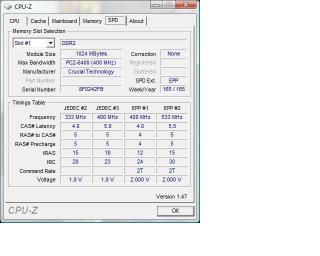
im not really sure the ram's voltage.... Added on September 25, 2008, 2:04 amoh ya, where can set the ram's voltage? This post has been edited by hong1380: Sep 25 2008, 02:04 AM |
|
|
Sep 25 2008, 02:16 AM
Show posts by this member only | Post
#8
|
|
Junior Member
512 posts Joined: Mar 2007
|
QUOTE System voltage control (Manual) - so that you can set your voltages DDR2 overvoltage control ---- Normal PCIE overvoltage control ----- Normal FSB overvoltage control ------ Normal (may need to increase if high FSB, usually if bus speed more than 450mhz) (G)MCH overvoltage control - Normal (may need to increase if high FSB, usually if bus speed more than 450mhz) CPU voltage control (very important) - let's mildly increase the vcore (+0.05v should be enough for now) there, DD@ overvoltage control. have a look at that link i showed u. dont worry, kmarc and that one not much different, since both same mobo.  |
|
|
 Sep 25 2008, 02:36 AM Sep 25 2008, 02:36 AM
Show posts by this member only | Post
#9
|
 
VIP
18,182 posts Joined: Jan 2005 From: Dagobah
|
When you overclock the FSB, usually the RAM frequency will follow suit... at 320MHz, the RAM frequency required will be at least 640MHz and usually achieveable using 1:2 memory ratio with DDR2-667. However to run at 1:1 ratios, would require RAM frequencies around 1280MHz (quad pumped) which is way beyond normal RAM clocks. Thus you have to beware of the memory frequency or host/memory settings also when overclocking. Anyway ideal overclocks for Q6600 (without resorting to "odd" frequencies) are...
2.67GHz = 8.0 x 333MHz (min DDR2-667) 3.0GHz = 9.0 x 333MHz (min DDR2-667) 3.2GHz = 8.0 x 400MHz (min DDR2-800) 3.6GHz = 9.0 x 400MHz (min DDR2-800) Anyway, try inquiring at the overclocking section... moving this thread there..  |
|
|
Sep 25 2008, 02:55 AM
|
|
Junior Member
344 posts Joined: Aug 2007
|
i tried to add the voltage of the ram by 0.4volt
it become worst, until totally cannot boot... and then i reset the bios by jumper |
|
|
Sep 25 2008, 03:08 AM
|

Junior Member
336 posts Joined: Oct 2007  
|
When u overclock, make sure ur ram not oc over than 1066... u can set that in bios under memory frequencies
like lex said, when u increased the fsb, the ram frequencies will increase |
|
|
Sep 25 2008, 03:30 AM
|
|
Junior Member
344 posts Joined: Aug 2007
|
hmm...i think didnt over 1066
since 320*2 ...just 640 0.0 |
|
|
Sep 25 2008, 04:27 AM
|

Senior Member
1,864 posts Joined: Jun 2008
|
You will probably need to increase Vmch and Vtt as well once you get to the higher FSBs.
|
|
|
|
|
|
Sep 25 2008, 11:03 AM
|
|
Junior Member
344 posts Joined: Aug 2007
|
what's that= =?
|
|
|
Sep 25 2008, 11:07 AM
|
 
Elite
8,545 posts Joined: Aug 2006 From: 224.0.0.6
|
vMCH = vNB = Voltage supplied to NorthBridge
vTT = Termination Voltage. Google it for more details.  -pWs- |
|
|
Sep 25 2008, 01:15 PM
|
|
Junior Member
344 posts Joined: Aug 2007
|
hmm..i tried to add the vmch and vtt...still the same= =
Added on September 25, 2008, 1:23 pmor either my motherboard / PSU cant support the overclock? This post has been edited by hong1380: Sep 25 2008, 01:23 PM |
|
|
Sep 25 2008, 07:40 PM
|

Elite
4,746 posts Joined: Dec 2007 From: Speed rule
|
Try 333x9,1:1 divider,all voltage leave on normal and timing to 5-5-5-12 for the time being.
Then,stress test it. |
|
|
Sep 25 2008, 09:34 PM
|
|
Junior Member
344 posts Joined: Aug 2007
|
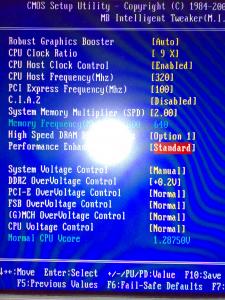

this is my bios setting, after i save and restart.. my cpu cant boot....the fans running, ram got light but the LED not blinking |
|
|
Sep 25 2008, 09:57 PM
|

Senior Member
976 posts Joined: Feb 2008 From: KU1TAN PHG
|
Just reset the bios again and set OC to 266mhz only..ensure ur vcore is up a little bit like 1.35v..
|
|
|
Sep 25 2008, 09:58 PM
|

Senior Member
7,318 posts Joined: Nov 2006 From: Pulau Sipadan
|
what is ur timing for now??
maybe u shud try to increase a little cpu voltage control |
| Change to: |  0.0215sec 0.0215sec
 0.65 0.65
 6 queries 6 queries
 GZIP Disabled GZIP Disabled
Time is now: 8th December 2025 - 10:25 PM |
 Quote
Quote