

Can anyone advise please?
thanks!
This post has been edited by Dozz: Sep 23 2008, 11:24 PM
Attached thumbnail(s)
Transfer custom ringing tone to iphone
|
|
 Sep 23 2008, 11:24 PM, updated 18y ago Sep 23 2008, 11:24 PM, updated 18y ago
Show posts by this member only | Post
#1
|
 
Senior Member
2,149 posts Joined: Aug 2005 From: Malaysia  
|
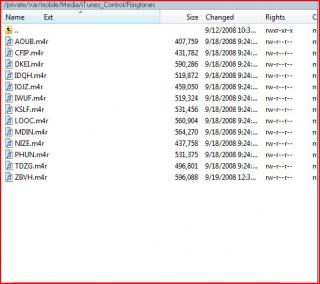
I use WinSCP. i tried to transfer custom make ringing tone into ringingtone folder, but it wont appear on my iphone. some more, all the name in ringing tone folder are a bit weird for me.
Can anyone advise please? thanks! This post has been edited by Dozz: Sep 23 2008, 11:24 PM Attached thumbnail(s)
|
|
|
|
|
|
Sep 23 2008, 11:32 PM
Show posts by this member only | Post
#2
|

Senior Member
1,361 posts Joined: Nov 2005 From: Melaka/Perth
|
y not use itunes and sync it to ur iphone ??
|
|
|
Sep 23 2008, 11:40 PM
Show posts by this member only | Post
#3
|
|
Senior Member
2,149 posts Joined: Aug 2005 From: Malaysia
|
because i using manually sync music and video, in this case... i cant use itune to sync ringtone.. otherwise all my songs will be deleted in ipod.
|
|
|
Sep 23 2008, 11:58 PM
Show posts by this member only | Post
#4
|

Senior Member
996 posts Joined: Jan 2003 From: Kuching, Sarawak 
|
for me, i will upload the Ringtones to /Library/Ringtones/ folder.
Hope this helps |
|
|
Sep 24 2008, 12:13 AM
Show posts by this member only | Post
#5
|
|
Senior Member
2,149 posts Joined: Aug 2005 From: Malaysia
|
QUOTE(siawgu @ Sep 23 2008, 11:58 PM) for me, i will upload the Ringtones to /Library/Ringtones/ folder. Does it support chinese name on this folder?Hope this helps  thx! |
|
|
Sep 24 2008, 12:18 AM
Show posts by this member only | Post
#6
|
|
Senior Member
996 posts Joined: Jan 2003 From: Kuching, Sarawak
|
QUOTE(Dozz @ Sep 24 2008, 12:13 AM) Does it support chinese name on this folder? yes it does.. you can use chinese, japanese which can be supported. All should be fine..thx! |
|
|
|
|
|
Sep 24 2008, 12:27 AM
Show posts by this member only | Post
#7
|
|
Senior Member
2,149 posts Joined: Aug 2005 From: Malaysia
|
QUOTE(siawgu @ Sep 24 2008, 12:18 AM) yes it does.. you can use chinese, japanese which can be supported. All should be fine.. thanks for your replied.i just try to transfer a ringing tone name in chinese and then transfer to my iphone, i got the following error: (please see the attached pic) Attached thumbnail(s) 
|
|
|
Sep 24 2008, 12:33 AM
Show posts by this member only | Post
#8
|
|
Senior Member
996 posts Joined: Jan 2003 From: Kuching, Sarawak
|
QUOTE(Dozz @ Sep 24 2008, 12:27 AM) thanks for your replied. oic. you try see the filename on the left hand side, whether is ???.m4r or not.i just try to transfer a ringing tone name in chinese and then transfer to my iphone, i got the following error: (please see the attached pic) Cause I using Mac (cyberduck) to transfer over my iphone, it's ok do you have any chinese star program? try to run it before transfer. if cannot try to rename to english words.. here is mine   |
|
|
Sep 24 2008, 12:42 AM
Show posts by this member only | Post
#9
|
|
Senior Member
2,149 posts Joined: Aug 2005 From: Malaysia
|
QUOTE(siawgu @ Sep 24 2008, 12:33 AM) oic. you try see the filename on the left hand side, whether is ???.m4r or not. Yes i can see chinese filename on my left side, when i transfer to my iphone then i got the error. i've tried to rename to english word, transfer to iphone... and then rename it to chinese again.. but it showing me ???.m4r instead.Cause I using Mac (cyberduck) to transfer over my iphone, it's ok do you have any chinese star program? try to run it before transfer. if cannot try to rename to english words.. here is mine |
|
|
Sep 24 2008, 12:52 AM
|
|
Senior Member
996 posts Joined: Jan 2003 From: Kuching, Sarawak
|
QUOTE(Dozz @ Sep 24 2008, 12:42 AM) Yes i can see chinese filename on my left side, when i transfer to my iphone then i got the error. i've tried to rename to english word, transfer to iphone... and then rename it to chinese again.. but it showing me ???.m4r instead. i think you temporary use English 1st. i think you need to ask another sifu who using windows..  |
|
|
Sep 24 2008, 09:14 AM
|
|
Senior Member
2,149 posts Joined: Aug 2005 From: Malaysia
|
QUOTE(siawgu @ Sep 24 2008, 12:52 AM) i think you temporary use English 1st. i think you need to ask another sifu who using windows.. I personal think WinSCP does not support chinese, that why i couldnt view chinese there... anyway, i will wait for you post soon...., thanks! |
|
|
Sep 24 2008, 09:21 AM
|

Junior Member
460 posts Joined: Jan 2006 From: Malaysia , Melaka
|
well u can try this way if u felt winscp doesnt support chinese .
1st : rename to alphanumeric [ english ] Transfer to the appropriate folder and see whats the output . |
|
|
Sep 24 2008, 09:23 AM
|
|
Senior Member
2,149 posts Joined: Aug 2005 From: Malaysia
|
QUOTE(tayhaithian @ Sep 24 2008, 09:21 AM) well u can try this way if u felt winscp doesnt support chinese . thx for your replied, yes i've tried that... i have no problem transfer the file to iphone after rename to english... if i rename it again to chinese (in iphone) it will become ?????.m4r1st : rename to alphanumeric [ english ] Transfer to the appropriate folder and see whats the output . |
|
|
|
|
|
Sep 24 2008, 09:32 AM
|
|
Junior Member
460 posts Joined: Jan 2006 From: Malaysia , Melaka
|
is your OS installed the language tool ?
using windows ? or Linux or Mac . |
|
|
Sep 24 2008, 09:34 AM
|

Senior Member
959 posts Joined: Jun 2006 From: Uaaaaaaa Status: Machine Coding 
|
QUOTE(Dozz @ Sep 24 2008, 09:23 AM) thx for your replied, yes i've tried that... i have no problem transfer the file to iphone after rename to english... if i rename it again to chinese (in iphone) it will become ?????.m4r i think if it show "?????.m4r means that it does don't support Chinese word, but as far as i know it does support Chinese word, BTW what is your iphone firmware..?since @siawgu can show chinese word in his iphone, should not have problem with other phone if it has the same firmware.. p/s: need to compare what is the different between siawgu and dozz firmware then maybe we can know what is the different betwen them that make dozz iphone cannot show/write chinese word.  BTW the weird ringtone name is normal for itunes, they change it into that "UZAR" or "TYPO" or "HGBE" is normal, but when you check its properties of that song, you can clearly see its real name song...try to right click and properties that song, sure can see it names, but open/click properties it on your windows, if using winscp to properties, im not sure it can show or not....  This post has been edited by TakanoKyohei: Sep 24 2008, 09:38 AM |
|
|
Sep 24 2008, 09:44 AM
|
|
Senior Member
2,149 posts Joined: Aug 2005 From: Malaysia
|
I m using Windows Vista Ultimate and my iphone firmware is 2.1
My computer have microsoft chinese input installed. i can view and write chinese on other applications except winscp. thank you! |
|
|
Sep 24 2008, 09:58 AM
|
|
Senior Member
959 posts Joined: Jun 2006 From: Uaaaaaaa Status: Machine Coding
|
QUOTE(Dozz @ Sep 24 2008, 09:44 AM) I m using Windows Vista Ultimate and my iphone firmware is 2.1 so means that winscp does not support chinese i guess, but i have google and it seems winscp version 4.1.6 does support chinese language, what is your winscp version..?My computer have microsoft chinese input installed. i can view and write chinese on other applications except winscp. thank you! try to get version 4.1.6 chinese via gogle, i just google it and it seems got winscp in chinese language, good luck. |
|
|
Sep 24 2008, 10:25 AM
|
|
Junior Member
460 posts Joined: Jan 2006 From: Malaysia , Melaka
|
check your winscp ver. as Taka. mention too .
|
|
|
Sep 24 2008, 11:49 AM
|
|
Senior Member
2,149 posts Joined: Aug 2005 From: Malaysia
|
my WinSCP is 4.1.6... i will try to download chinese version winscp and see it work or not.
thanks for the tips! |
|
|
Sep 24 2008, 11:58 AM
|
|
Junior Member
460 posts Joined: Jan 2006 From: Malaysia , Melaka
|
so your using win vista which i hate alot when i want to do programming .
here u goes ==>> [ another try ] control panel ==>> regional language ==>> 'languages' at the tab==>> then at the content thick install supplementary language and put in your OS cd's . Reboot . Ahh another things almost forgotten . at regional language ==>> go to "Advance tab" change the main language "English US" to "Chinese Taiwan" or Chinese SG thats it . NOTE * : Remember to have a reboot after every changes have make . Cz windows wasnt like Linux nor Mac . This post has been edited by tayhaithian: Sep 24 2008, 12:00 PM |
|
|
Sep 24 2008, 12:07 PM
|
|
Senior Member
2,149 posts Joined: Aug 2005 From: Malaysia
|
Sure, i will give it a try when i reach home tonight... thanks a lot for the information!
Mean while, i will try to google see need any setting for winscp in order to view chinese or not. |
|
Topic ClosedOptions
|
| Change to: |  0.0152sec 0.0152sec
 0.61 0.61
 6 queries 6 queries
 GZIP Disabled GZIP Disabled
Time is now: 12th December 2025 - 03:18 PM |
 Quote
Quote