Outline ·
[ Standard ] ·
Linear+
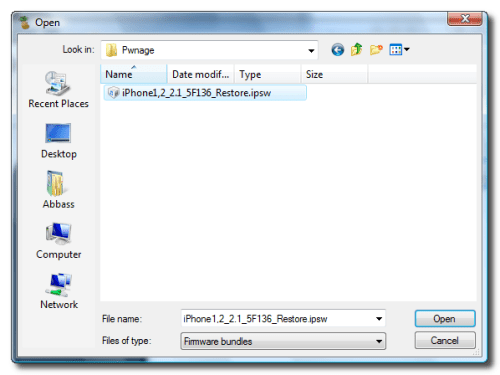
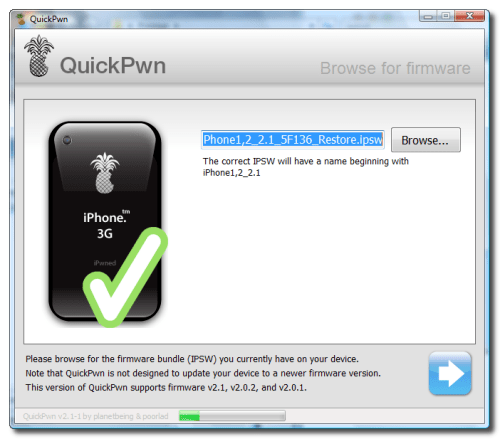
[Tutorial]How to Jailbreak Iphone with QuickPwn2.1, The Way To Jailbreak Iphone Version 2.1
|
TStwinkles
|
 Sep 20 2008, 12:32 PM Sep 20 2008, 12:32 PM
|

|
|
|
|
|
|
|
nghoongen
|
Sep 20 2008, 12:39 PM
|
|
|
- canceled - Sorry  This post has been edited by nghoongen: Sep 20 2008, 12:48 PM This post has been edited by nghoongen: Sep 20 2008, 12:48 PM |
|
|
|
|
|
TStwinkles
|
Sep 20 2008, 02:12 PM
|
|
|
What you wrote just now?? Hehe...
|
|
|
|
|
|
Dozz
|
Sep 20 2008, 07:24 PM
|
|
|
wow.. thanks for your step by step instruction... i will try later! thanks!
|
|
|
|
|
|
rx330
|
Sep 20 2008, 08:08 PM
|
|
|
oppss.... suddenly i remember wats jailbreak for  This post has been edited by rx330: Sep 20 2008, 08:15 PM This post has been edited by rx330: Sep 20 2008, 08:15 PM |
|
|
|
|
|
tayhaithian
|
Sep 20 2008, 08:11 PM
|
|
|
sry i miss out it have credited .  This post has been edited by tayhaithian: Sep 20 2008, 08:18 PM This post has been edited by tayhaithian: Sep 20 2008, 08:18 PM |
|
|
|
|
|
TStwinkles
|
Sep 20 2008, 08:18 PM
|
|
|
@tayhaithian Ok , i will do it now  |
|
|
|
|
|
Dozz
|
Sep 20 2008, 10:28 PM
|
|
|
i done with it.. now testing whether my phone really been JB or not.
ahaha
|
|
|
|
|
|
TStwinkles
|
Sep 20 2008, 11:12 PM
|
|
|
@Dozz whats the result now ??
|
|
|
|
|
|
smartboy2
|
Sep 21 2008, 04:08 AM
|
New Member

|
I try already, after i put the Maxis SIM Card in. It still cannot detect any signal. Any one can guide me? THank
|
|
|
|
|
|
Corvinux
|
Sep 21 2008, 08:59 AM
|
|
|
bro your thread is a duplication of http://forum.lowyat.net/topic/790913 bear in mind pwnage, quickpwn and winpwn are from the same developers inside pwnage & winpwn there is quickpwn too, all you need to do it to toggle it yes quickpwn is the fastest way but sometimes fast doesnt mean best nevertheless its a good effort of you to share with fellow members  hv a nice day |
|
|
|
|
|
TStwinkles
|
Sep 21 2008, 10:18 AM
|
|
|
@Corvinux This is the way that using windows to jailbreak iphone... http://forum.lowyat.net/topic/790913this is using mac to jailbreak... Im share with those person didnt have mac computer = same like me T_T |
|
|
|
|
|
Dozz
|
Sep 21 2008, 11:56 AM
|
|
|
QUOTE(twinkles @ Sep 20 2008, 11:12 PM) @Dozz whats the result now ?? already done JB, everything seem very normal... now i can see installer and cydia icons on my phone.... i try to install open SSH and SSL from installer... but dont know why it wont start the download.....  |
|
|
|
|
|
psyeo
|
Sep 21 2008, 12:05 PM
|
|
|
QUOTE(twinkles @ Sep 21 2008, 02:18 PM) @Corvinux This is the way that using windows to jailbreak iphone... http://forum.lowyat.net/topic/790913this is using mac to jailbreak... Im share with those person didnt have mac computer = same like me T_T It is good to share, but not when there is an existing thread for it ignorance.... I bet u hvnt finish reading the 1st page of that thread (what a waste of Davidgary's effort).... there is a windows guide there as well This post has been edited by psyeo: Sep 21 2008, 12:08 PM |
|
|
|
|
|
Dozz
|
Sep 21 2008, 12:11 PM
|
|
|
i realized when i wanna install something from installer... it wont actually download to my phone, it keep refreshing in TASK... after that i get time out error.
any idea how to solve this?
|
|
|
|
|
|
samlee860407
|
Sep 21 2008, 01:16 PM
|
|
|
ignorance or what, he is just trying to help
really appreciate his effort for posting all the pics and tutorial...thanks alot!!
|
|
|
|
|
|
TStwinkles
|
Sep 21 2008, 01:19 PM
|
|
|
@samlee860407 Thanks for support me |
|
|
|
|
|
zerokid
|
Sep 21 2008, 01:21 PM
|
|
|
thanks for the tutorial...good for newbie...easy to understand
|
|
|
|
|
|
psyeo
|
Sep 21 2008, 01:25 PM
|
|
|
QUOTE(samlee860407 @ Sep 21 2008, 05:16 PM) ignorance or what, he is just trying to help really appreciate his effort for posting all the pics and tutorial...thanks alot!! help and duplication of thread is not the same thing.. is good to try and help, but posting what someone have already posted is not the way..(in this case. the original thread starter's effort is wasted then) now Twinkles can u please kindly close your thread? This post has been edited by psyeo: Sep 21 2008, 01:27 PM |
|
|
|
|



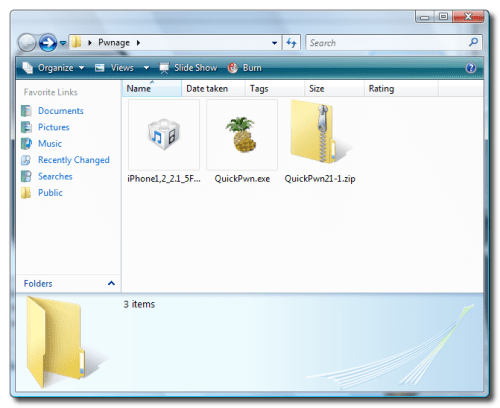


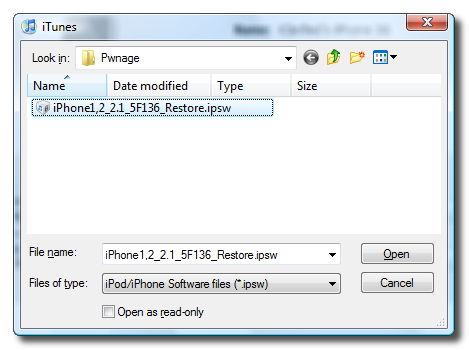

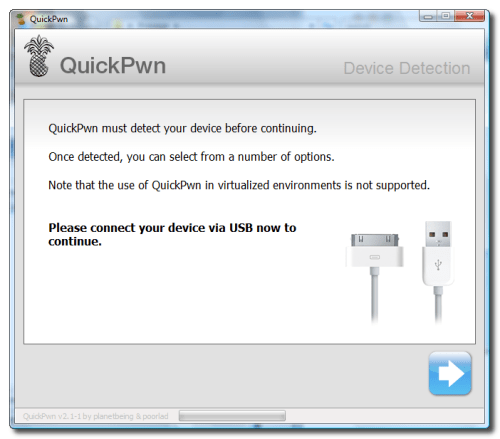
 Quote
Quote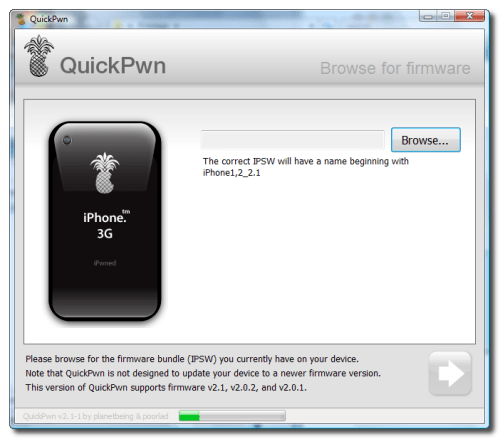


 0.0209sec
 0.58
0.58
 5 queries
 GZIP Disabled