Welcome Guest ( Log In | Register )

Bump Topic Topic Closed RSS Feed
121 Pages « < 93 94 95 96 97 > » Bottom

Outline · [ Standard ] · Linear+

 Pwnagetool/Quickpwn & "yellowsn0w" 3G Unlock, »2G/3G Fw 2.2.1 Unlocking&Jailbreaking«

views
     
kayzie
post Mar 30 2009, 10:24 PM

Getting Started
**
Junior Member
136 posts

Joined: Apr 2008


I've had this JB prob which i do not know where went wrong.
Hope some of you have any clues. I'll describe as clearly as possible.

My phone already been apple unlocked. (does this matter?)
I'm using maxis, sim card is slotted in.

1) I did a shift-restore on the firmware of 2.2.1.

2) After restoring, I close itunes just like the guide said so.

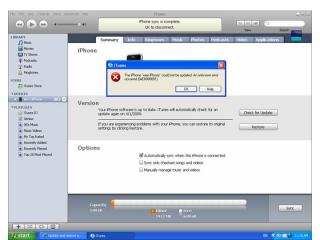
3) With USB cable still plug in, clicking quickpwn cause pop up with an error saying:
"The application failed to initialize properly (0xc0000135). Click on OK to terminate the application."

4) I've downloaded both firmware 2.2.1 and quickpwn 225-2 individually to re-run them making sure the files arent corrupted.

5) Same problem exists... Any step did i miss? What else should I know?

Btw, do I need to disconnect internet during restoring?
What bout maxis' auto detection of my phone?

Thanks in advance. smile.gif

themacro
post Mar 30 2009, 10:28 PM

New Member
*
Junior Member
13 posts

Joined: Feb 2009


Okay, first thing I wanna know that you sign with the contract of Maxis?
2nd thing, aren't the operator is already unlock for Maxis on iPhone 3G?
3rd thing, you need not to cut off your connection... It looks like a program crashing but if got screenshot might help alot for those who try to solve this problem... =)

Sorry I am a new user to iPhone but I got do some research hope my knowledge can help you... =)

This post has been edited by themacro: Mar 30 2009, 10:29 PM
kayzie
post Mar 30 2009, 10:36 PM

Getting Started
**
Junior Member
136 posts

Joined: Apr 2008


QUOTE(themacro @ Mar 30 2009, 10:28 PM)
Okay, first thing I wanna know that you sign with the contract of Maxis?
2nd thing, aren't the operator is already unlock for Maxis on iPhone 3G?
3rd thing, you need not to cut off your connection... It looks like a program crashing but if got screenshot might help alot for those who try to solve this problem... =)

Sorry I am a new user to iPhone but I got do some research hope my knowledge can help you... =)
*
Well nope, my phone is singtel phone. When I 1st activated it, maxis automatically open up my 3G services. (That's off topic.)

So back to the prob. I do not have a screen shot, the error msg basically stop me from accessing quickpwn.

Anyone seen that error b4?

"The application failed to initialize properly (0xc0000135). Click on OK to terminate the application."
TSdavidgary73
post Mar 30 2009, 10:48 PM

Music Producer
Group Icon
VIP
4,903 posts

Joined: Jul 2008
QUOTE(kayzie @ Mar 30 2009, 10:24 PM)
I've had this JB prob which i do not know where went wrong.
Hope some of you have any clues. I'll describe as clearly as possible.

My phone already been apple unlocked. (does this matter?)
I'm using maxis, sim card is slotted in. 

1) I did a shift-restore on the firmware of 2.2.1.

2) After restoring, I close itunes just like the guide said so.

3) With USB cable still plug in, clicking quickpwn cause pop up with an error saying:
"The application failed to initialize properly (0xc0000135). Click on OK to terminate the application."

4) I've downloaded both firmware 2.2.1 and quickpwn 225-2 individually to re-run them making sure the files arent corrupted.

5) Same problem exists... Any step did i miss? What else should I know?

Btw, do I need to disconnect internet during restoring?
What bout maxis' auto detection of my phone?

Thanks in advance.  smile.gif
*
Thread Merged.

Please read the pinned threads before opening a new thread.

Btw, please read the first post of this thread for solution.

Cheers

This post has been edited by davidgary73: Mar 30 2009, 10:48 PM
kayzie
post Mar 30 2009, 10:52 PM

Getting Started
**
Junior Member
136 posts

Joined: Apr 2008


QUOTE(davidgary73 @ Mar 30 2009, 10:48 PM)
Thread Merged.

Please read the pinned threads before opening a new thread.

Btw, please read the first post of this thread for solution.

Cheers
*
My gosh, davidgary. Why merge my topic to this one??

You don't get my problem here. Everyone here faced a problem AFTER JB.

For me, my quickpwn cant even run. It is not even JBed YET.

Don't you think I've read those topics?

I started a new topic because there isn't any solution i found.

TSdavidgary73
post Mar 30 2009, 10:55 PM

Music Producer
Group Icon
VIP
4,903 posts

Joined: Jul 2008
QUOTE(kayzie @ Mar 30 2009, 10:52 PM)
My gosh, davidgary. Why merge my topic to this one??

You don't get my problem here. Everyone here faced a problem AFTER JB.

For me, my quickpwn cant even run. It is not even JBed YET.

Don't you think I've read those topics?

I started a new topic because there isn't any solution i found.
*
Attached Image

This post has been edited by davidgary73: Mar 30 2009, 10:58 PM
kayzie
post Mar 30 2009, 11:10 PM

Getting Started
**
Junior Member
136 posts

Joined: Apr 2008


Thanks, davidgary.

Sorry for my rudeness, it's my bad, didn't see that part of my problem.

smile.gif


wee395
post Mar 30 2009, 11:14 PM

Casual
***
Junior Member
495 posts

Joined: Oct 2004


QUOTE(ZipD @ Mar 30 2009, 09:56 PM)
Here's what my screen shows when I do it:

user posted image

Just out of curiosity, did you extract the IPCC file out first?
*
Thx zipd,after I restart pc,I can c my ipcc file,but hold shift and click update the file is running but show error like x8000034 something like that.so I cnt do anything.I try to restore n now back to normal.tomolo I will try again.
edwinlcw
post Mar 31 2009, 09:30 AM

Regular
******
Senior Member
1,754 posts

Joined: Jan 2003
From: Puchong


Jailbreak-ed my iphone 3g from maxis without need to restore the maxis_my.ipcc file.... rclxms.gif
will try to get some sw from cydia and try...
wee395
post Mar 31 2009, 11:24 AM

Casual
***
Junior Member
495 posts

Joined: Oct 2004


showing this error code when i update the ipcc file using itune sad.gif sad.gif sad.gif

try to jailbreak again, finally i successful already.thanks notworthy.gif notworthy.gif


Attached thumbnail(s)
Attached Image Attached Image
clawhammer
post Mar 31 2009, 12:59 PM

///M
Group Icon
VIP
8,788 posts

Joined: Jan 2003
From: Kuala Lumpur


I jailbreak my Maxis Iphone without problems too and it took around 5-10 mins only. I haven't installed anything from Cydia so far except for the updates. Btw, does installing lots of application slow down the Iphone considerably?
TSdavidgary73
post Mar 31 2009, 01:11 PM

Music Producer
Group Icon
VIP
4,903 posts

Joined: Jul 2008
QUOTE(clawhammer @ Mar 31 2009, 12:59 PM)
I jailbreak my Maxis Iphone without problems too and it took around 5-10 mins only. I haven't installed anything from Cydia so far except for the updates. Btw, does installing lots of application slow down the Iphone considerably?
*
There's no lack in performance if you do have lot's of application installed, even with 7-8 pages of applications. You'll notice some games quitting to springboard due to the lack of memory. Just a respring will help to continue the game.

Btw, Winterboard does take some amount of boot time if you have lot's of themes in comparison to the default iPhone boot time.
yap065899
post Mar 31 2009, 04:12 PM

New Member
*
Junior Member
12 posts

Joined: Oct 2008


iphone 3g bb 02.30.03...face a problem, hav to connect the headset only can get the line(using rebel sim)... can help? or anyone facing tis problem too? icon_question.gif

This post has been edited by yap065899: Mar 31 2009, 04:21 PM
TSdavidgary73
post Mar 31 2009, 04:23 PM

Music Producer
Group Icon
VIP
4,903 posts

Joined: Jul 2008
QUOTE(yap065899 @ Mar 31 2009, 04:12 PM)
iphone 3g bb 02.30.03...face a problem, hav to connect the headset only can get the line(using rebel sim)... can help? or anyone facing tis problem too?  icon_question.gif
*
You have the same problem as slyeo. Read below.

http://forum.lowyat.net/topic/790913/+1840#entry24669659
clawhammer
post Mar 31 2009, 04:50 PM

///M
Group Icon
VIP
8,788 posts

Joined: Jan 2003
From: Kuala Lumpur


QUOTE(davidgary73 @ Mar 31 2009, 01:11 PM)
There's no lack in performance if you do have lot's of application installed, even with 7-8 pages of applications. You'll notice some games quitting to springboard due to the lack of memory. Just a respring will help to continue the game.

Btw, Winterboard does take some amount of boot time if you have lot's of themes in comparison to the default iPhone boot time.
*
Thanks bro. Respring means holding the home + power button together right? smile.gif
yap065899
post Mar 31 2009, 04:53 PM

New Member
*
Junior Member
12 posts

Joined: Oct 2008


QUOTE(davidgary73 @ Mar 31 2009, 04:23 PM)
You have the same problem as slyeo. Read below.

http://forum.lowyat.net/topic/790913/+1840#entry24669659
*
the link hv no info about the problem..
TSdavidgary73
post Mar 31 2009, 05:00 PM

Music Producer
Group Icon
VIP
4,903 posts

Joined: Jul 2008
QUOTE(clawhammer @ Mar 31 2009, 04:50 PM)
Thanks bro. Respring means holding the home + power button together right? smile.gif
*
Not holding the home + power button together. You can use SBSettings (dwonload from Cydia) where you can just repring by pressing the repring function.


QUOTE(yap065899 @ Mar 31 2009, 04:53 PM)
the link hv no info about the problem..
*
Here' the info below.

QUOTE(slyeo @ Mar 27 2009, 01:02 PM)
now i solve the problem for make and receive, but the funny thing happened...

when i make and receive call, must use headphone.. otherwise will straight away lost all signal and appear "call failed".
eg. after make or receive call (plugging headphone), on the conversation, then i pull out the headphone, straight away "call failed" and lost all signal..  shocking.gif  doh.gif vmad.gif

when make call, it can be done when i pressed "call" and immediately pressed "speaker" and turn on loud speaker..

what happen is that?  pls help~~ cry.gif  cry.gif
*
I guess you need to buy another rebel sim in hoping it will fix the call problem. You may also wanna try sim unlocker, Gevey Sim v2 (Fw 2.2.1).

We can't help much as this the the most encountered problem using sim unlockers(rebel sim) with Lock 3G iPhones in comparison to an official unlock 3G iPhone.

This post has been edited by davidgary73: Mar 31 2009, 05:09 PM
limyusiong
post Mar 31 2009, 06:03 PM

Look at all my stars!!
*******
Senior Member
2,815 posts

Joined: Feb 2006


i am 2g iphone user here...previously was in 2.2 FW...recently feel my iphone is a big laggy, so decided to upgrade to latest 2.2.1 FW.

downloaded all files needed..run 1st step as tutorial, restore de iphone, 2nd step wanna run quickPwn.exe......but my it show error, application error...

"the application failed to initialize properly (0xc0000135). click on OK to terminate the application"

wat happen here???i am running on Window XP...thx
TSdavidgary73
post Mar 31 2009, 06:12 PM

Music Producer
Group Icon
VIP
4,903 posts

Joined: Jul 2008
QUOTE(limyusiong @ Mar 31 2009, 06:03 PM)
i am 2g iphone user here...previously was in 2.2 FW...recently feel my iphone is a big laggy, so decided to upgrade to latest 2.2.1 FW.

downloaded all files needed..run 1st step as tutorial, restore de iphone, 2nd step wanna run quickPwn.exe......but my it show error, application error...

"the application failed to initialize properly (0xc0000135). click on OK to terminate the application"

wat happen here???i am running on Window XP...thx
*
Read the first post again. The answer in there. Is under Windows..you're the 2nd person to miss this.

I made the font larger for everyone to see and hope this will not come about again.

This post has been edited by davidgary73: Mar 31 2009, 06:14 PM
limyusiong
post Mar 31 2009, 06:20 PM

Look at all my stars!!
*******
Senior Member
2,815 posts

Joined: Feb 2006


sorry sir, nt aware of it...tq very much for ur prompt reply.

121 Pages « < 93 94 95 96 97 > » Top
Topic ClosedOptions
 

Change to:
| Lo-Fi Version
0.0299sec    0.28    6 queries    GZIP Disabled
Time is now: 7th December 2025 - 04:14 PM