Welcome Guest ( Log In | Register )

Outline · [ Standard ] · Linear+

 Raidmax Sagitta, Customizing......................

views
     
TSM1X
post Sep 11 2008, 08:45 AM, updated 17y ago

Look at all my stars!!
*******
Senior Member
2,334 posts

Joined: May 2007
From: Kuching


Hell work : Fixing cables...
2 Days Ago 6pm - 12pm


Ya here's what I did for my casing, put a board to cover up the messy cables. Since I want to make some fix on my other components, so as well I fix the 'buttom-cover' as well. Last time I used some paper blocks as the 'feet', but this time I cut some chunks of the home-electrical-cable covering tubes (though it rectangle... What that thing called anyway?).

user posted image

Next I just stick it with double tapes...

user posted image

Oh here a simple paper-board I cut.

user posted image

Er, I changed the position of those blocks, fix those switches, cables, molex... WTH. What switches you ask? Just continue reading and you'll know.

user posted image

Now just cover it up and ready to put the board on.

user posted image

Oh hei, let's looks at the chaotic side...

user posted image

OK after put on the board, woah it looks far better than doing nothing.

user posted image

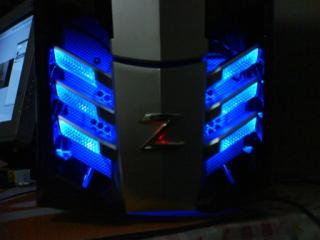
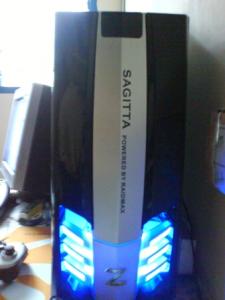
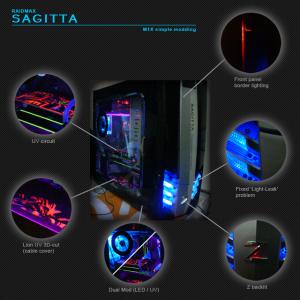
I also make abit of lighting at the front cover, but... I need some brighter LEDs. The border just not BOOM enough... If the LEDs are bright enough, you'll notice the whole left and right border of the middle plate glow. Of course, since it white plastic, some light might passed through, I can later simply just stick some black stickers in the inner side to prevent that. Oh ya, also want to add some nice tribal sticker on it when I can come out any nice one...

user posted image

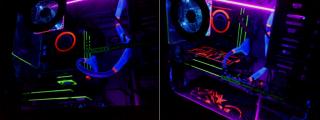
Here's what I make the switches for... Now, for the LED first. Uhm, actually there are 2 sets of LEDs (one set on the exhaust fan and another one set on the side-window fan). They can be turned on or off saperately...

user posted image

Now for the UV to go on stage... (Opps, me still newbies in most of these thing lah...)

user posted image

( Post continued below ........ )

This post has been edited by M1X: Sep 15 2008, 01:14 PM
chyu89
post Sep 11 2008, 10:08 AM

I'm not a gynaecologist but I'll take a look
*******
Senior Member
2,465 posts

Joined: Sep 2007
From: Kuala Lumpur     Status: Freeride not dead
u should use this code
CODE
[SPOILER][IMG]url[/IMG][/SPOILER]

Would be easier for viewers.
TSM1X
post Sep 11 2008, 10:13 AM

Look at all my stars!!
*******
Senior Member
2,334 posts

Joined: May 2007
From: Kuching


It says : "Sorry, but you have posted more images than you are allowed to"...
mADmAN
post Sep 11 2008, 03:52 PM

10k Club
********
All Stars
10,530 posts

Joined: Nov 2004
From: Petaling Jaya & Mid Valley


thats coz its limited to 10 pix per post...and when u post subsequently itll auto merge the posts making it exceeding the limit


so this is what u need to do..

QUOTE(wKkaY @ Jan 27 2007, 02:53 PM)
You can still separate your posts by entering the Add Reply mode user posted image (not Fast Reply). Tick the "Do not combine with previous post?" option before posting. This also bumps your topic up.

Added on January 28, 2007, 12:30 amUpdate: this feature is disabled in Kopitiam because of the posting style there.
*
also this should be in UV mods.....


anyway....wicked mod dude thumbup.gif
serez
post Sep 11 2008, 09:38 PM

serez beznez
******
Senior Member
1,231 posts

Joined: Aug 2006
From: teh intehnets


wow another modd from raidmax user. nice dow but i have to click those links each time want to view it. btw hope u`ll fix it soon.
TSM1X
post Sep 15 2008, 01:15 PM

Look at all my stars!!
*******
Senior Member
2,334 posts

Joined: May 2007
From: Kuching


( Continued post )

Now, everyone on the stage!!! LOL!!!

user posted image

The rear part. The red one is the PSU fan. The blue one was the exhaust fan.

user posted image

Ah... Still need alot more efforts... Just need to get some super bright LEDs for the front panel... =/

user posted image


Added on September 11, 2008, 8:50 amPain in the Finger : Cutting paper-board
Yesterday 10pm - 1.30am Today


I notice the lion from FF7 was quite nice. I didn't want to cut it on the UV sticker, but I want to cut the card-board instead, then stick the UV paper
from behind... Give it a bit of depth sense, instead of just 2D. But it gonna be tough to cut the card-board... Ok draw it on the back of the board first (cuz the front is black la)...

user posted image

Now stick it on a piece of marble so I can proceed to cut it.

user posted image

Duh... Tough, cuz it PAPER!!! Gonna be real careful or else I gonna ruin everything...

user posted image

More than 2 hours later... I just put it in first, pretty tired already cuz... 1.00am I finish cutting it. Just put it on for demo first, still got some
stuff to fix. (urgh, it looks abit pale because I just put on a low-quality UV paper...)

user posted image

Deng................ Pening kepala, jari sakit, mata sakit...


Added on September 11, 2008, 9:14 amOh if anyone want the lion image, here's the PSD file :

http://www.filefactory.com/file/b70179/n/Untitled-1_psd


Added on September 15, 2008, 1:22 pmMy Next Task Planning:

- cut the lion pic on the front panel (on the silver plate), and put red LED in there... :: Almost... impossible? But it gonna be cool if I success... DUH!!
ps: it that suitable?! Cuz Saggita not lion... But Horse-Man... (hei, kebetulan I'm Saggita too... lol my birthday is 25 November)

This post has been edited by M1X: Sep 15 2008, 01:22 PM
BuLaNaR
post Sep 20 2008, 03:45 AM

penyair sepi
*****
Senior Member
777 posts

Joined: Sep 2007
From: bandar baru bangi


wow..nice design u got bro..
yojimbo512
post Sep 23 2008, 03:49 AM

Getting Started
**
Junior Member
237 posts

Joined: Mar 2007
From: primordial soup


wah! reli like wat u did wit de board... cool stuff!
wana ciplak pulak if u dun mind, hehe
SUScube328
post Sep 23 2008, 10:26 PM

Getting Started
**
Junior Member
157 posts

Joined: Sep 2008


QUOTE(M1X @ Sep 15 2008, 02:15 PM)
( Continued post )

Now, everyone on the stage!!! LOL!!!

user posted image

The rear part. The red one is the PSU fan. The blue one was the exhaust fan.

user posted image

Ah... Still need alot more efforts... Just need to get some super bright LEDs for the front panel... =/

user posted image

Added on September 11, 2008, 8:50 amPain in the Finger : Cutting paper-board
Yesterday 10pm - 1.30am Today


I notice the lion from FF7 was quite nice. I didn't want to cut it on the UV sticker, but I want to cut the card-board instead, then stick the UV paper
from behind... Give it a bit of depth sense, instead of just 2D. But it gonna be tough to cut the card-board... Ok draw it on the back of the board first (cuz the front is black la)...

user posted image

Now stick it on a piece of marble so I can proceed to cut it.

user posted image

Duh... Tough, cuz it PAPER!!! Gonna be real careful or else I gonna ruin everything...

user posted image

More than 2 hours later... I just put it in first, pretty tired already cuz... 1.00am I finish cutting it. Just put it on for demo first, still got some
stuff to fix. (urgh, it looks abit pale because I just put on a low-quality UV paper...)

user posted image

Deng................ Pening kepala, jari sakit, mata sakit...


Added on September 11, 2008, 9:14 amOh if anyone want the lion image, here's the PSD file :

http://www.filefactory.com/file/b70179/n/Untitled-1_psd


Added on September 15, 2008, 1:22 pmMy Next Task Planning:

- cut the lion pic on the front panel (on the silver plate), and put red LED in there... :: Almost... impossible? But it gonna be cool if I success... DUH!!
ps: it that suitable?! Cuz Saggita not lion... But Horse-Man... (hei, kebetulan I'm Saggita too... lol my birthday is 25 November)
*
Ur Raidmax gaming Development looks so pro ! heehaw! notworthy.gif notworthy.gif notworthy.gif !
nchuan
post Sep 25 2008, 03:12 PM

Getting Started
**
Junior Member
137 posts

Joined: Mar 2008
wat paper u using for the cutting?
TSM1X
post Sep 26 2008, 11:43 AM

Look at all my stars!!
*******
Senior Member
2,334 posts

Joined: May 2007
From: Kuching


Just a simple thick card board bought from Popular. One face is black and the back is white.

More Shots:

Attached Image
Fixed the front panel problem : lights were leak.

Attached Image
This is a shot before the fix

Attached Image
I changed the sticker to OREN...

» Click to show Spoiler - click again to hide... «


This post has been edited by M1X: Sep 26 2008, 12:43 PM
Deswin
post Dec 7 2008, 06:27 PM

Smoked'Em
*****
Senior Member
816 posts

Joined: Nov 2008


how did u do thise stickers on ur graphic card??? wat material u used?? looks nice??


TSM1X
post Dec 9 2008, 10:55 AM

Look at all my stars!!
*******
Senior Member
2,334 posts

Joined: May 2007
From: Kuching


Simply cut your stickers less tham 1mm thick, then stick them part by part on the circuit... Easy... I got many LEDs now and maybe chnages the front light to orange-red blending...
cynicito
post Feb 23 2009, 06:51 PM

New Member
*
Newbie
1 posts

Joined: Feb 2009
From: Klang


wut is the led volt u use 4 the front panel?the red one...
TSM1X
post Feb 26 2009, 01:16 PM

Look at all my stars!!
*******
Senior Member
2,334 posts

Joined: May 2007
From: Kuching


??? Hei, is Lowyat database been reset yesterday? Suppose I already posted here...

It 2V each.


Change to:
| Lo-Fi Version
0.0211sec    0.58    6 queries    GZIP Disabled
Time is now: 11th December 2025 - 04:27 PM