Welcome Guest ( Log In | Register )

Bump Topic Topic Closed RSS Feed

Outline · [ Standard ] · Linear+

 Compaq Presario CQ40 AMD Series V1, Turion X2, HD 3450, RM2k!

views
     
lordskarn
post Sep 29 2008, 05:25 AM

Getting Started
**
Junior Member
157 posts

Joined: Dec 2004
From: Puchong - Cyberjaya


Hi fellow CQ40-125AX users.. I just bought mine around 9pm just now from Compu-Zone lowyat.. RM2099, 0% interest easy payment for 1 year using RHB cdt card (they say support Maybank and Ambank too) around RM175 per month..

But because use easy payment, no freebie at all.. it's rm2099 plus rm200 for 4GB ddr667 ram (ddr800 is rm145 a piece just now so cant really afford)

currently I'm installing Windows Vista Ultimate 64bit retail version, and the drivers seem to be a hassle.. the official link of http://h10025.www1.hp.com/ewfrf/wc/softwar...product=3805640 for Vista 64bit does seem to be missing the webcam and wireless card drivers..

I'll try to force the x86 drivers or contact HP about this.. I'll post the Windows Experience index later..

One thing I do notice is that the lappy is hot, even during installation of Vista. however my desktop rig of AMD Phenom + ATI HD3870 is also running quite hot, so I think it's standard for AMD/ATI platform.. dont you think?
lordskarn
post Sep 29 2008, 06:54 AM

Getting Started
**
Junior Member
157 posts

Joined: Dec 2004
From: Puchong - Cyberjaya


Looks like not as much problem as I first suspected.. install the LAN driver, plug it into the Internet (After installing an antivirus!) run Windows Update (for Vista)- and the Broadcom wireless driver + some internal dialup modem driver is there on Windows Update.. yay.. letting it do the updates now as I catch some Zzzz..
lordskarn
post Sep 30 2008, 09:48 AM

Getting Started
**
Junior Member
157 posts

Joined: Dec 2004
From: Puchong - Cyberjaya


QUOTE(vincentyiam @ Sep 15 2008, 07:09 PM)
I just like to know can CQ40-125AX support DDR2 800mhz 4gb (2x 2gb)?
Cause just now I went to a dealer and tested with DDR2 667mhz 4gb (2x 2gb),
can be detect by the bios.

Not sure it can be use on actual vista.
I am very interested to get 1 but worry that can't support 4gb ram (DDR2 800mhz).

This morning, I tried calling the customer service, (sounds like mat salleh)
he claim CQ40-125AX can support 4gb.

But, later I wanted to buy online.
I check with the sales rep from HP.
She said cannot......... cry.gif  cry.gif  cry.gif

Now, i really confused................ vmad.gif  vmad.gif  vmad.gif  vmad.gif
icon_question.gif  icon_question.gif

Anyone, please help to clarify this matter.
Thank you
*
Confirmed 4GB DDR667 is fully functioning, been running vista 64bit for 2 days now, very stable, no blue screen, crashes whatsoever.. Nice!
Anybody got test 4GB DDR800 yet?

Here's the CPUZ readout :

» Click to show Spoiler - click again to hide... «


I played CS:Condition Zero at 1280x800 and it's quite sharp and smooth.. not bad for light gaming.. tried to play a 8GB H264 video and it's a bit laggy, could be because of the unoptimized video drivers on my platform.. hopefully ATI comes out with better drivers soon!

All in All, I'm very satisfied with the laptop, considering the relatively cheap price and good performance, and it works flawlessly with 64 bit Windows as well. The only slight issue is the noticable heat & the relatively low battery life, but then again, nothing in this world is perfect~!!

P/S emkay_2020: The webcam driver is installed automatically when you install the HP's bundled Cyberlink YouCAM software :

What is YouCam : http://h10025.www1.hp.com/ewfrf/wc/generic...us&lc=en&dlc=en

Download link : http://h10025.www1.hp.com/ewfrf/wc/generic...us&lc=en&dlc=en
lordskarn
post Oct 6 2008, 04:59 PM

Getting Started
**
Junior Member
157 posts

Joined: Dec 2004
From: Puchong - Cyberjaya


Here's the Windows Performance Index for mine (running on Vista 64bit SP1 with all updates applied, 4GB DDR 667 RAM)

Attached Image
lordskarn
post Oct 7 2008, 12:36 AM

Getting Started
**
Junior Member
157 posts

Joined: Dec 2004
From: Puchong - Cyberjaya


As per solarwing's request to combine all this links into one :

HP's Cyberlink YouCam software (to enhance/provide effects for the built in webcam, and sometimes installing this will allow Vista to detect the cam as well, as in my case)

You can download it here :
http://h10025.www1.hp.com/ewfrf/wc/generic...us&lc=en&dlc=en

Help files (What is YouCam) : http://h10025.www1.hp.com/ewfrf/wc/generic...us&lc=en&dlc=en


Official page for CQ40-125AX Vista 64 bit drivers :
http://h10025.www1.hp.com/ewfrf/wc/softwar...product=3805640

Vista 32 bit drivers :
http://h10025.www1.hp.com/ewfrf/wc/softwar...product=3752107

There was a very long post in the earlier pages for XP 32bit drivers - too long for me to copy everything.

Anyway thanks to all the posters for providing all these information.
lordskarn
post Oct 7 2008, 12:42 AM

Getting Started
**
Junior Member
157 posts

Joined: Dec 2004
From: Puchong - Cyberjaya


QUOTE(iq_myst @ Oct 6 2008, 11:43 PM)
wanna ask you guyz, anyone had any problem installing vista? because mine got problem whein installing vista. it got stucked during the 'completing installation' stage. i tried a lot of vista dvd including the genuine one already. but still cannot. anyone has any solution? my current vista installed by the shop and they didnt tell me how they did it..
*
I installed vista 5 times in about 3 hours in the beginning, and it all went out fast and smooth.
Did you try and just let the installation run for a very long time (30 minutes - 1 hour) and see if it completes the installation?

If still not working, and if your Vista is retail, you can give a ring to Microsoft who will guide you on getting the installation done, it's toll free and you wont be charged for an installation issue for a newly purchased product.

Microsoft Malaysia Customer Service & Support Careline
For Domestic Call: 1800 88 6295

Hours of Operation:
8.30am – 7.00pm (Mon-Fri); 10.00am – 2.00pm(Sat)

If it's OEM, you can still try your luck, since MS wont be able to check your PID (it's not installed yet) and unable to determine whether its retail or OEM.

Good luck!
lordskarn
post Oct 9 2008, 02:37 PM

Getting Started
**
Junior Member
157 posts

Joined: Dec 2004
From: Puchong - Cyberjaya


My friend just got the laptop today.. from lowyat also.. (He'll be joining us here soon - he forgot his LYN password!)

And he got a free gift, looks like it's from HP/AMD directly!!

I wonder why I didnt get one sad.gif The shop say normally other lowyat shops would take the free gift for themselves.. thats not nice lah.. vmad.gif
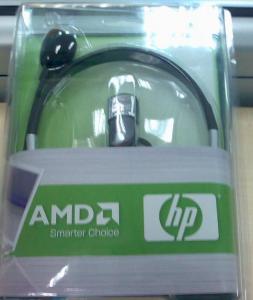
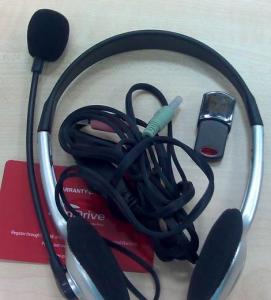
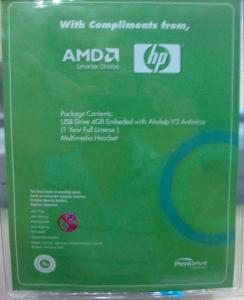
Anyway, I'll attach the picture of the gifts HP/AMD gave :

Front Picture :

Attached Image


Back Picture :

[attachmentid=622381]


The Contents :

Attached Image

Basically it's a 4GB pendrive (Pendrive brand, 5 years warranty), Multimedia headset and mic, plus 1 year license for AHNlab V3 antivirus.
He also got the standard HP/Compaq nylon bag, and he added 4GB DDR800 RAM into the laptop. So far the Windows Experience Index is showing score 5.9 for his RAM (my DDR 667 4GB is showing 5.6 only!)

This post has been edited by lordskarn: Oct 9 2008, 02:41 PM


Attached thumbnail(s)
Attached Image
lordskarn
post Oct 12 2008, 03:37 AM

Getting Started
**
Junior Member
157 posts

Joined: Dec 2004
From: Puchong - Cyberjaya


QUOTE(uhlaw @ Oct 11 2008, 03:26 AM)
According to http://www.notebookcheck.net/Mobile-Graphi...List.844.0.html,

GeForce 9200M GS scores 3541 in 3DMark05 and 1623 in 3DMark06

Mobility Radeon HD 3450 scores 3783 in 3DMark05 and 1912 in 3DMark06.

Guys, judge it yourself bah!  rclxms.gif
*
Dear friends,

For questions on the store, plz forward it to Nathan__lo himself, he's the friend I mentioned. (Nathan,welcome!)

This is my 3dmark scores, i'll add 3dmark vantage score later. All benchmarks are done with default 3dmark settings, with ATI catalyst 8.9 64 bit drivers + mobility modder, Catalyst 3d settings set to balanced (default setting), and laptop is of course plugged to ac power. I also installed the latest directx drivers, dxdiag showing directx 10.1 for the display.

3dMark 2001 : 10685 3DMarks -
3dMark 2005 : 3293 3DMarks - 7535 CPUMarks
3dMark 2006 : 1779 3DMarks - SM2.0 Score 585, HDR/SM3.0 Score 724, CPU score 1395


lordskarn
post Oct 13 2008, 05:17 PM

Getting Started
**
Junior Member
157 posts

Joined: Dec 2004
From: Puchong - Cyberjaya


QUOTE(tkcham @ Oct 13 2008, 01:55 PM)
everybody here are happy but me un-happy....

[1] webcam installed not properly (webcam len inside front-frame) causing top of front-frame goes outside a little ...

[2] dvd-rw writer not closing smoothly, hard to close and a "CRACK" sound ...

[3] one of cable connect to WIFI-card loose out ...

[4] base-unit not firmly assembled withe top unit (front)

[5] card reader - sd card hard to push in middle way like problem of dvd-rw writer...

just wait claiming new set but it may considering "repair case" ... so sad
*
We get 1 year full warranty with this laptop (email, phone and walk in warranty), so I suggest you contact HP if the product you receive is not up to standard and has a lot of problems. Maybe walk in to their service center in damansara heights and let them see. Who knows, the supplier/reseller might have changed stuffs or give u a refurbished/used one... hell, anything is possible in this day and age!

Topic ClosedOptions
 

Change to:
| Lo-Fi Version
0.0207sec    0.32    7 queries    GZIP Disabled
Time is now: 3rd December 2025 - 08:50 PM