Welcome Guest ( Log In | Register )

Bump Topic Topic Closed RSS Feed

Outline · [ Standard ] · Linear+

Home Theatre LCD and Plasma TV Discussion Thread | V3, Which is right for you?

views
     
AskDS
post Sep 21 2008, 10:51 PM

Casual
***
Junior Member
369 posts

Joined: Jun 2008
My Panasonic plasma TV suddenly has no picture at all. I put it into standby and then went out to shop with missus. When I came back and press the On button the remote, nothing happen. It doesn't seems to be due to power supply since I can switch the TV on/off. When I push the on button, the power indicator turn green and then it just flashes red a few times and nothing come on. Pressing the On button on the remote many time also has no effect. Looks like my unit has gone kaput.

Called the seller and he is kind enough to help to report this on my behalf to the service center. Now has to go back to my old faithful 21-inch TV.

Wonder if anyone Panasonic plasma TV owner has encountered the same symptom before?
AskDS
post Sep 22 2008, 12:25 AM

Casual
***
Junior Member
369 posts

Joined: Jun 2008
QUOTE(htkaki @ Sep 21 2008, 11:41 PM)
Burned IC? or could be the processor. Very rare for Panny plasma
*
Let see what's the service rep has to said when he come over to my house.
AskDS
post Sep 22 2008, 04:27 PM

Casual
***
Junior Member
369 posts

Joined: Jun 2008
QUOTE(speedy3210 @ Sep 22 2008, 02:58 PM)
Pana plasmas can display fault codes through the power LED. You have to watch carefully how it blinks. It has long and short blink and in sequence.
As per my experience with gen4 and gen5 Pana panels, two long blinks means faulty power supply section. Video processor board error gives 5 short blinks or something, but can't remember that well.

But since your unit is under warranty, no need to sweat over that. Let the Pana tech people handle it.

Regards.
*
Thanx speedy3210, I searched through the manual and couldn't find anything on the troubleshooting page on the fault code. I can see it blinks a few time but don't know what it mean so I call the supplier instead. Do you know if there is a link that give the describe the fault code?
AskDS
post Sep 22 2008, 08:45 PM

Casual
***
Junior Member
369 posts

Joined: Jun 2008
QUOTE(speedy3210 @ Sep 22 2008, 06:17 PM)
That was throught my experience dealing with the panels. But upon searching through Google, got the link below and jump to page 38.
Panasonic Plasma TV Troubleshooting Manual
*
Thank you so much.

The blinking time is twice and repeat itself. According to the manual, the faulty area is either the SC, SS, C-board.

Still waiting for the service center personnel to come over to have a look at this problem.
AskDS
post Sep 23 2008, 12:44 PM

Casual
***
Junior Member
369 posts

Joined: Jun 2008
I bought the PY800H because I was told that it is imported from Japan and not from across the causeway. Just didn't expect the SC/SS/C-board to fail so early.

Service centre personnel called today and will come over later. Hope it can be fixed on the spot or else request for replacement.
AskDS
post Sep 23 2008, 05:11 PM

Casual
***
Junior Member
369 posts

Joined: Jun 2008
QUOTE(law1777 @ Sep 23 2008, 02:02 PM)
since it is under warranty.. just ask them to replace a new one!! i dun wan something that failed me b4!!
*
Well since it is under warranty, it is more important to understand and appreciate what the warranty offer!!

I guess we need to give Panasonic the benefit of doubts in this case.

Anyway it was a pleasant experience with this service from their personnel.

They called to made an appointment for the repair and they came on time.

I explained to them earlier the symptom and they bought along the replacement part.

All in it took them about 20 minutes to replace the part, reset the unit and the plasma TV is up and running again.

According to them this is the first incident for this kind of fault.

However, I am a happy camper now.

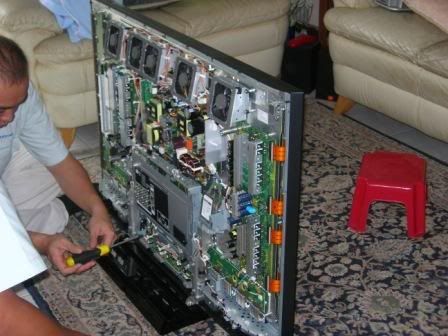
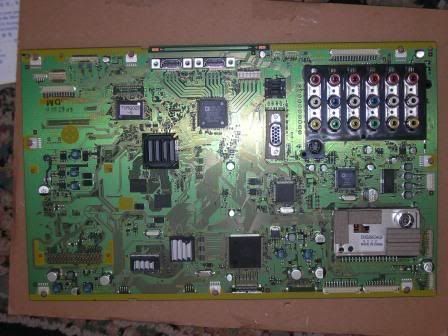
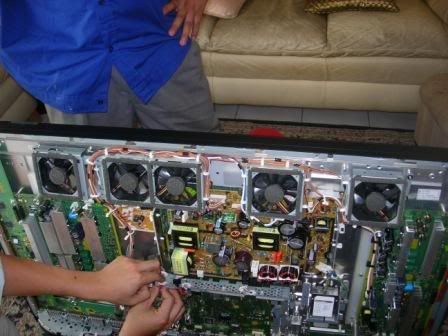
Here are a few snapshot of the service:

The back cover opened to replace the board

user posted image

The new board before replacement

user posted image

Look at the number of fans they provide for this model!

user posted image

Cheers

AskDS
post Sep 23 2008, 06:49 PM

Casual
***
Junior Member
369 posts

Joined: Jun 2008
Well some people tend to be negative when it come to warranty.

I am happy that they fix my problem. I have my TV back and have the confident that if it is faulty again, I have the backing of Panasonic 5 year warranty.

I have no intention to clean the fans myself. Panasonic must have some procedure to clean those fans so I am not worry about them. If they failed they are easy to identify because they are at the top of the TV and you can see through the grill.


AskDS
post Sep 23 2008, 09:24 PM

Casual
***
Junior Member
369 posts

Joined: Jun 2008
The service personnel did mentioned that only the full HD model has fans. Why so many, he also doesn't know. Maybe the heat generated on this model is higher than those with HD ready only.
AskDS
post Sep 23 2008, 10:41 PM

Casual
***
Junior Member
369 posts

Joined: Jun 2008
Why be conservative with the usage. You buy it to enjoy.

I switch it on at least 6 hours a day. Otherwise it wouldn't justify the 100,000 hours panel life time claim smile.gif Also I think the fans are there to do it job.

AskDS
post Sep 23 2008, 11:34 PM

Casual
***
Junior Member
369 posts

Joined: Jun 2008
QUOTE(pierreye @ Sep 23 2008, 11:10 PM)
Just got my 50PY800H. Compare to my 42PV60H, it's huge difference. Even color is better on the PY800H. And the best part is I can get 1:1 pixel scan at 1080p. I do a quick check using i1Pro and Cinema settings with warm color is the closest to D65 but the gamma curve is out at around 1.9. Best part is you can access the service menu in the PY800H (I can't do it on the old PV60H) to adjust the color temp to perfection. Didn't see any option to adjust gamma yet. If you are using 1080p, turn down the sharpness to 0. Anything more than that will generate artifacts on your screen. When I first received the unit, it's set at standard and normal color temperature and it hurts my eye to even look at the screen for more than 5 mins. With tune in color temp, it's more pleasing. No regrets getting this unit. Everything is so sharp.

For those who want to know how to access the service menu:

PLEASE DO NOT enter service menu if you don't know what you are doing. You can screw up your display. Luckily there should be an option in the menu to reset back to factory default.

1. Hold the channel down button on your TV (NOT remote).
2. Press the "Recall" button on your remote 3 times.
3. Release the channel down button.
4. Quickly switch to the HDMI input before the service menu show.
5. Press 1 or 2 to go through the service menu. On of the option is WB-ADJ (White Balance Adjustment). Use 3,4 for sub menu option. You can choose RGB cut/gain in this option. Usie vol up/down to change the value. Press OK to save the settings. Please note that you need to have a colorimeter or spectrometer to do White balance adjustment.

If anyone know how to tune the gamma curve, do let me know.
*
Hi pierreye,

Would you mind to PM me the settings for your 50PY800H? I would like to set my 42PY800H to something better than the default.

Yes I am aware of the risk of "screwing up". At least I saw the service personnel doing the "reset" on my unit today so I am pretty sure I can handle this.


Thanx
AskDS
post Sep 24 2008, 01:09 AM

Casual
***
Junior Member
369 posts

Joined: Jun 2008
QUOTE(pierreye @ Sep 23 2008, 11:47 PM)
I'm not sure if you should copy my setting. Normally from tv to tv, there should be some differences even for the same model. I would advice you set to cinema picture mode and warm color temp first.

Anyway, here's my setting:

Press 9 to change WB-ADJ to cinema
Press 7 to change color temp to warm

R cut - 7A
G cut - 79
B cut - 81
R drive - FF
G drive - F9
B drive - 8C

For PC levels 0-255 use
Contrast 55
Brightness 60

For Video levels 16-235
Contrast 50
Brightness 52

Make sure you set aspect ratio to 16:9 so that you have an option in Setup menu to set overscan off (to get 1:1 pixel for 1080p).
Sharpness at 0

Good luck.
*
hi pierreye.

Thanks for sharing the settings. Even with cinema picture mode and warm colour temperature, it is more pleasing that the default settings. My wife doesn't complaint of the TV being too bright anymore.

I'll try out the other settings tomorrow.

Once again thanks for the information.

Regards
AskDS
post Sep 24 2008, 11:09 AM

Casual
***
Junior Member
369 posts

Joined: Jun 2008
QUOTE(pierreye @ Sep 24 2008, 09:42 AM)
Some people are sensitive to phosphor decay. Try turn off Intelligent Frame Creation to reduce the lag. Another possible issue is your contrast is too high which cause the green phosphor do not have enough time to decay.

http://www.hdtvtest.co.uk/news/plasma-phos...-2007040133.htm
*
One more thing.

Last night while I was playing around with the settings, I noticed when I turn off the Picture Overscan, there is a green line at the bottom of the screen when I play DVD movie. Not sure if this green line (less than 1 cm width) is what you guy described here. If I turn it on again, the green line disappeared.
AskDS
post Oct 28 2008, 06:10 PM

Casual
***
Junior Member
369 posts

Joined: Jun 2008
It depends on the car.

I transported my 42-inch plasma laying down on the back of the rear seat. So far it is still kicking alive.

I don't know if there is any difference in the packaging for the PY800 vs PV80/8. The styroforms used to hold the PY800 are definitely strong enough to sustain a bit of bump and shake on the way home. Maybe the PY800 is fully imported so it is better protected from vibration!

Topic ClosedOptions
 

Change to:
| Lo-Fi Version
0.1179sec    0.61    7 queries    GZIP Disabled
Time is now: 12th December 2025 - 08:20 AM