Welcome Guest ( Log In | Register )

Bump Topic Topic Closed RSS Feed
3 Pages  1 2 3 >Bottom

Outline · [ Standard ] · Linear+

 AMD® Socket-AM2&AM2+ Overclocking V10, ~overcooking ur proc here~

views
     
cloudstrife07
post Sep 30 2008, 11:17 PM

I'm back, beaches!
*******
Senior Member
4,688 posts

Joined: Jan 2003
From: http://127.0.0.1


bros, any chance that i can OC more from my mom's PC?

she's using Athlon x2 Windsor 3600+, 1GB 667Mhz kingston valueRAM, Abit K9NS motherboard, stock cooler.

since i'm not that familiar with AMD world, i can only tweak the bus speed at Abit Softmenu in BIOS. now running at 234Mhz x10 = 2.34Ghz with Core temp around 45C.

as for RAM, the timing is 5-5-5-15 (i set auto sweat.gif )

user posted image

This post has been edited by cloudstrife07: Sep 30 2008, 11:17 PM
cloudstrife07
post Sep 30 2008, 11:44 PM

I'm back, beaches!
*******
Senior Member
4,688 posts

Joined: Jan 2003
From: http://127.0.0.1


QUOTE(digswell @ Sep 30 2008, 11:23 PM)
still got many space for u to push da chips
ur mobo is nforce chip rite ??...if yes ,might to lower the HTlink below 1000mhz .
*
QUOTE(ah_khoo @ Sep 30 2008, 11:32 PM)
this is d highest end board bro, so it's expected...  wink.gif
i'm pretty sure there're still rooms for improvement... i've played w/ 2 f2 all of 'em can fetch around 2.5GHz. hope these help...  smile.gif
3600+@2.7GHz

NFS_3800+@2.5GHz
*
yea, using Nforce 550 chipset smile.gif

now the main prob is there's no adjusting HTlink option in the Abit Softmenu. sweat.gif

only the bus speed, multiplier, PCI-E bus speed (which is not necessary) and voltage control (Vcore, NB Core etc)

so now, whenever i up the bus speed 235mhz and above, mobo will hang and have to do change jumper, open CMOS batt and cut off the power for around 5mins sweat.gif
cloudstrife07
post Oct 1 2008, 12:50 AM

I'm back, beaches!
*******
Senior Member
4,688 posts

Joined: Jan 2003
From: http://127.0.0.1


QUOTE(digswell @ Sep 30 2008, 11:58 PM)
@cloudstrife07
at  Advanced Chipset Features
option name HT Frequency
or see ur manual book at page 3-8
*
QUOTE(ah_khoo @ Oct 1 2008, 12:09 AM)
yup, d ht multiplier could be referrin to k8<->mcp55 ht speed.  smile.gif
*
oh thanks guys notworthy.gif

now im at 2.5Ghz already rclxm9.gif

user posted image

This post has been edited by cloudstrife07: Oct 1 2008, 12:59 AM
cloudstrife07
post Oct 1 2008, 01:07 AM

I'm back, beaches!
*******
Senior Member
4,688 posts

Joined: Jan 2003
From: http://127.0.0.1


QUOTE(ah_khoo @ Oct 1 2008, 01:03 AM)
is it prime stable? if yes u mite go as far as 2.7~2.8GHz w/ higher volt. put command rate to 2t & ramp up d frequency of ya ram...  smile.gif
*
priming right now. it's just that i felt so excited that i post the CPU-Z screeny 1st tongue.gif

higher vcore?i wish i can do that though. on stock cooler now sweat.gif and the RAMs are Kingston ValueRAM sweat.gif

btw which is better for stability test?OCCT or prime95?

This post has been edited by cloudstrife07: Oct 1 2008, 01:08 AM
cloudstrife07
post Oct 1 2008, 01:33 AM

I'm back, beaches!
*******
Senior Member
4,688 posts

Joined: Jan 2003
From: http://127.0.0.1


QUOTE(ah_khoo @ Oct 1 2008, 01:15 AM)
well, if coolin is limitin u then try to bring down d volt needed by doin burn in, it helps sometimes.  smile.gif

i believe even ddr667 kvr is capable of 800 @ 5-5-5-x w/ 1.9~2.1v.  wink.gif

prime 95 is d toughest test for amd imo... i can run occt pass but prime failed within an hour.  biggrin.gif
*
ic..so prime95 is the toughest for AMD while OCCT is for intel hmm.gif Intel Burn Test is for Intel sweat.gif

1.9~2.1v eh..i tried playing around with the setting just now to get 2.6Ghz.but it seems the BIOS failed to boot. tried to up vcore oso no use. issit because of the RAM voltage not enough?

now back to 2.54Ghz. doing priming.

This post has been edited by cloudstrife07: Oct 1 2008, 03:10 AM
cloudstrife07
post Oct 1 2008, 04:25 PM

I'm back, beaches!
*******
Senior Member
4,688 posts

Joined: Jan 2003
From: http://127.0.0.1


btw guys, how many hours should i run prime95 before i can conclude that the machine is stable?
cloudstrife07
post Oct 1 2008, 04:57 PM

I'm back, beaches!
*******
Senior Member
4,688 posts

Joined: Jan 2003
From: http://127.0.0.1


QUOTE(xixo_12 @ Oct 1 2008, 04:46 PM)
some ppl said suppose 8 hour shakehead.gif
n i prefer 1 hours n playing game after that ..test in 3 days.. if got no bsod.. so good already for ur system
*
8 hours? sweat.gif

i guess i should cut it into 1/2 lah. 4 hours only. since my lil' bro and sis want to use the PC sweat.gif
cloudstrife07
post Oct 1 2008, 05:25 PM

I'm back, beaches!
*******
Senior Member
4,688 posts

Joined: Jan 2003
From: http://127.0.0.1


QUOTE(xixo_12 @ Oct 1 2008, 05:10 PM)
then can follow my advice..then let ur sis test kaw kaw with her work.. later got shout , imean bsod, just bump a lil volt..or lower down ur clock
read previous page.. uwill find the answer.. hint , my SS nod.gif
*
i lol'ed laugh.gif

anyway, i don't quite understand the RAM part.

at the DRAM config, there's DDR2 800/667/ 533/400 etc, then there's the timing and the command rate, and down there got some uber stuffs that i don't know.

mine currently set (manually) at DDR2 533, and the timing is 5-5-5-15 while the command rate is 2T.

the DDR2 533 is the RAM divider right?

let say i want to OC past 250mhz, should i play around with the RAM configs again and up my vcore/vdimm or just up the vcore/vdimm?

before this i try to up the vcore to 1.300V and the vdimm to 1.9V (the proc bus is 260mhz, HTT multi X3) but the PC won't boot.

guess that's the limit of my proc eh?

This post has been edited by cloudstrife07: Oct 1 2008, 05:26 PM

cloudstrife07
post Oct 1 2008, 05:38 PM

I'm back, beaches!
*******
Senior Member
4,688 posts

Joined: Jan 2003
From: http://127.0.0.1


QUOTE(xixo_12 @ Oct 1 2008, 05:33 PM)
as i dunno what is ur current hardware now.. can u list it out??
some more, see at ur sigs 2gb ram.. while in oc SS u attach before it's 1gb only.. can give a new SS?
*
oops, now that u mention it, i forgot to edit the siggy. that crucial is for my future intel rig project brows.gif i copypaste wrongly tongue.gif

the spec is like in (edited) siggy:

AMD Athlon X2 3600+ 2.0Ghz@2.51Ghz
Abit KN9S mobo Nforce 550 Chipset
1GB KVR DDR2 667Mhz
160GB+640GB WD HDD
Colorful ATi Radeon X1650XT DDR3 512MB
22" Samsung 226BW
Windows Vista Ultimate SP1
Coolermaster Extreme Power 430W PSU

This post has been edited by cloudstrife07: Oct 1 2008, 05:39 PM
cloudstrife07
post Oct 1 2008, 05:48 PM

I'm back, beaches!
*******
Senior Member
4,688 posts

Joined: Jan 2003
From: http://127.0.0.1


QUOTE(xixo_12 @ Oct 1 2008, 05:44 PM)
u should look first at divider table at main post.
when u set at divider 533 it just yield around the default speed of ur ram.. so there is no problem..

what i'm thinking now it maybe come from the insufficient voltage that supply to ur own proc.. other hardware give the factor also why u cant achieve 260 HTT
*
u mean the mobo is holding me back eh hmm.gif since i pumped more vcore yesterday up to 1.350V also the system won't boot.. hmm.gif
cloudstrife07
post Oct 1 2008, 05:58 PM

I'm back, beaches!
*******
Senior Member
4,688 posts

Joined: Jan 2003
From: http://127.0.0.1


QUOTE(xixo_12 @ Oct 1 2008, 05:50 PM)
posibly ur proc or psu hmm.gif
*
i use psu calculator, my psu gave me more than adequate watts (assuming the extremepower 430W has 70% efficiency) hmm.gif

perhaps it's my proc then sad.gif

from DDR2 667Mhz down to 533Mhz

266Mhzx2=533Mhz

HTT increase from 200Mhz to 251Mhz = 51Mhz increase

so 266Mhz+51Mhz = 317Mhz

317Mhz x2 = 634Mhz DDR2 speed, which is still below the rated RAM speed of 667Mhz

issit correct?

This post has been edited by cloudstrife07: Oct 1 2008, 06:02 PM
cloudstrife07
post Oct 1 2008, 06:19 PM

I'm back, beaches!
*******
Senior Member
4,688 posts

Joined: Jan 2003
From: http://127.0.0.1


QUOTE(-pWs- @ Oct 1 2008, 06:16 PM)
I do not think the way you calculate the ram speed is correct.
Please go and understand how to read the AM2 divider table.

-pWs-
*
ugh, ok sweat.gif
cloudstrife07
post Oct 1 2008, 06:40 PM

I'm back, beaches!
*******
Senior Member
4,688 posts

Joined: Jan 2003
From: http://127.0.0.1


QUOTE(-pWs- @ Oct 1 2008, 06:24 PM)
For your case.
You using Brisby 3600.

Multi: 10 --> Refer to Multi 10 Table.
Divider: 533 --> As mentioned by u earlier.

1. See the 533 column in that table.
2. Left most column is HTT.
3. In your case, HTT 250. Table should show u 625MHz.

Got it? smile.gif

-pWs-
*
QUOTE(-pWs- @ Oct 1 2008, 06:27 PM)
Another way.

You can straight calculate out.
As you see 533MHz column there, there is 533/8 right?

Ram = CPU/8

Take your speed replace in CPU den divide by 8.

Let say: 250 x10 (Your case)
2500 / 8 = 312.5MHz

In order to get real DDR speed, double it.

312.5 x 2 = 625MHz.

-pWs-
*
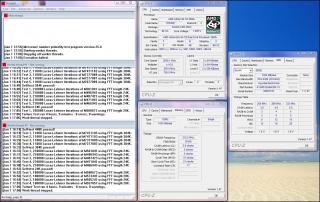
ah thanks bro smile.gif no wonder im a bit clueless..the HTT have to multiply by 10 then only can divide by 8. i forgot to multiply sweat.gif

btw here's the screeny:

Attached Image

btw, i'm thinking of beating goldfries's record. he's using stock cooler and valuerams too @2.509Ghz brows.gif

This post has been edited by cloudstrife07: Oct 1 2008, 06:48 PM
cloudstrife07
post Oct 1 2008, 06:57 PM

I'm back, beaches!
*******
Senior Member
4,688 posts

Joined: Jan 2003
From: http://127.0.0.1


QUOTE(xixo_12 @ Oct 1 2008, 06:53 PM)
CR rate change to 2t...
*
change to 2T eh.

for >2.5Ghz, should i up the vcore + vdimm or vcore only?since the RAM hasn't reach it's rated speed yet. how bout vNB etc etc?

pushing my luck tongue.gif

This post has been edited by cloudstrife07: Oct 1 2008, 06:57 PM
cloudstrife07
post Oct 1 2008, 07:02 PM

I'm back, beaches!
*******
Senior Member
4,688 posts

Joined: Jan 2003
From: http://127.0.0.1


QUOTE(-pWs- @ Oct 1 2008, 06:58 PM)
Ha...I dun think AMD got vNB. smile.gif
It depends. What not enuf add what lo  laugh.gif  laugh.gif

-pWs-
*
eh AMD don't have ke?ok sweat.gif

QUOTE(xixo_12 @ Oct 1 2008, 06:58 PM)
bump a little vdimm.. and try to push HTT after u change to 2T

what -pWs- try to said.. trial and error nod.gif
*
up vdimm eh.ok. smile.gif

it's just that this KN9S mobo is a bit pain in the ass. sometimes i reset the cmos jumper, take out the cmos battery oso this thing dont want to reset the BIOS shakehead.gif


Added on October 1, 2008, 7:11 pmanyway, what's the use of MCP55P voltage and HyperTransport voltage?

This post has been edited by cloudstrife07: Oct 1 2008, 07:11 PM
cloudstrife07
post Oct 1 2008, 07:55 PM

I'm back, beaches!
*******
Senior Member
4,688 posts

Joined: Jan 2003
From: http://127.0.0.1


btw what's the max safe voltage for KVR RAMs and Windsor procs?
cloudstrife07
post Oct 1 2008, 08:07 PM

I'm back, beaches!
*******
Senior Member
4,688 posts

Joined: Jan 2003
From: http://127.0.0.1


QUOTE(AMDAthlon @ Oct 1 2008, 07:58 PM)
There are no safe voltage..Every increament are danger
Usually KVR Rams 2.1V Max
Windsor..1.57VCore is max safe voltage(DEPENDS ON COOLING AND NOT RECOMENDED FOR 24/7).However,since u are using Stock Cooler..1.4V is the safest for you..
*
thanks buddy smile.gif

my target now is 2.6Ghz. let see if i'm able to go that far using stock cooler.

update: unable to go more than 255Mhz HTT. pumped vcore up to 1.350 and vDIMM up to 1.95 also cannot boot. perhaps it's my proc limiting me sad.gif

now primetesting @2.54Ghz in windows (2.55Ghz in BIOS).

This post has been edited by cloudstrife07: Oct 1 2008, 08:21 PM
cloudstrife07
post Oct 1 2008, 08:45 PM

I'm back, beaches!
*******
Senior Member
4,688 posts

Joined: Jan 2003
From: http://127.0.0.1


QUOTE(ah_khoo @ Oct 1 2008, 08:42 PM)
2.2v for me, i used to run a pair of d9dcl w/ 2.2v for 24/7 naked passively. for chip it'll depend on ya load temp. as long as < 60'c, i'm fine w/ that.  wink.gif
ram changed to 2t still can't boot? which slot u put ya ram? try to put in diff slots mite help.  nod.gif
*
this is interesting. i've never heard putting RAM in diff slots helped OC hmm.gif

will try it later after i succeeded in hyperPi 32M smile.gif
cloudstrife07
post Oct 1 2008, 10:36 PM

I'm back, beaches!
*******
Senior Member
4,688 posts

Joined: Jan 2003
From: http://127.0.0.1


QUOTE(User_Xp @ Oct 1 2008, 10:25 PM)
bro...we have the same mobo here..

i`m using KN9S to..

i can OC my F2 38 to 2.8Ghz stable..

of course the Vcore is 1.45V and the KVR is 2.2V@5-5-5-15,935Mhz
*
ain't that a bit dangerous?2.2V on KVR? sweat.gif

and also, u got red scorpion mah, me stock cooler only sweat.gif

maybe i should follow the settings you put on your siggy hmm.gif
cloudstrife07
post Oct 1 2008, 11:53 PM

I'm back, beaches!
*******
Senior Member
4,688 posts

Joined: Jan 2003
From: http://127.0.0.1


QUOTE(User_Xp @ Oct 1 2008, 11:45 PM)
yup..it`s a bit dangerous..but i put cap ayam heat spreadder on it...

if u OC with stock Vcore..u use the stock cooler like i did dulu...

the result may be different...so good luck...

btw...i dun always OC...i juz OC to benchies..  thumbup.gif
*
how much can u push using the stock cooler?

mind telling me your vcore, vdimm and ram timing as well?maybe i can make that as reference smile.gif

3 Pages  1 2 3 >Top
Topic ClosedOptions
 

Change to:
| Lo-Fi Version
0.0368sec    0.27    7 queries    GZIP Disabled
Time is now: 7th December 2025 - 10:44 AM