Welcome Guest ( Log In | Register )

Outline · [ Standard ] · Linear+

Technical PS3 + Tversity = Universal Media Centre, Discuss everything about Tversity on PS3

views
     
TSlightning69
post Aug 17 2008, 01:33 PM, updated 17y ago

Look at all my stars!!
*******
Senior Member
2,298 posts

Joined: Jan 2003
From: Miri, Sarawak


Recently i went to try out Tversity with my PS3 and it totally blow me away. Before I use Tversity, I have to convert all the non-PS3 compatible video format to a PS3 compatible format which is limited to MP4 and DIVX. That takes lots of time and space on the HD and is a real pain in the ass.

Now with Tversity, I can play all types of video format with my LCD TV using my PS3 which includes quicktime movies and rmvb format where most the Hong Kong and chinese series is encoded. You don't even need to transfer it to your PS3 HDD. Just keep it on your PC HDD and Tversity will stream it to your PS3 realtime. What is most amazing is that it can handles mkv files and you know what that means..... HD content with 5.1 or 6.1 AC3 audio if you know where to find and download them. I have try out Ratatouille in 720P and they are gorgeous.

Other great things about Tversity is that you can turn your PS3 into internet TV as you can add internet tv, video podcast, audio podcast and stream them real time to your TV. Add internet radio and suddenly you have the world's radio station at your fingertips.

By now you should have an idea how Tversity can turn your living room into a global universal media centre.

If you haven't try it out, go and download it now. You won't regret it.

Here is the link ... Tversity

But please read this guide first...it really helps Guide no. 1

Guide no.2

Btw..it work on the XBOX360 and PSP too!!!

Here is guide on how to get your mkv files to work smoothly on your PS3!
I have figure out out how to play mkv files smooth on the PS3 via Tversity. MKV files cannot be play directly on the PS3 so you need Tversity to stream it to your PS3.
Some mkv files with lower video bitrate can be stream to PS3 smoothly but some are just laggy no matter what you do. The main cause of this is Tversity itself.

1. For laggy mkv files, just use tsMuxeR to convert the mkv files to m2ts or ts or vob which can then be played on the PS3 direct without any lag at all! I notice one disadvantages of mkv streaming is that i cannot get it to work in Dolby Digital via Tversity. But once you convert it to ts or m2ts you can play it directly on your PS3 without lag and in dolbly Digital. You can even burn the m2ts or ts on dvd and play it on the PS3 or simply store it in the external usb drive. M2ts cannot be stream to your PS3 via Tversity because Tversity cannot recognise it unless someone knows a way around it. So I prefer to convert it to ts which Tversity can recognise and stream directly on the PS3.

The conversion process using tsMuxeR is a a very simply one. The video or audio content is not actually converted at all. All tsMuxeR does is that it extracts (demuxes) the video and audio from the Matroska .MKV file and wraps them (muxes) to a .m2ts transport stream format. The video or audio remain untouched, so the quality is not impacted and the process is very fast.

Here is a guide on how to do it.
Using tsMuxeR to author a AVCHD or Blu-ray disc

Once again the process of remuxing the files and authoring the AVCHD / Blu-ray disc is a very simple process using tsMuxeR. Through the process the video and audio remain untouched, so the quality is not impacted and the process is very fast.

open tsMuxer & perform the following steps:

1. Open a .MKV file with AVC/AC3 content using the Add button
2. Observe the track info for AVC profile information. If it shows a value higher than 4.1, then use the Change level function to adjust it down to 4.1
user posted image
3. Choose your output to TS muxing to convert mkv to ts file for playback on PS3 via TVersity.(or Bluray if you want to burn a bluray disk)
4. Click browse button and choose the name and location for your file
5. Click Start muxing to begin

The above only works if your mkv files in encoded in AC3 soundstream. A lot of MKV files is encoded in DTS sound stream so you need to follow this guide instead.
Converting mkv to vob using mkv2vob
So for mkv files with DTS sound, i use mkv2vob and convert it to vob files and stream it to my PS3.

r
Enjoy!

This will be updated if there is anything new in future.

This post has been edited by lightning69: Oct 2 2008, 05:24 PM
myqd
post Aug 17 2008, 01:44 PM

Look at all my stars!!
*******
Senior Member
2,247 posts

Joined: Feb 2005


will have a look,thanks for sharing ya biggrin.gif
supernothing
post Aug 17 2008, 02:17 PM

super ☆
******
Senior Member
1,343 posts

Joined: Jun 2006
From: Wangsa Maju/TTDI/Ampang


with all the guides from the internet i still can't get tversity to display subtitles when i play videos off my pc on ps3. but other than that, this piece of software is AWESOME.

now waiting for the fall season's tv series to start again.
TSlightning69
post Aug 17 2008, 02:29 PM

Look at all my stars!!
*******
Senior Member
2,298 posts

Joined: Jan 2003
From: Miri, Sarawak


QUOTE(supernothing @ Aug 17 2008, 02:17 PM)
with all the guides from the internet i still can't get tversity to display subtitles when i play videos off my pc on ps3. but other than that, this piece of software is AWESOME.

now waiting for the fall season's tv series to start again.
*
Where do you find all the good tv channels and add them to tversity?
ckwei
post Aug 17 2008, 10:37 PM

Nacho Man(tm)
*****
Senior Member
969 posts

Joined: Jan 2003
From: nachoville

don't know why but mine is kinda jerky during streaming, and shows freeze and continue every once in a while. got pissed off after a few times and decided to copy it to the ps using tversity and delete it after watching sad.gif anyone facing similar problems?

fyi my computer is just 2-3m away from the router and the router is just 3-4m away from the ps3. nothing stands in between.

btw i do get errors like 2104 every now and then too.
supernothing
post Aug 17 2008, 10:46 PM

super ☆
******
Senior Member
1,343 posts

Joined: Jun 2006
From: Wangsa Maju/TTDI/Ampang


QUOTE(lightning69 @ Aug 17 2008, 02:29 PM)
Where do you find all the good tv channels and add them to tversity?
*
i meant the downloaded tv series for the new fall season.

QUOTE(ckwei @ Aug 17 2008, 10:37 PM)
don't know why but mine is kinda jerky during streaming, and shows freeze and continue every once in a while. got pissed off after a few times and decided to copy it to the ps using tversity and delete it after watching sad.gif anyone facing similar problems?

fyi my computer is just 2-3m away from the router and the router is just 3-4m away from the ps3. nothing stands in between.

btw i do get errors like 2104 every now and then too.
*
just follow the instructions above. can't go wrong with those. i had no problems even when i was using wifi to connect my ps3
Cyphereza
post Aug 18 2008, 01:06 AM

Jedi Cat™
Group Icon
Moderator
2,311 posts

Joined: Jan 2003
From: Dark Zone, NYC


Hmmm... it seems that I can't stream large files. If I do, Vista will give me a message saying Tversity has been stopped. And even if I manage to stream small videos, the sound will be garbled. Anyone facing similar problem on Vista? I had no problem previously with XP. hmm.gif

PC is on WiFi, 100% signal strength (the router is just a couple of feet away).
- legit Vista Business updated with latest updates

PS3 is connected using cable.

I installed Vista Codec, K-Lite Codec, (mutually) none of em works. rclxub.gif
storky20
post Aug 18 2008, 09:13 AM

Getting Started
**
Junior Member
182 posts

Joined: Feb 2008
If PS3 using WiFi to connect to Tversity in PC can work?
cwl_ykh
post Aug 18 2008, 09:31 AM

Look at all my stars!!
*******
Senior Member
5,114 posts

Joined: May 2007


try to stream it using pc wifi to ps3 wifi without any router wifi or something like that... bcoz tversity can connect straight to ur ps3 using pc wifi...
aaron5829
post Aug 18 2008, 10:28 AM

Getting Started
**
Junior Member
135 posts

Joined: Dec 2007
From: Penang


It is a great software....

ckwei,

Make sure you are not downloading anything (ie, torrents) while streaming the movies... it will freeze, your router must not be busy with anything else.


TSlightning69
post Aug 18 2008, 01:20 PM

Look at all my stars!!
*******
Senior Member
2,298 posts

Joined: Jan 2003
From: Miri, Sarawak


QUOTE(ckwei @ Aug 17 2008, 10:37 PM)
don't know why but mine is kinda jerky during streaming, and shows freeze and continue every once in a while. got pissed off after a few times and decided to copy it to the ps using tversity and delete it after watching sad.gif anyone facing similar problems?

fyi my computer is just 2-3m away from the router and the router is just 3-4m away from the ps3. nothing stands in between.

btw i do get errors like 2104 every now and then too.
*
I use to have jerky video when playing HD movies when using the old version Tversity, but since upgrading to the latest version it is running very smoothly. So which version are you running? The other thing is that you must have a fast PC if you are transcoding HD video or else you will get jerky video.

The best way to start is to follow the guide above.


Added on August 18, 2008, 1:22 pm
QUOTE(Cyphereza @ Aug 18 2008, 01:06 AM)
Hmmm... it seems that I can't stream large files. If I do, Vista will give me a message saying Tversity has been stopped. And even if I manage to stream small videos, the sound will be garbled. Anyone facing similar problem on Vista? I had no problem previously with XP. hmm.gif

PC is on WiFi, 100% signal strength (the router is just a couple of feet away).
- legit Vista Business updated with latest updates

PS3 is connected using cable.

I installed Vista Codec, K-Lite Codec, (mutually) none of em works. rclxub.gif
*
I won't use Vista because its shitty...takes too much resources and slow.

This post has been edited by lightning69: Aug 18 2008, 01:22 PM
bearbrick
post Aug 18 2008, 02:10 PM

Casual
***
Junior Member
363 posts

Joined: Jan 2005
Anyone having problem with poor audio quality stream in HD mkv movie?
I cant hear the sound at all is like cracking but playing normal RMVB files is ok,any clue?
supernothing
post Aug 18 2008, 02:32 PM

super ☆
******
Senior Member
1,343 posts

Joined: Jun 2006
From: Wangsa Maju/TTDI/Ampang


so far my mkv files play perfectly. i followed this guide here:

http://davieslim.wordpress.com/2008/07/20/tversity-to-ps3/

solved all my problems, subtitles are showing now.

edit: and i did installed the new version of tversity and re-install all my codecs as suggested by the guide.

This post has been edited by supernothing: Aug 18 2008, 02:33 PM
TSlightning69
post Aug 18 2008, 04:29 PM

Look at all my stars!!
*******
Senior Member
2,298 posts

Joined: Jan 2003
From: Miri, Sarawak


QUOTE(supernothing @ Aug 18 2008, 02:32 PM)
so far my mkv files play perfectly. i followed this guide here:

http://davieslim.wordpress.com/2008/07/20/tversity-to-ps3/

solved all my problems, subtitles are showing now.

edit: and i did installed the new version of tversity and re-install all my codecs as suggested by the guide.
*
Thanks for the link to a nice guide.
Cyphereza
post Aug 19 2008, 12:20 AM

Jedi Cat™
Group Icon
Moderator
2,311 posts

Joined: Jan 2003
From: Dark Zone, NYC


I followed the guide, it fixed the streaming of large file but not the sound.
For the sound, I installed VistaCodec and choose use ffdshow for MPEG settings.
And now its working like a charm except for a few lags. Will try to sort that one out too.
supernothing
post Aug 19 2008, 12:53 AM

super ☆
******
Senior Member
1,343 posts

Joined: Jun 2006
From: Wangsa Maju/TTDI/Ampang


does it lag during first few seconds or all the way through?

i tried playing 8GB mkv file today, first minute was a lot of stuttering on video and audio. then ok. i read around, they say it's the buffering.
yeewensmc
post Aug 19 2008, 12:02 PM

Getting Started
**
Junior Member
135 posts

Joined: Nov 2004
Hi guys, if i uninstall all the codec pack in my pc, can i still play my rmvb files using Media Player Classic? I'm using windows media player 11 as a media server. Is it possible 2 stream avi files with subtitles file such as srt file ? Thanks !
TheUndead
post Aug 19 2008, 12:05 PM

Getting Started
**
Junior Member
177 posts

Joined: Nov 2007
From: Johor Bahru


For RMVB playback, I suggest Real Alternative.
aaron5829
post Aug 20 2008, 06:18 PM

Getting Started
**
Junior Member
135 posts

Joined: Dec 2007
From: Penang


QUOTE(yeewensmc @ Aug 19 2008, 12:02 PM)
Hi guys, if i uninstall all the codec pack in my pc, can i still play my rmvb files using Media Player Classic? I'm using windows media player 11 as a media server. Is it possible 2 stream avi files with subtitles file such as srt file ? Thanks !
*
I am not sure about subtitles, but WMP11, i had problems playing some movie files...

I'm gonna go try the new version of TVersity to see if the files work... to confirm WMP11 is a good media server or not.

smile.gif


Coconut
post Aug 20 2008, 09:50 PM

Regular
******
Senior Member
1,268 posts

Joined: Jan 2003


hm is it a must to uninstall all the codec first? will it still work? The last that i know uninstall and reinstall codec will always screw up alot of things

supernothing
post Aug 20 2008, 11:23 PM

super ☆
******
Senior Member
1,343 posts

Joined: Jun 2006
From: Wangsa Maju/TTDI/Ampang


^uninstall and reinstall will not screw up your system at all. if you really worried, just run a registry cleaner.

i've done many uninstall/reinstall just to get tversity running smoothly. so far nothing screws up, in terms of playing media. though i do miss media player classic, but can always download the standalone version.
Cyphereza
post Aug 21 2008, 12:18 AM

Jedi Cat™
Group Icon
Moderator
2,311 posts

Joined: Jan 2003
From: Dark Zone, NYC


Just wanna share some info.

This is for those who installed Vista Codecs.

For those hearing crackling sounds, do this:
- run AC3Filter configuration, uncheck use spdif

For those getting disconnection right after you choose a big file to stream, do this:
- run use Gabest's splitter for MKV, MPEG

Not sure if it'll work for you guys, but it does for me.
supernothing
post Aug 21 2008, 12:22 AM

super ☆
******
Senior Member
1,343 posts

Joined: Jun 2006
From: Wangsa Maju/TTDI/Ampang


yes gabest splitter is the right one to use. not that when you unpack the package there's two version: Release, and Release Unicode. install 'Release' for Vista, and 'Release Unicode' for XP
TSlightning69
post Aug 21 2008, 10:34 AM

Look at all my stars!!
*******
Senior Member
2,298 posts

Joined: Jan 2003
From: Miri, Sarawak


wow..i can see many people using tversity...any recommendation for good internet tv stations and radio?
I3eerI3elly
post Aug 22 2008, 07:01 PM

New Member
*
Junior Member
4 posts

Joined: Sep 2007
QUOTE(lightning69 @ Aug 21 2008, 10:34 AM)
wow..i can see many people using tversity...any recommendation for good internet tv stations and radio?
*
I'm looking for good internet Tv and radio stations too. Anyone care to share?
BlueLotus
post Aug 22 2008, 07:48 PM

New Member
*
Junior Member
31 posts

Joined: Dec 2005
From: Selangor


good software to stream to PS3. Excellent. But music quality sux. I can get better audio quality when i stream from Windows Media Player.

Is there a way to use subtitle file with TVersity? How to get internet radio?
TSlightning69
post Aug 22 2008, 08:38 PM

Look at all my stars!!
*******
Senior Member
2,298 posts

Joined: Jan 2003
From: Miri, Sarawak


QUOTE(BlueLotus @ Aug 22 2008, 07:48 PM)
good software to stream to PS3. Excellent. But music quality sux. I can get better audio quality when i stream from Windows Media Player.

Is there a way to use subtitle file with TVersity? How to get internet radio?
*
I keep all my mp3 on my ps3 HDD so not really need to stream it. What i'm interested is the internet radio.
I3eerI3elly
post Aug 23 2008, 02:57 PM

New Member
*
Junior Member
4 posts

Joined: Sep 2007
Have anyone try out streaming 1080P mkv movies? I was wondering if it is jerky or not? If not then it might be worthwhile to download them.

BTW, what is the minimum spec of the PC to play 1080P video?
cwl_ykh
post Aug 28 2008, 11:46 AM

Look at all my stars!!
*******
Senior Member
5,114 posts

Joined: May 2007


anyone here can share which wifi dongle u r using for streaming ur pc to ps3?? bcoz mine 1 seems too slow so im looking for a better 1.. can u let me know where u bought and what is the price for that??
supernothing
post Aug 28 2008, 12:15 PM

super ☆
******
Senior Member
1,343 posts

Joined: Jun 2006
From: Wangsa Maju/TTDI/Ampang


QUOTE(I3eerI3elly @ Aug 23 2008, 02:57 PM)
Have anyone try out streaming 1080P mkv movies?  I was wondering if it is jerky or not?  If not then it might be worthwhile to download them.

BTW, what is the minimum spec of the PC to play 1080P video?
*
shouldn't be very high. latest processors and GFX card can handle it. my rig is not that high end still can play 1080p mkv just fine. but for streaming haven't tried yet. i have however streamed 720 mkv with ps3 + tversity. stuck/jerks a few times for buffering the first 5-10 minutes. then ok already. the most important thing is that it doesn't crash. and sometime in the middle got jerks again. maybe for buffering sweat.gif

QUOTE(cwl_ykh @ Aug 28 2008, 11:46 AM)
anyone here can share which wifi dongle u r using for streaming ur pc to ps3?? bcoz mine 1 seems too slow so im looking for a better 1.. can u let me know where u bought and what is the price for that??
*
wi-fi dongle? never tried that shocking.gif i just use wi-fi router for all connections in my house
cwl_ykh
post Aug 28 2008, 12:33 PM

Look at all my stars!!
*******
Senior Member
5,114 posts

Joined: May 2007


well wifi dongle just like using ur pc wifi connect directly to ur ps3 without using ur wifi router...
bcoz i think it will be more better than connect through wifi router if im not wrong sweat.gif sweat.gif sweat.gif

This post has been edited by cwl_ykh: Aug 28 2008, 12:34 PM
TheUndead
post Aug 28 2008, 12:34 PM

Getting Started
**
Junior Member
177 posts

Joined: Nov 2007
From: Johor Bahru


PS3 no need wi-fi dongle wan
cwl_ykh
post Aug 28 2008, 12:38 PM

Look at all my stars!!
*******
Senior Member
5,114 posts

Joined: May 2007


QUOTE(TheUndead @ Aug 28 2008, 12:34 PM)
PS3 no need wi-fi dongle wan
*
ist not my ps3 want to use wifi dongle but my pc bro sweat.gif sweat.gif
TheUndead
post Aug 28 2008, 01:39 PM

Getting Started
**
Junior Member
177 posts

Joined: Nov 2007
From: Johor Bahru


oh.. wifi adapter la that wan.. LOL..

any brand also can la.. DLink, Linksys..

try cari here la: http://forum.lowyat.net/NetworkingRelatedItems
ron4
post Aug 28 2008, 01:52 PM

Regular
******
Senior Member
1,123 posts

Joined: Jun 2006
From: KL


QUOTE(cwl_ykh @ Aug 18 2008, 09:31 AM)
try to stream it using pc wifi to ps3 wifi without any router wifi or something like that... bcoz tversity can connect straight to ur ps3 using pc wifi...
*
Is it true i dont need any Wifi Router / cable to connect between my PC and PS3 directly using Tversity?, because my PC have Wifi enable.

This post has been edited by ron4: Aug 28 2008, 01:53 PM
supernothing
post Aug 28 2008, 04:24 PM

super ☆
******
Senior Member
1,343 posts

Joined: Jun 2006
From: Wangsa Maju/TTDI/Ampang


QUOTE(ron4 @ Aug 28 2008, 01:52 PM)
Is it true i dont need any Wifi Router / cable to connect between my PC and PS3 directly using Tversity?, because my PC have Wifi enable.
*
your pc got routing capabilities? (of course it does) can you connect ps3 to the internet using the dongle? if it can then probably you can try setting up tversity using that.

i don't know much, but i surely know that ps3 will scan (when u ask it to scan) certain ports (which i dont know) in your network for any media server services. that means tversity does not only work on ps3 but maybe other mobile devices that can scan for media servers.
mikeeeee
post Aug 28 2008, 05:05 PM

*~Tien9Chi~*
*******
Senior Member
3,026 posts

Joined: Oct 2004
From: KL, Penang & JB


remember, when u connect direct from PC to PS3 via wifi, your Wifi Adapter (dongle) need to have AP capability.

PS3 doesn't do ah-hoc wifi with PC if not mistaken.
cwl_ykh
post Aug 28 2008, 05:28 PM

Look at all my stars!!
*******
Senior Member
5,114 posts

Joined: May 2007


QUOTE(mikeeeee @ Aug 28 2008, 05:05 PM)
remember, when u connect direct from PC to PS3 via wifi, your Wifi Adapter (dongle) need to have AP capability.

PS3 doesn't do ah-hoc wifi with PC if not mistaken.
*
yeah thats right! let say if u using ur notebook wifi so u must set ur notebook to enabled ur ps3 to search for ur notebook media server.... sometimes im also confuse settiing up those thing... sweat.gif sweat.gif sweat.gif
ron4
post Aug 29 2008, 08:59 PM

Regular
******
Senior Member
1,123 posts

Joined: Jun 2006
From: KL


What is the different between Wireless Router and Wifi Adapter (dongle) in term of Streaming capability?, if i only have one of this can i stream my PS3 with PC?
TSlightning69
post Sep 2 2008, 10:59 AM

Look at all my stars!!
*******
Senior Member
2,298 posts

Joined: Jan 2003
From: Miri, Sarawak


QUOTE(supernothing @ Aug 28 2008, 12:15 PM)
shouldn't be very high. latest processors and GFX card can handle it. my rig is not that high end still can play 1080p mkv just fine. but for streaming haven't tried yet. i have however streamed 720 mkv with ps3 + tversity. stuck/jerks a few times for buffering the first 5-10 minutes. then ok already. the most important thing is that it doesn't crash. and sometime in the middle got jerks again. maybe for buffering  :sweat:
wi-fi dongle? never tried that  :shock:  i just use wi-fi router for all connections in my house
*
I have figure out out how to play mkv files smooth on the PS3 via Tversity. MKV files cannot be play directly on the PS3 so you need Tversity to stream it to your PS3.
Some mkv files with lower video bitrate can be stream to PS3 smoothly but some are just laggy no matter what you do. The main cause of this is Tversity itself.

1. For laggy mkv files, just use tsMuxeR to convert the mkv files to m2ts which can then be played on the PS3 direct without any lag at all! I notice one disadvantages of mkv streaming is that i cannot get it to work in Dolby Digital via Tversity. But once you convert it to m2ts you can play it directly on your PS3 without lag and in dolbly Digital You can even burn the m2ts on dvd and play it on the PS3 or simply store it in the external usb drive. But you cannot stream it to your PS3 via Tversity because Tversity cannot recognise it unless someone knows a way around it. However I would prefer playing it directly on the PS3.

The conversion process using tsMuxeR is a a very simply one. The video or audio content is not actually converted at all. All tsMuxeR does is that it extracts (demuxes) the video and audio from the Matroska .MKV file and wraps them (muxes) to a .m2ts transport stream format. The video or audio remain untouched, so the quality is not impacted and the process is very fast.

Here is a guide on how to do it.
Guide to convert mkv to m2ts

2. If you prefer to stream your mkv files to your PS3 via Tversity, then there is another way to get your laggy mkv files to stream smoothly without any loss of quality and with Dolby Digital Surround sound.

Just follow this guide to convert your mkv to vob. The process is again very simple and fast.

Enjoy!


rx330
post Sep 2 2008, 11:33 AM

10k Club
********
All Stars
11,809 posts

Joined: Jun 2006
so troublesome....
TSlightning69
post Sep 2 2008, 12:21 PM

Look at all my stars!!
*******
Senior Member
2,298 posts

Joined: Jan 2003
From: Miri, Sarawak


QUOTE(rx330 @ Sep 2 2008, 11:33 AM)
so troublesome....
*
Have you try it out? I suppose not. rclxub.gif

Like I say the process to demux the mkv to m2ts or vob takes 5 mins and that is troublesome?
rx330
post Sep 2 2008, 01:48 PM

10k Club
********
All Stars
11,809 posts

Joined: Jun 2006
try b4 liao lar, my pariah notbook took more than tat... sad.gif
TSlightning69
post Sep 2 2008, 02:10 PM

Look at all my stars!!
*******
Senior Member
2,298 posts

Joined: Jan 2003
From: Miri, Sarawak


QUOTE(rx330 @ Sep 2 2008, 01:48 PM)
try b4 liao lar, my pariah notbook took more than tat... sad.gif
*
Well, its about time to upgrade biggrin.gif

Anyway, I love those mkv files i download ... close to bluray quality. I just got streamysucks last month and my line is really fast too. I can get 200kps from rapidshare so it took me about 7 hrs to get a 5gb mkv movie. Bye bye bluray. sweat.gif
yeewensmc
post Sep 2 2008, 07:46 PM

Getting Started
**
Junior Member
135 posts

Joined: Nov 2004
Hi guys, i have download and install the tversity, but my ps3 seems cant detect the media server... is there anyone here to teach me step by step? I'm using Linksys WAG200 wifi router , i've set my pc to static ip. Is there any port 2 open when using tversity ?
But ps3 detect the media server with my WMP11... but it just cant seems 2 detect the tversity...
TSlightning69
post Sep 10 2008, 07:54 AM

Look at all my stars!!
*******
Senior Member
2,298 posts

Joined: Jan 2003
From: Miri, Sarawak


QUOTE(yeewensmc @ Sep 2 2008, 07:46 PM)
Hi guys, i have download and install the tversity, but my ps3 seems cant detect the media server... is there anyone here to teach me step by step? I'm using Linksys WAG200 wifi router , i've set my pc to static ip. Is there any port 2 open when using tversity ?
But ps3 detect the media server with my WMP11... but it just cant seems 2 detect the tversity...
*
No, there is no port to open for Tversity

Make sure you follow the instruction from the link on this thread. Open firewall for Tversity. Should work.
unrealweapon
post Sep 10 2008, 08:07 AM

it's painful.
*****
Senior Member
865 posts

Joined: Jan 2008
From: Paradise City


i have my pc /ps3 directly connected to my 32" .

the question is.. why do i need to switch on both things at the same time 2 watch something from PC ?

i can always just watch from my pc directly to my lcd.


TSlightning69
post Sep 10 2008, 11:57 AM

Look at all my stars!!
*******
Senior Member
2,298 posts

Joined: Jan 2003
From: Miri, Sarawak


QUOTE(unrealweapon @ Sep 10 2008, 08:07 AM)
i have my pc /ps3 directly connected to my 32" .

the question is.. why do i need to switch on both things at the same time  2 watch something from PC ?

i can always just watch from my pc directly to my lcd.
*
You have a point there, but not everyone have their PC next to the LCD tv. I don't want to have my PC sittng right in front of my living room with my home theater system.

My setting is my PS3 as my mediaplayer in my living room network to my PC some other place.
I3eerI3elly
post Sep 18 2008, 11:43 AM

New Member
*
Junior Member
4 posts

Joined: Sep 2007
Thanks a lot. I have manage to get my HD movies running smoothly on my PS3 now and the quality is awesome.
TSlightning69
post Sep 28 2008, 05:38 PM

Look at all my stars!!
*******
Senior Member
2,298 posts

Joined: Jan 2003
From: Miri, Sarawak


My HD movies collection that is playing silky smooth on my PS3 via Tversity with 5.1 or 6.1 DD Surround Sound. thumbup.gif

rclxms.gif


This post has been edited by lightning69: Oct 18 2008, 11:07 PM
edvpc
post Sep 28 2008, 08:08 PM

HardSun..... (IntoTheWild)
******
Senior Member
1,274 posts

Joined: Mar 2007
From: the Muddy Banks of the Wishkah...


fuyooo power... rclxms.gif
lets start download guys....kohkohkoh laugh.gif
TSlightning69
post Sep 30 2008, 02:26 PM

Look at all my stars!!
*******
Senior Member
2,298 posts

Joined: Jan 2003
From: Miri, Sarawak


Just finish dl IRON MAN 720P and Forbidden Kingdom, both bluray version. smile.gif
aironiq
post Sep 30 2008, 02:56 PM

Getting Started
**
Junior Member
297 posts

Joined: Jan 2003
From: Galactic Empire


Cool bro..u have a lot of HD movies....where u store all those files? in 500GB hdd? I'm using Tversity too...streaming mkv over wifi...problem is my PC inside other room and a bit far..so the picture drop a bit..already tried to tweak with the setting..but none..nada..Will try later..


TSlightning69
post Sep 30 2008, 04:18 PM

Look at all my stars!!
*******
Senior Member
2,298 posts

Joined: Jan 2003
From: Miri, Sarawak


QUOTE(aironiq @ Sep 30 2008, 02:56 PM)
Cool bro..u have a lot of HD movies....where u store all those files? in 500GB hdd? I'm using Tversity too...streaming mkv over wifi...problem is my PC inside other room and a bit far..so the picture drop a bit..already tried to tweak with the setting..but none..nada..Will try later..
*
Yah, I store in 500GB hdd. Tversity cannot stream mkv smoothly so I transmute my mkv to ts file and only then it can stream smoothly. See my guide on the first page on how to do that.
TSlightning69
post Oct 2 2008, 05:26 PM

Look at all my stars!!
*******
Senior Member
2,298 posts

Joined: Jan 2003
From: Miri, Sarawak


QUOTE(kerollowyat @ Oct 2 2008, 03:24 PM)
Thanks for the links.
Those are very good site.

I'm downloading Indiana Jones right now. At the moment Ratatouille is the best. Both IQ and SQ.  laugh.gif

I already tried the Tversity. Really2....cool. So easy. My PS3 quickly detect the media server.
Can see pictures, videos and many more.

Still exploring.

Need to customize (clean up) the menu, cause I think it's so messy. I still figuring how to delete the default folder that exist after installation, like internet radio, etc

@lightning69
I still have problem playing MKV files. I'm not really understand your tutorial at the 1st post.
Which one should I do - convert to m2ts or vob?

I read the guide 2 you provided. Have you tried the advance setting - modifying the code.

Anyway, it's really fun. biggrin.gif
*
Sorry I miss out an important step on my guide. Its updated now.

Let me know if you have any problem.
mdzamri
post Oct 3 2008, 12:59 AM

Getting Started
**
Junior Member
80 posts

Joined: Jan 2008


hey lightning 69, i've just tried out TVersity. Its cool. But i still cant get my subtitles to show up. Only appear when i play mkv files which is laggy, so as u suggest i converted the mkv files to m2ts then no more subs appear... I also tried normal avi files and subs still never show up. If play using media player 11 on PC no problem, the ffdshow works fine with the subs appearing... but when streaming with PS3 no more subs. I have done everything that mentioned in davies lim guide but still wont work. Can u help me out?
TSlightning69
post Oct 3 2008, 02:41 PM

Look at all my stars!!
*******
Senior Member
2,298 posts

Joined: Jan 2003
From: Miri, Sarawak


QUOTE(mdzamri @ Oct 3 2008, 12:59 AM)
hey lightning 69, i've just tried out TVersity. Its cool. But i still cant get my subtitles to show up. Only appear when i play mkv files which is laggy, so as u suggest i converted the mkv files to m2ts then no more subs appear... I also tried normal avi files and subs still never show up. If play using media player 11 on PC no problem, the ffdshow works fine with the subs appearing... but when streaming with PS3 no more subs. I have done everything that mentioned in davies lim guide but still wont work. Can u help me out?
*
Sorry I can help you out on this one. I personally don't like subtitles as i think its such a distraction so I never really go to explore how to get sub to display. I will try to find out something for you.


kerollowyat
post Oct 3 2008, 03:26 PM

Getting Started
**
Junior Member
274 posts

Joined: Jul 2007
From: Selangor


QUOTE(lightning69 @ Oct 3 2008, 02:41 PM)
Sorry I can help you out on this one.  I personally don't like subtitles as i think its such a distraction so I never really go to explore how to get sub to display. I will try to find out something for you.
*
I, myself need the subtitles also. Esspecially, when watching House 720p, because they talk medical jargon and fast. Really hard to catch what they are saying. laugh.gif
I'm exploring too. When I got it, I'll post here.
TSlightning69
post Oct 3 2008, 04:01 PM

Look at all my stars!!
*******
Senior Member
2,298 posts

Joined: Jan 2003
From: Miri, Sarawak


QUOTE(kerollowyat @ Oct 3 2008, 03:26 PM)
I, myself need the subtitles also. Esspecially, when watching House 720p, because they talk medical jargon and fast. Really hard to catch what they are saying.  laugh.gif
I'm exploring too. When I got it, I'll post here.
*
try mkv2vob and put the setting to force subtitles on.


This post has been edited by lightning69: Oct 18 2008, 11:07 PM
I3eerI3elly
post Oct 10 2008, 02:33 PM

New Member
*
Junior Member
4 posts

Joined: Sep 2007
I just finish watching Iron Man. Its awesome picture and sound quality.

Thanks for your wonderful guide. Tversity is awesome man.
TSlightning69
post Oct 11 2008, 02:44 PM

Look at all my stars!!
*******
Senior Member
2,298 posts

Joined: Jan 2003
From: Miri, Sarawak


rclxms.gif

This post has been edited by lightning69: Oct 18 2008, 11:06 PM
h_bib
post Oct 11 2008, 02:47 PM

Gadgets Freak
*****
Senior Member
847 posts

Joined: Jan 2003
From: Klang Valley


Never know got Tversity thread here...
I'm using it with PS3 all the time...
cable with PC, wifi with PS3.
sometimes hangs when its too long...
overall. convenience
TSlightning69
post Oct 11 2008, 03:32 PM

Look at all my stars!!
*******
Senior Member
2,298 posts

Joined: Jan 2003
From: Miri, Sarawak


QUOTE(h_bib @ Oct 11 2008, 02:47 PM)
Never know got Tversity thread here...
I'm using it with PS3 all the time...
cable with PC, wifi with PS3.
sometimes hangs when its too long...
overall. convenience
*
So do you get your HD movies?
kerollowyat
post Oct 18 2008, 04:50 PM

Getting Started
**
Junior Member
274 posts

Joined: Jul 2007
From: Selangor


Alright. I tried using mkc2vob. Tried to display the subtitles.
It works. the subtitle appear. But the placement of the subtitle is to low, so some part can not see as out of display.

the only annoying thing is the time taken to convert the files. It's very long... sweat.gif
The quality is good.
I think it's better to watch using PS3 than my PC.

law1777
post Oct 18 2008, 06:17 PM

DreamMan
*******
Senior Member
2,654 posts

Joined: Dec 2007


since i can use my laptop with hdmi direct to my fullhd lcd.. this maybe too troublesome for me. so u guys who dl from rapidshare have own rapidshare account? whats the price for that?
TSlightning69
post Oct 18 2008, 10:39 PM

Look at all my stars!!
*******
Senior Member
2,298 posts

Joined: Jan 2003
From: Miri, Sarawak


QUOTE(kerollowyat @ Oct 18 2008, 04:50 PM)
Alright. I tried using mkc2vob. Tried to display the subtitles.
It works. the subtitle appear. But the placement of the subtitle is to low, so some part can not see as out of display.

the only annoying thing is the time taken to convert the files. It's very long... sweat.gif
The quality is good.
I think it's better to watch using PS3 than my PC.
*
So far the only way to play subtitles that is selectable on the PS3 is to transmux the mkv files to bluray file format and burn to DVD. The PS3 can then play it like a normal bluray disc. You can even have multiple audio track.

For those mkv files transmux to m2ts or ts or vob format will not support multiple audio or subtitles when playback on the PS3. Hope sony will rectify this in future firmware updates.

The reason its taking so long to convert the files its because mkv2vob is actually re-encoding the whole video by putting the subtitle into each frame. In other words its hard subtitles which cannot be turn on or off.

I only use mkv2vob if the audio is DTS which need to be converted to Dolby Digital AC3 format.

For now i am really happy with the quality i get and i don't like subtitles anyway.


Added on October 18, 2008, 10:45 pm
QUOTE(law1777 @ Oct 18 2008, 06:17 PM)
since i can use my laptop with hdmi direct to my fullhd lcd.. this maybe too troublesome for me. so u guys who dl from rapidshare have own rapidshare account? whats the price for that?
*
Its really not that troublesome when you know how to do it. Most mkv files just need to be transmux to ts file extension without re-encoding the whole video and it takes less than 5 mins.

Playing your movies direct from you laptop to your full hd LCD is one option, but how about the sound? Can you get full 5.1 or 6.1 dolby digital sound? When I play my HD ts files via Tversity on my PS3, I get full 5.1 or 6.1 Dolby Digital sound and it awesome. You gotta try it.

Yes, i have a premium account and it only cost 55Euros( Rm280) for 1 year. That is only RM23 per month. I use to buy ahem DVD9 that cost RM15 per disc and the quality is nowhere near what I am getting from rapidshare now. For your info, I am downloading 10gigs of data everyday which is the limit for rapidshare premuim user.

This post has been edited by lightning69: Oct 18 2008, 10:53 PM
law1777
post Oct 18 2008, 10:49 PM

DreamMan
*******
Senior Member
2,654 posts

Joined: Dec 2007


hmm.. if like this it seems i have to try tversity already. u guys have not yet told me where and how did u guys dl those movies
TSlightning69
post Oct 18 2008, 11:00 PM

Look at all my stars!!
*******
Senior Member
2,298 posts

Joined: Jan 2003
From: Miri, Sarawak


QUOTE(law1777 @ Oct 18 2008, 10:49 PM)
hmm.. if like this it seems i have to try tversity already. u guys have not yet told me where and how did u guys dl those movies
*
These are the best :

Tehparadox
Rapidfind
linktalk
forumw

You need to register to gain full access and its free.

law1777
post Oct 18 2008, 11:18 PM

DreamMan
*******
Senior Member
2,654 posts

Joined: Dec 2007


what is your username? i want to refer your username
liquidsny
post Oct 18 2008, 11:20 PM

On my way
****
Junior Member
589 posts

Joined: Apr 2007
I dont know why but if i use klite codec with tversity n open any mkv video, it will crash
law1777
post Oct 18 2008, 11:21 PM

DreamMan
*******
Senior Member
2,654 posts

Joined: Dec 2007


QUOTE(liquidsny @ Oct 18 2008, 11:20 PM)
I dont know why but if i use klite codec with tversity n open any mkv video, it will crash
*
u never read the direction to install tversity is it? very clearly stated there delete your existing codec
liquidsny
post Oct 18 2008, 11:31 PM

On my way
****
Junior Member
589 posts

Joined: Apr 2007
dont simply assume. of course i uninstall all codec.. all is clean install and there's another guide on net that says can be used with klite
TSlightning69
post Oct 18 2008, 11:31 PM

Look at all my stars!!
*******
Senior Member
2,298 posts

Joined: Jan 2003
From: Miri, Sarawak


QUOTE(liquidsny @ Oct 18 2008, 11:20 PM)
I dont know why but if i use klite codec with tversity n open any mkv video, it will crash
*
Not sure about that. If I were u i will uninstall all the other codec because Tversity comes with a very complete codec for most of the movies file. I did install Stormcodec after i install Tversity but so far no problem.
kerollowyat
post Oct 25 2008, 04:46 PM

Getting Started
**
Junior Member
274 posts

Joined: Jul 2007
From: Selangor


QUOTE(lightning69 @ Oct 18 2008, 11:31 PM)
Not sure about that.  If I were u i will uninstall all the other codec because Tversity comes with a very complete codec for most of the movies file.  I did install Stormcodec after i install Tversity but so far no problem.
*
I didnt install the Tversity codec. I only use KM player. It's great for me, and I love it. No problem at all.

@lightning69,

So, most of the time, you convert all the bluray movies that you download, using txmuxer, and convert it to ts format. Am I right?
I think it's better to follow you.

I'm not yet tried converting hd movies file (4G >). For now only 1G files. I'm sure if I used mkv2vob, the process will be longer.
So, better to use txmuxer.

However, I noticed that after I convert to ts. the playback in pc is not nice. the quality suck. But, play the same file in ps3, the quality is good.
I used mkv2vob, because I notice these different in quality.

I know both software is the same, only use mkv2vob when movie comes with DTS sound.

Anyway, I like watching the movie in PS3 using the Tversity. The quality is excellent. Very different watching in PC.
TSlightning69
post Nov 24 2008, 09:47 AM

Look at all my stars!!
*******
Senior Member
2,298 posts

Joined: Jan 2003
From: Miri, Sarawak


QUOTE(kerollowyat @ Oct 25 2008, 04:46 PM)
I didnt install the Tversity codec. I only use KM player. It's great for me, and I love it. No problem at all.

@lightning69,

So, most of the time, you convert all the bluray movies that you download, using txmuxer, and convert it to ts format. Am I right?
I think it's better to follow you.

I'm not yet tried converting hd movies file (4G >). For now only 1G files. I'm sure if I used mkv2vob, the process will be longer.
So, better to use txmuxer.

However, I noticed that after I convert to ts. the playback in pc is not nice. the quality suck. But, play the same file in ps3, the quality is good.
I used mkv2vob, because I notice these different in quality.

I know both software is the same, only use mkv2vob when movie comes with DTS sound.

Anyway, I like watching the movie in PS3 using the Tversity. The quality is excellent. Very different watching in PC.
*
I download all my HD movies in mkv format encoded in h.264

Just use tsMuxer or MKV2VOB to repackage the mkv to either mp4, ts, or m2ts format which can all be play on the PS3. Remember that you are not converting the video itself because that takes a long time. What the tsMuxer program do is take the video and audio stream in the mkv file and change it to ts or m2ts file without re-encoding the video so it take a few minutes only.

You say that your PC playback ts file and the quality sucks? It cannot be because tsmuxer and and mkv2vob did not re-encode the video stream so the video quality remain the same. It could be the player you use are not properly set up.
JayC75
post Nov 24 2008, 11:36 AM

Here We Go
******
Senior Member
1,404 posts

Joined: Jul 2006
From: Puchong


when streaming through Tversity, can you fast forward or rewind it?? was told that if u remux it and play through PS3 directly, u cant fast forward or rewind...
TSlightning69
post Nov 24 2008, 11:52 PM

Look at all my stars!!
*******
Senior Member
2,298 posts

Joined: Jan 2003
From: Miri, Sarawak


QUOTE(JayC75 @ Nov 24 2008, 11:36 AM)
when streaming through Tversity, can you fast forward or rewind it?? was told that if u remux it and play through PS3 directly, u cant fast forward or rewind...
*
Yes,you can fast forward and it support search function too.
kerollowyat
post Nov 27 2008, 03:24 PM

Getting Started
**
Junior Member
274 posts

Joined: Jul 2007
From: Selangor


Just finish converting Wanted. The sound is in DTS format, so I need to use mkv2vob to convert it. For a 4.6GB file, it takes from morning to evening to convert it. sweat.gif

At first, I tried to convert it using tsmuxer. But, when I played it on PS3, the picture is fine but no sound coming out. Then only, I realized, I need to use mkv2vob for sound with DTS.

I know, lightning69 already mention this.

Still, got 2 major problem.
First is the subtitles. Converting using tsmuxer to .ts format is fast, but subtitle will not be displayed. Still looking for a way to do this.

Second problem - I downloaded Batman Dark Knight 1080p. Convert it using tsmuxer. During playback, the sound is great, but no picture. Just black from the beginning to the end.

I'm thinking these happens because, the maximum resolution of my LCD TV is 1360x768, and the resolution of the movie is 1920x1080.
At first, I set the maximum res in Tversity to 1360x768, no picture. Set it to 1920x1080, also no picture.
Now I dont know what to do.

So, please anyone can give me some ideas.

@lightning69

The original file (Wanted movie) is 4.6GB, but after conversion using mkv2vob, the output file become 3.7GB. Big difference in size. Is this normal?
Will the PQ and SQ be reduced?

Thanks smile.gif

This post has been edited by kerollowyat: Nov 27 2008, 03:31 PM
JayC75
post Dec 2 2008, 04:08 PM

Here We Go
******
Senior Member
1,404 posts

Joined: Jul 2006
From: Puchong


Seem like this is a much easy software than Tversity :
http://ps3mediaserver.blogspot.com/

i gonna give it a try this week.


Added on December 3, 2008, 10:33 ami tried the ps3mediaserver software last nite, almost zero configuration!! very cool!!

This post has been edited by JayC75: Dec 3 2008, 10:33 AM
TSlightning69
post Dec 3 2008, 12:04 PM

Look at all my stars!!
*******
Senior Member
2,298 posts

Joined: Jan 2003
From: Miri, Sarawak


QUOTE(kerollowyat @ Nov 27 2008, 03:24 PM)
Just finish converting Wanted. The sound is in DTS format, so I need to use mkv2vob to convert it. For a 4.6GB file, it takes from morning to evening to convert it.  sweat.gif

At first, I tried to convert it using tsmuxer. But, when I played it on PS3, the picture is fine but no sound coming out. Then only, I realized, I need to use mkv2vob for sound with DTS.

I know, lightning69 already mention this.

Still, got 2 major problem.
First is the subtitles. Converting using tsmuxer to .ts format is fast, but subtitle will not be displayed. Still looking for a way to do this.

Second problem - I downloaded Batman Dark Knight 1080p. Convert it using tsmuxer. During playback, the sound is great, but no picture. Just black from the beginning to the end.

I'm thinking these happens because, the maximum resolution of my LCD TV is 1360x768, and the resolution of the movie is 1920x1080.
At first, I set the maximum res in Tversity to 1360x768, no picture. Set it to 1920x1080, also no picture.
Now I dont know what to do.

So, please anyone can give me some ideas.

@lightning69

The original file (Wanted movie) is 4.6GB, but after conversion using mkv2vob, the output file become 3.7GB. Big difference in size. Is this normal?
Will the PQ and SQ be reduced?

Thanks  smile.gif
*
When you use tsMuxer to transmux your file from mkv to ts, make sure you change the x.264 video to level4.1 and your sound is ac3 dolby digital. If your resulting ts file play with sound but no picture, then its likely the video format is not compatible with ps3. Most mkv file i download is compatible with only a few that is not. If you come across those mkv files that has video stream that is not compatible with ps3, then you need to convert it using mkv2vob. Next time I will avoid those mkv files from certain authors to avoid lengthy time in converting them.

For smaller file size after conversion from mkv2vob, its normal because you are converting the dts track to ac3 which is much smaller file size. So far i did not notice any drop in video quality...and dolby digital sound fine to me...
kerollowyat
post Dec 3 2008, 03:25 PM

Getting Started
**
Junior Member
274 posts

Joined: Jul 2007
From: Selangor


QUOTE(lightning69 @ Dec 3 2008, 12:04 PM)
When you use tsMuxer to transmux your file from mkv to ts, make sure you change the x.264 video to level4.1 and your sound is ac3 dolby digital.  If your resulting ts file play with sound but no picture, then its likely the video format is not compatible with ps3.  Most mkv file i download is compatible with only a few that is not.  If you come across those mkv files that has video stream that is not compatible with ps3, then you need to convert it using mkv2vob.  Next time I will avoid those mkv files from certain authors to avoid lengthy time in converting them.

For smaller file size after conversion from mkv2vob, its normal because you are converting the dts track to ac3 which is much smaller file size.  So far i did not notice any drop in video quality...and dolby digital sound fine to me...
*
Ok. Thanks!. I already make moves like yours - downloading from certain authors. So, the only way, right now, to be able to watch the movie is to convert it using mkv2vob, right?
The file is 11GB. cry.gif laugh.gif

Yeah, I did not notice any loss in quality as well.
Thanks for the explanation.

For movie that comes with subtitles, is there any way I can make it displayed during playback using PS3. I tried download movie with subtitle, and convert it using tsmuxer and mkv2vob

For tsmuxer, no success. Even if I add the subtitle file with the movie during conversion to .ts.
For mkv2vob, also no success. I already tried different configuration.
TSlightning69
post Dec 4 2008, 11:30 AM

Look at all my stars!!
*******
Senior Member
2,298 posts

Joined: Jan 2003
From: Miri, Sarawak


QUOTE(kerollowyat @ Dec 3 2008, 03:25 PM)
Ok. Thanks!. I already make moves like yours - downloading from certain authors. So, the only way, right now, to be able to watch the movie is to convert it using mkv2vob, right?
The file is 11GB.  cry.gif  laugh.gif

Yeah, I did not notice any loss in quality as well.
Thanks for the explanation.

For movie that comes with subtitles, is there any way I can make it displayed during playback using PS3. I tried download movie with subtitle, and convert it using tsmuxer and mkv2vob

For tsmuxer, no success. Even if I add the subtitle file with the movie during conversion to .ts.
For mkv2vob, also no success. I already tried different configuration.
*
At the moment PS3 do not support subtitles and multiple audio for ts, vob or mp4.

There are 2 ways you can watch your movies with subtitles. One is to use tsmuxer to make a bluray disc and burn on dvd disc which can be play with your ps3 which you can then toggle the subtitles on or off.

The other ways is to re-encode the video stream with mkv2vob and remember to check the encode subtitles.
kerollowyat
post Dec 8 2008, 01:28 PM

Getting Started
**
Junior Member
274 posts

Joined: Jul 2007
From: Selangor


wrong post

This post has been edited by kerollowyat: Dec 20 2008, 01:22 PM
ape
post Dec 17 2008, 02:18 PM

Enthusiast
*****
Senior Member
849 posts

Joined: Apr 2006
QUOTE(lightning69 @ Dec 4 2008, 11:30 AM)
One is to use tsmuxer to make a bluray disc and burn on dvd disc which can be play with your ps3 which you can then toggle the subtitles on or off.
*
Bro, i have tried this method but the error "not enuf disk space" returned. I used a SL DVD and the mkv file size is just 4GB. Do i need a BD?
Kite
post Dec 17 2008, 03:03 PM

Dark Tipper
Group Icon
VIP
4,289 posts

Joined: Jan 2003
From: Behind You

@kerollowyat - please take note that we do not endorse any 'pirated' talk here , so please don't discuss what movie to download

Thank you smile.gif
westthen
post Jan 3 2009, 01:45 AM

Regular
******
Senior Member
1,661 posts

Joined: Jan 2003
is there any other software where we can use to stream avi files to the ps3?
asherteoh
post Jan 3 2009, 09:26 AM

Getting Started
**
Validating
159 posts

Joined: Nov 2008


guys,

i need some help here. i've done the tutorials and have set tversity running as a service on my pc AND enabled media server on my ps3 but when i scan for media servers from ps3.... none found. what am i doing wrong here? newbie....... thanks!
danmooncake
post Jan 3 2009, 12:04 PM

Market Up, Market Down...Wheee..
********
All Stars
10,123 posts

Joined: Aug 2007
QUOTE(westthen @ Jan 3 2009, 01:45 AM)
is there any other software where we can use to stream avi files to the ps3?
*
Uhh.. TVersity works great with .AVI files too.. what's wrong with your setup?


Added on January 3, 2009, 12:06 pm
QUOTE(asherteoh @ Jan 3 2009, 09:26 AM)
guys,

i need some help here. i've done the tutorials and have set tversity running as a service on my pc AND enabled media server on my ps3 but when i scan for media servers from ps3.... none found. what am i doing wrong here? newbie....... thanks!
*
Did you add the files (by browsing the folders) on your TVersity PC?

You have to manually add those files in the folders so that it can share and broadcast them to your PS3 otherwise your PS3 only able to read blank folders! rolleyes.gif


Added on January 3, 2009, 12:10 pm
QUOTE(lightning69 @ Dec 4 2008, 11:30 AM)
At the moment PS3 do not support subtitles and multiple audio for ts, vob or mp4.

There are 2 ways you can watch your movies with subtitles.  One is to use tsmuxer to make a bluray disc and burn on dvd disc which can be play with your ps3 which you can then toggle the subtitles on or off.

The other ways is to re-encode the video stream with mkv2vob and remember to check the encode subtitles.
*
I find re-encoding using mkv2vob takes too much time..esp for 1-2 hour movie.

What I found is especially for DIVX .AVI files, which has an external .SRT
subtitles, it is much easier to join the .AVI video file and the .SRT file together and create a new .AVI (DIVX format) file.
This way, you can use the subtitle button and it works!

The process takes 2-5 minutes depending on the size of your file and speed of your PC.


This post has been edited by danmooncake: Jan 3 2009, 12:10 PM
asherteoh
post Jan 3 2009, 12:16 PM

Getting Started
**
Validating
159 posts

Joined: Nov 2008


QUOTE(danmooncake @ Jan 3 2009, 12:04 PM)
Uhh.. TVersity works great with .AVI files too.. what's wrong with your setup?


Added on January 3, 2009, 12:06 pm

Did you add the files (by browsing the folders) on your TVersity PC?

You have to manually add those files in the folders so that it can share and broadcast them to your PS3 otherwise your PS3 only able to read blank folders!  rolleyes.gif


Added on January 3, 2009, 12:10 pm

I find re-encoding using mkv2vob takes too much time..esp for 1-2 hour movie.

What I found is especially for DIVX .AVI files, which has an external .SRT
subtitles, it is much easier to join the .AVI video file and the .SRT file together and create a new .AVI (DIVX format) file.
This way, you can use the subtitle button and it works!

The process takes 2-5 minutes depending on the size of your file and speed of your PC.
*
thanks for replying dan.... i did add the folder which contains my mkv files and ensured that tversity services are running as per lightning69's tutorial. when i did a scan for media servers from my ps3...... it said none found tongue.gif btw i'm using an aztech wireless g router.. any ideas why it can't detect my tversity from my pc? one observation was the wifi light didn't blink on either my ps3 nor my router
westthen
post Jan 3 2009, 01:55 PM

Regular
******
Senior Member
1,661 posts

Joined: Jan 2003
alot of my avi files are with srt subtitles, so i got no choice except to join them together?
danmooncake
post Jan 3 2009, 11:16 PM

Market Up, Market Down...Wheee..
********
All Stars
10,123 posts

Joined: Aug 2007
QUOTE(asherteoh @ Jan 3 2009, 12:16 PM)
thanks for replying dan....  i did add the folder which contains my mkv files and ensured that tversity services are running as per lightning69's tutorial. when i did a scan for media servers from my ps3...... it said none found tongue.gif btw i'm using an aztech wireless g router.. any ideas why it can't detect my tversity from my pc? one observation was the wifi light didn't blink on either my ps3 nor my router
*
What OS are you running on your PC?

I assume it is Windows, if so, did you check your Firewall settings on your PC?
Sometimes Windows built-in Firewall DOES NOT automatically recognize TVersity and it won't create exception for it to share.
You must manually make those changes otherwise it will be blocked and your PS3 won't see anything.


Added on January 3, 2009, 11:23 pm
QUOTE(westthen @ Jan 3 2009, 01:55 PM)
alot of my avi files are with srt subtitles, so i got no choice except to join them together?
*
Yes, because PS3 can't support external .SRT files. So, you'll make them together.
It is removable (not Burn-In) in the newer DIVX file format when you press your Subtitle button on your remote.

This process is better and faster than re-encoding using mkv2vob.

This post has been edited by danmooncake: Jan 3 2009, 11:23 PM
westthen
post Jan 3 2009, 11:35 PM

Regular
******
Senior Member
1,661 posts

Joined: Jan 2003
btw this can be used for rmvb files rite?


Added on January 3, 2009, 11:36 pmand yea how do i combine the srt sub together with the avi files? wat software should i use?

This post has been edited by westthen: Jan 3 2009, 11:36 PM
asherteoh
post Jan 4 2009, 06:17 PM

Getting Started
**
Validating
159 posts

Joined: Nov 2008


[quote=danmooncake,Jan 3 2009, 11:16 PM]
What OS are you running on your PC?

I assume it is Windows, if so, did you check your Firewall settings on your PC?
Sometimes Windows built-in Firewall DOES NOT automatically recognize TVersity and it won't create exception for it to share.
You must manually make those changes otherwise it will be blocked and your PS3 won't see anything.


Added on January 3, 2009, 11:23 pm

i'm using vista 32bit. i did make an exception for the tversity app to passthru the firewall... any ideas?
lksing78
post Jan 4 2009, 06:50 PM

Getting Started
**
Junior Member
91 posts

Joined: Sep 2007
From: People Republic Of Malaysia

Lastr night i try PMC (PS3 Media Server not MGS4 PMC)works great...streaming MKV ..haha no need to transfer or convert any files
watch teran-pomer last night...fuyoh Dolby digital..

davidletterboyz
post Jan 4 2009, 09:40 PM

Der Kaiser
*******
Senior Member
4,672 posts

Joined: Jan 2003


QUOTE(lksing78 @ Jan 4 2009, 06:50 PM)
Lastr night i try PMC (PS3 Media Server not MGS4 PMC)works great...streaming MKV ..haha no need to transfer or convert any files
watch teran-pomer last night...fuyoh Dolby digital..
*
Just wondering, what version is ur PS3's firmware? I heard those new firmwares are buggy....streaming video ain't smooth. Any idea if this is true? (afraid to update firmware lol)
shahreza2000
post Jan 4 2009, 11:10 PM

Getting Started
**
Junior Member
62 posts

Joined: Sep 2004
From: Ampang


QUOTE(davidletterboyz @ Jan 4 2009, 09:40 PM)
Just wondering, what version is ur PS3's firmware? I heard those new firmwares are buggy....streaming video ain't smooth. Any idea if this is true? (afraid to update firmware lol)
*
so far no problem... upgraded to latest fw...
lksing78
post Jan 5 2009, 01:39 AM

Getting Started
**
Junior Member
91 posts

Joined: Sep 2007
From: People Republic Of Malaysia

Same here latest firmware... and latest PMC...
no lag at all ...tested almost all types of movie format
MKV. Avi. Mp4.
can play MKV that's good enough for me
watch my favorite anime smile.gif
westthen
post Jan 5 2009, 12:49 PM

Regular
******
Senior Member
1,661 posts

Joined: Jan 2003
PMC is it the built in media server? by using windows media player 11 to stream?
koonming
post Jan 10 2009, 12:11 AM

Getting Started
**
Junior Member
53 posts

Joined: Aug 2005
From: Bandar Utama, Selangor, Malaysia


QUOTE(ckwei @ Aug 17 2008, 10:37 PM)
don't know why but mine is kinda jerky during streaming, and shows freeze and continue every once in a while. got pissed off after a few times and decided to copy it to the ps using tversity and delete it after watching sad.gif anyone facing similar problems?

fyi my computer is just 2-3m away from the router and the router is just 3-4m away from the ps3. nothing stands in between.

btw i do get errors like 2104 every now and then too.
*
I'm having the same problem

?

Anyone can help solve the problem ?


sieg_wahrheit
post Jan 11 2009, 02:16 AM

Getting Started
**
Junior Member
157 posts

Joined: Dec 2004


QUOTE(lksing78 @ Jan 4 2009, 06:50 PM)
Lastr night i try PMC (PS3 Media Server not MGS4 PMC)works great...streaming MKV ..haha no need to transfer or convert any files
watch teran-pomer last night...fuyoh Dolby digital..
*
yup, this piece of software rocks. can even stream hd mkv files with subs! rclxms.gif rclxms.gif rclxms.gif
download it here

This post has been edited by sieg_wahrheit: Jan 11 2009, 02:17 AM
nonoldo
post Jan 11 2009, 04:28 AM

New Member
*
Junior Member
6 posts

Joined: Nov 2008
From: KL


May I know where u guys get those MKV movie?
danmooncake
post Jan 11 2009, 04:36 AM

Market Up, Market Down...Wheee..
********
All Stars
10,123 posts

Joined: Aug 2007
QUOTE(nonoldo @ Jan 11 2009, 04:28 AM)
May I know where u guys get those MKV movie?
*
You just make them yourself. tongue.gif

Just take a DVD movie that you've bought legally, and you
can use mkv2vob to convert them to digital file, put it on
TVersity server and you can watch it on your PS3.

If you're asking about ahemm. illegal files..
then no, you MAY NOT know, until you read all the posts in the newbie section of the PS3 FAQ. biggrin.gif


Added on January 11, 2009, 4:41 am
QUOTE(lksing78 @ Jan 5 2009, 01:39 AM)
Same here latest firmware... and latest PMC...
no lag at all ...tested almost all types of movie format
MKV. Avi. Mp4.
can play MKV that's good enough for me
watch my favorite anime  smile.gif
*
Ditto here.. Latest firmware has no issue with the various movie format: .avi, .mkv, .mp4, .wmv (only certain).

But, with TVersity.. it can almost play anything as long it can transcode. Just make sure your PC server has
the correct codec.

My only wish list is that the FWD and REV button in TVersity stream can work better..much like in PS3 local harddisk.

This post has been edited by danmooncake: Jan 11 2009, 04:42 AM
zarule7
post Jan 11 2009, 09:13 AM

Getting Started
**
Junior Member
126 posts

Joined: Mar 2008


I'M having problem when i use TVersity....it lags sometimes...and i use mkv2vob software for conversion.and i can detect noise on my panasonic 32" full hd. is it because i'm using cap ayam hdmi cable..i'm thinking of changing my hdmi cable with monster hdmi cable..is it worth it???
TSlightning69
post Jan 22 2009, 07:57 PM

Look at all my stars!!
*******
Senior Member
2,298 posts

Joined: Jan 2003
From: Miri, Sarawak


QUOTE(zarule7 @ Jan 11 2009, 09:13 AM)
I'M having problem when i use TVersity....it lags sometimes...and i use mkv2vob software for conversion.and i can detect noise on my panasonic 32" full hd. is it because i'm using cap ayam hdmi cable..i'm thinking of changing my hdmi cable with monster hdmi cable..is it worth it???
*
All HDMI cable give the same results. Its digital.


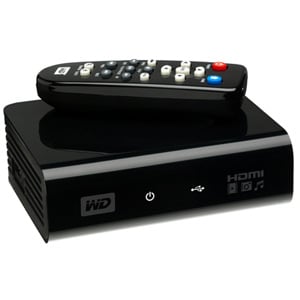
Added on January 22, 2009, 8:12 pmFor those of you who wants to play mkv files with subtitles and DTS audio on your HD TV...your dream have just come true.

Check out the Western Digital WD TV HD Media Player

user posted image

This thing can play almost all the digital media like movies, photos, music from any usb drive. Best of all it supports NTFS which means that you don't need to split those larger mkv files to 4gb size. PS3 only supports fat32 limits the filesize to 4GB.


This post has been edited by lightning69: Jan 22 2009, 08:12 PM
kerollowyat
post Feb 1 2009, 10:05 PM

Getting Started
**
Junior Member
274 posts

Joined: Jul 2007
From: Selangor


Also tested the PS3 Media Server. Works great.
At first, got problem - data is corrupted. But already figured it out. My Sunbelt Personal Firewall seems having problem with PMS.
Disabling or exiting the firewall didn't solve the problem. Only by uninstalling it, then I can play all video files,even mkv with subtitles smoothly.
Overall, works great. thumbup.gif

Now, trying to figure out how to decrease the subtitle font size.

I don't think it's appropriate to talk about PMS here, at this is Tversity thread.
Unless the thread's title change to "Media Server for PS3". Then we can discuss whatever type of media server for PS3.
Just an idea notworthy.gif
weikengwong
post Feb 15 2009, 04:44 PM

New Member
*
Junior Member
27 posts

Joined: Jun 2008


QUOTE(kerollowyat @ Feb 1 2009, 10:05 PM)
Also tested the PS3 Media Server. Works great.
At first, got problem - data is corrupted. But already figured it out. My Sunbelt Personal Firewall seems having problem with PMS.
Disabling or exiting the firewall didn't solve the problem. Only by uninstalling it, then I can play all video files,even mkv with subtitles smoothly.
Overall, works great. thumbup.gif

Now, trying to figure out how to decrease the subtitle font size.

I don't think it's appropriate to talk about PMS here, at this is Tversity thread.
Unless the thread's title change to "Media Server for PS3". Then we can discuss whatever type of media server for PS3.
Just an idea  notworthy.gif
*
I have 2 MVK files,

FileA:
Video: H.264 (MPEG-4 AVC), 1280x696, Aspect ratio: 1.83:1
Audio: DTS, Sampling Rate: 48000
Subtitle: SRT/UTF-8

FileB:
Video: H.264 (MPEG-4, AVC), 1280x720
Audio: AC3, Sampling Rate: 48000
Subtitle: SRT/UTF-8

Both files can be recognized by PS3. I can play FileB without problem. However, PS3 cannot play FileA (DTS). Always got this message: File Corrupted.

Anyone can adivise me what I need to do? Convert to VOB by using mk2vob?


nirvanic
post Feb 15 2009, 09:57 PM

New Member
*
Newbie
1 posts

Joined: Jun 2005
From: Kelana Jaya


I ran TVersity and strangely nothing works. All says can't process data. But if i run the normal server mode that basically means enabling the wm11 sharing capabilities it works... for some shows, not all. Wondering why that is. Must i uninstall all my codecs and just let tversity handle the codecs ah? thanx in advance for the advice
Kerry1136
post Feb 15 2009, 10:36 PM

One Decade Old
******
Senior Member
1,925 posts

Joined: Feb 2006
From: Petaling Jaya


Guys happen to you before when sometimes run Tversity then it says you have been disconnected then you check your PC and it says windows encountered an error bla bla etc...
slyyoung
post Feb 16 2009, 10:39 AM

'sup.
******
Senior Member
1,154 posts

Joined: Nov 2006
QUOTE(nirvanic @ Feb 15 2009, 09:57 PM)
I ran TVersity and strangely nothing works. All says can't process data. But if i run the normal server mode that basically means enabling the wm11 sharing capabilities it works... for some shows, not all. Wondering why that is. Must i uninstall all my codecs and just let tversity handle the codecs ah? thanx in advance for the advice
*
Just follow the tutorials provided here. I tried it and it works like a charm.


QUOTE(Kerry1136 @ Feb 15 2009, 10:36 PM)
Guys happen to you before when sometimes run Tversity then it says you have been disconnected then you check your PC and it says windows encountered an error bla bla etc...
*
Never experienced that before. Try re-installing it?
JayC75
post Feb 16 2009, 11:42 AM

Here We Go
******
Senior Member
1,404 posts

Joined: Jul 2006
From: Puchong


forget about tversity, use ps3 media server, easy setup, can copy file to u Ps3 also.
ronramka
post Feb 16 2009, 12:45 PM

Casual
***
Junior Member
393 posts

Joined: Oct 2006


guyzz..got question here.. i used tversity on xp works great,

but now i'm using vista ultimate 32bit..install tversity just fine, also got connected..but when i tried search for media server on my PS3, it detects the windows vista's media server n not the tversity rclxub.gif ..tried to disable the windows media server but still cannot find tversity sad.gif

anyone?

if cannot, want to try PS3 media server...
geekster129
post Feb 16 2009, 01:13 PM

Janitor
******
Senior Member
1,180 posts

Joined: Jan 2007
From: *awaiting GPS accuracy*


QUOTE(ronramka @ Feb 16 2009, 12:45 PM)
guyzz..got question here.. i used tversity on xp works great,

but now i'm using vista ultimate 32bit..install tversity just fine, also got connected..but when i tried search for media server on my PS3, it detects the windows vista's media server n not the tversity  rclxub.gif ..tried to disable the windows media server but still cannot find tversity  sad.gif 

anyone?

if cannot, want to try PS3 media server...
*
Check if you got any Firewall/Internet Security/Anitivirus program that blocks the port TVersity is listening to.
ronramka
post Feb 16 2009, 02:20 PM

Casual
***
Junior Member
393 posts

Joined: Oct 2006


QUOTE(geekster129 @ Feb 16 2009, 01:13 PM)
Check if you got any Firewall/Internet Security/Anitivirus program that blocks the port TVersity is listening to.
*
already checked that...still cannot...

i'm afraid that the tversity conflict with vista's media server kot... hmm.gif

edit : problem solve thumbup.gif using ps3 media server, less hastle, easy 2 set up, n easily get the subtitle file sum more rclxm9.gif

This post has been edited by ronramka: Feb 16 2009, 11:46 PM
nirvanic
post Feb 17 2009, 02:49 PM

New Member
*
Newbie
1 posts

Joined: Jun 2005
From: Kelana Jaya


QUOTE(slyyoung @ Feb 16 2009, 10:39 AM)
Just follow the tutorials provided here. I tried it and it works like a charm.
Never experienced that before. Try re-installing it?
*
Thanx bro... finally with some tweaking it plays... well most of the files... some still not working but it's a big improvement. My only gripe left is that via wireless it does lag... but that is natural. Once i get it to run wired it should improve tons. Already seeing a lot of improvement in terms of vid quality as compared to my XMBC set up. I compared frame to frame... colours r so much nicer ... XMBC running on component but at 480i tho... XMBC on 720p is just hideous!
TSlightning69
post Mar 30 2009, 02:22 PM

Look at all my stars!!
*******
Senior Member
2,298 posts

Joined: Jan 2003
From: Miri, Sarawak


QUOTE(nirvanic @ Feb 17 2009, 02:49 PM)
Thanx bro... finally with some tweaking it plays... well most of the files... some still not working but it's a big improvement. My only gripe left is that via wireless it does lag... but that is natural. Once i get it to run wired it should improve tons. Already seeing a lot of improvement in terms of vid quality as compared to my XMBC set up. I compared frame to frame... colours r so much nicer ... XMBC running on component but at 480i tho... XMBC on 720p is just hideous!
*
Try PS3mediaserver...its much better and more simple to set-up. I have switch from Tversity to PS3mediaserver.
weikengwong
post Apr 8 2009, 07:43 AM

New Member
*
Junior Member
27 posts

Joined: Jun 2008


QUOTE(lightning69 @ Mar 30 2009, 02:22 PM)
Try PS3mediaserver...its much better and more simple to set-up. I have switch from Tversity to PS3mediaserver.
*
Does it work for Vista?
economist
post Sep 25 2009, 08:52 AM

Getting Started
**
Junior Member
115 posts

Joined: Dec 2008
anyone can play RMVB thru TVresity?........i cant.......it says data corrupted......status says its reading it as MPG file....which codec to use? thanks
mox123
post Sep 29 2009, 01:29 PM

Getting Started
**
Junior Member
244 posts

Joined: Aug 2008
Hi,

If without router, can I connect my laptop to PS3? Is yes, how? My laptop have wifi.

Thanks.
cik_tak
post Sep 29 2009, 03:33 PM

Getting Started
**
Junior Member
210 posts

Joined: Jul 2009
Tversity sucks ... Java Ps3 Media Server ftw !!!
TSlightning69
post Sep 29 2009, 03:56 PM

Look at all my stars!!
*******
Senior Member
2,298 posts

Joined: Jan 2003
From: Miri, Sarawak


QUOTE(economist @ Sep 25 2009, 08:52 AM)
anyone can play RMVB thru TVresity?........i cant.......it says data corrupted......status says its reading it as MPG file....which codec to use? thanks
*
Not sure about TVersity but I amsure PS3mediaserver can as my wife is watching her SG series on it.
barney
post Sep 30 2009, 07:16 PM

Casual
***
Junior Member
329 posts

Joined: Sep 2006
From: Somewhere on Earth


i need help playing mkv file using my ps3. i can play all avi and rmvb files from TVersity no problem but when i tried to play mkv files....it shows this error on my ps3 "Media server error: A DLNA protocal error (2102) has occurred" and then i cant play all avi files already.

now how do i fix this? i cant even play mkv files at the moment. what should i do?

This post has been edited by barney: Sep 30 2009, 07:18 PM
shahreza2000
post Sep 30 2009, 08:11 PM

Getting Started
**
Junior Member
62 posts

Joined: Sep 2004
From: Ampang


QUOTE(barney @ Sep 30 2009, 07:16 PM)
i need help playing mkv file using my ps3. i can play all avi and rmvb files from TVersity no problem but when i tried to play mkv files....it shows this error on my ps3 "Media server error: A DLNA protocal error (2102) has occurred" and then i cant play all avi files already.

now how do i fix this? i cant even play mkv files at the moment. what should i do?
*
PS3 + TVersity + MKV-support
http://forums.tversity.com/viewtopic.php?f=28&t=27398

http://forums.tversity.com/viewtopic.php?f=28&t=13150

Media server error means ur ps3 disconnected from the server (PC), thus you can't play files... router prob perhaps???
gnsumas
post Sep 30 2009, 08:11 PM

/k/+ps=WIN!
*****
Senior Member
736 posts

Joined: Feb 2007
From: Hell


.mkv files take eternity to download whistling.gif
shahreza2000
post Sep 30 2009, 08:22 PM

Getting Started
**
Junior Member
62 posts

Joined: Sep 2004
From: Ampang


even kilat69 aldy post on 1st page regarding mkv on tversity.... plz read up
gnsumas
post Sep 30 2009, 08:23 PM

/k/+ps=WIN!
*****
Senior Member
736 posts

Joined: Feb 2007
From: Hell


QUOTE(shahreza2000 @ Sep 30 2009, 08:22 PM)
even kilat69 aldy post on 1st page regarding mkv on tversity.... plz read up
*
I mean when downloading the file to my PC.

Dem long cry.gif
0300078
post Oct 1 2009, 10:03 AM

Regular
******
Senior Member
1,447 posts

Joined: Mar 2006


mkv file i find it difficult for Tversity but Playstation Media Server can play them well. u might as well try that one.
barney
post Oct 8 2009, 09:17 AM

Casual
***
Junior Member
329 posts

Joined: Sep 2006
From: Somewhere on Earth


ok...tried the guide and can play .mkv files but sometimes got a bit lag (how to solve this?). Another thing is....can it play the sub title? in pc i can play the sub title but when playing mkv files from my ps3 there is no sub title. is there a way it can play the sub title?
cik_tak
post Oct 8 2009, 11:13 AM

Getting Started
**
Junior Member
210 posts

Joined: Jul 2009
QUOTE(barney @ Oct 8 2009, 09:17 AM)
ok...tried the guide and can play .mkv files but sometimes got a bit lag (how to solve this?). Another thing is....can it play the sub title? in pc i can play the sub title but when playing mkv files from my ps3 there is no sub title. is there a way it can play the sub title?
*
bro ... used PS3 Media Server ... much more better than Tversity ... can play all codecs + subtitle without any problem ...
Tversity Sucks ..
barney
post Oct 8 2009, 06:36 PM

Casual
***
Junior Member
329 posts

Joined: Sep 2006
From: Somewhere on Earth


QUOTE(cik_tak @ Oct 8 2009, 11:13 AM)
bro ... used PS3 Media Server ... much more better than Tversity ... can play all codecs + subtitle without any problem ...
Tversity Sucks ..
*
PS3 media server? is that some soft of a software like Tversity that i can download?
shahreza2000
post Oct 8 2009, 10:29 PM

Getting Started
**
Junior Member
62 posts

Joined: Sep 2004
From: Ampang


QUOTE(barney @ Oct 8 2009, 06:36 PM)
PS3 media server? is that some soft of a software like Tversity that i can download?
*
PS3 media server
http://forum.lowyat.net/index.php?showtopi...hl=media+server

Tversity not sux btw....

i have both running.... both have pros and cons
ebee
post Nov 4 2009, 07:26 PM

New Member
*
Junior Member
24 posts

Joined: Jan 2005


Hi guys, i recently setup my PS3 with TVersity and PS3 Media Server. Both connects and can play videos. But I can't listen to MP3 or browse Photos. Anyone knows why?
MadCow76
post Mar 1 2011, 04:46 PM

New Member
*
Junior Member
5 posts

Joined: Jan 2009


Hi all,

Need some advice from you experts, am having some problem using MKV2VOB now.

I have been using this MKV2VOB for quite some time now, thanks to this thread. I have been downloading MKV files and converting them to VOB without any problems with my Windows XP PC.

Recently, my PC died on me and has been changed to a Windows Vista now. Ever since then, I have not been able to convert the MKV files successfully, mostly it has picture but no audio, once it had audio but was distorted. I thought it was a file error so I tried it on my old laptop, running on Windows XP as well. It worked fine, picture and sound all ok.

Anyone of you faced this problem before? I need to know how to overcome this issue as it is troublesome to transfer from 1 PC to another laptop.

Looking forward to your replies...

Thanks in advance...


Change to:
| Lo-Fi Version
0.0491sec    0.22    5 queries    GZIP Disabled
Time is now: 5th December 2025 - 06:31 PM