

May I know where u guys get those MKV movie?
Technical PS3 + Tversity = Universal Media Centre, Discuss everything about Tversity on PS3
Technical PS3 + Tversity = Universal Media Centre, Discuss everything about Tversity on PS3
|
|
 Jan 11 2009, 04:28 AM Jan 11 2009, 04:28 AM
|
 
Junior Member
6 posts Joined: Nov 2008 From: KL  
|
May I know where u guys get those MKV movie?
|
|
|
|
|
|
Jan 11 2009, 04:36 AM
|

All Stars
10,124 posts Joined: Aug 2007
|
QUOTE(nonoldo @ Jan 11 2009, 04:28 AM) May I know where u guys get those MKV movie? You just make them yourself.   Just take a DVD movie that you've bought legally, and you can use mkv2vob to convert them to digital file, put it on TVersity server and you can watch it on your PS3. If you're asking about ahemm. illegal files.. then no, you MAY NOT know, until you read all the posts in the newbie section of the PS3 FAQ.  Added on January 11, 2009, 4:41 am QUOTE(lksing78 @ Jan 5 2009, 01:39 AM) Same here latest firmware... and latest PMC... Ditto here.. Latest firmware has no issue with the various movie format: .avi, .mkv, .mp4, .wmv (only certain).no lag at all ...tested almost all types of movie format MKV. Avi. Mp4. can play MKV that's good enough for me watch my favorite anime  But, with TVersity.. it can almost play anything as long it can transcode. Just make sure your PC server has the correct codec. My only wish list is that the FWD and REV button in TVersity stream can work better..much like in PS3 local harddisk. This post has been edited by danmooncake: Jan 11 2009, 04:42 AM |
|
|
Jan 11 2009, 09:13 AM
|

Junior Member
126 posts Joined: Mar 2008
|
I'M having problem when i use TVersity....it lags sometimes...and i use mkv2vob software for conversion.and i can detect noise on my panasonic 32" full hd. is it because i'm using cap ayam hdmi cable..i'm thinking of changing my hdmi cable with monster hdmi cable..is it worth it???
|
|
|
Jan 22 2009, 07:57 PM
|

Senior Member
2,298 posts Joined: Jan 2003 From: Miri, Sarawak
|
QUOTE(zarule7 @ Jan 11 2009, 09:13 AM) I'M having problem when i use TVersity....it lags sometimes...and i use mkv2vob software for conversion.and i can detect noise on my panasonic 32" full hd. is it because i'm using cap ayam hdmi cable..i'm thinking of changing my hdmi cable with monster hdmi cable..is it worth it??? All HDMI cable give the same results. Its digital.Added on January 22, 2009, 8:12 pmFor those of you who wants to play mkv files with subtitles and DTS audio on your HD TV...your dream have just come true. Check out the Western Digital WD TV HD Media Player 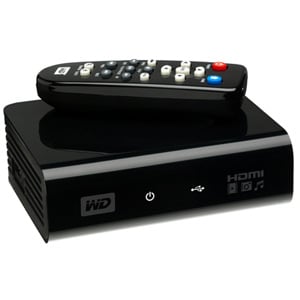 This thing can play almost all the digital media like movies, photos, music from any usb drive. Best of all it supports NTFS which means that you don't need to split those larger mkv files to 4gb size. PS3 only supports fat32 limits the filesize to 4GB. This post has been edited by lightning69: Jan 22 2009, 08:12 PM |
|
|
Feb 1 2009, 10:05 PM
|

Junior Member
274 posts Joined: Jul 2007 From: Selangor
|
Also tested the PS3 Media Server. Works great.
At first, got problem - data is corrupted. But already figured it out. My Sunbelt Personal Firewall seems having problem with PMS. Disabling or exiting the firewall didn't solve the problem. Only by uninstalling it, then I can play all video files,even mkv with subtitles smoothly. Overall, works great.  Now, trying to figure out how to decrease the subtitle font size. I don't think it's appropriate to talk about PMS here, at this is Tversity thread. Unless the thread's title change to "Media Server for PS3". Then we can discuss whatever type of media server for PS3. Just an idea  |
|
|
Feb 15 2009, 04:44 PM
|
|
Junior Member
27 posts Joined: Jun 2008
|
QUOTE(kerollowyat @ Feb 1 2009, 10:05 PM) Also tested the PS3 Media Server. Works great. I have 2 MVK files, At first, got problem - data is corrupted. But already figured it out. My Sunbelt Personal Firewall seems having problem with PMS. Disabling or exiting the firewall didn't solve the problem. Only by uninstalling it, then I can play all video files,even mkv with subtitles smoothly. Overall, works great. Now, trying to figure out how to decrease the subtitle font size. I don't think it's appropriate to talk about PMS here, at this is Tversity thread. Unless the thread's title change to "Media Server for PS3". Then we can discuss whatever type of media server for PS3. Just an idea FileA: Video: H.264 (MPEG-4 AVC), 1280x696, Aspect ratio: 1.83:1 Audio: DTS, Sampling Rate: 48000 Subtitle: SRT/UTF-8 FileB: Video: H.264 (MPEG-4, AVC), 1280x720 Audio: AC3, Sampling Rate: 48000 Subtitle: SRT/UTF-8 Both files can be recognized by PS3. I can play FileB without problem. However, PS3 cannot play FileA (DTS). Always got this message: File Corrupted. Anyone can adivise me what I need to do? Convert to VOB by using mk2vob? |
|
|
|
|
|
Feb 15 2009, 09:57 PM
|
|
Newbie
1 posts Joined: Jun 2005 From: Kelana Jaya
|
I ran TVersity and strangely nothing works. All says can't process data. But if i run the normal server mode that basically means enabling the wm11 sharing capabilities it works... for some shows, not all. Wondering why that is. Must i uninstall all my codecs and just let tversity handle the codecs ah? thanx in advance for the advice
|
|
|
Feb 15 2009, 10:36 PM
|

Senior Member
1,925 posts Joined: Feb 2006 From: Petaling Jaya
|
Guys happen to you before when sometimes run Tversity then it says you have been disconnected then you check your PC and it says windows encountered an error bla bla etc...
|
|
|
Feb 16 2009, 10:39 AM
|

Senior Member
1,154 posts Joined: Nov 2006
|
QUOTE(nirvanic @ Feb 15 2009, 09:57 PM) I ran TVersity and strangely nothing works. All says can't process data. But if i run the normal server mode that basically means enabling the wm11 sharing capabilities it works... for some shows, not all. Wondering why that is. Must i uninstall all my codecs and just let tversity handle the codecs ah? thanx in advance for the advice Just follow the tutorials provided here. I tried it and it works like a charm.QUOTE(Kerry1136 @ Feb 15 2009, 10:36 PM) Guys happen to you before when sometimes run Tversity then it says you have been disconnected then you check your PC and it says windows encountered an error bla bla etc... Never experienced that before. Try re-installing it? |
|
|
Feb 16 2009, 11:42 AM
|

Senior Member
1,404 posts Joined: Jul 2006 From: Puchong
|
forget about tversity, use ps3 media server, easy setup, can copy file to u Ps3 also.
|
|
|
Feb 16 2009, 12:45 PM
|

Junior Member
393 posts Joined: Oct 2006 
|
guyzz..got question here.. i used tversity on xp works great,
but now i'm using vista ultimate 32bit..install tversity just fine, also got connected..but when i tried search for media server on my PS3, it detects the windows vista's media server n not the tversity  ..tried to disable the windows media server but still cannot find tversity ..tried to disable the windows media server but still cannot find tversity  anyone? if cannot, want to try PS3 media server... |
|
|
Feb 16 2009, 01:13 PM
|

Senior Member
1,180 posts Joined: Jan 2007 From: *awaiting GPS accuracy* 
|
QUOTE(ronramka @ Feb 16 2009, 12:45 PM) guyzz..got question here.. i used tversity on xp works great, Check if you got any Firewall/Internet Security/Anitivirus program that blocks the port TVersity is listening to.but now i'm using vista ultimate 32bit..install tversity just fine, also got connected..but when i tried search for media server on my PS3, it detects the windows vista's media server n not the tversity ..tried to disable the windows media server but still cannot find tversity anyone? if cannot, want to try PS3 media server... |
|
|
Feb 16 2009, 02:20 PM
|
|
Junior Member
393 posts Joined: Oct 2006
|
QUOTE(geekster129 @ Feb 16 2009, 01:13 PM) Check if you got any Firewall/Internet Security/Anitivirus program that blocks the port TVersity is listening to. already checked that...still cannot...i'm afraid that the tversity conflict with vista's media server kot...  edit : problem solve using ps3 media server, less hastle, easy 2 set up, n easily get the subtitle file sum more  This post has been edited by ronramka: Feb 16 2009, 11:46 PM |
|
|
|
|
|
Feb 17 2009, 02:49 PM
|
|
Newbie
1 posts Joined: Jun 2005 From: Kelana Jaya
|
QUOTE(slyyoung @ Feb 16 2009, 10:39 AM) Just follow the tutorials provided here. I tried it and it works like a charm. Thanx bro... finally with some tweaking it plays... well most of the files... some still not working but it's a big improvement. My only gripe left is that via wireless it does lag... but that is natural. Once i get it to run wired it should improve tons. Already seeing a lot of improvement in terms of vid quality as compared to my XMBC set up. I compared frame to frame... colours r so much nicer ... XMBC running on component but at 480i tho... XMBC on 720p is just hideous!Never experienced that before. Try re-installing it? |
|
|
Mar 30 2009, 02:22 PM
|
|
Senior Member
2,298 posts Joined: Jan 2003 From: Miri, Sarawak
|
QUOTE(nirvanic @ Feb 17 2009, 02:49 PM) Thanx bro... finally with some tweaking it plays... well most of the files... some still not working but it's a big improvement. My only gripe left is that via wireless it does lag... but that is natural. Once i get it to run wired it should improve tons. Already seeing a lot of improvement in terms of vid quality as compared to my XMBC set up. I compared frame to frame... colours r so much nicer ... XMBC running on component but at 480i tho... XMBC on 720p is just hideous! Try PS3mediaserver...its much better and more simple to set-up. I have switch from Tversity to PS3mediaserver. |
|
|
Apr 8 2009, 07:43 AM
|
|
Junior Member
27 posts Joined: Jun 2008
|
QUOTE(lightning69 @ Mar 30 2009, 02:22 PM) Try PS3mediaserver...its much better and more simple to set-up. I have switch from Tversity to PS3mediaserver. Does it work for Vista? |
|
|
Sep 25 2009, 08:52 AM
|

Junior Member
115 posts Joined: Dec 2008
|
anyone can play RMVB thru TVresity?........i cant.......it says data corrupted......status says its reading it as MPG file....which codec to use? thanks
|
|
|
Sep 29 2009, 01:29 PM
|
|
Junior Member
244 posts Joined: Aug 2008
|
Hi,
If without router, can I connect my laptop to PS3? Is yes, how? My laptop have wifi. Thanks. |
|
|
Sep 29 2009, 03:33 PM
|

Junior Member
210 posts Joined: Jul 2009
|
Tversity sucks ... Java Ps3 Media Server ftw !!!
|
|
|
Sep 29 2009, 03:56 PM
|
|
Senior Member
2,298 posts Joined: Jan 2003 From: Miri, Sarawak
|
QUOTE(economist @ Sep 25 2009, 08:52 AM) anyone can play RMVB thru TVresity?........i cant.......it says data corrupted......status says its reading it as MPG file....which codec to use? thanks Not sure about TVersity but I amsure PS3mediaserver can as my wife is watching her SG series on it. |
| Change to: |  0.0200sec 0.0200sec
 0.54 0.54
 5 queries 5 queries
 GZIP Disabled GZIP Disabled
Time is now: 15th December 2025 - 01:22 AM |
 Quote
Quote