

i spray mine to black oso but at the screw hole the paint tercabut edy.. how to prevent this?
Cable management thread, Share your cable management here
Cable management thread, Share your cable management here
|
|
 Apr 19 2009, 06:23 PM Apr 19 2009, 06:23 PM
|
 
Senior Member
2,027 posts Joined: Nov 2007 From: Greenwood, GBK 
|
i spray mine to black oso but at the screw hole the paint tercabut edy.. how to prevent this?
|
|
|
|
|
|
Apr 19 2009, 08:02 PM
|

Junior Member
385 posts Joined: Mar 2009 
|
Wao CM690 looking gud.
|
|
|
Apr 19 2009, 08:03 PM
|

Senior Member
902 posts Joined: Mar 2009
|
once properly screwed...don remove anymore?
|
|
|
Apr 19 2009, 08:22 PM
|

Senior Member
4,390 posts Joined: Oct 2004 From: Cheras, Malaysia 
|
Another cm690 post xD
Please clean your casing elses you will ended up like me » Click to show Spoiler - click again to hide... « Before: » Click to show Spoiler - click again to hide... « After: I hate my motherboard, i have to install my soundcard soooooooooooooo near to my graphic card. » Click to show Spoiler - click again to hide... « Any tips to do it better? This post has been edited by Sky.Live: Apr 19 2009, 09:09 PM |
|
|
Apr 19 2009, 08:54 PM
|

Senior Member
874 posts Joined: Feb 2008
|
@Sky.Live
bro, CM690 so damn easy to to cable management plus ur PSU is shorter than mine. things you should do: 1. remove all the cable clip. it's useless. 2. get longer SATA Cables. 3. route all cables to back MoBo tray. 4. if u rajin, spray interior black. |
|
|
Apr 20 2009, 12:05 AM
|

Senior Member
1,009 posts Joined: Oct 2008 From: KK<-->PJ
|
hey guys~
tis is my cm690  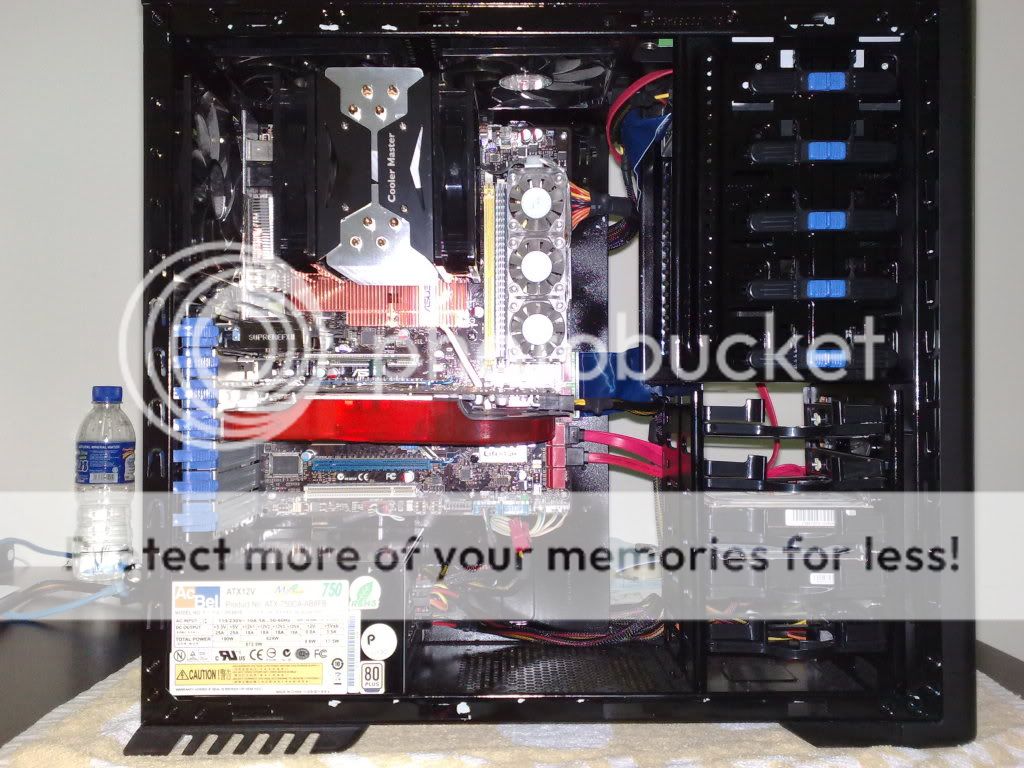 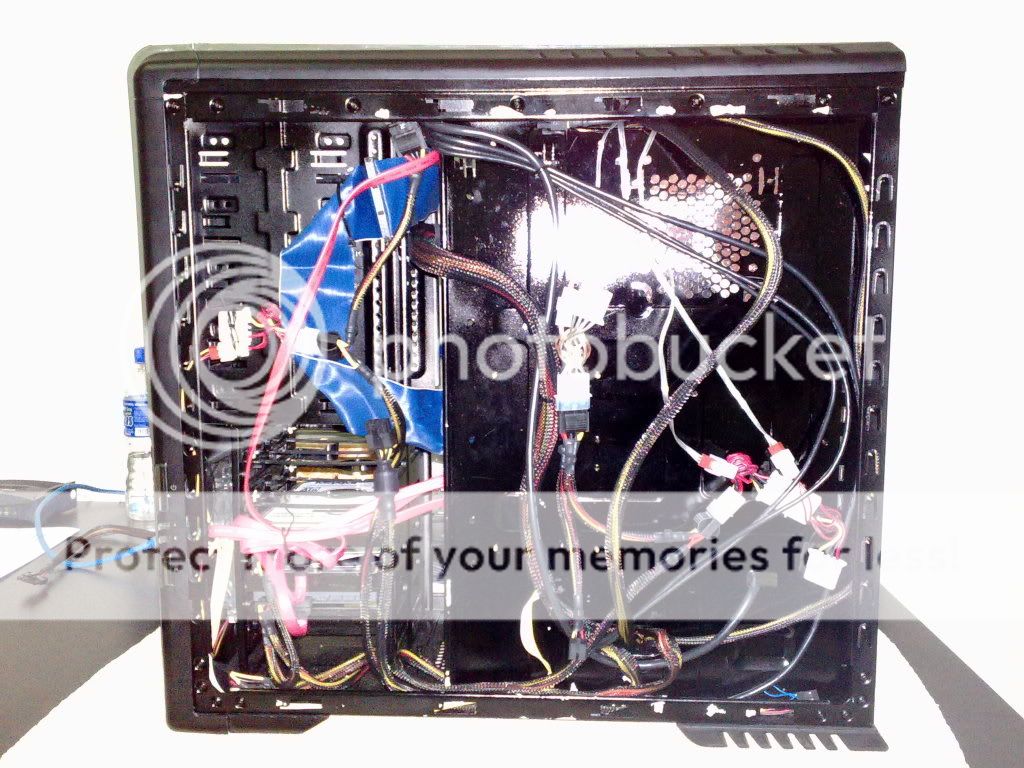 |
|
|
|
|
|
Apr 20 2009, 12:10 AM
|

All Stars
12,413 posts Joined: Jan 2008 From: KL - Cardiff - Subang - Sydney 
|

|
|
|
Apr 20 2009, 01:39 AM
|
|
Senior Member
2,027 posts Joined: Nov 2007 From: Greenwood, GBK
|
@Sky.Live
i tink u ram not in dual channel mode.. slot it in the same color slot to enable dual channel.. ur 520w corsair capable to handle 4 HDDs? |
|
|
Apr 20 2009, 09:15 AM
|

Senior Member
699 posts Joined: May 2008 From: Kajang / K.L
|
not all mobo use the same color to enable dual channel, like my MSI mobo must put in different color to enable dual channel.
|
|
|
Apr 20 2009, 11:47 AM
|

Senior Member
920 posts Joined: Jun 2007 From: Somewhere in Malaysia
|
CM690 so easy to do the cable management, my current casing hard to manage the cable
 . . |
|
|
Apr 20 2009, 12:15 PM
|
|
Junior Member
385 posts Joined: Mar 2009
|
CM690 is gud case, i will think bout this case when i wan to change. ^^
|
|
|
Apr 20 2009, 01:52 PM
|
|
Senior Member
4,390 posts Joined: Oct 2004 From: Cheras, Malaysia
|
QUOTE(anep @ Apr 20 2009, 01:39 AM) @Sky.Live i tink u ram not in dual channel mode.. slot it in the same color slot to enable dual channel.. ur 520w corsair capable to handle 4 HDDs?  QUOTE(amiranna @ Apr 20 2009, 09:15 AM) not all mobo use the same color to enable dual channel, like my MSI mobo must put in different color to enable dual channel. i am not sure running on dual channel or not also lol, never bother since i installed.my motherboard is asus p5q pro really admire you all's passion to actually spray it black lolx. this is the first time i look at my casing after 3 months installing it. harddisk does not consume much electricity compare to other components like graphic card and processor, 520w is more than enough for me |
|
|
Apr 20 2009, 07:00 PM
|

Senior Member
3,890 posts Joined: Feb 2007 From: Kuala Lumpur > Kuala Ketil > Kuala Muda
|
@Sky.Live
you can check with CPU-Z to know your ram running dual channel or single channel |
|
|
|
|
|
Apr 20 2009, 07:11 PM
|

Junior Member
194 posts Joined: Jun 2008 From: 127.0.0.1
|
QUOTE(amiranna @ Apr 20 2009, 09:15 AM) not all mobo use the same color to enable dual channel, like my MSI mobo must put in different color to enable dual channel. he is using asus |
|
|
Apr 20 2009, 07:39 PM
|

Senior Member
1,165 posts Joined: Jul 2007 From: Johor
|
im using p5q pro and dual channel mode is ram slot 1 + slot 3 and slot 2 + slot 4
|
|
|
Apr 20 2009, 10:50 PM
|
|
Junior Member
385 posts Joined: Mar 2009
|
I tot this is a cable management thread.. Y all the sudden discuss bout RAM.. Huhu
|
|
|
Apr 20 2009, 11:29 PM
|

Senior Member
844 posts Joined: Aug 2007 From: land below the wind (KK<--->KL)
|
@onnjeyyon,
Dude nice cable management .  |
|
|
Apr 21 2009, 03:57 AM
|

Senior Member
3,593 posts Joined: Feb 2005 From: ***Penang***
|
QUOTE(anep @ Apr 20 2009, 01:39 AM) @Sky.Live i dont see why a 520W cant handle 4 HDDs anywayi tink u ram not in dual channel mode.. slot it in the same color slot to enable dual channel.. ur 520w corsair capable to handle 4 HDDs? i was running my 5 HDD and overclocked system with 450W before |
|
|
Apr 21 2009, 10:20 AM
|
|
Junior Member
385 posts Joined: Mar 2009
|
R u serious? 4 HDDS with a overclocked CPU with only 450 watt? izzit real power ur PSU?
|
|
|
Apr 21 2009, 02:09 PM
|
|
Senior Member
3,890 posts Joined: Feb 2007 From: Kuala Lumpur > Kuala Ketil > Kuala Muda
|
why not?..as long as he not used high end graphic card...graphic card suck more juice from PSU...
|
|
Topic ClosedOptions
|
| Change to: |  0.0219sec 0.0219sec
 0.47 0.47
 6 queries 6 queries
 GZIP Disabled GZIP Disabled
Time is now: 14th December 2025 - 09:19 AM |
 Quote
Quote


