Welcome Guest ( Log In | Register )

Outline · [ Standard ] · Linear+

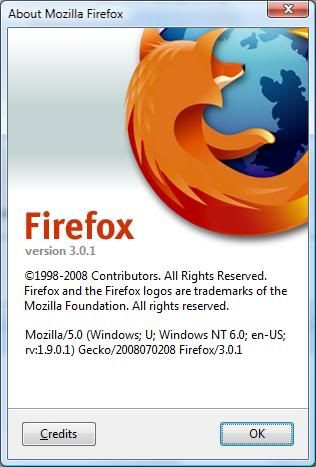
 Mozilla Firefox 3.0.1

views
     
TSfariz
post Jul 17 2008, 03:37 AM, updated 18y ago

Tan Sri F
Group Icon
VIP
16,825 posts

Joined: Jan 2003
From: Siberia
Firefox 3.0.1 fixed several issues found in Firefox 3.
  • Fixed several security issues.
  • Fixed several stability issues.
  • Fixed an issue where the phishing and malware database did not update on first launch.
  • Under certain circumstances, Firefox 3.0 did not properly save the SSL certificate exceptions list.
  • Updated the internal Public Suffix list.
  • In certain cases, installing Firefox 2 in the same directory in which Firefox 3 has been installed resulted in Firefox 2 being unstable. This issue was fixed as part of Firefox 2.0.0.15.
  • Fixed an issue where, when printing a selected region of content from the middle of a page, some of the output was missing (bug 433373).
  • Fixed a Linux issues where, for users on a PPP connection (dialup or DSL) Firefox always started in "Offline" mode (bug 424626).
Download: http://www.mozilla.com/en-US/products/down...=win&lang=en-US

This post has been edited by fariz: Jul 21 2008, 06:37 AM
sniper69
post Jul 17 2008, 07:23 AM

.: One Shot One Kill :. .+|Level 9 Type Shit|+.
*******
Senior Member
7,173 posts

Joined: Jan 2003
From: PCH


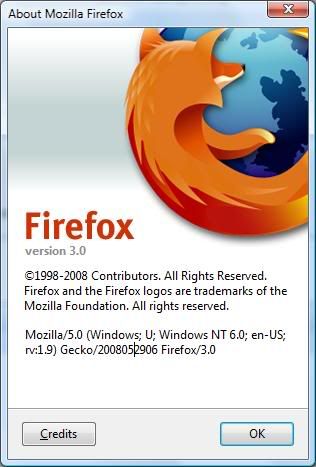
ok... updated, but didn't know it still in Beta blink.gif unsure.gif

user posted image vs user posted image
AMDAthlon
post Jul 17 2008, 09:57 AM

The future is Fusion
*******
Senior Member
5,221 posts

Joined: Aug 2007
From: Deneb star


I dont thinks its beta.Becos i check and there is 3.0.1.I guess its final version.
tachlio
post Jul 17 2008, 10:06 AM

de~sign "ing"
*******
Senior Member
3,102 posts

Joined: May 2005
From: Penang *̡͌l̡*̡̡
Feel nothing different too after i update the FF
jolmy
post Jul 17 2008, 11:31 AM

Meow
******
Senior Member
1,182 posts

Joined: Jan 2003


QUOTE(sniper69 @ Jul 17 2008, 07:23 AM)
ok... updated, but didn't know it still in Beta blink.gif unsure.gif

user posted image vs user posted image
*
What makes you think it is still in beta? 3.0.1 is a security update/bug fix release to Firefox 3.0.


Added on July 17, 2008, 11:33 am
QUOTE(tachlio @ Jul 17 2008, 10:06 AM)
Feel nothing different too after i update the FF
*
If you hadn't encounter problem with Firefox 3.0, then very likely you won't notice anything different. After all, 3 critical issues and various other issues are fixed in this release:

The 3 critical issues:
MFSA 2008-36 Crash with malformed GIF file on Mac OS X
MFSA 2008-35 Command-line URLs launch multiple tabs when Firefox not running
MFSA 2008-34 Remote code execution by overflowing CSS reference counter

This post has been edited by jolmy: Jul 17 2008, 11:38 AM
TSfariz
post Jul 17 2008, 11:51 AM

Tan Sri F
Group Icon
VIP
16,825 posts

Joined: Jan 2003
From: Siberia
for those who uses tab mix plus dev-build, it's not compatible with fx3.0.1

you have to manually edit it or use MR Tech Toolkit

open the .xpi with winrar and change the max version in install.rdf.

This post has been edited by fariz: Jul 17 2008, 11:56 AM
amenlo9
post Jul 17 2008, 11:59 AM

Look at all my stars!!
*******
Senior Member
2,627 posts

Joined: Jan 2003
From: Sepang,Cheras,Jupiter


QUOTE(fariz @ Jul 17 2008, 11:51 AM)
for those who uses tab mix plus dev-build, it's not compatible with fx3.0.1

you have to manually edit it or use MR Tech Toolkit

open the .xpi with winrar and change the max version in install.rdf.
*
thanks for the remind.wonder why TMP take so long to be compatible with ff3. sad.gif

normeck
post Jul 17 2008, 11:59 AM

Look at all my stars!!
*******
Senior Member
3,158 posts

Joined: Dec 2006


i dont know how to change tab mix plus....can give me the file?..
tq
amenlo9
post Jul 17 2008, 12:05 PM

Look at all my stars!!
*******
Senior Member
2,627 posts

Joined: Jan 2003
From: Sepang,Cheras,Jupiter


go here

http://tmp.garyr.net/forum/viewtopic.php?t=7031
TSfariz
post Jul 17 2008, 12:06 PM

Tan Sri F
Group Icon
VIP
16,825 posts

Joined: Jan 2003
From: Siberia
Save .xpi to desktop.
Right-click on it.
Select 'open with' if available, otherwise, select 'open'.
Choose 'select the program from a list'.
In subsequent dialogue box, select WinRar
At the top level of the archive you should find 'install.rdf'.
Drag 'install.rdf' to the desktop.
Right-click on it.
Select 'open with' if available, otherwise, select 'open'.
Choose 'select the program from a list'.
In the subsequent dialogue box, select Notepad
Search for line 'em:maxVersion="3.0"'.
Replace "3.0" with higher version. ("3.1" worked for me.)
Save file.
Drag 'install.rdf' from desktop back into the archive, overwriting existing file.
Drag the .xpi from your desktop into your FF window. Install.
solarwing
post Jul 17 2008, 01:31 PM

aR u LoOkInG fOr mE ?""
******
Senior Member
1,202 posts

Joined: Jul 2007
From: Western Digital "Bring your Life TO LIFE"


Thanks for sharing. laugh.gif
normeck
post Jul 17 2008, 03:36 PM

Look at all my stars!!
*******
Senior Member
3,158 posts

Joined: Dec 2006


QUOTE(fariz @ Jul 17 2008, 12:06 PM)
Save .xpi to desktop.
Right-click on it.
Select 'open with' if available, otherwise, select 'open'.
Choose 'select the program from a list'.
In subsequent dialogue box, select WinRar
At the top level of the archive you should find 'install.rdf'.
Drag 'install.rdf' to the desktop.
Right-click on it.
Select 'open with' if available, otherwise, select 'open'.
Choose 'select the program from a list'.
In the subsequent dialogue box, select Notepad
Search for line 'em:maxVersion="3.0"'.
Replace "3.0" with higher version. ("3.1" worked for me.)
Save file.
Drag 'install.rdf' from desktop back into the archive, overwriting existing file.
Drag the .xpi from your desktop into your FF window. Install.
*
thankzzz!!! rclxm9.gif
skylinegtr34rule4life
post Jul 17 2008, 03:40 PM

13k elite :P
********
Senior Member
13,340 posts

Joined: Feb 2005
From: back from vacation XD


woah so fast got upgrade dy ah laugh.gif i'll wait 4 the alert updates first rclxms.gif
punkyswat
post Jul 17 2008, 05:51 PM

Regular
******
Senior Member
1,519 posts

Joined: Jan 2007
thanks.my firefox fixed all those security.i feel smooth surfing.
jolmy
post Jul 17 2008, 11:44 PM

Meow
******
Senior Member
1,182 posts

Joined: Jan 2003


QUOTE(skylinegtr34rule4life @ Jul 17 2008, 03:40 PM)
woah so fast got upgrade dy ah laugh.gif i'll wait 4 the alert updates first rclxms.gif
*
You can manually click Help > Check for Updates to install the update without having to download the full installer.
kusha
post Jul 20 2008, 02:08 PM

Enthusiast
*****
Senior Member
851 posts

Joined: Nov 2004
From: USJ


thanks fariz. do u know how about another add-ons? to be compatible with this 3.0.1 updates.

hmm.gif
such:
unofficial myspace toolbar 1.4.92
fasterfox 2.0.0
adobe dlm 1.5.2.19

thanks!

TSfariz
post Jul 20 2008, 06:13 PM

Tan Sri F
Group Icon
VIP
16,825 posts

Joined: Jan 2003
From: Siberia
add-on compatibility checker
BuLaNaR
post Jul 21 2008, 03:05 AM

penyair sepi
*****
Senior Member
777 posts

Joined: Sep 2007
From: bandar baru bangi


QUOTE(fariz @ Jul 17 2008, 03:37 AM)
Firefox 3.0.1 fixed several issues found in Firefox 3.

  • Fixed several security issues.
  • Fixed several stability issues.
  • Fixed an issue where the phishing and malware database did not update on first launch.
  • Under certain circumstances, Firefox 3.0 did not properly save the SSL certificate exceptions list.
  • Updated the internal Public Suffix list.
  • In certain cases, installing Firefox 2 in the same directory in which Firefox 3 has been installed resulted in Firefox 2 being unstable. This issue was fixed as part of Firefox 2.0.0.15.
  • Fixed an issue where, when printing a selected region of content from the middle of a page, some of the output was missing (bug 433373).
  • Fixed a Linux issues where, for users on a PPP connection (dialup or DSL) Firefox always started in "Offline" mode (bug 424626).
Download: http://www.mozilla.com/en-US/products/down...=win〈=en-US
*
thanks for sharing bro!!! nod.gif
danieljoey
post Jul 22 2008, 11:54 PM

ǝᴉqooN
******
Senior Member
1,284 posts

Joined: Oct 2007
From: 槟城 - Penang Island Status: Un-Owned


Im using FLOCK by mozilla.. this is social browser and mozilla 3 package
ericmaxman
post Jul 23 2008, 08:35 AM

-
*******
Senior Member
7,951 posts

Joined: Sep 2005
Thanks for sharing.
noien
post Jul 23 2008, 02:13 PM

Getting Started
*******
Senior Member
3,186 posts

Joined: Jan 2008
i think firefox 3 is nice than the password manager is better than firefox 2
jananan
post Jul 25 2008, 10:49 AM

Android
******
Senior Member
1,513 posts

Joined: Jan 2003
From: Penang, Malaysia


IMHO FF3 is not slow PC friendly... i reverted back to FF2 after trying FF3 for 2 hours...

PS: thats why FF2 is still being developed... the latest is FF2 2.0.0.16 ...

This post has been edited by jananan: Jul 25 2008, 10:50 AM
TSfariz
post Jul 25 2008, 04:36 PM

Tan Sri F
Group Icon
VIP
16,825 posts

Joined: Jan 2003
From: Siberia
QUOTE(jananan @ Jul 25 2008, 10:49 AM)
IMHO FF3 is not slow PC friendly... i reverted back to FF2 after trying FF3 for 2 hours...

PS: thats why FF2 is still being developed... the latest is FF2 2.0.0.16 ...
*
Firefox 2 will be maintained with security and stability upgrades until mid-December 2008, after that all users are encouraged to upgrade to Firefox 3.

Typing this using Firefox 3
jolmy
post Jul 25 2008, 11:47 PM

Meow
******
Senior Member
1,182 posts

Joined: Jan 2003


QUOTE(jananan @ Jul 25 2008, 10:49 AM)
IMHO FF3 is not slow PC friendly... i reverted back to FF2 after trying FF3 for 2 hours...

PS: thats why FF2 is still being developed... the latest is FF2 2.0.0.16 ...
*
that is not the reason that it is still being developed.

Mozilla's policy is to continue support for previous version for 6 months after the release of a new version.
ash.ashie
post Jul 26 2008, 12:24 AM

Getting Started
**
Junior Member
144 posts

Joined: Apr 2008
From: BTHO'Ville, Southern Cheras.


QUOTE(jolmy @ Jul 25 2008, 11:47 PM)
that is not the reason that it is still being developed.

Mozilla's policy is to continue support for previous version for 6 months after the release of a new version.
*
well, I gotta agree.

Firefox 3 isn't that friendly to slow PC users.
-Mogwai-
post Jul 26 2008, 05:35 AM

Casual
***
Junior Member
344 posts

Joined: Nov 2005
From: -Iceland-

is it slow? I dont think so.

I just tested my bandwidth which got d.load=877kbps and upload=426kbps.

fyi im using the 1mbps streamyx.

This post has been edited by -Mogwai-: Jul 26 2008, 05:36 AM
ash.ashie
post Jul 26 2008, 06:47 AM

Getting Started
**
Junior Member
144 posts

Joined: Apr 2008
From: BTHO'Ville, Southern Cheras.


what I meant is for old/slow/minimum spec PC , not slow in term of speed, but performance.
kazalan_kamitake
post Jul 26 2008, 08:42 AM

This Star Nothing For Me
******
Senior Member
1,114 posts

Joined: Sep 2006
From: C.S.W Kembang


This sofware also good for use..thr security from virus good from the IE
DjTranceHan
post Jul 28 2008, 09:39 AM

Getting Started
**
Junior Member
293 posts

Joined: Apr 2007
From: Kepayan Ridge


i been usin firefox for long time this is the first time i encounter this kind problem after i update it to 3.0. i suff web like devianART i always get error.

anyone knows how to fix it
TSfariz
post Jul 28 2008, 09:42 AM

Tan Sri F
Group Icon
VIP
16,825 posts

Joined: Jan 2003
From: Siberia
what type of error?

do you use adblock or stylish?
DjTranceHan
post Jul 28 2008, 10:49 AM

Getting Started
**
Junior Member
293 posts

Joined: Apr 2007
From: Kepayan Ridge


firefox.exe

i didnt use any of those
TSfariz
post Jul 28 2008, 10:56 AM

Tan Sri F
Group Icon
VIP
16,825 posts

Joined: Jan 2003
From: Siberia
can you be more specific.

I don't have any error browsing deviantart.. both on 3.0 and 3.0.1

This post has been edited by fariz: Jul 28 2008, 10:57 AM
WebWalker
post Aug 2 2008, 01:11 PM

Computer Geek
********
All Stars
12,851 posts

Joined: May 2005
From: Puchong, Selangor


Firefox market share exceeds 20%, Internet Explorer dips below 70%

By Wolfgang Gruener
Wednesday, July 30, 2008 15:22

Chicago (IL) – It has been six weeks since Firefox 3 has been released and if we believe market share numbers provided by an ongoing survey of NetApplications, then it appears that Mozilla has had a successful launch with market share gains, especially at the expense of Microsoft’s Internet Explorer.

Examining NetApplications’ numbers, it is almost certain that this data is highly dependent on daily user behavior and that any results have to be taken with a grain of salt. But if the numbers are any indication then it is clear that Microsoft’s Internet Explorer market share is trending down, while Mozilla is playing with the 20% range and is successfully jumping over this mark more often.

The average market share for Firefox was 19.27% in June, up from 18.41% in May. Internet Explorer dropped from 73.75% to 72.95% in the same time frame.

According to the most recent data made available by the market research firm today, Internet Explorer stands at 69.88% today, while Firefox 2 and 3 account for a combined market share of 20.68% (Firefox 2: 13.75%, Firefox 3: 6.92%.) Since the launch of Firefox 3 on June 17, IE’s share was as high as 74.30% and played at least 12 time with numbers below the 71% mark, while today’s estimate is a new low for the browser in NetApplications’ chart.

On the other side, Firefox was estimated to have accounted for a market share of 17.81% on June 17 (Firefox 2: 16.19%, Firefox 3: 1.62%) and was able to jump over the 20% barrier eight times since then. Firefox 3 has been continuously gaining market share since launch and Firefox appears to be making a slight comeback in recent days, after falling as low as 12.37% on July 23. July 26 and July 27 have been the first two consecutive days on which Firefox was able to maintain a market share above 20%.

Since the day of the introduction of Firefox 3, Firefox was able to add 2.85 percentage points to its market share, while IE lost 4.20 points in the same time frame.

Source : http://www.tgdaily.com/html_tmp/content-view-38653-113.html

iRonTech
post Aug 5 2008, 01:55 PM

Access Denied
*******
Senior Member
8,621 posts

Joined: Nov 2004
QUOTE(fariz @ Jul 25 2008, 04:36 PM)
Firefox 2 will be maintained with security and stability upgrades until mid-December 2008, after that all users are encouraged to upgrade to Firefox 3.

Typing this using Firefox 3
*
blink.gif still few months to go...couple of old pc still using 2.0.0.16 sweat.gif

QUOTE(ash.ashie @ Jul 26 2008, 06:47 AM)
what I meant is for old/slow/minimum spec PC , not slow in term of speed, but performance.
*
icon_idea.gif FF ver 1.5 is the best for older pc. im using it on my eee pc
mengsuan
post Aug 5 2008, 05:33 PM

9W2NNS
Group Icon
Staff
10,459 posts

Joined: Sep 2005
From: Puchong

At last Windows Live Mail fully supports FF3. biggrin.gif
normeck
post Aug 14 2008, 01:36 PM

Look at all my stars!!
*******
Senior Member
3,158 posts

Joined: Dec 2006


how to clear this address??


Attached thumbnail(s)
Attached Image
Golden
post Aug 14 2008, 01:39 PM

Casual
***
Senior Member
499 posts

Joined: Oct 2005


QUOTE(normeck @ Aug 14 2008, 01:36 PM)
how to clear this address??
*
I really like the smart address bar in Firefox 3.0.1 which searches addresses by keywords.

i wonder will Internet Explorer and Opera copy this feature from Firefox?

This post has been edited by Golden: Aug 14 2008, 01:44 PM
TSfariz
post Aug 14 2008, 02:11 PM

Tan Sri F
Group Icon
VIP
16,825 posts

Joined: Jan 2003
From: Siberia
QUOTE(normeck @ Aug 14 2008, 01:36 PM)
how to clear this address??
*
select with mouse and press Delete key
normeck
post Aug 14 2008, 02:21 PM

Look at all my stars!!
*******
Senior Member
3,158 posts

Joined: Dec 2006


i want permanent delete...
y11
post Aug 14 2008, 03:11 PM

Getting Started
**
Junior Member
173 posts

Joined: Mar 2008
From: JB
how to delete all add-on and bookmarks?
i try to reinstall firefox
but the add-on and bookmarks still got
cyew86
post Aug 14 2008, 03:47 PM

oh my ...
*******
Senior Member
4,251 posts

Joined: Aug 2006
QUOTE(normeck @ Aug 14 2008, 02:21 PM)
i want permanent delete...
*
Select Tools --> Clear Private Data
and some of them will still be left there if u have bookmarked those websites
TSfariz
post Aug 14 2008, 04:04 PM

Tan Sri F
Group Icon
VIP
16,825 posts

Joined: Jan 2003
From: Siberia
QUOTE(normeck @ Aug 14 2008, 02:21 PM)
i want permanent delete...
*
you have to clear your history and bookmarks.


Added on August 14, 2008, 4:08 pm
QUOTE(y11 @ Aug 14 2008, 03:11 PM)
how to delete all add-on and bookmarks?
i try to reinstall firefox
but the add-on and bookmarks still got
*
delete profile folder

This post has been edited by fariz: Aug 14 2008, 04:08 PM
y11
post Aug 14 2008, 04:31 PM

Getting Started
**
Junior Member
173 posts

Joined: Mar 2008
From: JB
got it~
thx fariz biggrin.gif
noien
post Aug 15 2008, 12:40 AM

Getting Started
*******
Senior Member
3,186 posts

Joined: Jan 2008
anybody firefox always clash?mine always clash and it always show the send or dont send thing.any1 have this problem?
SUSfree666
post Aug 31 2008, 05:53 PM

Getting Started
**
Junior Member
235 posts

Joined: Mar 2007


guys will ff3 slow down the browsing speed?

it kinda slow in loading compare to ff2..
normeck
post Aug 31 2008, 06:34 PM

Look at all my stars!!
*******
Senior Member
3,158 posts

Joined: Dec 2006


loading when it starts or loading webpage?
SUSfree666
post Aug 31 2008, 09:16 PM

Getting Started
**
Junior Member
235 posts

Joined: Mar 2007


loading webpage.
orenzai
post Sep 1 2008, 12:06 AM

Look at all my stars!!
*******
Senior Member
3,114 posts

Joined: Dec 2006


i got a bit of a question here...my ff3 seem to startup quite slowly.. you can see my siggy...specs should be the prob.. i monitor the mem usage from task manager can see the ff3 slowly crawls up 10k-20k.....until arnd 50k then it will appear on my screen...this happens most of the time while sometime very fast...whats the prob ar? i see my adobe bridge seem to have had that prob last time but now no more... so only this ff3 got the prob now..anyone know how to solve it?
kery
post Sep 1 2008, 12:55 AM

New Member
*
Newbie
1 posts

Joined: Aug 2008


QUOTE(normeck @ Aug 14 2008, 02:36 PM)
how to clear this address??
*
simply by clik tools,then click clear private data,then tick all box and finally click clear private data now

setoyo
post Sep 1 2008, 03:03 PM

Luv MySeLF!
*****
Senior Member
849 posts

Joined: Sep 2007
I love firefox wub.gif and using it right now BUT mad.gif
Got "Internet Connection Disconnect" when using firefox 3.0.1 for maybank2u
Last firefox 2.0 it ok..
So each time im going to log in maybank2u im using IE...
normeck
post Sep 1 2008, 03:14 PM

Look at all my stars!!
*******
Senior Member
3,158 posts

Joined: Dec 2006


i dont have any problem at all...can login into Maybank2u..can surf web faster..
The Silent Killer
post Sep 2 2008, 12:38 AM

On my way
****
Senior Member
657 posts

Joined: May 2006
i love ff3 but some plugins doesn't seem to work with it....
slehead
post Sep 6 2008, 09:27 PM

Getting Started
**
Junior Member
142 posts

Joined: Jul 2007
From: Kluang, Johor


hye can anyone help me...
my firefox cannot show even i have click it severel time..now im using IE..
when i check on task manager on the proses show that im running firefox..but the browser didn't show up..
can any1 help me
orenzai
post Sep 6 2008, 09:49 PM

Look at all my stars!!
*******
Senior Member
3,114 posts

Joined: Dec 2006


see the memory usage slowly go up.then after a while should show up..
Sylvester.ee
post Sep 23 2008, 01:15 AM

On my way
****
Senior Member
526 posts

Joined: Sep 2008
QUOTE(slehead @ Sep 6 2008, 09:27 PM)
hye can anyone help me...
my firefox cannot show even i have click it severel time..now im using IE..
when i check on task manager on the proses show that im running firefox..but the browser didn't show up..
can any1 help me
*
have you try install again?


Change to:
| Lo-Fi Version
0.0331sec    0.79    6 queries    GZIP Disabled
Time is now: 23rd December 2025 - 06:50 AM