

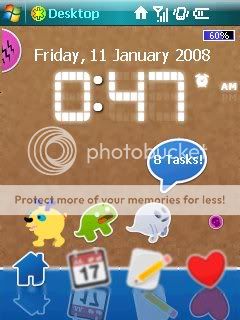
the dog say" '%d' miss call" , dino " new '%d' sms!" and ghost " "%d" task
by click them also will bring to phone, msg and task.
This post has been edited by acrylic_26: Aug 3 2008, 01:45 PM
WM Themes, Skin & Today Plug-in, Sharing and Discussing
|
|
 Aug 3 2008, 01:41 PM Aug 3 2008, 01:41 PM
|
 
Junior Member
267 posts Joined: Aug 2006  
|
this is mine
the dog say" '%d' miss call" , dino " new '%d' sms!" and ghost " "%d" task by click them also will bring to phone, msg and task. This post has been edited by acrylic_26: Aug 3 2008, 01:45 PM |
|
|
|
|
|
Aug 3 2008, 05:46 PM
|

Senior Member
1,739 posts Joined: Jun 2005
|
QUOTE(Deani_77 @ Aug 3 2008, 09:27 AM) Look very nice. How about the RAM usage? Is it OK? i duno how to check RAM usage   Its this? I feel its quite smooth compare my previous combination rl +PA+ UL + BS now i only use PA + UL + BS +S2U2 +WA3 +Quickmenu(Start menu-freeware) I had disable the biotouch(cube) since UL can does the same thing  p/s biotouch consume a lot memory Attached thumbnail(s) 
|
|
|
Aug 11 2008, 01:46 AM
|

Junior Member
336 posts Joined: Dec 2004
|
QUOTE(Deani_77 @ Jul 15 2008, 08:02 AM)  Another modification to my WM7 skin. Add up some shortcut and weather forecast features.  |
|
|
Aug 11 2008, 05:25 PM
|

Senior Member
3,251 posts Joined: Nov 2006 From: Kuala Rompin, Pahang
|
QUOTE(denver @ Aug 11 2008, 01:46 AM) How do you change the left softkey to Call History? I downloaded the software to re-map the left softkey but couldn't find the link or program for Call History. Dunno if this can be apply to other model. For my P525 when I put it "Reset to Defaults" it will assign that button to CallHistory.exe  |
|
|
Aug 11 2008, 05:56 PM
|

Senior Member
2,308 posts Joined: Jul 2007
|
eih... i was wondering....
having Ultimate Launcher/battery status or other plugin installed, [b]but not using them in the today screen.[  will they eat up ram?? |
|
|
Aug 11 2008, 06:12 PM
|
|
Senior Member
3,251 posts Joined: Nov 2006 From: Kuala Rompin, Pahang
|
QUOTE(ahnien @ Aug 11 2008, 05:56 PM) eih... i was wondering.... I don't think it will affecting the RAM if they are not active. Anyway you can try it by activate and deactivated the plug-in and check the free RAM having Ultimate Launcher/battery status or other plugin installed, [b]but not using them in the today screen.[ will they eat up ram?? |
|
|
|
|
|
Aug 11 2008, 07:58 PM
|
|
Senior Member
1,739 posts Joined: Jun 2005
|
QUOTE(ahnien @ Aug 11 2008, 05:56 PM) eih... i was wondering.... Do u know where to find the .exe for both program?having Ultimate Launcher/battery status or other plugin installed, [b]but not using them in the today screen.[ will they eat up ram?? Today's plugin is using .dll right? |
|
|
Aug 12 2008, 05:28 PM
|
|
Junior Member
336 posts Joined: Dec 2004
|
QUOTE(Deani_77 @ Aug 11 2008, 05:25 PM) Dunno if this can be apply to other model. For my P525 when I put it "Reset to Defaults" it will assign that button to CallHistory.exe Thanks. I manage to download callhistory.exe from xda forum. Hope this will work. |
|
|
Aug 12 2008, 05:43 PM
|
|
Senior Member
2,308 posts Joined: Jul 2007
|
QUOTE(bububang @ Aug 11 2008, 07:58 PM) Do u know where to find the .exe for both program? harr...?? got .exe meh? both program oso "tick-to-activate" at today screen option woToday's plugin is using .dll right? |
|
|
Aug 12 2008, 07:32 PM
|
|
Senior Member
1,739 posts Joined: Jun 2005
|
QUOTE(ahnien @ Aug 12 2008, 05:43 PM) harr...?? got .exe meh? both program oso "tick-to-activate" at today screen option wo Found solution already  |
|
|
Aug 12 2008, 07:41 PM
|

Senior Member
4,477 posts Joined: Jan 2003 From: Bandar Utama,PJ,Subang Jaya, TTDI 
|
guys wanna ask u, though no modification, im using a picture as my background for my today screen. problem is they kinda lighten up the whole picture and the words for owner, calendar all those are in white. any ways to change the words to black ?
|
|
|
Aug 12 2008, 07:44 PM
|

Senior Member
1,319 posts Joined: Dec 2005 From: somewhere i belong
|
QUOTE(~Battousai~ @ Aug 12 2008, 07:41 PM) guys wanna ask u, though no modification, im using a picture as my background for my today screen. problem is they kinda lighten up the whole picture and the words for owner, calendar all those are in white. any ways to change the words to black ? why not try another theme (.tsk)? |
|
|
Aug 12 2008, 07:49 PM
|
|
Senior Member
4,477 posts Joined: Jan 2003 From: Bandar Utama,PJ,Subang Jaya, TTDI
|
no no it's not a theme just picture. my own picture with my gf.. but every picture i use they'll lighten it
Added on August 12, 2008, 9:07 pmif i select the picture itself and select the option to put it as background pic through touch commander i can edit transparency level. but if use today cant... so one part settled.. the only part not settled is can i edit font colour This post has been edited by ~Battousai~: Aug 12 2008, 09:07 PM |
|
|
|
|
|
Aug 13 2008, 01:47 AM
|
|
Senior Member
1,739 posts Joined: Jun 2005
|
QUOTE(~Battousai~ @ Aug 12 2008, 07:49 PM) no no it's not a theme just picture. my own picture with my gf.. but every picture i use they'll lighten it Font color i duno.. but font size or font-family is editable from registry key. Added on August 12, 2008, 9:07 pmif i select the picture itself and select the option to put it as background pic through touch commander i can edit transparency level. but if use today cant... so one part settled.. the only part not settled is can i edit font colour I found this.. Font color Try this application ChangeFonts Not really.. actually using build in File explorer also can change transparency level(view picture using OS image viewer) This post has been edited by bububang: Aug 13 2008, 02:17 AM |
|
|
Aug 17 2008, 02:32 PM
|

Senior Member
4,587 posts Joined: Jan 2003 From: Golden Meadow
|
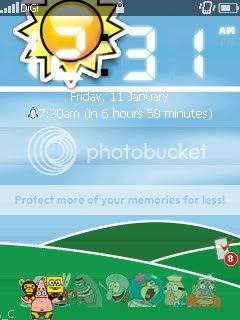
this is mine, diamond theme ... on htc cruise, none of this is mine ... something here and there ...
 This post has been edited by earl-ku: Aug 17 2008, 02:33 PM |
|
|
Aug 17 2008, 04:30 PM
|

Senior Member
3,988 posts Joined: Apr 2005 From: KL
|
QUOTE(earl-ku @ Aug 17 2008, 02:32 PM) this is mine, diamond theme ... on htc cruise, none of this is mine ... something here and there ... Cool yo. Any sources? Just install or need to flash rom? |
|
|
Aug 18 2008, 11:52 AM
|
|
Junior Member
18 posts Joined: Jul 2007 From: Cheras
|
hi there,
would appreciate it if someone can point me in the correct direction to get the seperator bar / horizontal line in the today screen removed. Please refer to the attached screen. Thanks. Attached thumbnail(s) 
|
|
|
Aug 18 2008, 12:52 PM
|

Senior Member
1,227 posts Joined: Sep 2004
|
QUOTE(~Battousai~ @ Aug 12 2008, 07:49 PM) no no it's not a theme just picture. my own picture with my gf.. but every picture i use they'll lighten it R u sure with today screen u cant? Open your picture with default picture & video viewer. Search for your gf picture. Open it. Go Menu and select set as background. Adjust your transparency there and click ok. You r done Added on August 12, 2008, 9:07 pmif i select the picture itself and select the option to put it as background pic through touch commander i can edit transparency level. but if use today cant... so one part settled.. the only part not settled is can i edit font colour  QUOTE(vkv @ Aug 18 2008, 11:52 AM) hi there, I believe u cant would appreciate it if someone can point me in the correct direction to get the seperator bar / horizontal line in the today screen removed. Please refer to the attached screen. Thanks.  |
|
|
Aug 18 2008, 01:00 PM
|

Senior Member
5,301 posts Joined: Jan 2003 From: Ampang - Putrajaya 
|
yeah, I would like to know too
|
|
|
Aug 18 2008, 11:59 PM
|
|
Senior Member
4,477 posts Joined: Jan 2003 From: Bandar Utama,PJ,Subang Jaya, TTDI
|
QUOTE(bububang @ Aug 13 2008, 01:47 AM) Font color i duno.. but font size or font-family is editable from registry key. thanks bro haha I found this.. Font color Try this application ChangeFonts Not really.. actually using build in File explorer also can change transparency level(view picture using OS image viewer)  QUOTE(Quinn @ Aug 18 2008, 12:52 PM) R u sure with today screen u cant? Open your picture with default picture & video viewer. Search for your gf picture. Open it. Go Menu and select set as background. Adjust your transparency there and click ok. You r done no no what i meant earlier is by going to settings and at the today button there i cant lower transparency..but with file explorer programs u can do that I believe u cant  |
|
Topic ClosedOptions
|
| Change to: |  0.0180sec 0.0180sec
 1.07 1.07
 6 queries 6 queries
 GZIP Disabled GZIP Disabled
Time is now: 17th December 2025 - 01:48 PM |
 Quote
Quote