

those cooler only cool the GPU only right?
so u need another 8 x ramsink and 4 PWM heatsink to cool the card, right??
just double check.
ATI Radeon HD 4000 series already released!v2, Hot card in town..bye2 NVidia..
ATI Radeon HD 4000 series already released!v2, Hot card in town..bye2 NVidia..
|
|
 Jun 27 2008, 01:58 PM Jun 27 2008, 01:58 PM
Return to original view | Post
#1
|
 
Senior Member
857 posts Joined: Jan 2003  
|
those cooler only cool the GPU only right?
so u need another 8 x ramsink and 4 PWM heatsink to cool the card, right?? just double check. |
|
|
|
|
|
Jun 28 2008, 03:54 PM
Return to original view | Post
#2
|
|
Senior Member
857 posts Joined: Jan 2003
|
the card is very hot.. 80-idle. 88-load
sigh |
|
|
Jun 29 2008, 02:02 AM
Return to original view | Post
#3
|
|
Senior Member
857 posts Joined: Jan 2003
|
hey just wanna check..
is ATI card starting from the 3xxx series have the same mounting as Nvidia 7 series??? the card is running very hot..  " "idle - 80c , load - 88c |
|
|
Jun 30 2008, 08:58 PM
Return to original view | Post
#4
|
|
Senior Member
857 posts Joined: Jan 2003
|
QUOTE(XTREME @ Jun 30 2008, 03:22 PM) sorry if this is a repost i cant find the file.. need some guide. anyone kind to help me out??QUOTE(bretware@guru3d) if you make a profile in catalyst after turning on Overdrive( make sure clock and memory settings are correct). You can then go to the file "C:\Users\Bretware\AppData\Local\ATI\ACE\Bretware. XML. the xml file will have the same name as the catalyst profile you saved. right click and hit edit. <Feature name="FanSpeedAlgorithm_0"> <Property name="FanSpeedAlgorithm" value="Manual" /> </Feature> <Feature name="FanSpeedRPMTarget_0"> <Property name="Want" value="0" /> </Feature> <Feature name="FanSpeedPercentTarget_0"> <Property name="Want" value="65" /> Change the value to "manual" and Want value to "65" Save the file then reload your profile in catalyst. 65% seemed perfect for me, 70% was loud but you may need it if your case has poor air flow. You will may have to select the profile everytime you start the computer, but it will work until there is a fix or better info so i can figure how to change the auto target temp. Good Luck ,bretware  using WindowXP ... cant find "User" directory in C:\ le...even show hidden file and folder. Only found the "Profile.XML" in C:\Documents and Settings\All Users\Application Data\ATI\ACE but how i edit it?? as in how i insert the parameters?? |
|
|
Jun 30 2008, 09:18 PM
Return to original view | Post
#5
|
|
Senior Member
857 posts Joined: Jan 2003
|
yes.. open in notepad for edit...
but where i insert the Parameter? Added on June 30, 2008, 9:20 pm QUOTE(amir89 @ Jun 30 2008, 09:05 PM) Bretware is the creator name for this technologies (lol i open C:\ very often... ) )u never open C:\ before? hidden file and folder? seems like a fresh OS there..  edit using notepad/wordpad right click on that XML and open with.. find notepad  but as stated i'm Window XP OS user... Thanks xen0. guess it's only solution for Vista?? This post has been edited by daze: Jun 30 2008, 09:20 PM |
|
|
Jun 30 2008, 09:26 PM
Return to original view | Post
#6
|
|
Senior Member
857 posts Joined: Jan 2003
|
QUOTE(amir89 @ Jun 30 2008, 09:22 PM) u attach ur .xml file here.. let someone make it for you.. i found mine in Windows XP is in here C:\Documents and Settings\All Users\Application Data\ATI\ACE\Profiles.XML <Profile> <Caste name="Graphics"> <Groups /> <Adapter name="PCI_VEN_1002&DEV_9440&SUBSYS_05021002&REV_00_4&243D7BD0&0&0070A" /> </Caste> </Profile> BTW, My ATI Overdrive has been enable. |
|
|
|
|
|
Jun 30 2008, 09:33 PM
Return to original view | Post
#7
|
|
Senior Member
857 posts Joined: Jan 2003
|
C:\Documents and Settings\xxx\Application Data\ATI\ACE\
Nothing there... is empty. |
|
|
Jun 30 2008, 09:55 PM
Return to original view | Post
#8
|
|
Senior Member
857 posts Joined: Jan 2003
|
 note: - profile already created. - ATI overdrive enable - view all hidden files and folder ticked. - screen shot of my Admin & All user folder... i'm wondering wat goes wrong here.... |
|
|
Jun 30 2008, 10:25 PM
Return to original view | Post
#9
|
|
Senior Member
857 posts Joined: Jan 2003
|
okie. got it...
For WindowXp, the path is in C:\Documents and Settings\Daze\Local Settings\Application Data\ATI\ACE\daze.XML Thnx alot.. at 65%..it really go down by 20c.. cool. but kinda noisy.. |
|
|
Jul 1 2008, 12:19 AM
Return to original view | Post
#10
|
|
Senior Member
857 posts Joined: Jan 2003
|
QUOTE(xen0 @ Jun 30 2008, 10:26 PM) hey daze, can post some gpuz 0.2.5 sensors? seems u r using 4870..its detect the bandwidth correctly... Here you go. BTW,..i've patch the hotfix.. why i cant run 3dmark 05,06?? it just stop at the splash screen. check the status at task manager. - not responding... " |
|
|
Jul 1 2008, 12:53 AM
Return to original view | Post
#11
|
|
Senior Member
857 posts Joined: Jan 2003
|
whats the GPU temp #1, #2, #3 for??
there's more than 1 sensor there? mem clock.. should be able too. but didnt try.. playing COD4 1st.. lolx. so many eye candy. max load temp. not more than 72c with 40% fan speed. |
|
|
Jul 1 2008, 03:01 AM
Return to original view | Post
#12
|
|
Senior Member
857 posts Joined: Jan 2003
|
yeah.. 40-45% is fine..
just run thru 3dmark05 & 06... default setting... laugh the hell at it... especially on CPU stress. kakaka... CPU bottleneck kao kao... """3dmark05 - 13816 3dmark06 - 9472  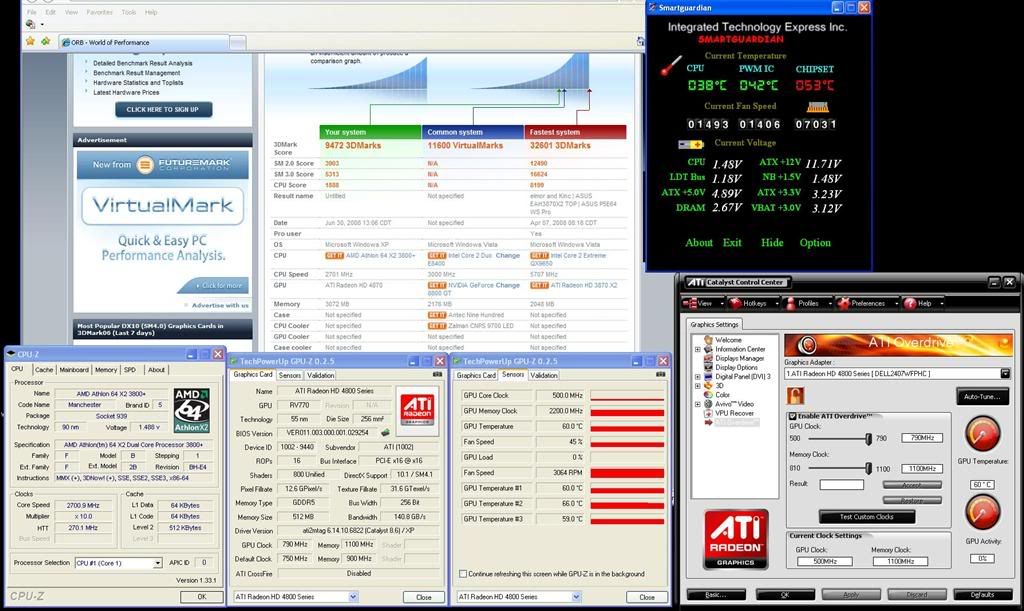 hahaha how it translate to 750/3600 ??? how many mhz the mem is running? This post has been edited by daze: Jul 1 2008, 03:02 AM |
|
|
Jul 1 2008, 09:55 AM
Return to original view | Post
#13
|
|
Senior Member
857 posts Joined: Jan 2003
|
QUOTE(xpresside @ Jul 1 2008, 04:17 AM) 4870 using gddr5 so actually its 900mhz x 4 = 3600 oh....in CCC i'm able to clock to Core = 790 MEM = 1100 but in GPU-z. the mem clock shows 2200mhz only.?? so, should it stated as 790 / 4400 instead?? i need a new CPU badly..  This post has been edited by daze: Jul 1 2008, 09:55 AM |
|
|
|
|
|
Jul 2 2008, 01:42 PM
Return to original view | Post
#14
|
|
Senior Member
857 posts Joined: Jan 2003
|
how to overclock higher than the limit available in CCC???
|
|
|
Jul 2 2008, 01:58 PM
Return to original view | Post
#15
|
|
Senior Member
857 posts Joined: Jan 2003
|
QUOTE(Hyde`fK @ Jul 2 2008, 01:49 PM) Easier way, use BIOS hack. Gulp....i'm not up to tat lvl...i dunno see my brand new card go kaput like tat. |
|
|
Jul 2 2008, 02:34 PM
Return to original view | Post
#16
|
|
Senior Member
857 posts Joined: Jan 2003
|
Kapishssss then. lolx...
|
|
|
Jul 2 2008, 05:52 PM
Return to original view | Post
#17
|
|
Senior Member
857 posts Joined: Jan 2003
|
QUOTE(Kuroro @ Jul 2 2008, 05:35 PM) I see a lot of people adjusting the fan speed for 4850. Is it needed for the newer 4870? would be better. IMO..cause stock 4870 fan running at 20% temp go from 80c - 88c.... much hotter.. |
|
|
Jul 4 2008, 02:57 PM
Return to original view | Post
#18
|
|
Senior Member
857 posts Joined: Jan 2003
|
what software u guys use to test the Overclock graphic card stability??
3dmark? tats all? |
|
|
Jul 4 2008, 03:34 PM
Return to original view | Post
#19
|
|
Senior Member
857 posts Joined: Jan 2003
|
cool.. will try the AMDATICLOCKTOOL...
btw...CF a 4870 + 4850 on a p45. will it be bottleneck by the PCI lanes? 10%? |
|
|
Jul 4 2008, 05:33 PM
Return to original view | Post
#20
|
|
Senior Member
857 posts Joined: Jan 2003
|
2gb GDDR5 and 1gb GDDR3 !!!!!!!!!!!!!!!!!!!!!!!!!!!!!!!!!!!??
HUAT ah!! |
|
Topic ClosedOptions
|
| Change to: |  0.0251sec 0.0251sec
 0.55 0.55
 7 queries 7 queries
 GZIP Disabled GZIP Disabled
Time is now: 10th December 2025 - 06:12 AM |
 Quote
Quote