Welcome Guest ( Log In | Register )

Bump Topic Topic Closed RSS Feed
123 Pages « < 75 76 77 78 79 > » Bottom

Outline · [ Standard ] · Linear+

 CLOSED

views
     
aztechx
post Sep 21 2008, 06:51 PM

~Aviation Freak~
*******
Senior Member
3,854 posts

Joined: Mar 2006
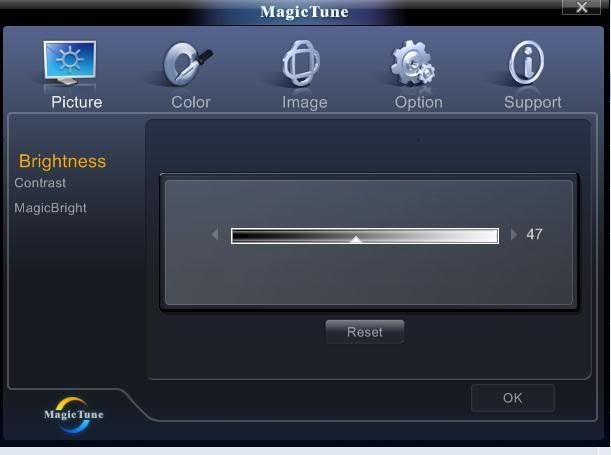
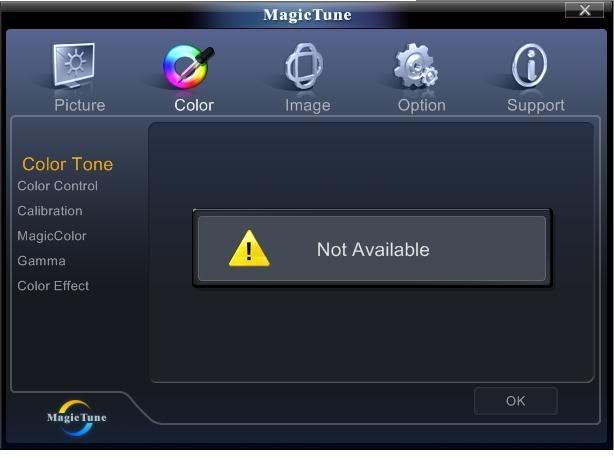
guys..im having a problem with the magictune software provided with my samsung t220..here are a few screenies..anyone can give me a hand?

user posted image
user posted image

LIST OF 'not available' SETTINGS
-contrast
-color tone
-color control
-color effect

contrast was available the first time i installed..but after i updated the software online,it was no longer available..uninstalling the old version and installing the old one from the cd didnt help either..anyone?
WilliamG
post Sep 21 2008, 07:18 PM

Getting Started
**
Junior Member
142 posts

Joined: Oct 2005


QUOTE(PaiGeWonG @ Sep 21 2008, 06:07 PM)
Well , im using HP w2228h - 22inch exactly same design and finishing
I don't experience any glossy or any complaints on that while using it  thumbup.gif
*
Hmmm...i mean the screen izzit look like glass made (glossy) ?hehe sry hope u guys understand wat i mean
angelic-x
post Sep 21 2008, 07:29 PM

Not a member
****
Senior Member
644 posts

Joined: Dec 2006

My friend using HPW2207 22" LCD, It look very nice and support HDMI FULL HD 1080p
viperiii
post Sep 21 2008, 07:31 PM

Casual
***
Junior Member
498 posts

Joined: Apr 2008


QUOTE(angelic-x @ Sep 21 2008, 07:29 PM)
My friend using HPW2207 22" LCD, It look very nice and support HDMI FULL HD 1080p
*
HP monitor is very bright.. impressive..
but let me check the specs 1st before put in any comment.

PaiGeWonG
post Sep 21 2008, 09:06 PM

Getting Started
**
Junior Member
219 posts

Joined: Jul 2008


QUOTE([fr33dom?)
,Sep 21 2008, 06:33 PM]
same same model here.... wink.gif  thumbup.gif

btw, wanna ask u , urs HP "black panel" there, will look like not "ketat" when touch the panel??

mine one rigth hand side down there, when touch the panel (near the word HP w2228h there) , it will like not ketat one...zzz....how come

hope u understand wat i m saying.... doh.gif
*
LOL , i didnt even notice it , waaa u molest ur monitor every part of it ka lol biggrin.gif
Yes after wad u describe , i try to feel it , only near that HP word part pressing that part macam tak ketat only when u told me lol biggrin.gif

Donno y maybe buttons are at around that corner gua sweat.gif
But no big deal lar biggrin.gif
arkard
post Sep 21 2008, 09:10 PM

talk to the Hand
*******
Senior Member
6,610 posts

Joined: Jan 2003
From: the Void
QUOTE(angelic-x @ Sep 21 2008, 07:29 PM)
My friend using HPW2207 22" LCD, It look very nice and support HDMI FULL HD 1080p
*
as a 22incher, Max Resolution: 1680 x 1050 does not give you FULL HD or 1080p
PaiGeWonG
post Sep 21 2008, 09:17 PM

Getting Started
**
Junior Member
219 posts

Joined: Jul 2008


QUOTE(WilliamG @ Sep 21 2008, 07:18 PM)
Hmmm...i mean the screen izzit look like glass made (glossy) ?hehe sry hope u guys understand wat i mean
*
Yes like glass made =glossy i understand wad u mean
But when i turn it on or watch a movie or play a game , Or in another words when the monitor is turn on , i don see any glare to it


Added on September 21, 2008, 9:23 pm
QUOTE(arkard @ Sep 21 2008, 09:10 PM)
as a 22incher, Max Resolution: 1680 x 1050 does not give you FULL HD or 1080p
*
Yes it doesnt gives u a full HD or 1080p but certainly it can plays any 720p or 1080p files

As for my experience on my pc with this monitor
720p certainly is clear
1080p the is DAM CLEAR and the sound quality is as clear as the screen quality

And Yes that isnt called FULL HD , but its already superb personally for me as for such quality thumbup.gif

Oh by the way im using DVI - HDMI cable

This post has been edited by PaiGeWonG: Sep 21 2008, 09:25 PM
boris
post Sep 21 2008, 09:24 PM

you bastard~!!
*****
Senior Member
955 posts

Joined: Jan 2003


QUOTE(angelic-x @ Sep 21 2008, 07:29 PM)
My friend using HPW2207 22" LCD, It look very nice and support HDMI FULL HD 1080p
*
Are you sure about that? Being able to receive HD resolution and being able to properly display HD resolution are two different things. icon_rolleyes.gif
WilliamG
post Sep 21 2008, 10:40 PM

Getting Started
**
Junior Member
142 posts

Joined: Oct 2005


Heh thx guys. Going to get HP w2408h for sure le!!!! Wahhahaa...
[fr33dom]
post Sep 21 2008, 11:23 PM

Getting Started
**
Junior Member
244 posts

Joined: Nov 2006
QUOTE(PaiGeWonG @ Sep 21 2008, 09:06 PM)
LOL , i didnt even notice it , waaa u molest ur monitor every part of it ka lol  biggrin.gif
Yes after wad u describe , i try to feel it , only near that HP word part pressing that part macam tak ketat only when u told me lol  biggrin.gif

Donno y maybe buttons are at around that corner gua  sweat.gif
But no big deal lar  biggrin.gif
*
10s bro for ur "confirmation"..... thumbup.gif

cause tis few day i a bit worry about it...keep think izzit is during i bring back, got kena langgar wall or not, so make it bcome like tis....haha... sad.gif


law1777
post Sep 21 2008, 11:26 PM

DreamMan
*******
Senior Member
2,654 posts

Joined: Dec 2007


u guys must get w2408h la!! worth every single of your penny!! im personally using it. most importantly its a fullhd and support hdmi. saved alot spaces for messy ugly looking wires. whenever u play a game or connect your next-gen console the PQ/SQ are both great..
[fr33dom]
post Sep 21 2008, 11:48 PM

Getting Started
**
Junior Member
244 posts

Joined: Nov 2006
QUOTE(law1777 @ Sep 21 2008, 11:26 PM)
u guys must get w2408h la!! worth every single of your penny!! im personally using it. most importantly its a fullhd and support hdmi. saved alot spaces for messy ugly looking wires. whenever u play a game or connect your next-gen console the PQ/SQ are both great..
*
bro, as i know 2408h and 2228h got big diff price lehh...

some more 24 inch is too big for me....so i get 22 inch since it oso support hdmi....^^ icon_rolleyes.gif

This post has been edited by [fr33dom]: Sep 21 2008, 11:49 PM
vvwowvv
post Sep 21 2008, 11:55 PM

Getting Started
**
Junior Member
75 posts

Joined: Oct 2007
QUOTE(law1777 @ Sep 21 2008, 11:26 PM)
u guys must get w2408h la!! worth every single of your penny!! im personally using it. most importantly its a fullhd and support hdmi. saved alot spaces for messy ugly looking wires. whenever u play a game or connect your next-gen console the PQ/SQ are both great..
*
biggrin.gif w2408h how much now? which shop nice buy? 3 year warranty?
is samsung T 240 much better and cheaper (1699)
WilliamG
post Sep 22 2008, 01:03 AM

Getting Started
**
Junior Member
142 posts

Joined: Oct 2005


hmmm...i can get hp w2408h around RM 1499 , hp w2207h around RM1299 donno weather its expensive o not compare to u guys hmmm
arkard
post Sep 22 2008, 01:58 AM

talk to the Hand
*******
Senior Member
6,610 posts

Joined: Jan 2003
From: the Void
QUOTE(WilliamG @ Sep 22 2008, 01:03 AM)
hmmm...i can get hp w2408h around RM 1499 , hp w2207h around RM1299 donno weather its expensive o not compare to u guys hmmm
*
w2408h for RM 1499? is that the retail price or a special price that u got?

I'm currently considering the benQ v2400w which is retailing at RM1499 too but needa order...anyone knows shops that stock this model?
Oxburg
post Sep 22 2008, 02:27 AM

Enthusiast
*****
Senior Member
857 posts

Joined: Feb 2007


QUOTE(aztechx @ Sep 21 2008, 06:51 PM)
guys..im having a problem with the magictune software provided with my samsung t220..here are a few screenies..anyone can give me a hand?

user posted image
user posted image

LIST OF 'not available' SETTINGS
-contrast
-color tone
-color control
-color effect

contrast was available the first time i installed..but after i updated the software online,it was no longer available..uninstalling the old version and installing the old one from the cd didnt help either..anyone?
*
Disable your Magic Color, then all option is available.When magic activated those will be locked.
2 Cents.
Fearless
post Sep 22 2008, 04:36 AM

Casual
***
Junior Member
390 posts

Joined: Mar 2005


QUOTE(zzzz52 @ Sep 20 2008, 11:25 PM)
Normally the best setting is the native resolution, for 19' widescreen is 1440x900. Because if you set to a lower resolution, the image is not sharp anymore as the LCD has to scale down to the lower resolution.

I think most of us will stick to the native resolution as it gives the best image quality.

The font is slightly smaller, but you will get use to it.
*
To have big font size for surfing, I suggest u get a low end 32" TV LCD as your monitor. U can get it at around RM2000 for Philips, Samsung, etc.

Indeed I overlooked this option, I very regret for having 24" 1900X1200 Philips monitor, the font size is too small for comfortable reading.
PaiGeWonG
post Sep 22 2008, 09:35 AM

Getting Started
**
Junior Member
219 posts

Joined: Jul 2008


QUOTE(WilliamG @ Sep 21 2008, 10:40 PM)
Heh thx guys. Going to get HP w2408h for sure le!!!! Wahhahaa...
*
Good for you , anyway if u really particular with the glossy thing , well as i said mine has no such experience
But before u buy , they got show u some running display on the display set in LOWYAT shops , see it to believe it first lor biggrin.gif

Cos mine is same design and same glass sort of screen = glossy type but i don see any reflection when i using it
But as for urs is 24inch so errr just to triple confirm , see the display playing it on the spot lo


Added on September 22, 2008, 9:40 am
QUOTE([fr33dom�)
,Sep 21 2008, 11:23 PM]
10s bro for ur  "confirmation"..... thumbup.gif

cause tis few day i a bit worry about it...keep think izzit is during i bring back, got kena langgar wall or not, so make it bcome like tis....haha... sad.gif
*
haha no problem , firstly im a female lar
the monitor is solid compares to alot , so no worries lar biggrin.gif

This post has been edited by PaiGeWonG: Sep 22 2008, 09:40 AM

s[H]sIkuA
post Sep 22 2008, 09:58 AM

live in the present
*******
Senior Member
2,162 posts

Joined: Sep 2004


Anyone know what is the price for BenQ G2400 now? smile.gif
law1777
post Sep 22 2008, 10:35 AM

DreamMan
*******
Senior Member
2,654 posts

Joined: Dec 2007


hey bros.. not to forget this w2408h has 1:1 pixel mapping which is very important to games and ambient light sensor. erm about the font too small i dun think i have this problem here. how far are u from your monitor? and if u have 'eyes degree' prob u dun wear ur glasses in front of your monitor? anyway i bought my baby b4 2008 CNY which cost me rm1680 and few weeks ago i went to lowyat hp retail and ask its still the same price. i got mine from the hp retail opposite lowyat actually. remember to ask them to test your monitor for dead-pixel-free

123 Pages « < 75 76 77 78 79 > » Top
Topic ClosedOptions
 

Change to:
| Lo-Fi Version
0.0221sec    0.95    6 queries    GZIP Disabled
Time is now: 9th December 2025 - 12:20 PM