Welcome Guest ( Log In | Register )

Bump Topic Topic Closed RSS Feed

Outline · [ Standard ] · Linear+

 ***Official Biostar T-Power i45***, Overclocking/Disccusion/Review/Guide

views
     
TScstkl1
post Jun 17 2008, 11:38 PM, updated 18y ago

Look at all my stars!!
Group Icon
Elite
6,799 posts

Joined: Jan 2003

****************Biostar T-Power I45 Overclocking/Discussion/Review/Guide Thread*****************************


Bios
80015 - Initial Bios

** Example 600 fsb by Biostar Guide

http://www.biostar.com.tw/app/en-us/event/tpi45oc/index.htm

Review List - Forums/Websites etc

http://www.biostar.com.tw/app/en-us/event/...i45rp/index.htm

Hardware
E8500
Biostar Tpower I45
4x1gb Team Xtreem PC2-6400 CL3's
Silverstone Op1000
Western Digital Raptor X
Windows Vista Ultimate
Coolit Freezone Elite
Sapphire X1050/ Sapphire HD4870 Crossfire


Software
Everest Ultimate 4.5.1330
OCCT
Windows Vista Ultimate 64bit SP1
CPUZ 1.45
Memtest 3.5beta
T-Power 2 Utility


cstkl1
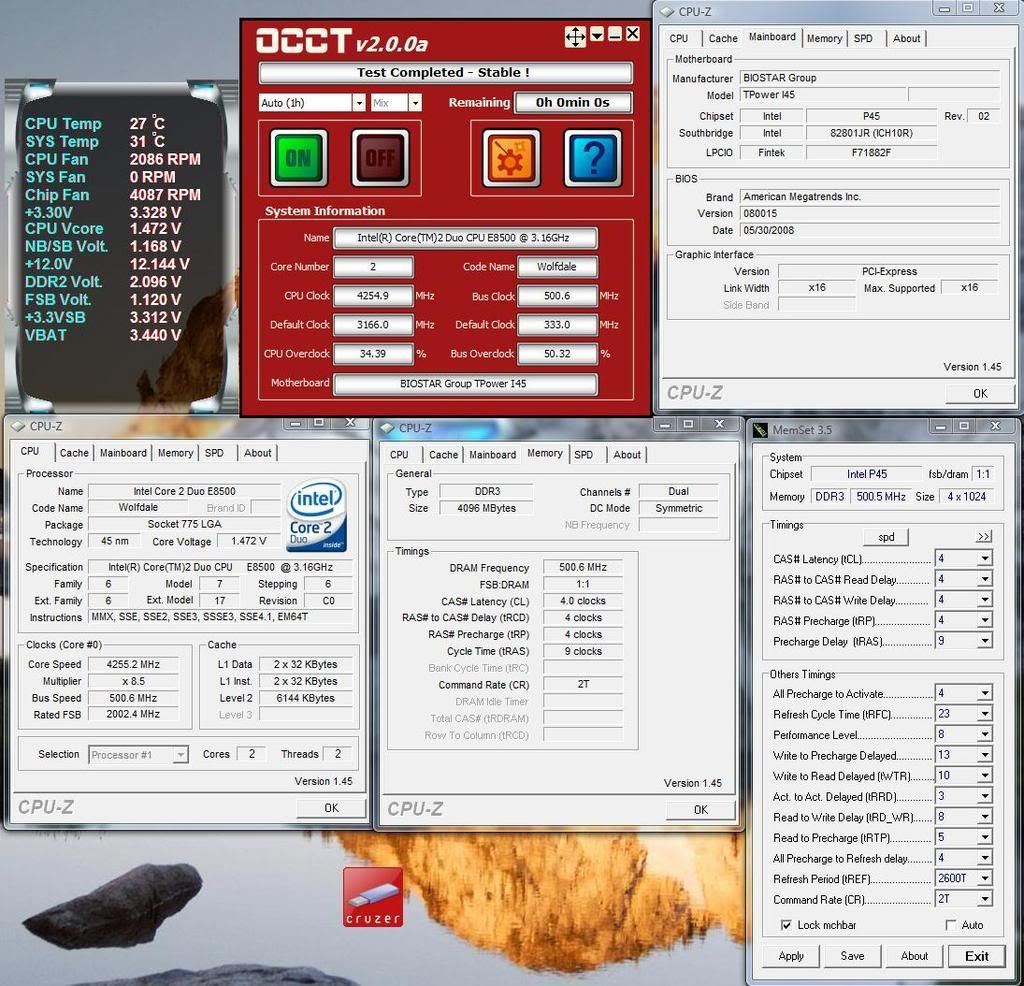
1 - 4.25ghz 500x8.5 1000mhz Cl4-4-4-9 tRD 8 - Stable
E8500/Team Xtreem PC2-6400 CL3 4x1gb
2 - 4.25ghz 500x8.5 1200mhz CL5-5-5-9 tRD 8 - Stable
E8500/Team Xtreem PC2-6400 CL3 4x1gb
3 - 4.27ghz 533x8.0 1066mhz CL5-5-5-9 tRD 10 -Stable
E8500/Team Xtreem PC2-6400 CL3 4x1gb
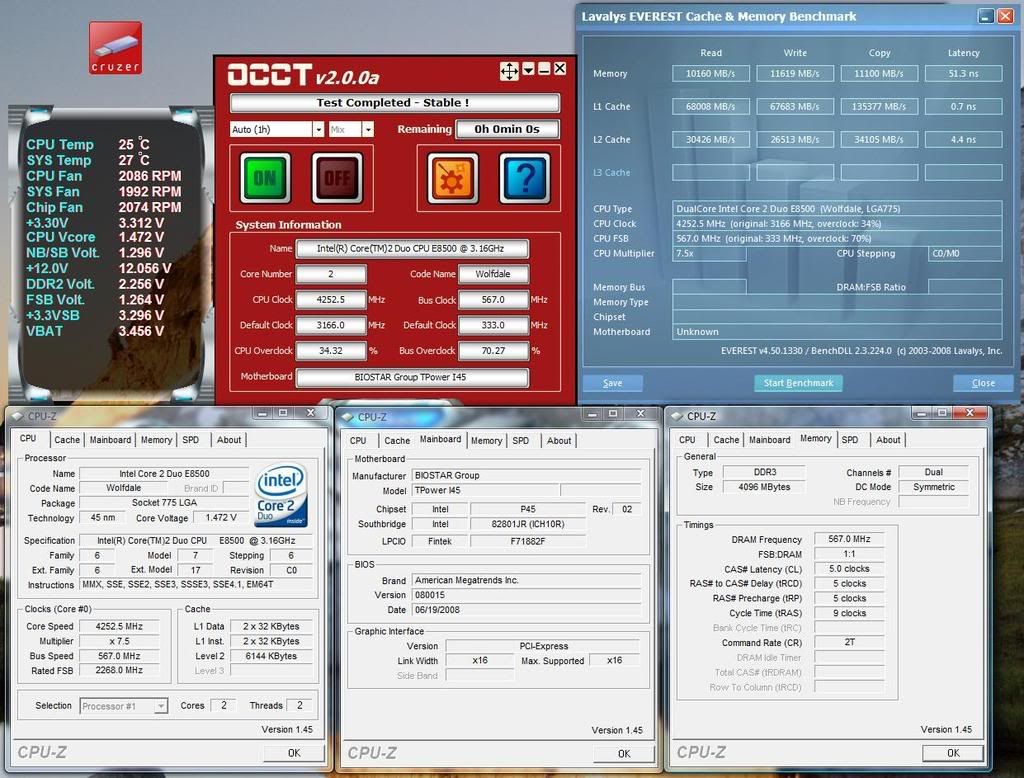
4 - 4.25ghz 566x7.5 1132mhz CL5-5-5-9 tRD 10 - Stable

rhlc7
1 - 4.27ghz 533x8.0 1066mhz CL5-5-5-15 tRD 9 - SP1m
e7200/Team Xtreem PC2-6400 Cl3 2x1gb
2 - 4.40ghz 550x8.0 1100mhz CL4-4-4-12 tRD 8 rclxms.gif rclxms.gif - SP1m
e7200/Team Xtreem PC2-6400 Cl3 2x1gb

coolice
1. 3.75ghz 625mhzx6 1250mhz CL5-5-5-15 tRD 10 SP8m
X3310/Crucial Anniversary PC2-5400 Cl3 2x1gb

coolice & dblooi
1. 5.8ghz 645mhzx9 rclxms.gif rclxms.gif 1290mhz CL5-5-5-15 tRD 10 SP1m
X3310/Crucial Anniversary PC2-5400 Cl3 2x1gb


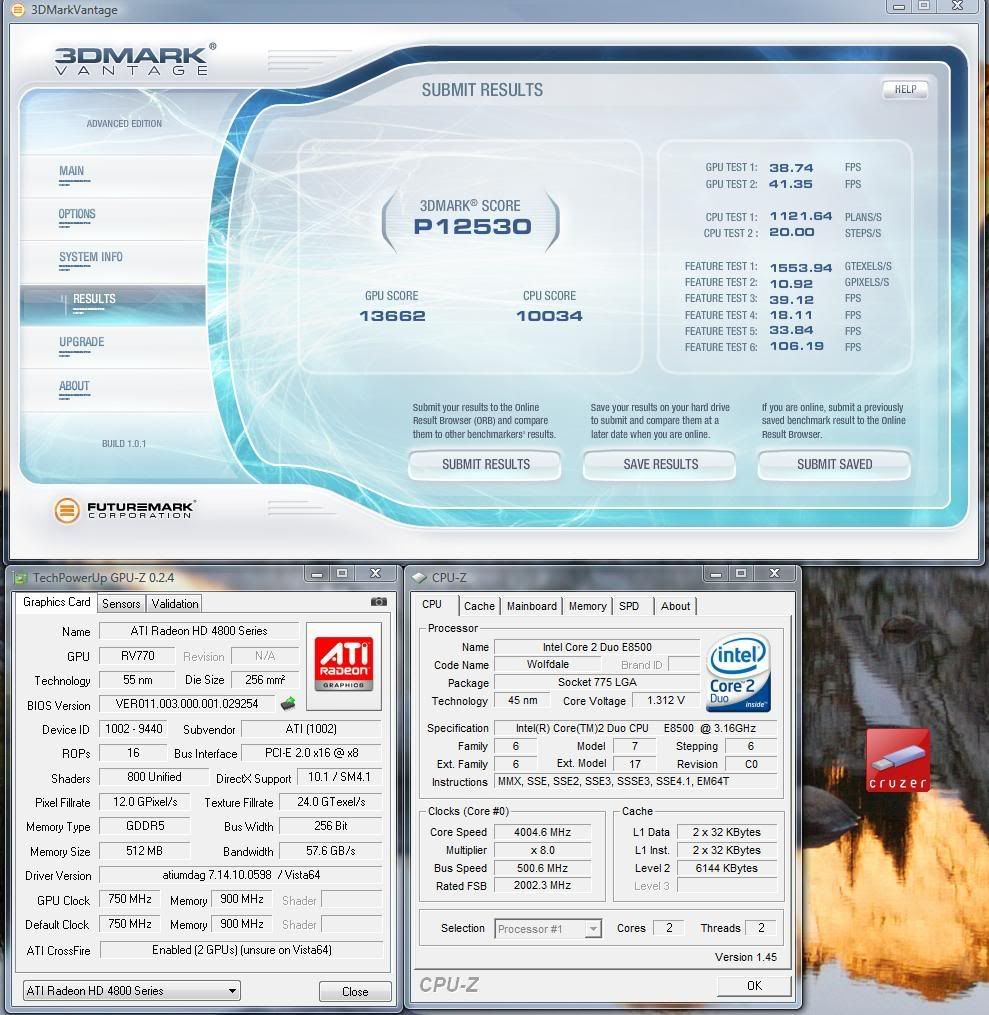
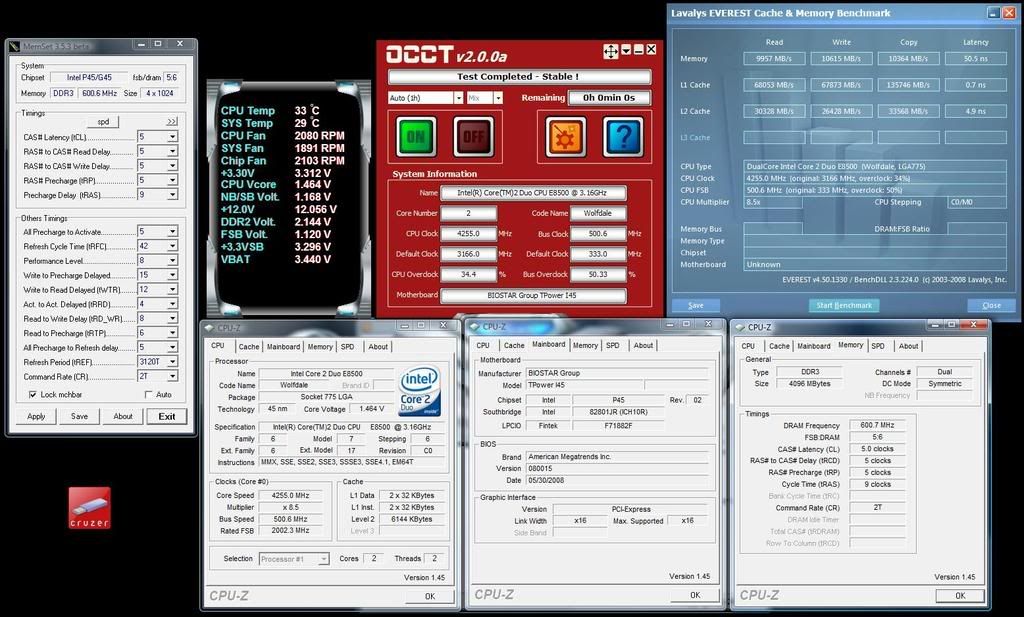
500x8 1000mhz CL4-4-4-9 2.09v
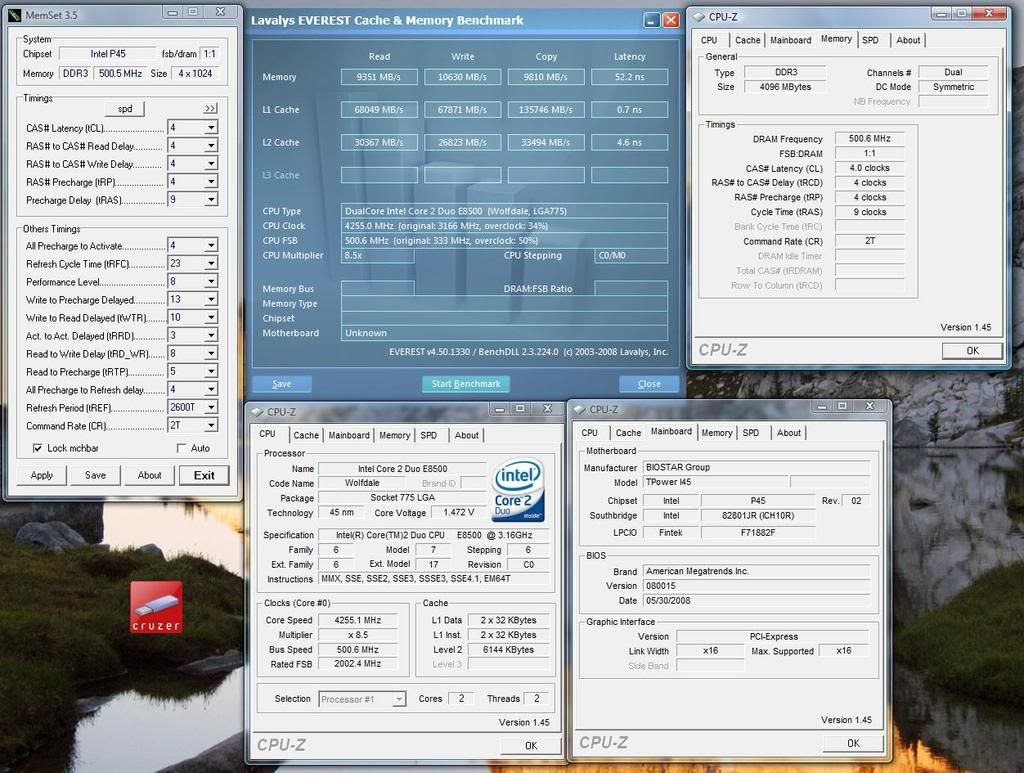
user posted imageuser posted image

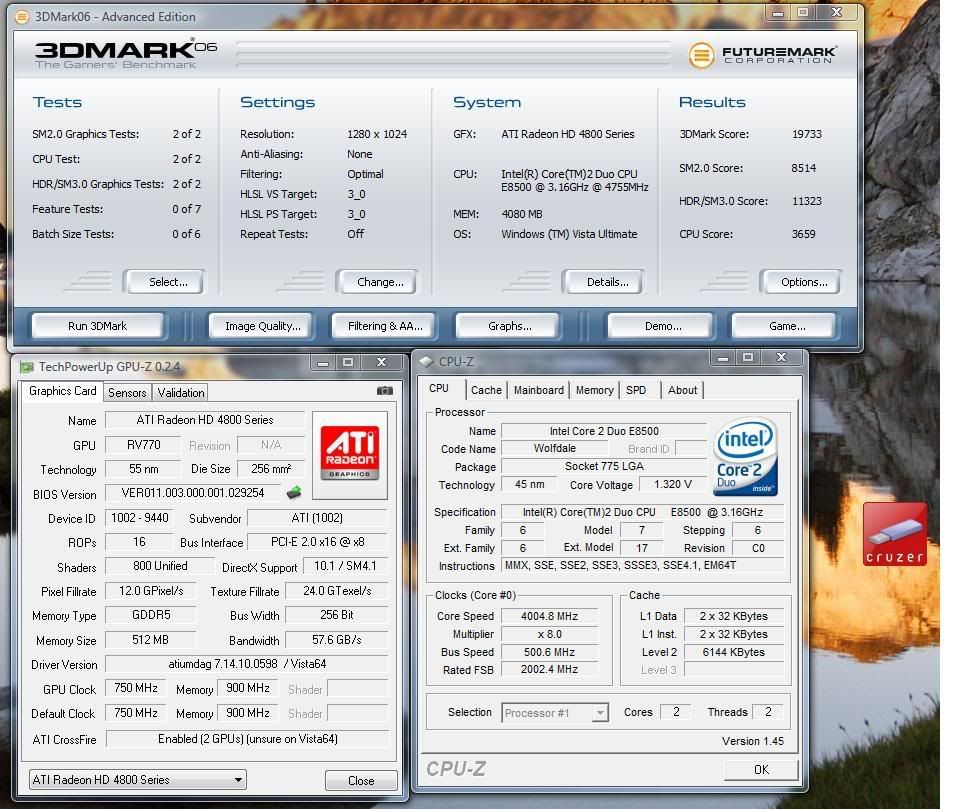
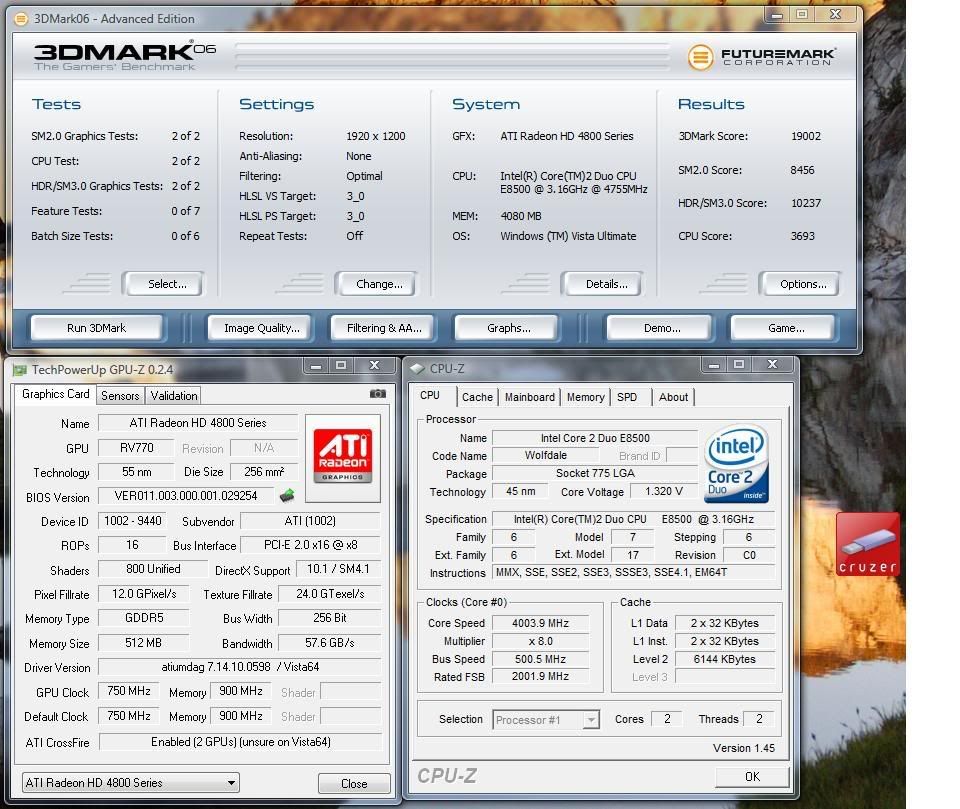
500x8 1200mhz CL5-5-5-9 2.14v
user posted image
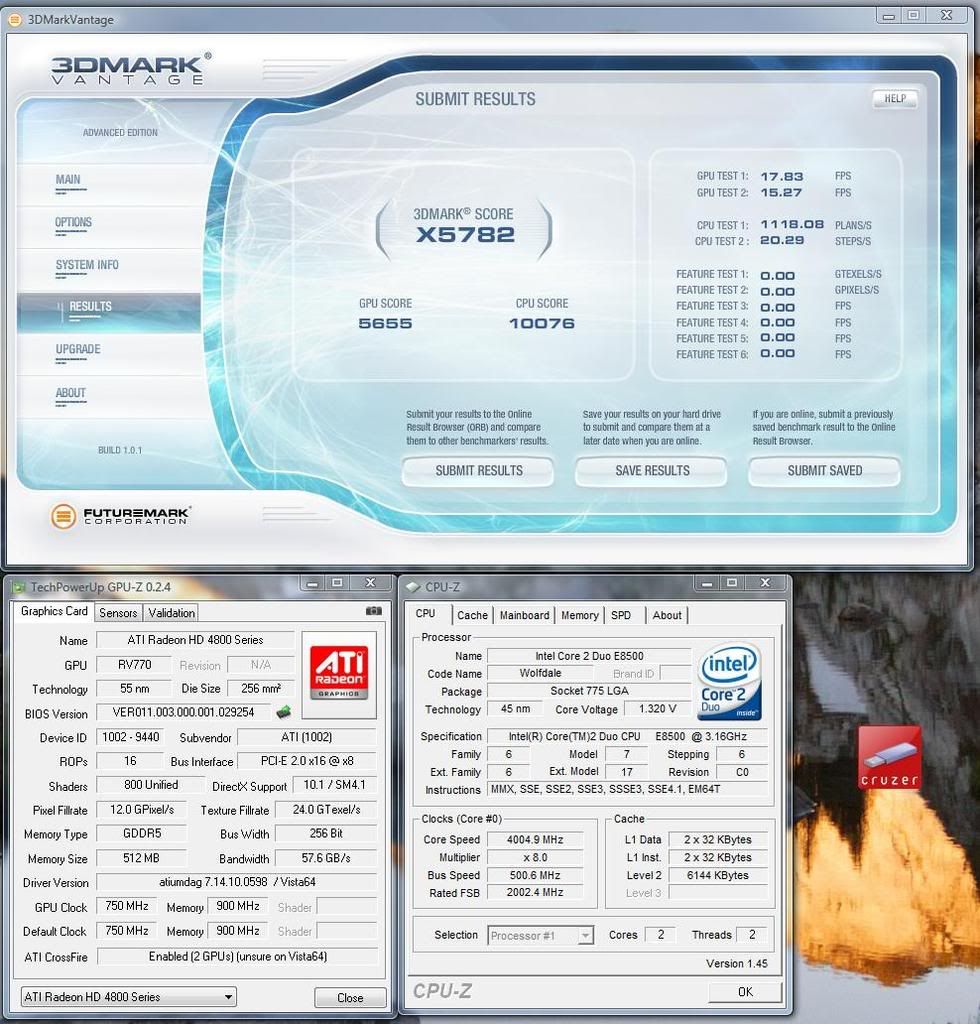
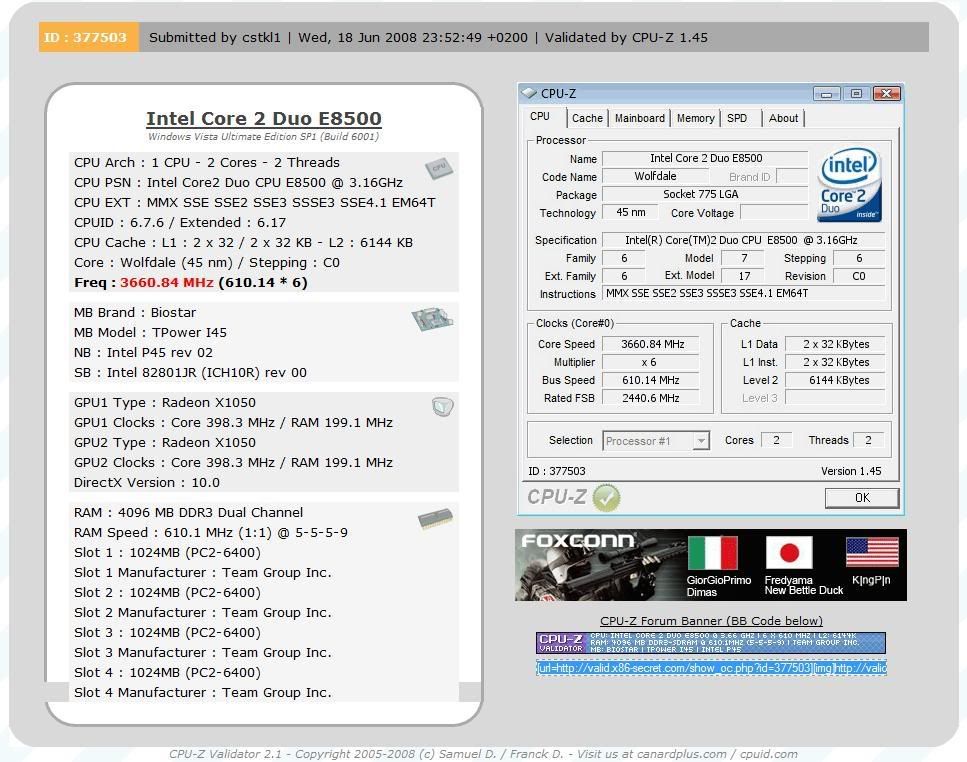
610fsb!!! thumbup.gif
user posted image


RATING

Pros
Excellent in overclocking rclxms.gif
Ram Bandwidth is currently no.1 for p45's rclxms.gif (My comparison with p5q Deluxe and Gigabyte EP45dq6)
Excellent Bios rclxms.gif
Excellent Manual rclxms.gif
Cheap

Cons
No other features on this board aka powersaving etc. shakehead.gif
Sometimes Corrupts my HDD shakehead.gif
Crossfire performance is unstable

4/5 thumbup.gif thumbup.gif thumbup.gif thumbup.gif

since its a overclocking board

This board i recommend for any intel proc with single card. Dual gpu seems to be too much for this board


*5/5 rating it needs to be perfect on everything... so will asus maximus 2 formula take this rating... stay tune

Overclocking Aim

Stable
533x8 - Achieved
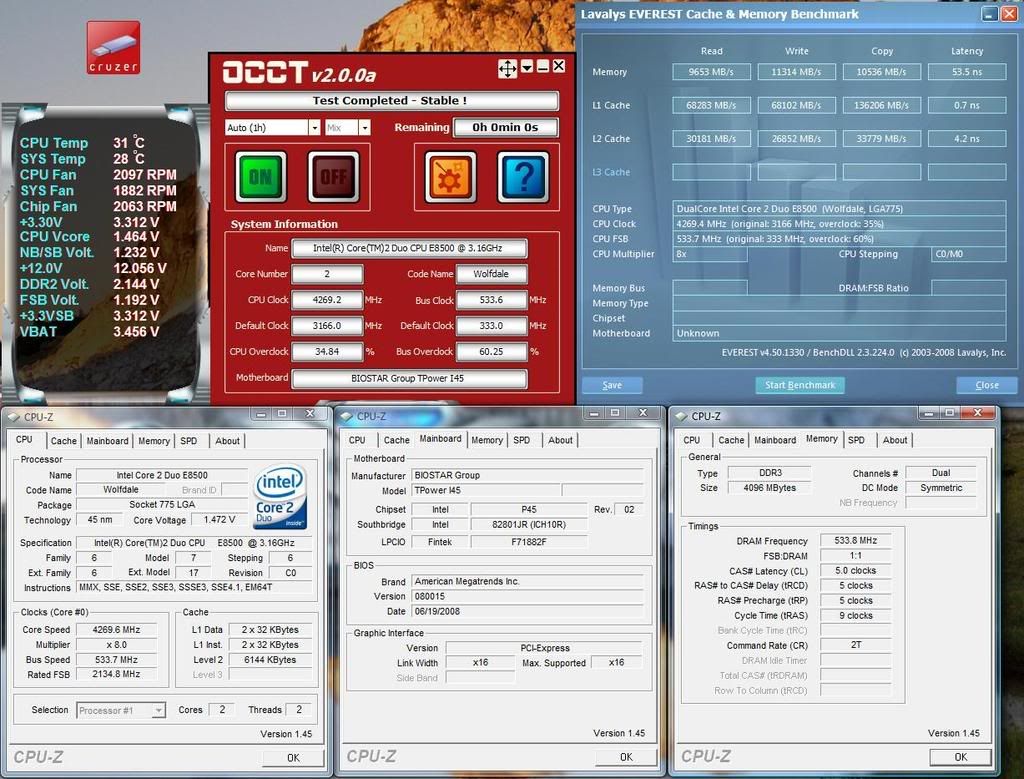
user posted image

566x7.5 - Achieved
user posted image

600x7

Hopefully be done soon.

This post has been edited by cstkl1: Jul 2 2008, 05:26 PM
TScstkl1
post Jun 18 2008, 11:29 PM

Look at all my stars!!
Group Icon
Elite
6,799 posts

Joined: Jan 2003

update on answers by fae for the two main concerns and also the third issue

also for the results

i can already post it but i am having issues on banwidth gains.. so dont want to mislead u guys to buying the board with any results ...
so now exploring mch clock skews..


This post has been edited by cstkl1: Jun 18 2008, 11:31 PM
TScstkl1
post Jun 20 2008, 12:39 AM

Look at all my stars!!
Group Icon
Elite
6,799 posts

Joined: Jan 2003

raymond actually this is the first board that i can certify loves d9gmh's...

no issue whatsover on ram part..

TScstkl1
post Jun 20 2008, 09:50 AM

Look at all my stars!!
Group Icon
Elite
6,799 posts

Joined: Jan 2003

dunno dude the p5q deluxe i had was a early demo unit

the new boards seems much better...

hard to say..

but the biostar easier to clock.. and very user friendly
and its not so picky about the rams as the p5q deluxe

up to 500fsb performance level.. biostar beats the asus moobo...

that is for sure..

heatsink quality.. the biostar is full copper all the way.. not plated etc like the asus..


This post has been edited by cstkl1: Jun 20 2008, 09:54 AM
TScstkl1
post Jun 20 2008, 08:17 PM

Look at all my stars!!
Group Icon
Elite
6,799 posts

Joined: Jan 2003

depending on voltage

low voltages less than 1.2v droop around 0.008-0.010v
medium voltage 1.3-1.4 around 0.015-0.025
high voltage 1.4++ around 0.04-0.07v

all measure with vmm

but i would say its very good..


i hated load line it always had issue on idle
best way to test load line is actually occt.. many times it bsod/restart during the last four minutes when it when to monitoring mode in idle..

thats y i am a anti loadline person..kekeke

posting soon some 1200CL5 tRD8 5:6 stable bandwidth awesomeness..

** raymond - please use photobucket ... doesnt lag like imageshack for streamyx..

everytime to see ure post i have to switch to a vpn server..

This post has been edited by cstkl1: Jun 20 2008, 08:30 PM
TScstkl1
post Jun 20 2008, 10:33 PM

Look at all my stars!!
Group Icon
Elite
6,799 posts

Joined: Jan 2003

prime doesnt doest test the caches hard enough..

prime/orthos is only good for proc stability

occt is better for proc/nb/vtt and mem stability
also run memtest86... but becarefully with memtest and wdmt..
as it stress ure rams and heat up ..

dont advice any ballistix to be used this way
TScstkl1
post Jun 21 2008, 12:56 AM

Look at all my stars!!
Group Icon
Elite
6,799 posts

Joined: Jan 2003

will post 533x8 stable tongue.gif and 566x7.5

for this lowest is trd 10 pull to trd 9 for 1066 CL5...

need to use another GC.. as GC going haywire.. its a saphire x1050 that shares the mem.... just need to double confirm.. that its just the card issue with the high fsb

finally figured out this mobo rclxm9.gif rclxm9.gif
3 days to tame it.. not bad eh.... just shows how easy and well made the bios is

dfi x48 3 weeks
maximus from early bios till rampage took like 1 month
dfi UT p35.. 2 weeks.

This post has been edited by cstkl1: Jun 21 2008, 01:09 AM
TScstkl1
post Jun 21 2008, 02:17 PM

Look at all my stars!!
Group Icon
Elite
6,799 posts

Joined: Jan 2003

any difference this bios??

TScstkl1
post Jun 21 2008, 02:25 PM

Look at all my stars!!
Group Icon
Elite
6,799 posts

Joined: Jan 2003

dude pm me the the forum please
want to read on that bios


Added on June 21, 2008, 4:57 pmnew bios
newbie warning
no higher clocks
just better control on rams subtimings
me like...


This post has been edited by cstkl1: Jun 21 2008, 04:57 PM
TScstkl1
post Jun 23 2008, 09:06 PM

Look at all my stars!!
Group Icon
Elite
6,799 posts

Joined: Jan 2003

***56k Warning ***

review was done with handpicked very rare and eoled D9GMH's
hence y i posted not just 2x1gb but clocking on all 4x1gb to show the boards and ram powah..
dont expect crappy rams and crappy ballistix to do this easily...

with all this high fsb ure going to need good rams..

delay noticed
600fsb and 566fsb coming up soon as soon as i solve the gpu issue.
i can post the stable occt but its fake cause actually the gpu is going haywire..

***56k Warning***

oh yeah new bios
newbie hands off warning
as this board for ram settings has no auto..
with the new bios u get extra settings.. which will make matters worse for u and ure rams..
tongue.gif

This post has been edited by cstkl1: Jun 23 2008, 09:09 PM
TScstkl1
post Jun 23 2008, 09:24 PM

Look at all my stars!!
Group Icon
Elite
6,799 posts

Joined: Jan 2003

well without the sub timings i couldn't have gotten the 533fsb stable...
566/600fsb close to stable.. gpu issue again..

the other option the fsb fine tune doesnt apply.. tested it/retested it etc
so i think its meant for the 8800gt/8800gtx issue as it was stated..

the gpu issue...
dunno whether u get that or not..
i am running dual monitor on my awesome saphire X1050 ( Awesome DoTa performance... tongue.gif) usually one monitor will go crazy...

oh yeah also
the newbios made me understand

the big difference of the p45's and other p35/x48/x38
have u noticed even when the latencies are higher/ higher tRD
the performance can come close to a lower tRD value for read/copy/write.... here is where the subtimings magic happens..


Added on June 23, 2008, 9:27 pm
QUOTE(IcEMoCHa @ Jun 23 2008, 09:10 PM)
so dfi x48 or this better? biggrin.gif
*
clock to clock

DFI LT X48 on DDR2 is king of all DDR2 mobo's

none comes close..

Bios Difficulty on rating from 1 to 10.. i rate that LT mobo 10...
took me so long ...
so many hours
and sometimes i still not sure whether did i really master it...
but i think i did.. tongue.gif

This post has been edited by cstkl1: Jun 23 2008, 09:30 PM
TScstkl1
post Jun 23 2008, 10:19 PM

Look at all my stars!!
Group Icon
Elite
6,799 posts

Joined: Jan 2003

QUOTE(IcEMoCHa @ Jun 23 2008, 09:56 PM)
hmmm.. so dfi lt x48 is a better choice compared to this?... haha...
*
yes but take note again
i consider myself not bad... tongue.gif in clocking ram timings

and i said that mobo is hard..
i mean really hard

TScstkl1
post Jun 23 2008, 11:20 PM

Look at all my stars!!
Group Icon
Elite
6,799 posts

Joined: Jan 2003

QUOTE(OC4/3 @ Jun 23 2008, 11:02 PM)
Have you done a good Super PI 1M time with DFI LP LP X48?That is what clock for clock in my definition.
*
HAHAHAHAHAHAHAHAH >>>>>>RLVFLLLLLLLLLLLLL

ignore list u go for life..


Added on June 24, 2008, 12:24 amUpdate

Solved the 566 vga issue... tested running video for 8 hours...

This post has been edited by cstkl1: Jun 24 2008, 12:24 AM
TScstkl1
post Jul 11 2008, 04:38 PM

Look at all my stars!!
Group Icon
Elite
6,799 posts

Joined: Jan 2003

follow my voltages..
dont forget to adjust ure gtl's


TScstkl1
post Aug 1 2008, 10:46 AM

Look at all my stars!!
Group Icon
Elite
6,799 posts

Joined: Jan 2003

QUOTE(IcEMoCHa @ Jul 31 2008, 11:08 PM)
i just got this mobo... after installing everything... tried to boot up... but its stuck at boot and doesnt show anything on screen... it shows 2 type of POST code... here they are... is it faulty mobo?.. help pls... sad.gif

user posted image

user posted image
*
its either two things

ure gpu or rams

flash ure mobo to the latest bios with another gpu
TScstkl1
post Oct 16 2008, 06:05 PM

Look at all my stars!!
Group Icon
Elite
6,799 posts

Joined: Jan 2003

dude also ..
most of the E0's report accurate temps only when its 60C above.. so i wouldnt worry about the temps

to answer ure pm..

TScstkl1
post Oct 31 2008, 01:36 AM

Look at all my stars!!
Group Icon
Elite
6,799 posts

Joined: Jan 2003

hmm ure setting all is crazy...

Bios
set both cpu gtl to 0.635
leave mch gtl alone
cpu pll to lowest 1.5
nb voltage to 1.2v
fsb termination to 1.2v
leave all the clock skews alone( 500 fsb only right)
disable any form of spectrum.
disable all ure cpu config except for ExeCutable Bits and of Course no Of Cores.
set ure dram config to 3
set ure mem voltage to 2.2v for now..
set ure mem timings to 5-5-5-15...
Leave the subtimings alone.

vcore around 1.25v

ok here is how to test ure each component..


OS Condition
theres 4 test i need to pass before running linpack.. ( usually guarantees linpack 64 around 99% chance of passing 50 runs)
this will take a total time of 3 hours or so..

all must be run in diagnostic mode in windows with virtual mem disabled so that u can test ure hardware fully.

disable screensaver
set ure power options to performance and set ure turn off the display to Never

1st Test
Vcore..MAX |VTT Med |GTL ,NB,RAM Lightly
Run Orthos
Set Test to Blend
and Then Set To Custom
Now u can See the Blend Setting
Change Min FFT to 8 Max FFT to 8 Press OK
Start...
U MUST PASS to atleast 35 mins at Priority 10.
That means two rounds of 15 mins and 3rd Round Test 2
so keep upping ure vcore until u dont see any difference or u pass this requirement

2nd Test
FSB - max |Ram, NB - Mid | GTL/Vcore -Low
Same as Above
But Change Min FFT to 4096 Max FFT to 4096
Then start at Priority 10
U Must pass atleast 32-33mins roughly which means two rounds of 15 mins and entering third round Test 2...
For p45.. Maintain Fsb termination One level Above NB VOltage.
Keep upping NB and FSB one voltage higher than NB till u PASS THIS.

3rd test
GTL - MAX |FSB - MAX |PLL - Max | The Rest - Mid
Run Orthos
Set To Blend
And then to Custom
Change only Time to run each FFT to 1 min...

U need to pass all the fft which is from 8 to the last one that is 4096..
stop after 4096 when it enters back to square one at 1024
FOr this mobo.. theres no setting to change for this for duallies.

4th Test
NB/MEM- Super Max | The Rest - Low
Then run memtest windows...
if ure running 4gb run two instances of memtest each at 1700
make sure u pass 100%
Up Vdimm until u pass. or NB tweaking ( u will know when theres no affect to Vdimm increase when for example that 1 error is always there at a certain level.. balance it and get the optimum)


Now u can pass prime95, Linpack and anything ure heart desire for whatever hours ...

Condition
All this assuming ure ram/nb/cpu is having sufficient cooling
Good air flow
Good stable voltages on ure psu


Have fun.
The Rest Google...or asked those ordained overclocking guru in this thread to help ya.

heck this should be a noob guide for p45's


This post has been edited by cstkl1: Oct 31 2008, 02:09 AM
TScstkl1
post Oct 31 2008, 10:38 AM

Look at all my stars!!
Group Icon
Elite
6,799 posts

Joined: Jan 2003

oh yeah dude after u pass all this u can start tweaking ure rams and testing lower voltages for each component until its perfect...

use the above 4 test to test and end it with linpack 5 runs for 4gb...

PS if ure max temp is already over the wall on orthos around 60C + on load ....dont bother running linpack..
orthos priority 10.. is already a hard requirement to pass..


TScstkl1
post Oct 31 2008, 06:27 PM

Look at all my stars!!
Group Icon
Elite
6,799 posts

Joined: Jan 2003

post dude..

wheres the post
seeing yat post 4.5ghz stable.. yet no screenies..

infact posting the first 3 test above.. can guarantee linpack stable..
so no need 20 runs of linpack 64 on ure case which will take about one hour 15-20 mins..


This post has been edited by cstkl1: Oct 31 2008, 07:02 PM
TScstkl1
post Oct 31 2008, 11:31 PM

Look at all my stars!!
Group Icon
Elite
6,799 posts

Joined: Jan 2003

assumption is the mother of all f***ups

2 Pages  1 2 >Top
Topic ClosedOptions
 

Change to:
| Lo-Fi Version
0.0294sec    0.32    7 queries    GZIP Disabled
Time is now: 3rd December 2025 - 04:00 PM