Welcome Guest ( Log In | Register )

Outline · [ Standard ] · Linear+

 Wanna make a custom SFF, need some idea...

views
     
TSomara86
post Jun 15 2008, 11:14 PM, updated 18y ago

0mg nicotine juice
*****
Senior Member
707 posts

Joined: Jan 2007
From: Island of Borneo
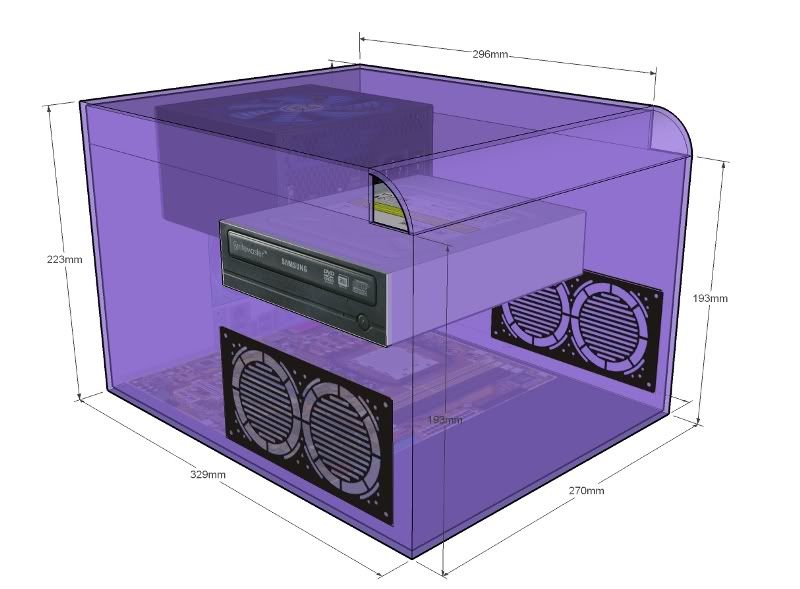
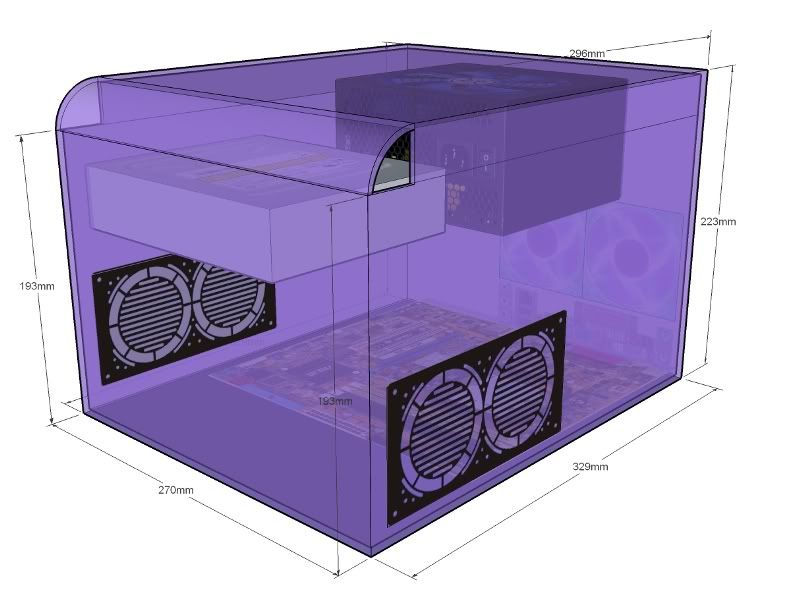
i'm planning to make my own custom SFF case, dust free system, less bling2.. but my prob's r:

1] i dont hav any idea on air flow design, i want it to be a dust free system.. so no intake fan, only depending on outlet fan and grills r fully filtered..

2] i cant fit any 120mm fans behind the case, if i'm using 80mm fan, is it gonna be noisy?


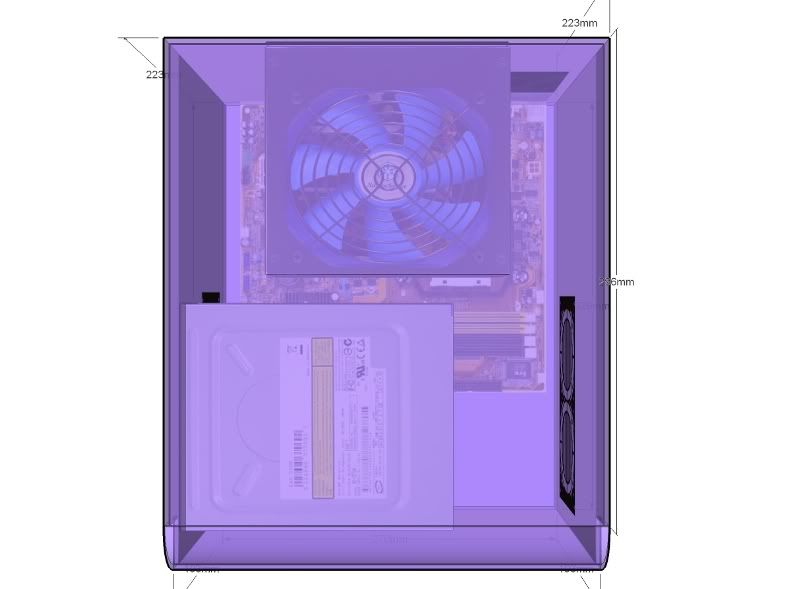
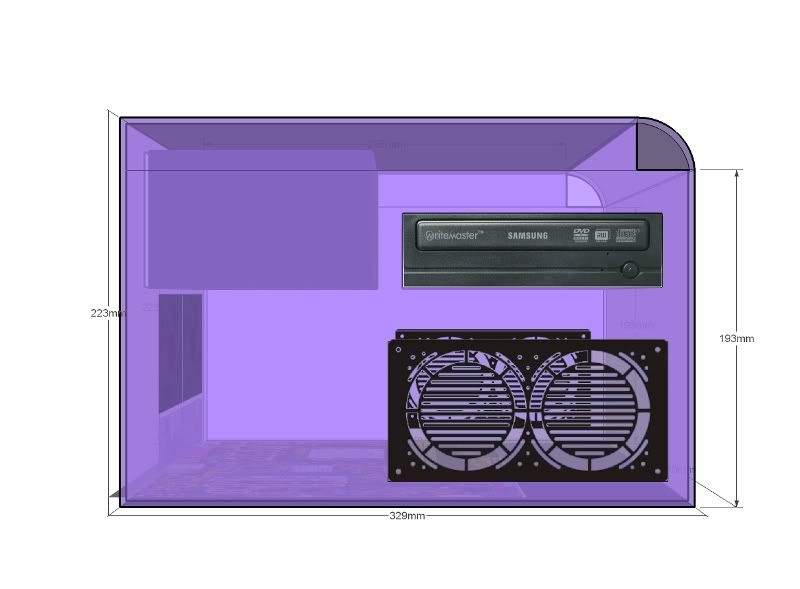
the graphics below is not what exactly what i'm gonna do...

a) the color gonna be glossy white or black... will choose later.. but i love black more.. i'm using glass in the pic juz to show inner hardware
b) hardware illustrated inside is not i'm gonna use... last resort of pics.. ekekeke..
c) dont mind the hole at top.. it will be fully covered.. it juz that i cant draw it using sketchup..
d) i didnt draw the HDD... it will be place above the DVD-RW
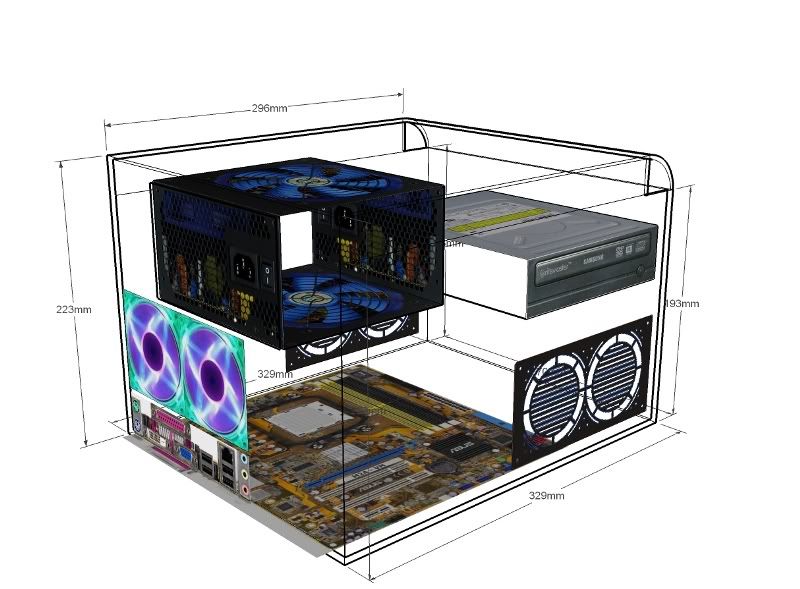
e) i didnt draw the main frame... but the hardware placing is accurate... frame and holder will be made according to the hardware placement..


my specs for this case is same as my previous mod, changing case only...
AMD X2 6000+
Asus M2A-VM
2 x 1GB DDR2 KVR
ThermalTake Mini Typhoon CPU Cooler
not yet decide for PSU
DVD-RW
160GB SATA2 HDD


an opening at the front top is not a blow hole.. my bad in using 3d drawing.. cant draw a layer to cover it.. the real one is fully covered...


the designed @ ideas

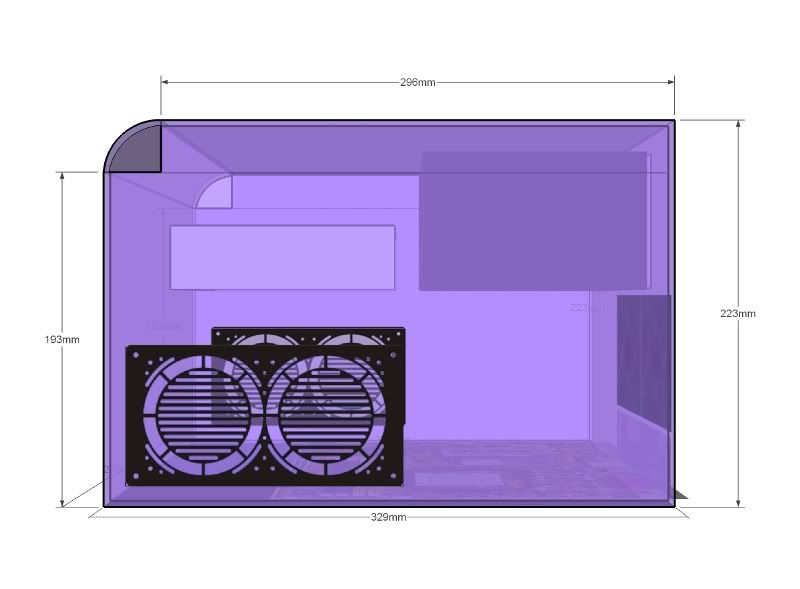
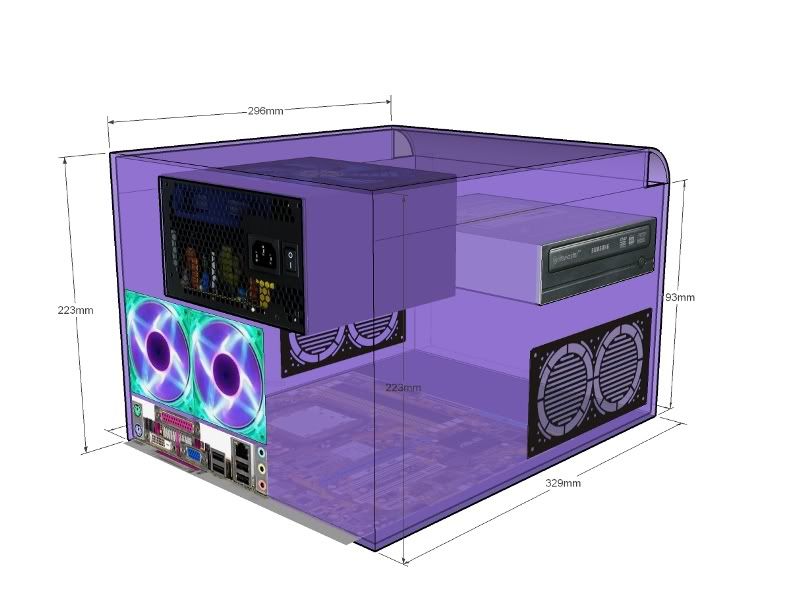
3/4 view - left

user posted image

3/4 view - right
user posted image

top view - bird eye view
user posted image

left
user posted image

right
user posted image

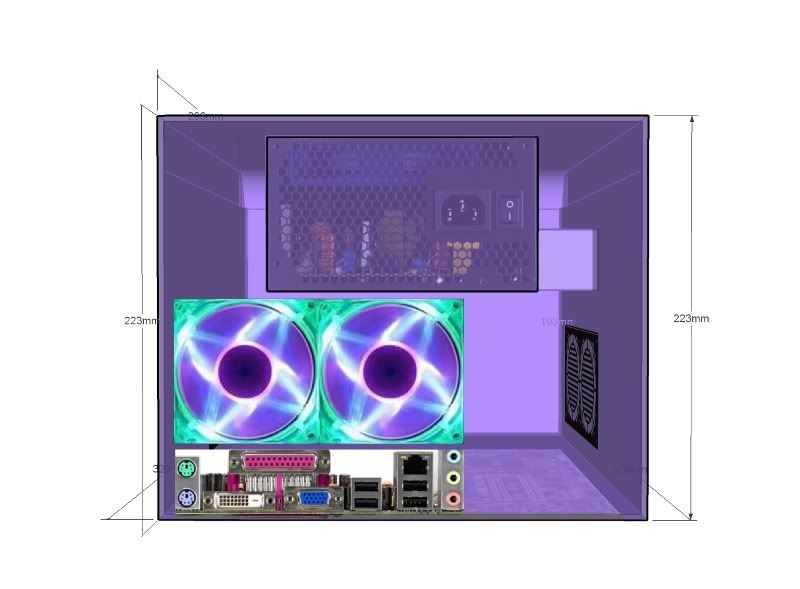
rear
user posted image

3/4 rear left view
user posted image

naked view, only outlines and surface pics r shown
user posted image


so... any idea on improvement??

This post has been edited by omara86: Jun 15 2008, 11:59 PM
9876789
post Jun 15 2008, 11:35 PM

lost soul
*****
Senior Member
866 posts

Joined: Jan 2003
From: KL


hi, i'm not air flow specialist, but i wonder:

1) why not parallel your side fans with your rear fans ?
i would put the right fans side by side with rear fans, The reason is as the side fans are nearer to the CPU and it helps to pump out the hot air.

2) why not put your fans higher ?
because hot air will float and the cooler air will be pumped out if you put it at the buttom...

3) the ventilation holes on your round corners will allow dust to come in, so maybe you can put a tray or a "ground" inside the box to gather the dust, with this you can clean the dust easily and it kind of act as a filter to block the dust...

4) this is only my suggestion i don't know whether it works well but i think you may try :
under the CD ROM there is a space, you can put "silica" or something like that to absorb the moisture... while on the outside, just behind the wall of the box, you can make a compartment to put dry ice or ice, with this, the air near the space would be cooler, as the silica absorb the moisture, the 6 fans near the CPU suck out the air, it would allow the cold air to flow to the CPU space.... which makes the air much more cooler.


EDIT FROM HERE:


i found that your cdrom is hanging not tight, so you might need to stick the side of your cdrom on the front wall, and i assume your hard disk will be situated under the cdrom, which makes the space another parking place for heat source, so i suggest the front compartment should be like:

________
cdrom.....|
_______|
|________
harddisk..|
________|
|
|_______
silica.......|
________|
| dry ice / ice
|________
________|

This post has been edited by 9876789: Jun 15 2008, 11:48 PM
E-J@1
post Jun 15 2008, 11:40 PM

Capital E™
*******
Senior Member
2,603 posts

Joined: Sep 2006
let me guess, building a case base on Lubic kits?

improvement:
  1. sff case surely needs a modular psu & if u ain't planning to use one, i suggest u to make a box for the redundant unused cables, place the box behind the dvd-burner
  2. top blow hole over the expansion slot area, make a 120mm hole to place an exhaust fan, really improve the air flow (in dissipating hot air)

TSomara86
post Jun 15 2008, 11:41 PM

0mg nicotine juice
*****
Senior Member
707 posts

Joined: Jan 2007
From: Island of Borneo
QUOTE(9876789 @ Jun 15 2008, 11:35 PM)
1) why not parallel your side fans with your rear fans ?
i would put the right fans side by side with rear fans, The reason is as the side fans are nearer to the CPU and it helps to pump out the hot air.

3) the ventilation holes on your round corners will allow dust to come in, so maybe you can put a tray or a "ground" inside the box to gather the dust, with this you can clean the dust easily and it kind of act as a filter to block the dust...

4) this is only my suggestion i don't know whether it works well but i think you may try :
under the CD ROM there is a space, you can put "silica" or something like that to absorb the moisture... while on the outside, just behind the wall of the box, you can make a compartment to put dry ice or ice, with this, the air near the space would be cooler, and the as silica absorb the moisture, the 6 fans near the CPU suck out the air, it would allow the cold air to flow to the CPU space.... which makes the air much more cooler.
*
1. u gave me a very good idea.. i can forget about rear fan... coz now i have 2 x 240volt 120mm fan.. which is very high powered and low noise fan (quite good)... i can put it at the right side (near the cpu cooler) and put more filtered grills on the left side... brilliant idea.. thx bro...

3. that's my bad in drawing using sketchup... i cant draw a layer to cover the hole.. actually the hole is not there... it's fully covered...

4. i wanna make my system as simple as possible.. so i'm not taking the option of extra ice cooling... anyway.. good idea...
E-J@1
post Jun 15 2008, 11:43 PM

Capital E™
*******
Senior Member
2,603 posts

Joined: Sep 2006
1 more thing, ur hdd surely needs fan blowing on em

if not u'll face the same problem with SG03 --> hdd temp
TSomara86
post Jun 15 2008, 11:44 PM

0mg nicotine juice
*****
Senior Member
707 posts

Joined: Jan 2007
From: Island of Borneo
QUOTE(E-J@1 @ Jun 15 2008, 11:40 PM)
let me guess, building a case base on Lubic kits?

improvement:

  1. sff case surely needs a modular psu & if u ain't planning to use one, i suggest u to make a box for the redundant unused cables, place the box behind the dvd-burner
  2. top blow hole over the expansion slot area, make a 120mm hole to place an exhaust fan, really improve the air flow (in dissipating hot air)

*
i'm using aluminium L bar as for the frame.. and cover it using acrylic...

i'm not gonna make a transparent case... so i dont really care about the kucar kacir cabling as long as it's not effecting the air flow..
E-J@1
post Jun 15 2008, 11:47 PM

Capital E™
*******
Senior Member
2,603 posts

Joined: Sep 2006
QUOTE(omara86 @ Jun 15 2008, 11:44 PM)
i'm using aluminium L bar as for the frame.. and cover it using acrylic...

i'm not gonna make a transparent case... so i dont really care about the kucar kacir cabling as long as it's not effecting the air flow..
*
bro, no gc? using on board only?

then no need for the 2x80mm exhaust fan as the psu exhaust fan is sufficient enought

place ur hdd bay drive over the expansion slot since u r not gonna use it anyway & place a 80/120m fan on the rear panel icon_idea.gif


Added on June 15, 2008, 11:50 pm
QUOTE(omara86 @ Jun 15 2008, 11:41 PM)
1. u gave me a very good idea.. i can forget about rear fan... coz now i have 2 x 240volt 120mm fan.. which is very high powered and low noise fan (quite good)... i can put it at the right side (near the cpu cooler) and put more filtered grills on the left side... brilliant idea.. thx bro...
*
just a reminder, base on the pics u provided, i think by placing fans on the right side will create some clearance issue

anyway, just measure it to make sure the panel can be close without the fans clashing to anything (eg. board, proc cooler) laugh.gif

This post has been edited by E-J@1: Jun 15 2008, 11:50 PM
TSomara86
post Jun 15 2008, 11:52 PM

0mg nicotine juice
*****
Senior Member
707 posts

Joined: Jan 2007
From: Island of Borneo
my rough idea.. will measure it later...

user posted image

i'm going to bed... will reply more tomorrow... bye all.. thx for advices...

this 240v 120mm fan power is really good... this single fan can beat 3 120mm 12v fans... who place his/her face toward this fan can feel the sensation of table fan power... but with low noise...

i have 2 now.. but mayb only use 1 for this case...


This post has been edited by omara86: Jun 15 2008, 11:57 PM
mcmicheal
post Jun 15 2008, 11:54 PM

IT Guy
*****
Senior Member
952 posts

Joined: Jun 2005
From: Cyberjaya
Personally... One tips for dust free... no fan for in and out except the PSU fan only and
the case must put in air con room...
This will last for years without dust. I have one in my living room serve as media player.

If u use for like media player, online, do office work u can go for SFF
But for gaming and some CPU intensive usage... SFF is not advisable.
It will be like a baking oven...
TSomara86
post Jun 15 2008, 11:57 PM

0mg nicotine juice
*****
Senior Member
707 posts

Joined: Jan 2007
From: Island of Borneo
he he~ i'm not doing OC anymore since i'm satisfied with my result alrdy... i'm doing it as a record only.. i dont use OC condition for daily usage.. that's why i'm using high clocked proc...

i'm not really into gaming (only dota, CS and cabal) so no prob with temp... the only thing that create high temp is only the proc, i'm using on board gc..
mcmicheal
post Jun 16 2008, 12:03 AM

IT Guy
*****
Senior Member
952 posts

Joined: Jun 2005
From: Cyberjaya
QUOTE(omara86 @ Jun 15 2008, 11:57 PM)
he he~ i'm not doing OC anymore since i'm satisfied with my result alrdy... i'm doing it as a record only.. i dont use OC condition for daily usage.. that's why i'm using high clocked proc...

i'm not really into gaming (only dota, CS and cabal) so no prob with temp... the only thing that create high temp is only the proc, i'm using on board gc..
*
If like this then i suggest u to put a tower based cpu cooler... then if possible make it blow to ur psu
so it could carry out the heat.
Then please dun put intake fan and outlet fan also dun put.

If can try to use WD Green power HDD which is cooler

In this settings, no matter wat case u use, ur comp can be dust free for years
lohwenli
post Jun 16 2008, 02:03 PM

Penang Overclockers Club
*****
Senior Member
971 posts

Joined: Aug 2006
From: Penang


There are two main solutions to your airflow planning.

1)Positive pressure
-Filtered intake fan blowing at hotspots (CPU & HDD), small vents put in rear as exhaust (filter not required)
-PSU is the main exhaust vent for system
-Benefit is that dust can only accumulate at the fan filters and everywhere else will be dust free as all the air inside is clean and will be blowing out though all the gaps in the casing, preventing dust accumulation.
-Downside is that case temperature will be higher, as hot air will recirculate for a while before exiting the case. However considering the hardware isn't really that hot except for the CPU (HDD doesn't need much airflow to cool), this may be acceptable. Parts near the intake(s) will be quite cool, even below chassis temp.

2)Negative pressure (your current plan)
-Unfiltered exhaust fan with filtered fanless intake holes. PSU acts as secondary exhaust.
-Casing will be at lower air pressure than surroundings, and air will be sucked in though all gaps in the casing, though most of it will come though the large filtered intakes
-Benefit is entire casing will be cooler, and as a result all parts will be cooler, though no part will go below casing temp unlike positive intake.
-Downside is that due to negative pressure, all gaps (even tiny ones) will accumulate dust over time as air is continuously sucked into the case. The inside will remain fairly free of dust as long as all the larger gaps are filtered, smaller gaps will act as filters themselves by nature of their size.

Up to you which you prefer. Positive pressure means you'll have to clean the filters more often or temps will get out of controlonce they get excessively clogged, but rest of casing is pretty much maintainence free. Negative pressure mean it will accumulate dust eventually, and not just at the intake filters. Most of your system isn't much of a problem to cool even with very little airflow, the only exception is the 6000 X2, which even when not overclocked, is a pretty hot processor on load (its no problem on idle).


QUOTE(9876789 @ Jun 15 2008, 11:35 PM)
hi, i'm not air flow specialist, but i wonder:

1) why not parallel your side fans with your rear fans ?
i would put the right fans side by side with rear fans, The reason is as the side fans are nearer to the CPU and it helps to pump out the hot air.

2) why not put your fans higher ?
because hot air will float and the cooler air will be pumped out if you put it at the buttom...
*
1) Good idea.

2) In a silent setup, airflow is naturally limited though not static, so position of the fans for a negative pressure setup doesn't make that much difference.

QUOTE(E-J@1 @ Jun 15 2008, 11:43 PM)
1 more thing, ur hdd surely needs fan blowing on em

if not u'll face the same problem with SG03 --> hdd temp
*
HDDs need airflow to keep cool, but not much. most silent fans 80mm or larger are already sufficient. Another way which I use is to put the hard disk near the largest intake hole (without fan) for a casing that is at negative pressure due to exhaust fans.

TSomara86
post Jun 16 2008, 06:33 PM

0mg nicotine juice
*****
Senior Member
707 posts

Joined: Jan 2007
From: Island of Borneo
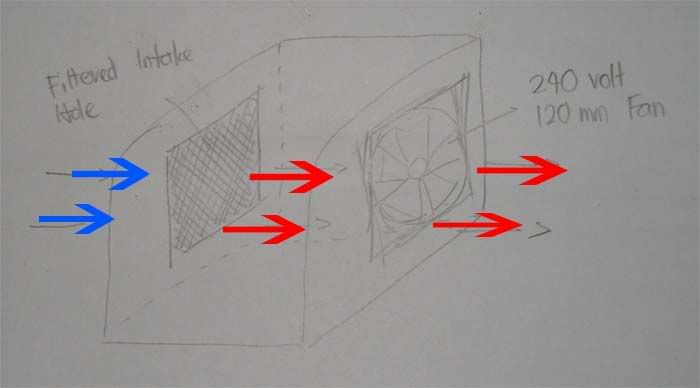
bro lohwenli... ur theory about positive and negative pressure is right... and i'm taking ur 1st option.. positive pressure... will put intake fan and let blow hole for free... so which u said about dust accumulating at small holes wont happened...

so my idea is... is it ok if i put 2 x 120mm fans... each at both side? but the prob is.. the air flow will pointed to the center of the case.. so wont be a smooth and efficient air flow... some kind of puting beliung at center before the air escape through PSU fan and rear blow hole...

or combine the idea of positive pressure and parallel setup for fan as mentioned by 9876789...
user posted image
but a bit different.. i'll use fan for intake and open unfiltered blow hole.. is it ok?
mADmAN
post Jun 16 2008, 07:18 PM

10k Club
********
All Stars
10,530 posts

Joined: Nov 2004
From: Petaling Jaya & Mid Valley


dude....u wan dust free... ur gonna have to go with positive pressure...

put lots of FILTERED intake fans and mebbe only 1 exhaust fan (or 0..let ur PSU be the only exhaust)

at least this way ur dust intake will be concentrated on the filters.......which u can clean. although take note that filters dont stop dust from going in...it only minimizes the amount of dust

if u put negative pressure, u have no way of controlling ur dust intake. the dust will be sucked in from all nooks and crannies of the case... even ur DVDRom slot.
TSomara86
post Jun 16 2008, 07:49 PM

0mg nicotine juice
*****
Senior Member
707 posts

Joined: Jan 2007
From: Island of Borneo
QUOTE(mADmAN @ Jun 16 2008, 07:18 PM)
dude....u wan dust free... ur gonna have to go with positive pressure...

put lots of FILTERED intake fans and mebbe only 1 exhaust fan (or 0..let ur PSU be the only exhaust)

at least this way ur dust intake will be concentrated on the filters.......which u can clean. although take note that filters dont stop dust from going in...it only minimizes the amount of dust

if u put negative pressure, u have no way of controlling ur dust intake. the dust will be sucked in from all nooks and crannies of the case... even ur DVDRom slot.
*
so any available fans r for intake only? outlet using grilled hole and PSU fan? so how many fan needed for this setup? i'm planning to place 2 fans, 1 at each side... and make a hole at rear... so the air can get out from the hole and PSU...
lohwenli
post Jun 17 2008, 08:03 AM

Penang Overclockers Club
*****
Senior Member
971 posts

Joined: Aug 2006
From: Penang


QUOTE(mADmAN @ Jun 16 2008, 07:18 PM)
dude....u wan dust free... ur gonna have to go with positive pressure...

put lots of FILTERED intake fans and mebbe only 1 exhaust fan (or 0..let ur PSU be the only exhaust)

at least this way ur dust intake will be concentrated on the filters.......which u can clean. although take note that filters dont stop dust from going in...it only minimizes the amount of dust

if u put negative pressure, u have no way of controlling ur dust intake. the dust will be sucked in from all nooks and crannies of the case... even ur DVDRom slot.
*
QUOTE(omara86 @ Jun 16 2008, 07:49 PM)
so any available fans r for intake only? outlet using grilled hole and PSU fan? so how many fan needed for this setup? i'm planning to place 2 fans, 1 at each side... and make a hole at rear... so the air can get out from the hole and PSU...
*
That's correct. All fans are filtered and used as intakes and all exhaust are just the PSU and open vents. Depending on how good is your filter (stretched pantyhose is pretty good, but requires frequent cleaning), you system can be close to dust free. Whenever the fan noise starts to become loud, it means the filters are getting clogged.

Btw, with your system configuration which doesn't put out much heat, you won't need that many fans if you plan out your airflow carefully. 2 silent 120mm fans should be more than enough, it may even be enough if a midrange non-overclocked GFX is added. From what I can see, the main noisemaker here will be the CPU fan, in the case of AMD stock heatsinks for 6000 X2s, it will be quite noisy once the processor heats up.

Important points
-One intake fan near the CPU. This will help keep CPU fan noise down by keeping temps down. A 3rd party cooler may not be a bad idea if you're going for silence.
-Position the hard disk so its near an intake or is somewhere where you can feel air movement with your hand. Hard disks need some airflow to keep cool, but not much. If the PSU exhaust isn't that strong and the exhaust vents are clustered together, you can also put the hard disk there where all the air is blowing out.
-Put a coarse grill around exhaust vents. While dust won't get in while the PC is on, it can while the fans are off. Exhausts vents on the top are also a dust attraction.
-Its highly optional to put the upper vents towards the upper part of the case. While it does have some benefit for fanless casings, it requires that airflow be completely unobstructed (impossible with filters) and airflow is almost entirely vertical.

This post has been edited by lohwenli: Jun 17 2008, 08:04 AM
apex_ikan
post Jun 30 2008, 01:36 PM

Getting Started
**
Junior Member
188 posts

Joined: Feb 2008


the psu should be not on the top of proc i guess...
for 3rd party cooling if u use...
btw what software u use to do the drawing?solidwork? hmm.gif
[Top-Gun]
post Jun 30 2008, 01:59 PM

Wanted: Dead or Alive
******
Senior Member
1,061 posts

Joined: Jan 2003
From: Status: M.I.A.


QUOTE(apex_ikan @ Jun 30 2008, 01:36 PM)
the psu should be not on the top of proc i guess...
for 3rd party cooling if u use...
btw what software u use to do the drawing?solidwork? hmm.gif
*
Looks like Google Sketchup to me.
Easy to learn and it's free!
Braynumb
post Jul 1 2008, 06:33 PM

Yea, Still Broke
******
Senior Member
1,409 posts

Joined: May 2008
From: Somewhere Over There...


bro, I made this casing a few days ago.. pretty small and tight.. thumbup.gif
only issues i had with it was there were no space for the HDD and DVD\ROM... rclxub.gif
but it's just a prototype la.. going to improve the designs and add a few parts so that can add in the other stuff.. rclxms.gif

The Future Case:
Attached Image

The Insides:
Attached Image

Becomes Mr. Pau:

Attached Image

rclxms.gif drool.gif rclxm9.gif
rexoxo
post Jul 1 2008, 11:56 PM

Casual
***
Junior Member
426 posts

Joined: Dec 2007
ts..
nice design u have there..
post some picture when it is complete..


Change to:
| Lo-Fi Version
0.0199sec    0.95    6 queries    GZIP Disabled
Time is now: 20th December 2025 - 06:57 PM