Welcome Guest ( Log In | Register )

Bump Topic Topic Closed RSS Feed
126 Pages « < 121 122 123 124 125 > » Bottom

Outline · [ Standard ] · Linear+

Samsung Samsung OMNIA :: SGH-i900, omni u..can make the world seem bright..

views
     
borneo
post Nov 1 2008, 03:17 AM

Casual
***
Junior Member
316 posts

Joined: Sep 2005
From: KL


Been testing out DTHJ6-MCR02 for the past few days....... nice rom but bluetooth has gone bonkers.
Cant send or receive files....J1 was ok
Bluetooth headset working flawless though.
hmmmmm.......


sharpman
post Nov 1 2008, 08:04 AM

Veteran LYN Forumer
******
Senior Member
1,110 posts

Joined: Jan 2003


QUOTE(borneo @ Nov 1 2008, 03:17 AM)
Been testing out DTHJ6-MCR02 for the past few days....... nice rom but bluetooth has gone bonkers.
Cant send or receive files....J1 was ok
Bluetooth headset working flawless though.
hmmmmm.......
*
I am on the same DTHJ6-MCR02 too... can you explain more of your bluetooth problems? I can receive/send files perfectly via bluetooth


Added on November 1, 2008, 8:06 am
QUOTE(dkliew @ Nov 1 2008, 12:14 AM)
more than 1GB avi will be laggy and cant drag forward.
below 500mb is ok.

if mp4 format will be very smooth.
windowmedia player can play rmvb but laggy....maybe my rmvb plugin not working right.

TCPMP Media Player and coreplayer still my favourite.
just tested and it can play some ehem ehem 1gb avi video at not bad streaming.

beside. having a problem. camera cant be started sometime after 1~2 days of running many programme...
even i use task manager shut down all running programme the camera still cant be start....

anyone having the same issues?
*
TCPMP is my only player I use beside WMP for mp3 smile.gif

The problem with the camera should be fixed with roms ver HI1 and above.. what ROM are you on right now?

This post has been edited by sharpman: Nov 1 2008, 08:06 AM
borneo
post Nov 1 2008, 11:46 AM

Casual
***
Junior Member
316 posts

Joined: Sep 2005
From: KL


QUOTE(sharpman @ Nov 1 2008, 08:04 AM)
I am on the same DTHJ6-MCR02 too... can you explain more of your bluetooth problems? I can receive/send files perfectly via bluetooth
*
Maybe i made a premature assumption smile.gif
Just did more checking... my bluetooth can transfer files with my dell laptop.

My desktop using msi Bluetooth still has problem.... cant pair or retrieve services, but can detect.
When click on pair or retrieve services... nothing happens. Last time can do both.

btw, do u feel that it boots up faster than J1?
i feel is faster lo


old newspaper
post Nov 1 2008, 12:18 PM

if it ain't broke, don't fix it !
******
Senior Member
1,245 posts

Joined: Aug 2008
From: ERROR643:GPS failed to load
wanna speed up the system responsiveness of omnia? try this little tweak...

GOOD NEWS FOR ALL WINDOWS MOBILE USER ! brows.gif

Brief intro :
Most of you guys heard of NetCF 1.0 / 2.0 / 3.5 right?. For those who are not sure here is the brief about it;
» Click to show Spoiler - click again to hide... «


Most of the cooked rom is cooked in with this netCF3.5 so you guys must be asking.....so what are the benefit of NetCF 3.5? Read here;
» Click to show Spoiler - click again to hide... «


For your info, most of WM's stock rom is using netCF2.0 ! sweat.gif That's why those who are using cooked rom noticed the overall speed and performance gained over the stock rom. By just installing netCF 3.5 over stock rom WILL NOT gain any benefit out of it because this will not override the default netCF2.0 in the system. It's just merely reside in the system and let you install netCF3.5 written application to be install in your device e.g Auto Configurations Tools 3.2 etc etc .......

You need to 'instruct/tell' your system to use this netCF3.5 to really unleash it power! That's what this tweak is all about.

All you need is only 'this' little tool to the job and of course the netCF3.5 file, that's it ! Both are made in cab file for easy installation. Just copy both file to your device and install from your device. No hard reset / soft reset required !! and good news is this will not do any harm to your system rclxm9.gif

YOU WILL ENJOY 'CLOSE' TO THE SPEED AND PERFORMANCE OF COOKED ROM WITHOUT NEED TO FLASH ONE! brows.gif

Here's the file you need;
» Click to show Spoiler - click again to hide... «


Here's some screenshot;

user posted image

user posted image

Compatible Devices:
Basically all Windows Mobile devices. This has been tested on WM6/WM6.1. VGA/QVGA compatible!

icon_rolleyes.gif
Shinichi
post Nov 1 2008, 12:24 PM

◆【 真一 】◆
*******
Senior Member
4,051 posts

Joined: Jan 2003
From: 槟城


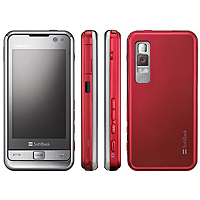
Omnia for Japanese market...

user posted image
user posted image
user posted image

http://plusd.itmedia.co.jp/mobile/articles...30/news072.html
http://k-tai.impress.co.jp/cda/article/new...page/42510.html
old newspaper
post Nov 1 2008, 12:34 PM

if it ain't broke, don't fix it !
******
Senior Member
1,245 posts

Joined: Aug 2008
From: ERROR643:GPS failed to load
Another tweak for fellow omnian.....

there are a couple of hidden menus and utilities on the Omnia

How to change the loudspeaker volume for ringtones, movies, mp3s etc

In the phone keypad type: *#0002*28346#
You will then have a screen pop up called audio control utililties.

Click menu, normal then handset (the first one, Phones headset / loudspeaker) Here you can change:
Speaker volume: SPK(02) -db is less volume, Set this to -1.5db (level)
Digital-to-analog: DAC(0C) this effects the overall volume of Mp3s, movies etc -both headset and loud speaker. Set this this with 0db.
Radio Volume: RVOL

How to change the headset / earphones volume.
Click menu, normal then headset (the second one, Headphones) Here you can change:
Headphones volume: HP(02) -db is less volume +db is more volume, set this to 0db (level)
Digital-to-analog: DAC(0C) This effects the overall volume of Mp3s, movies etc. Set this to 0db.
Radio Volume: RVOL

* You must click menu / apply for changes to take effect,
* Recommend play a Mp3 launch the app, then apply the changes and set your preferred max volume.
* Setting high levels could damage the loud speaker or your headphones, not to mention your hearing!!

note : pls backup the original setting in case you want to revert it back to original setting!

icon_rolleyes.gif

This post has been edited by old newspaper: Nov 1 2008, 12:37 PM
SUSnatzakaria
post Nov 1 2008, 12:36 PM

Regular
******
Senior Member
1,022 posts

Joined: Jan 2003
Thanks for the tips but i think you are 2 months behind

old newspaper
post Nov 1 2008, 12:42 PM

if it ain't broke, don't fix it !
******
Senior Member
1,245 posts

Joined: Aug 2008
From: ERROR643:GPS failed to load
^
my bad then....lol. i don't own omnia but Touch Pro.....i couldn't find any tweak pinned up on the first page so i thought might just share with you guys....

i still have tons of other tweak available for omnia.....only if you guys want it.....

sorry if repost those tweak ya....[this thread going real fast and i don't have time to browse thru all the pages....]

icon_rolleyes.gif
sharpman
post Nov 1 2008, 12:55 PM

Veteran LYN Forumer
******
Senior Member
1,110 posts

Joined: Jan 2003


QUOTE(old newspaper @ Nov 1 2008, 12:42 PM)
^
my bad then....lol. i don't own omnia but Touch Pro.....i couldn't find any tweak pinned up on the first page so i thought might just share with you guys....

i still have tons of other tweak available for omnia.....only if you guys want it.....

sorry if repost those tweak ya....[this thread going real fast and i don't have time to browse thru all the pages....]

icon_rolleyes.gif
*
it's okay that you want to share information and tips here wink.gif

yeah this thread grows a a bit fast and it could mean good or bad things sweat.gif tongue.gif
SUSnatzakaria
post Nov 1 2008, 01:18 PM

Regular
******
Senior Member
1,022 posts

Joined: Jan 2003
Perhaps a pinned thread should be started for just tweaks
tercupee
post Nov 1 2008, 01:55 PM

Casual
***
Junior Member
495 posts

Joined: Sep 2008
From: Petaling Jaya, Selangor

agreed...
Ryeeson
post Nov 1 2008, 03:32 PM

Head Hunter
*****
Senior Member
901 posts

Joined: Jan 2003
From: Promised Land


QUOTE(tercupee @ Oct 31 2008, 11:53 PM)
u still can mate, just as normal,
*
Lol.... care to guide me step by step how to replace the non-official firmware with the official one? because i tried to flash the firmware by the original one, DZj1, but got msg, your firmware already uptodate.
tercupee
post Nov 1 2008, 11:18 PM

Casual
***
Junior Member
495 posts

Joined: Sep 2008
From: Petaling Jaya, Selangor

QUOTE(Ryeeson @ Nov 1 2008, 03:32 PM)
Lol.... care to guide me step by step how to replace the non-official firmware with the official one? because i tried to flash the firmware by the original one, DZj1, but got msg, your firmware already uptodate.
*
[U]

oh really? i've never came accross that though,
gryp_enigma
post Nov 2 2008, 12:25 AM

Casual
***
Junior Member
322 posts

Joined: Jan 2003
japan phone got like more features 1, some more got 3.5 jack o.

and the resolution is 800 x 480.. what the hack????

somemore their UI is nicer... sad.gif

sob sob.

This post has been edited by gryp_enigma: Nov 2 2008, 12:31 AM
Ryeeson
post Nov 2 2008, 12:49 AM

Head Hunter
*****
Senior Member
901 posts

Joined: Jan 2003
From: Promised Land


800 x 480? arrrrr.. how much is th j-omnia?
jason111785
post Nov 2 2008, 03:53 AM

To Eat or Not To Eat
******
Senior Member
1,214 posts

Joined: Jul 2005
From: KaY El (KL)


wtH... WVGA for j-Omnia.. its NOT fair !! sad.gif Can we replace the LCD with the J-phone version ? hmm.gif tongue.gif wub.gif

This post has been edited by jason111785: Nov 2 2008, 03:56 AM
tercupee
post Nov 2 2008, 04:43 AM

Casual
***
Junior Member
495 posts

Joined: Sep 2008
From: Petaling Jaya, Selangor

QUOTE(jason111785 @ Nov 2 2008, 03:53 AM)
wtH... WVGA for j-Omnia.. its NOT fair !! sad.gif Can we replace the LCD with the J-phone version ?  hmm.gif  tongue.gif  wub.gif
*
u wish bro,
hahah tongue.gif
chyrus12
post Nov 2 2008, 06:34 AM

New Member
*
Junior Member
13 posts

Joined: Nov 2008


hey guys is this phone really tat good? few of my frens recomm. me this phone..i was tinking buying iphone 3G from hong kong at 1st..but afta i see all the posting im still deciding....i haven used a phone like this be4(using symbian phone all this long).. i read all the 120+ post is like = = this phone have alot of software thingy to upgrade this and tat...seeking for all the omnia's advise =)
sharpman
post Nov 2 2008, 07:34 AM

Veteran LYN Forumer
******
Senior Member
1,110 posts

Joined: Jan 2003


QUOTE(chyrus12 @ Nov 2 2008, 06:34 AM)
hey guys is this phone really tat good? few of my frens recomm. me this phone..i was tinking buying iphone 3G from hong kong at 1st..but afta i see all the posting im still deciding....i haven used a phone like this be4(using symbian phone all this long).. i read all the 120+ post is like = = this phone have alot of software thingy to upgrade this and tat...seeking for all the omnia's advise =)
*
First of all, Omnia is a PDA = Personal Digital Assistant. Please note that PDA is not a phone, many PDA do not have slot for sim card. Omnia however comes with sim card slot therefore it has phone capability smile.gif

The OS used by Omnia is Windows Mobile 6.1 (WM6.1 a.k.a WinMo 6.1) which means there are many softwares available for this OS save for some which are device specific and not compatible with Omnia. Just like most of PCs nowadays use Windows right?

Also note the absence of physical QWERTY keyboard may makes it hard for first time users. After sometimes u will get used to it.
Some say that iphone has the best virtual keyboard, and that same keyboard is available for download for WinMo devices smile.gif
chyrus12
post Nov 2 2008, 07:37 AM

New Member
*
Junior Member
13 posts

Joined: Nov 2008


thx for the info bro...but any suggestion...im afraid im not use to a pda since i haven use one be4...

126 Pages « < 121 122 123 124 125 > » Top
Topic ClosedOptions
 

Change to:
| Lo-Fi Version
0.0339sec    0.26    6 queries    GZIP Disabled
Time is now: 3rd December 2025 - 03:54 AM