

Bro, any place in Penang that I can audit HD65? Thanks.
Home Theatre Optoma HD65 Kakis, technical, tweaking, screenshot.........
Home Theatre Optoma HD65 Kakis, technical, tweaking, screenshot.........
|
|
 Oct 3 2008, 10:26 AM Oct 3 2008, 10:26 AM
Return to original view | Post
#1
|
 
Junior Member
397 posts Joined: Mar 2008 
|
Bro, any place in Penang that I can audit HD65? Thanks.
|
|
|
|
|
|
Nov 14 2008, 08:58 AM
Return to original view | Post
#2
|
|
Junior Member
397 posts Joined: Mar 2008
|
Another proud owner of HD65 report in.
No regret and the SIZE does matter. Due to limited room size, only able to get ~85" diagonal n more importantly not pening on fast action movie. Need to check with sifu here. It is about the fan cooling cycle during shut down. For my case, when I pressed the power button twice, the countdown screen appeared and right after that, the unit is under standby mode (Power LED turns RED) and the fan stop (I don't hear the woving sound). Look like the fan only operates a short time only during shut down. Is this the same with your HD65? My office multimedia projector's fan still operates for about 1 minutes or more when the screen is off. |
|
|
Nov 14 2008, 11:33 AM
Return to original view | Post
#3
|
|
Junior Member
397 posts Joined: Mar 2008
|
Thanks Laowai. That was super fast shutdown for a projector.
Are you guys using UPS to protect the projector's lamp in the event of power failure? Any cheap and good UPS to recommend? |
|
|
Nov 28 2008, 09:19 AM
Return to original view | Post
#4
|
|
Junior Member
397 posts Joined: Mar 2008
|
Guys, I noticed a ~1" border (dark grey color) around the 4 sides of the picture. I try to adjust the brightness/contrast with no success to eliminate the border. Just wondering is this a common for HD65.
|
|
|
Nov 28 2008, 10:06 AM
Return to original view | Post
#5
|
|
Junior Member
397 posts Joined: Mar 2008
|
I'm displaying 16:9 fullscreen movie. Tried on other movies also the same.
On the blue screen (no video signal), can also see rectangle borders on the 4 sides. I also reset the HD65 with no success. |
|
|
Nov 28 2008, 11:34 AM
Return to original view | Post
#6
|
|
Junior Member
397 posts Joined: Mar 2008
|
Tks for sharing n also d remedy action. At least I know this is not a defect.
Actually I'm DIY the screen. The screen size is slightly bigger even with max zoom. Will think a way to wrap the unwanted area with black fabric. |
|
|
|
|
|
Nov 28 2008, 11:56 AM
Return to original view | Post
#7
|
|
Junior Member
397 posts Joined: Mar 2008
|
nope. the image cannot entirely fit the screen.
 when making the screen, the measurement was taken with projector on the table. now the projector is hanging and the wall fixture length shorten the throw distance, hence reduce the projected image size. perhaps this is a lesson learned for DIY. |
|
|
Nov 29 2008, 10:06 AM
Return to original view | Post
#8
|
|
Junior Member
397 posts Joined: Mar 2008
|
well, i just leave it as it is for meantime. time to enjoy first.
taken a screen shot on Madagascar 1 DVD.  |
|
|
Nov 30 2008, 09:20 PM
Return to original view | Post
#9
|
|
Junior Member
397 posts Joined: Mar 2008
|
Diehard 4 (DVD) screenshot.
Display mode : Cinema Contrast : 3 Brightness : -2 Sharpness : 3 BC : 3 TV : 1 Color temp : Medium RG : 2 GG : -2 BG : -3 RB : -2 GB : -3 BB : -3  |
|
|
Dec 13 2008, 07:06 AM
Return to original view | Post
#10
|
|
Junior Member
397 posts Joined: Mar 2008
|
QUOTE(rx330 @ Dec 12 2008, 11:40 PM) diehard 4.0 dvd upsclae through PS3? yup.   sure u recognize the pause location  |
|
|
Dec 13 2008, 10:49 AM
Return to original view | Post
#11
|
|
Junior Member
397 posts Joined: Mar 2008
|
just ordered some bluray to try out...
play gt5p with hd-65, the graphic is awesome... |
|
|
Dec 21 2008, 05:47 PM
Return to original view | Post
#12
|
|
Junior Member
397 posts Joined: Mar 2008
|
another screenshot.
source mkv.  |
|
|
Dec 22 2008, 11:53 AM
Return to original view | Post
#13
|
|
Junior Member
397 posts Joined: Mar 2008
|
QUOTE(laowai @ Dec 22 2008, 09:10 AM) SQ either DTS or DD Too bad my HTiB cannot decode AAC, so only got 2 channel nia.  |
|
|
|
|
|
Jan 20 2009, 11:57 AM
Return to original view | Post
#14
|
|
Junior Member
397 posts Joined: Mar 2008
|
Ninja, nice screenshot. How do you stream the video? Wire or wireless? Since my PC/router located at ground floor, thinking of buying homeplug to link up with PS3 @ upper floor. But the price for 200Mbps homeplug is not cheap, can buy a wireless N router. In dilemma now.
|
|
|
Jul 26 2009, 09:41 PM
Return to original view | Post
#15
|
|
Junior Member
397 posts Joined: Mar 2008
|
long time no screen shot liao.... fai fai lei.
|
|
|
Sep 13 2009, 11:58 AM
Return to original view | Post
#16
|
|
Junior Member
397 posts Joined: Mar 2008
|
bery bery long no picture liao. come come share loh. otherwise HD65 bery boring lo.
just got my Xtreamer not long ago, here is the snapshot of Monster(MKV). very happy with this small wonder, can stream 1080p files flawlessly from my NAS. 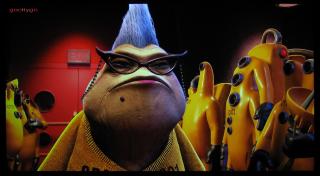

This post has been edited by gocitygo: Sep 13 2009, 12:13 PM |
|
|
Sep 14 2009, 08:30 PM
Return to original view | Post
#17
|
|
Junior Member
397 posts Joined: Mar 2008
|
u want fast, just project on the wall lo n enjoy.
then, get a project screen, either pull up/down or fixed screen. i would suggest u the fixed screen. want cheap n good screen, try ebay. then ask yr carpenter to make the frame. QUOTE(fir909 @ Sep 14 2009, 07:58 PM) reporting in new hd65 user reporting!! the pj already arrive. buka puasa, but can't finish it. poison too strong. now donno what should be done first any idea all hd 65 kakis? |
| Change to: |  0.0384sec 0.0384sec
 0.61 0.61
 7 queries 7 queries
 GZIP Disabled GZIP Disabled
Time is now: 10th December 2025 - 05:23 AM |
 Quote
Quote