Outline ·
[ Standard ] ·
Linear+
Home Theatre Optoma HD65 Kakis, technical, tweaking, screenshot.........
|
htkaki
|
 Oct 3 2008, 10:38 PM Oct 3 2008, 10:38 PM
|

|
Taikor, this is an additional service nia  . Not mine  . It's a third party. You will have to pay him directly as in the case of hackwire and vyzar. The RM380 installation fee is standard charge by this company. Normally, he does big project. That's why I recommend buyer who needs pro installation to look for him. Anjua? Ngam boh?  |
|
|
|
|
|
ycs
|
Oct 3 2008, 11:07 PM
|
|
|
what does this hd65 install include? just curious.
|
|
|
|
|
|
htkaki
|
Oct 3 2008, 11:31 PM
|
|
|
Only installation job. You need to provide cables, screen and pj mount for him to do the job. But, the feedback from customers of his service is excellent. All nicely and neatly done.
|
|
|
|
|
|
rthj
|
Oct 4 2008, 03:11 AM
|
|
|
laser levelers are nice and handy toys. i have them primarily to install these stuffs, its cheaper than paying someone to do it. now using it to check almost anything....hehe....eg coffee cup level or not?
|
|
|
|
|
|
ycs
|
Oct 4 2008, 08:46 AM
|
|
|
The RM380 installation fee seems reasonable coz I was quoted RM800 excluding cables, etc. which was why i decided to DIY everything. the only contractor was an indon to do plastering work at RM70 only.
|
|
|
|
|
|
rx330
|
Oct 4 2008, 06:42 PM
|
|
|
tak ngam  |
|
|
|
|
|
htkaki
|
Oct 6 2008, 09:41 AM
|
|
|
QUOTE(ycs @ Oct 4 2008, 08:46 AM) The RM380 installation fee seems reasonable coz I was quoted RM800 excluding cables, etc. which was why i decided to DIY everything. the only contractor was an indon to do plastering work at RM70 only. WOW! RM800  That's really cut throat  Btw, how's your progress of your room?  |
|
|
|
|
|
toytoy
|
Oct 6 2008, 09:50 AM
|
|
|
Sigh, house still in a mess but managed to project a 9' wide image on the wall hehehe. Doesn't look bad on the wall, image is clear but then a bit washed out. Seems like black level is not that black. Can see a washed out light on the wall. Project it on projector screen will solve this problem?
|
|
|
|
|
|
laowai
|
Oct 6 2008, 11:15 AM
|
|
|
Did you switch off surroundling lights?
What color is your wall?
How far is your projector from wall?
|
|
|
|
|
|
ycs
|
Oct 6 2008, 11:22 AM
|
|
|
my almost complete HT room. have yet to tackle white bits of the room on ceiling and side walls but already enjoying the room. sound imaging is much improved with floor carpet, ceiling foam and acoustic panels. bass is also tighter with the bass traps. 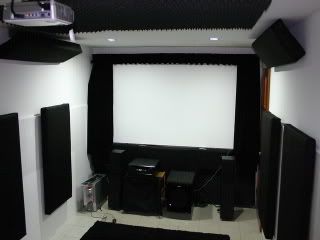 |
|
|
|
|
|
toytoy
|
Oct 6 2008, 11:28 AM
|
|
|
All lights are off. Color of wall is a little bit creamy and projector is around 14'6" away from wall. Projected image around 106"wide so it's around 120-122" diagonal.
When the image is bright, it looks very nice but once the image becomes a bit darker, then the whole image looks washed out.
On my monitor or TV when the image looks washed out it is due to brightness too high. So normally if i view 16:9 images on TV the blackbars will be slightly washed out and i will reduce the brightness until the black becomes real black. But using the projector, no matter what i do, the black is still washed out and reducing brightness or increasing contrast don't help.
|
|
|
|
|
|
laowai
|
Oct 6 2008, 01:28 PM
|
|
|
Best is to calibrate projector with one of those demo test pattern discs, to ensure the best white level or blacks.
If not helping, looks like a screen is required.
|
|
|
|
|
|
htkaki
|
Oct 6 2008, 04:54 PM
|
|
|
QUOTE(toytoy @ Oct 6 2008, 11:28 AM) All lights are off. Color of wall is a little bit creamy and projector is around 14'6" away from wall. Projected image around 106"wide so it's around 120-122" diagonal. When the image is bright, it looks very nice but once the image becomes a bit darker, then the whole image looks washed out. On my monitor or TV when the image looks washed out it is due to brightness too high. So normally if i view 16:9 images on TV the blackbars will be slightly washed out and i will reduce the brightness until the black becomes real black. But using the projector, no matter what i do, the black is still washed out and reducing brightness or increasing contrast don't help. Do you have any DVD with THX esp Star Wars I, II, or III? There is an option for calibration. If all else fails, looks like a screen is a safe bet. |
|
|
|
|
|
toytoy
|
Oct 6 2008, 05:10 PM
|
|
|
Hmm lemme try to find the DVD first. YCS - you r using plywood with paint only right? Do you have the problem i mention? You get good 'blacks' or washed out blacks? Need ur feedback on this. Thanks  My carpenter put a layer of white PVC sticker (same as those found on cabinet surface) on top of the plywood for me. So i can project the image on the plywood itself or wrap it with cloth. Haven't had time to test out the screen yet. Will post my findings soon. |
|
|
|
|
|
ycs
|
Oct 6 2008, 07:45 PM
|
|
|
QUOTE(toytoy @ Oct 6 2008, 05:10 PM) Hmm lemme try to find the DVD first. YCS - you r using plywood with paint only right? Do you have the problem i mention? You get good 'blacks' or washed out blacks? Need ur feedback on this. Thanks My carpenter put a (same as those found on cabinet surface) on top of the plywood for me. So i can project the image on the plywood itself or wrap it with cloth. Haven't had time to test out the screen yet. Will post my findings soon. i got no problems with blacks on my screen. maybe you need to re-check your pj settings or check whether reflections are spilling onto the screen area. the default settings are quite good already. just curious, what is "layer of white PVC sticker"? |
|
|
|
|
|
htkaki
|
Oct 6 2008, 11:36 PM
|
|
|
ycs, I must say that you have done a pretty good job in your DIY project. Very impressive indeed.
|
|
|
|
|
|
toytoy
|
Oct 7 2008, 02:02 AM
|
|
|
|
|
|
|
|
|
laowai
|
Oct 7 2008, 09:19 AM
|
|
|
Looking good.
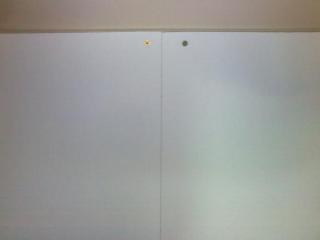
That line in the middle will be a bother, for me.
|
|
|
|
|
|
htkaki
|
Oct 7 2008, 09:28 AM
|
|
|
toytoy, melamine board is quite reflective if not mistaken, which is bad for pj
|
|
|
|
|
|
Synco
|
Oct 7 2008, 10:43 AM
|
|
|
QUOTE(toytoy @ Oct 7 2008, 02:02 AM) or u can easily get those 7ft x 7ft pull down wall fixed for under RM250 |
|
|
|
|



 Quote
Quote


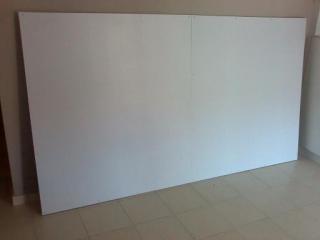
 but if i m not happy with the result, i can always wrap it with PJ screen cloth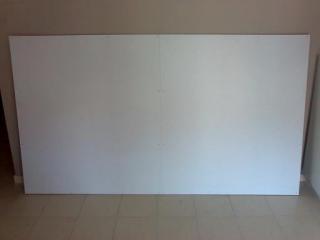



 0.0219sec
 0.57
0.57
 6 queries
 GZIP Disabled