Outline ·
[ Standard ] ·
Linear+
WorldWide Telescope
|
TShiroshi
|
 May 14 2008, 09:23 AM, updated 18y ago May 14 2008, 09:23 AM, updated 18y ago
|

|
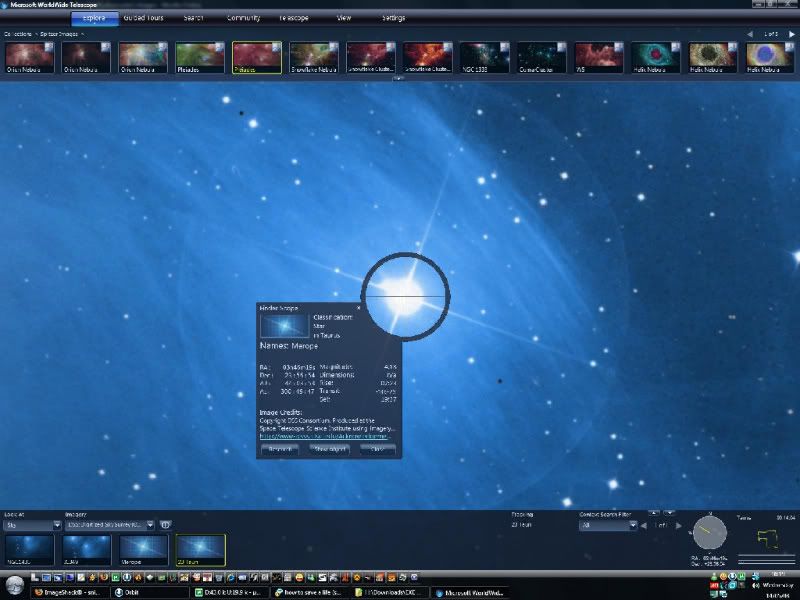
The WorldWide Telescope (WWT) is a Web 2.0 visualization software environment that enables your computer to function as a virtual telescope—bringing together imagery from the best ground and space-based telescopes in the world for a seamless exploration of the universe. WorldWide Telescope is created with the Microsoft high performance Visual Experience Engine™ and allows seamless panning and zooming around the night sky, planets, and image environments. http://www.worldwidetelescope.org |
|
|
|
|
|
sniper69
|
May 14 2008, 09:57 AM
|
|
|
whoah... seems promising, gonna download and let's have a look  , thanks for the heads up  |
|
|
|
|
|
StraxorX
|
May 14 2008, 02:41 PM
|
|
|
is this just same as google earth?
|
|
|
|
|
|
Liuteva
|
May 14 2008, 03:44 PM
|
|
|
This only can see sky?
|
|
|
|
|
|
sniper69
|
May 14 2008, 04:16 PM
|
|
|
can "see" our galaxy  |
|
|
|
|
|
fx_53_xt
|
May 14 2008, 04:20 PM
|
|
|
latest earth also can do so isn't it?
|
|
|
|
|
|
sniper69
|
May 14 2008, 04:26 PM
|
|
|
^ can't la... (haven't try though...) » Click to show Spoiler - click again to hide... « This post has been edited by sniper69: May 14 2008, 04:35 PM |
|
|
|
|
|
amenrom
|
May 15 2008, 08:50 PM
|
New Member

|
very interesting.seem like :
nasa world wind,celestia and stellarium
|
|
|
|
|
|
spartacvs
|
May 17 2008, 06:00 PM
|
|
|
It seems like some outer-space exploration thingy. I doubt Google-Earth can do project the image posted by Sniper69.
|
|
|
|
|
|
Mr Lonely
|
Jan 20 2009, 03:38 AM
|
|
|
WorldWide Telescope 2.2.41.1 The release has three new features and improvements: #National Virtual Observatory Cone Search/Registry Lookup: (Search menu) Search through the US NVO registry to find information about astronomical bodies. The results will include the URL to the document, the right-ascension in the J2000 coordinate system, the declination in the J2000 coordinate system, and the search radius. #Stereo 3D Views: (View menu) WWT now has a Anaglyph 3D view as well as a Stereoscopic view, which shows a split screen of normal and anaglyph views or a cross-eyed view. #Image Alignment: Just load any image, align one correspond star, right click on star centroid and drag any other star to scale and rotate the view. Map Cruncher can be accessed by hitting CTRL+E. Download |
|
|
|
|



 Quote
Quote




 0.0189sec
 1.05
1.05
 5 queries
 GZIP Disabled