

 Apr 29 2008, 06:26 AM


QUOTE(dblooi @ Apr 28 2008, 09:23 PM)
lolz why limit the HT Link to 1000MHz? 
No point to buy am2+ proc and mobo in this way
Don't blindly apply am2 oc method to am2+ oc
Observe and think before you apply, oc wise

yes.. as Tony from XtremeSystem Quotes No point to buy am2+ proc and mobo in this way
Don't blindly apply am2 oc method to am2+ oc
Observe and think before you apply, oc wise
QUOTE
K10 has thrown a spanner in our K8 overclocking world...they are NOT the same!
To clock K10 HTT upwards you have to do the following.
1 Find the max NB core clock the CPU will run (this is the CPU NB)
2 Find the max core speed the CPU will run.
3 Set HT to be same or under CPU NB core clock speed.
If HT is higher than CPU NB clock the board will hang, if CPU NB core clock is to high the board will hang.
K10 was not designed to run massive HTT speeds, it was designed to be super efficient at lower HTT but with high CPU NB clock speed....so we all need the 9600BE (Black Edition) as this will have an unlocked CPU multi...so no need to push massive HTT, although upto 300 would be nice
plus, K10 has totally independent clock control over CPU-NB and CPU core. In the DFI bios you will see the following under CPU features.To clock K10 HTT upwards you have to do the following.
1 Find the max NB core clock the CPU will run (this is the CPU NB)
2 Find the max core speed the CPU will run.
3 Set HT to be same or under CPU NB core clock speed.
If HT is higher than CPU NB clock the board will hang, if CPU NB core clock is to high the board will hang.
K10 was not designed to run massive HTT speeds, it was designed to be super efficient at lower HTT but with high CPU NB clock speed....so we all need the 9600BE (Black Edition) as this will have an unlocked CPU multi...so no need to push massive HTT, although upto 300 would be nice
CPU DID
CPU FID
CPU DID = multiplier divider
CPU FID = actual multi in HEX
I mapped some common values out for CPU muti.
HEX Multi
00 = 08
01 = 08.5
02 = 09
03 = 09.5
04 = 10
05 = 10.5
06 = 11
07 = 11.5
08 = 12
09 = 12.5
0A = 13
0B = 13.5
0C = 14 ETC
Now we have a CPU DID also, this can be 1,2,4,8,16
things get good from 11 onwards using the 2 4 8 or 16 dividers and ODD ratio's
setting 06 FID and 2 DID will give 5.5, setting 01 FID and DID2 will give 8.25 so yes you can have quarter multipliers also.
Remember DID1 will give FID/1=FID with no adjustment...2 4 8 16 give the special ratio's
Moving to NB FID and DID
NB DID is either 1 or 2
Hex NB Multi
00 = 4
01 = 5
02 = 6
03 = 7
04 = 8
05 = 9
06 = 10
07 = 11
08 = 12
09 = 13
0A = 14
0B = 15
0C = 16
0D = 17 ETC
Again we can DID or divide by 1 or 2...so 07HEX with DID2 will give 5.5 for the NB Multi
So how does this translate, well remember HTT is 200 by default so 01HEX=5X
5X200HTT=1000MHZ
02HEX=6X so 6x200 for 1.2GHZ etc
CPU NB and Link Multipliers are unlocked on ALL CPU's, there are rules though.
HT link speed can NOT exceed NB clock speed, but HT link can be lower than NB core clock.
NB Clock is what decreases L3 cache latency and so improves performance.
Overall HTT speed is dependent on many things, NB core clock, HT link and CPU multi, different configs give differing results..we just need to reasrch the best for now.
copied from Tony post in XtremeSystem
http://www.xtremesystems.org/forums/showthread.php?t=167977
i think these refer to those who uses DFI UT 790FX.. seems that the BIOS is quite.... difficult....
This post has been edited by casperito: Apr 29 2008, 07:16 AM
 Quote
Quote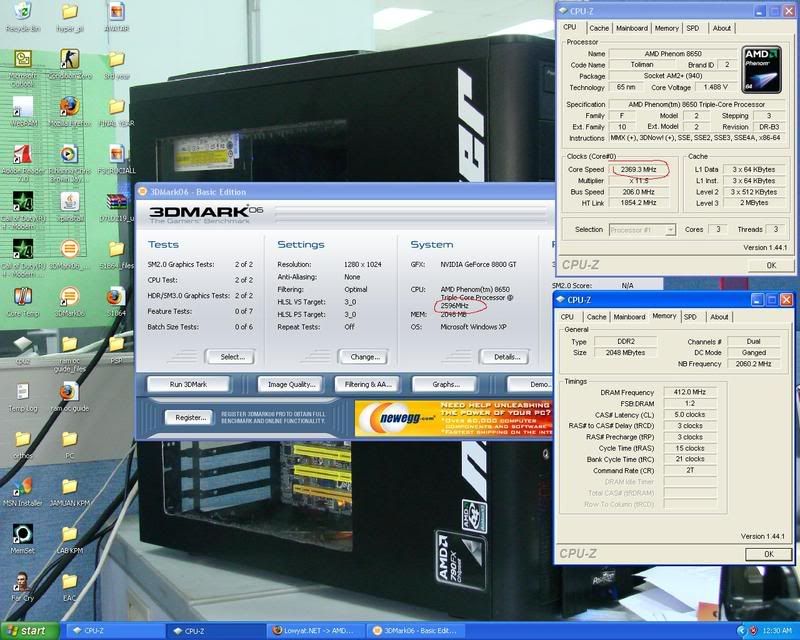


 0.2661sec
 0.89
0.89
 7 queries
 GZIP Disabled