

Hi, I've placed an order for a BLACK HTPC800, pls chk yr PM for details..
Thanks
Stanley
Casing [WTS] STYLISH JONSBO HTPC CHASSIS & ACCESSORIES, W1 Case - New Arrival 28 March 2014
Casing [WTS] STYLISH JONSBO HTPC CHASSIS & ACCESSORIES, W1 Case - New Arrival 28 March 2014
|
|
 Aug 24 2009, 01:52 AM Aug 24 2009, 01:52 AM
Return to original view | Post
#1
|
 
Senior Member
623 posts Joined: Jan 2003 From: Kuala Lumpur   
|
Hi, I've placed an order for a BLACK HTPC800, pls chk yr PM for details..
Thanks Stanley |
|
|
|
|
|
Aug 24 2009, 02:23 PM
Return to original view | Post
#2
|
|
Senior Member
623 posts Joined: Jan 2003 From: Kuala Lumpur
|
QUOTE(niclasteoh @ Aug 24 2009, 11:09 AM) ok noted No thanks, just chasis only TQ, u want add in order YAOCOO Remote Control & Receiver for Media Center PC for ur HTPC setup   |
|
|
Aug 28 2009, 06:24 PM
Return to original view | Post
#3
|
|
Senior Member
623 posts Joined: Jan 2003 From: Kuala Lumpur
|
Received the HTPC 800 Chasis today... installed and got it up and running...
Some comments / feedback :- The internal connector to the power supply is upside down, so need to squeeze it in.. I m using Xigmatek 500W P/S, fan blowing downwards to the chasis Instruction manual in chinese.. luckily I can understand the pictures and managed to installed it RPM on display is tapped from CPU power socket There are 2 temp sensors for case and cpu HDD activities red LED are combined into the power button, nice There is a slot for IR received inside the chasis below the DVD-drive but I decide not to put inside cos very cramp I also installed a 120mm fan behind the TV rack to suck the hot air out of the rack. Will post some pics later.. Thanks Stan |
|
|
Aug 30 2009, 12:12 AM
Return to original view | Post
#4
|
|
Senior Member
623 posts Joined: Jan 2003 From: Kuala Lumpur
|
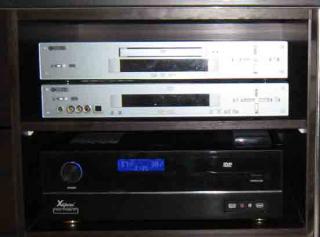
Here are the pics of the HTPC800 internal (sideways) and external view in the TV rack.
I find the airflow in the case is not so good cos the three fans are low noise fans (low RPMs) so after a while the CPU fans is running like 5000-6000 rpms.. Sometimes the chassis temp is even higher than CPU temp when AMD Cool n Quiet kicks in... The chassis built quality is china made quality but for the price, I think it is okay la.. Front panel can either use normal Audio or HD Audio connectors.. My Audio / Video Input / Output connections are as below :- HDMI output -> Plasma TV ( audio & video ) SPDIF output (Optical) -> AV Receiver ( for DTS signals from DVD ) Astro Video signal input (S-video) -> WinTV 150 Astro Audio input (L/R) -> WinTV 150 This post has been edited by stan001: Aug 30 2009, 12:14 PM Attached thumbnail(s) 
|
|
|
Sep 2 2009, 02:19 AM
Return to original view | Post
#5
|
|
Senior Member
623 posts Joined: Jan 2003 From: Kuala Lumpur
|
QUOTE(niclasteoh @ Aug 31 2009, 02:31 PM) Thanks for sharing with us the pictures n your view, bro. Thanks for the recommendations, I like this CPU cooler as it blows the air downwards... can cool the rest of the motherboard too.. nice design..Airflow can be improved and temperature can be reduced by having a better cpu cooler instead of the stock cooler. I would recommend u Zalman CNPS 8700 LED CPU Cooler which can fit in for HTPC chassis. It is full copper cpu cooler with excellent cooling capability. TQ! I went over budget for my HTPC cos I last minute change to a bluetooth keyboard with touchpad as the cordless keyboard causes lots of interference and too short range... I will invest in this cooler next...meanwhile to lower the chassis temp, I installed a Sanyo Denki 80mm fan at the exhaust outlet near the HDD bay... this fan is very high speed and efficient but very loud when it is very quiet...a but annoying... hehe |
|
|
Sep 16 2009, 10:08 PM
Return to original view | Post
#6
|
|
Senior Member
623 posts Joined: Jan 2003 From: Kuala Lumpur
|
QUOTE(niclasteoh @ Sep 2 2009, 09:06 PM) U r welcome, bro. Hi, I just purchased the Zalman 8700 LED, it was difficult to install on to this motherboard as those blue design heatsink was blocking the installation clip. Luckly the chipset heatsink is movable..It's ok, just feel free 2 drop me a pm when u r ready for a new cpu cooler. TQ! With the Zalman 8700 LED CPU cooler installed, the CPU & motherboard temp is reduced and of course no more high speed fan sounds as the fan is only running at 2400 RPM at the highest settings.. I put the included case sensors at the air intake (30C) and CPU sensors near to the CPU to measure the air temp being blown down ( 38-40C) by the CPU cooler. |
| Change to: |  0.0156sec 0.0156sec
 0.70 0.70
 7 queries 7 queries
 GZIP Disabled GZIP Disabled
Time is now: 3rd December 2025 - 03:10 PM |
 Quote
Quote