


location : Plaza Alam Sentral, Shah Alam
Maxis Maxis Wireless Broadband Thread #2, 3G/3.5G Broadband
|
|
 Nov 2 2009, 08:40 AM Nov 2 2009, 08:40 AM
Return to original view | Post
#61
|
 
Senior Member
898 posts Joined: Aug 2006 From: Kajang, Selangor  
|
New personal record for ping & upload
location : Plaza Alam Sentral, Shah Alam |
|
|
|
|
|
Nov 3 2009, 09:11 AM
Return to original view | Post
#62
|
|
Senior Member
898 posts Joined: Aug 2006 From: Kajang, Selangor
|
^^ seems like LKW not many ppl using maxis eh~ haha lucky you~ now let see how long can you manage to tahan with your FUP~
make as siggy la KKW hehehehe |
|
|
Nov 6 2009, 12:11 AM
Return to original view | Post
#63
|
|
Senior Member
898 posts Joined: Aug 2006 From: Kajang, Selangor
|
 Suddenly tonite my place... HSDPA only  maybe its temporary |
|
|
Nov 20 2009, 07:44 AM
Return to original view | Post
#64
|
|
Senior Member
898 posts Joined: Aug 2006 From: Kajang, Selangor
|
Happy hour time~ downloading firefox from its FTP server at 6.40am in the morning
reached 6.06mbps download  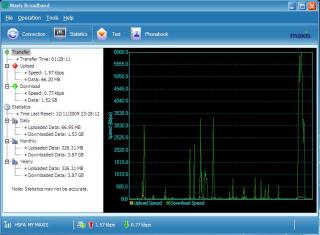
|
|
|
Nov 23 2009, 04:42 PM
Return to original view | Post
#65
|
|
Senior Member
898 posts Joined: Aug 2006 From: Kajang, Selangor
|
QUOTE(Kuja @ Nov 23 2009, 02:46 PM) Usually the dns set up automatically but it different from what i found from google for their primary and alternate dns. mind to share the dns ip or the source website that u refer tu? So i changed them and now working absolutely FINE. GOOD!!   |
|
|
Nov 29 2009, 04:51 PM
Return to original view | Post
#66
|
|
Senior Member
898 posts Joined: Aug 2006 From: Kajang, Selangor
|
 location : Jalan Abdul Rahman, Muar |
|
|
|
|
|
Dec 6 2009, 10:14 AM
Return to original view | Post
#67
|
|
Senior Member
898 posts Joined: Aug 2006 From: Kajang, Selangor
|
Great news.... have a try... Google DNS
primary DNS ip : 8.8.8.8 alternative DNS ip : 8.8.4.4 goole it then you know it location : Taman Sri Ramal Kajang here is my speedtest using default maxisdns  after using GoogleDNS  This post has been edited by cruxidex: Dec 6 2009, 10:14 AM |
|
|
Dec 6 2009, 11:02 PM
Return to original view | Post
#68
|
|
Senior Member
898 posts Joined: Aug 2006 From: Kajang, Selangor
|
QUOTE(vista enthusiasist @ Dec 6 2009, 12:29 PM) You're on HSPA? Nice ping and upload speed yup... HSPA... most places in Bangi n Kajang has HSPA~ n my personal record.. 6.1mbps download n ping was... erm 45ms as my siggy belowThis post has been edited by cruxidex: Dec 6 2009, 11:02 PM |
|
|
Dec 7 2009, 05:42 AM
Return to original view | Post
#69
|
|
Senior Member
898 posts Joined: Aug 2006 From: Kajang, Selangor
|
My New Download Record
 |
|
|
Dec 7 2009, 01:21 PM
Return to original view | Post
#70
|
|
Senior Member
898 posts Joined: Aug 2006 From: Kajang, Selangor
|
QUOTE(MX510 @ Dec 7 2009, 10:44 AM) Excuse me may i know what happened if u exceed 3gb quota limit extra charge or downgrade of speed? average ping = sameupload speed = same download speed = 128kbps actual download speed = 100-160kbps average... its spikes sometimes to 300kbps BUT if you are lucky... especially in HSPA networks... 2out of 10times you connect you can get full speed  |
|
|
Dec 11 2009, 08:29 PM
Return to original view | Post
#71
|
|
Senior Member
898 posts Joined: Aug 2006 From: Kajang, Selangor
|
i beg to differ... see my siggy~ this is what you can have if ur place got Maxis HSPA... during peak hours also you can get at least 240kbps
|
|
|
Dec 13 2009, 08:55 AM
Return to original view | Post
#72
|
|
Senior Member
898 posts Joined: Aug 2006 From: Kajang, Selangor
|
QUOTE(stanum @ Dec 13 2009, 12:49 AM) Hey guys, yes... you need to return back the entire package of the modem... some places will charge you for missing components of the modem regardless how long you have subscribe to maxis bbJust wanna ask something on the modem. I have used the 3g modem about a year and i want to terminate the subscription and changing to celcom. Do i need to give back the modem or i can keep it and use it for celcom broadband? Thanks for any reply! this is term FREE those days~ free = pinjam~  |
|
|
Dec 13 2009, 07:32 PM
Return to original view | Post
#73
|
|
Senior Member
898 posts Joined: Aug 2006 From: Kajang, Selangor
|
Speedtest at LEP 6/15
using Google DNS... maxisdns cannot complete.. like biskut abit today  |
|
|
|
|
|
Dec 15 2009, 10:49 AM
Return to original view | Post
#74
|
|
Senior Member
898 posts Joined: Aug 2006 From: Kajang, Selangor
|
QUOTE(leyley @ Dec 14 2009, 10:18 PM) So the excessive bandwidth won't be charges accordingly extra? if you are using Maxis bb prepaid = YESif you are using maxis bb postpaid = NO, just capped speed only this month i have used 35GB already out of my 6GB limit  they wont charge extra dont worry |
|
|
Dec 16 2009, 04:42 PM
Return to original view | Post
#75
|
|
Senior Member
898 posts Joined: Aug 2006 From: Kajang, Selangor
|
QUOTE(rstusa @ Dec 16 2009, 02:00 PM) I'm using Maxis bb, next month will go to Hokkaido, can I roam the maxis bb there? yes.... BUT in their T&C... ROAMING CHARGES APPLIES... i guess... its pay per use~ QUOTE(jimliew @ Dec 16 2009, 04:31 PM) I'm a Maxis wired broadband user. Recently I was upgraded to 2Mbps from 1Mbps. I also got a free trial for Maxis wireless. simple... 7.2mbps is the rated (super ideal) speed that the wireless network u connected can cater... but as all knows.. all bb providers are as BEST EFFORT BASIS...When I connect with the wireless modem, it shows I am connected at 7Mbps. Very good. I thought my speed faster than wired. But when I test with speedtest, it is slower than my wired. So why is this so? Thinking of returning the wireless already so its all depends on location&congestion... for a medium populated housing area... peak time average 800kbps-1.2mbps non-peak time average 1.8mbps-2.6mbps happy hour (super off peak 2am-6am) time average 3.0-6.0mbps see my signature... thats my personal record for ping, upload, and download under HSPA network |
|
|
Dec 23 2009, 11:24 AM
Return to original view | Post
#76
|
|
Senior Member
898 posts Joined: Aug 2006 From: Kajang, Selangor
|
QUOTE(KKW @ Dec 23 2009, 09:51 AM) Hmm.. maybe got yellow.. as I din see it because I din use EDGE before EDGE also green...  long time never see u do speedtest... if go anywhere else beside ur Uni n home just speedtest and post it out la... long time never see u do speedtest... if go anywhere else beside ur Uni n home just speedtest and post it out la...at least we can see by the ping time we can know HSPA or still the old HSDPA~ |
|
|
Dec 24 2009, 07:55 AM
Return to original view | Post
#77
|
|
Senior Member
898 posts Joined: Aug 2006 From: Kajang, Selangor
|
i think i have been uncapped~ today is the maxis billing date but then i thought uncapped on the 1st day of the month...~
here's my speedtest opposite Telekom Bangi  |
|
|
Dec 27 2009, 12:53 AM
Return to original view | Post
#78
|
|
Senior Member
898 posts Joined: Aug 2006 From: Kajang, Selangor
|
its the network that our modem use...
if u see you are connected to HSDPA your upload usually below 100kbps if u see you are connected to HSPA your upload speed usually 150-1000kbps some places maxis has already upgrade to HSPA. another diff is the ping time... HSPA usually 70-100ms while HSDPA usually 120-300ms |
|
|
Dec 28 2009, 11:53 PM
Return to original view | Post
#79
|
|
Senior Member
898 posts Joined: Aug 2006 From: Kajang, Selangor
|
^^
for my signature below... it is proven when i do some direct download especially around 2am-7am... the speed is just WOW~ This post has been edited by cruxidex: Dec 28 2009, 11:58 PM |
|
|
Dec 30 2009, 01:10 PM
Return to original view | Post
#80
|
|
Senior Member
898 posts Joined: Aug 2006 From: Kajang, Selangor
|
@SOHO Seafood Sg Merab,
under Capped speed... i imagine here can get full speed coz even in capped speed the speed is very stable... almost flat line at 130kbps  |
|
Topic ClosedOptions
|
| Change to: |  0.1503sec 0.1503sec
 0.39 0.39
 7 queries 7 queries
 GZIP Disabled GZIP Disabled
Time is now: 7th December 2025 - 05:21 PM |
 Quote
Quote